Like MidJourney But Unlimited Free Image Generations!
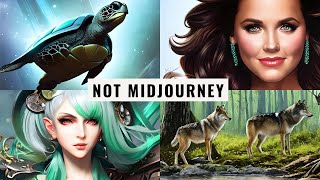
YouTube video (hosted by Matt Wolfe) demonstrating Blue Willow, a free Discord-based AI image generator similar to MidJourney but built from Stable Diffusion models. The presenter shows how to prompt in Blue Willow, compares its style and behavior to MidJourney and Stable Diffusion, demonstrates image generation/upscaling/variations, and links viewers to Lexica (prompt inspiration) and his Future Tools site/newsletter.
Chapters
See this right here, this is not Mid Journey. It looks just like Mid Journey, but it's not Mid Journey. And guess what? It's totally free. And you can generate unlimited images with it on the free plan. You just got to use it in Discord like you would in Mid Journey. And there's no limitations to how many images you can make. You can make some really cool stuff in this video. You'll see how I made these images. These images, these kind of funky images, these slightly less funky images, these awesome wolf images, these wolf images. And these kind of funky wolf images here. These ones, too. All totally for free. And I can make unlimited more if I wanted. I'll tell you all about it right now. Hey, what's up? Matt Wolfe here. In this video, I want to talk to you about a potential Mid Journey competitor. By now, if you've been watching my channel, you're probably fairly familiar with Midjourney and its capabilities of creating just amazing AI art. Well, there's a new tool in town that is just like midjourney in that you do it in Discord and you create variations and you upscale it, and pretty much everything works the same way you'd expect Midjourney to work. But it's not Mid Journey. It's a tool called Blue Willow, and it works the same way. It's actually a Discord community. You would come into the Discord community and you would use one of these rookie rooms to create your prompts and generate your images. Now, what's the difference between Mid Journey and Blue Willow? Well, Blue Willow doesn't use the same Mid Journey training model, so you're not going to get any images that look like what you would get out of Mid Journey. It's going to create kind of a totally different style of image. This is trained on various stable diffusion models. The way it supposedly works is there's a whole bunch of different models trained into Blue Willow. And based on your prompt, Blue Willow's bot is going to figure out which model is the best model for the use case that you put into it. So let's take a peek. Peek here at the Blue Willow faq, because I know me pulling this up, you probably have a couple of questions about it. I have a few questions about it myself. I'm just exploring it. I've only spent a little bit of time with it. So let's take a peek at some of the FAQ here because I think there's some things you're going to find very interesting about it. The question that most people watching this video are probably asking first, is this free? Yes, as of right now. But Mid Journey was free also up until like 25 images. How many images can I generate for free with this one? Well, here's your answer to that question. How many free prompts do we get? Unlimited. Get to do this Unlimited images for free right now. So why is Blue Willow unique from other AI text to image generators, Blue Willow gets you the right model depending on your goal. How are Blue Willow images different from Mid Journey? Each AI model has different strengths and weaknesses. Mid Journey is amazing at being Mid Journey. Other models are great at other things. Frame is to aggregate any model we can so you can get the results you want. We do not aggregate Mid Journey as their model is proprietary. So you're not going to get images that look like the images you get out of Mid Journey. You're going to get images that look like the images you'd get out of various Stable Diffusion models. If you've messed around with Stable Diffusion or watched any of my previous videos on Stable Diffusion, who owns the rights to images produced by Blue Willow AI? Can I use them in my art or sell them for commercial gain? User owns the images and can use them in their art and for commercial gain. Our supermodel picks the best model to run based on the user prompt. You can probably create some not safe for work images on here, but if you do, you'll pretty quickly get banned. We ban naughty words and Moderate the channel 24. 7 to delete the content that doesn't match the rules. So I don't believe there's any actual filters built in, but I wouldn't go and try it either because you're going to get kicked out. So this doesn't have nearly as many commands as Mid Journey. There's a lot less to know, but if you're familiar with using any of the the Stable Diffusion stuff in the past, you usually want to get a little bit more detailed with your prompting than you would normally get with your Mid Journey prompts. Mid Journey is pretty good at taking shorter not detailed prompts and getting really creative with them and making really cool images. Stable Diffusion, you got to be a little bit more clear with what you're looking for. Otherwise you're going to get some real funky stuff. Also with Stable Diffusion, you do tend to get a little bit more like morph hands and faces and just weird stuff. Not that it doesn't happen in Mid Journey also, but Stable Diffusion you will notice it quite a bit. So here's the commands that we have Available to us. There's the negative command which you use a dash. Dash. No, you've got your aspect ratio command where you'd use the ar32 or ar2. 3. Very similar to Mid Journey as well. And they also do have Image to image where you can upload an image and then prompt based on that image, just like you would in Mid Journey. So that's really all there is to know about Blue Willow. So let's go ahead and give it a test run here. So I'm going to come down to where the rookie rooms are down here. I'm going to pick one at random. Hopefully this is one that doesn't have a lot of action going on because if you're familiar with the other Discord rooms, things kind of move pretty quickly. But you know, if you need some inspiration, you can see what other people are prompting. Be inspired by it. Because it's all publicly available in the Discord right now. So let's go back to my old standby and let's do imagine a wolf in the forest with a deer in the background. Go. Aspect ratio 3, 2. And let's just see what it gives us when I don't really add a whole bunch of extra detail to my prompt. All right, so here's what it came back with. We've got our wolf in the forest with deers in the background. Got some funky shapes going on here. Like this wolf is a little bit stretched out. There's very little detail in this deer and this wolf in the background. Not too dang bad. Bad for not adding a whole lot of extra detail. Now you can see what my prompt looks like. And just like you're probably used to, if you like one of these images, you would press the U button next to it for upscale. So let's say we like this number two here. Which of these is probably the best looking one? I would click U2 and it'll upscale too. But I really like number three, but I'm not totally happy with it. I can press V3 and it's going to create four more variations of number three. So if I scroll down a little bit, you can see here's my upscaled version of the one that I liked. I can open this in a browser, take a peek, download it. I'll save this image to my AI Art Wolf folder here. And now this image is mine to use. Let's scroll down here and you can see here's my four variations that it created of that third one that I was interested in, which I think these Actually came out a little bit better. They omitted the deer. The deer's not in there anymore. And it's kind of producing these black bars. So I'm curious to see if I upscale it, if those black bars show up as well. Let's find out. I think of these, this first one looks the best. So let's grab that. Let's go and upscale number one and see if it produces those black bars. The upscaling is really fast. It only took seconds before this was ready, but you can see it didn't actually respect my aspect ratio. It tried to make it a square here and it put black boxes around it, which isn't what I was going for. But you know what? We're learning how to use this tool together here. I'm gonna go ahead and close this one out and let's add some more detail to our prompt. Go ahead and copy the prompt here and let's go with Imagine. And then I'll paste in my original prompt a wolf in the forest with a deer in the background. Now let's add some extra details to it. Say I want it to be kind of like cartoony. I like to add pix unreal engine detailed HD 8K. Right. This is. These are the types of prompts that I would normally do in Stable diffusion, but not mid journey. But again, this is using what you would expect more from Stable diffusion. So I'm going to go ahead and roll with this prompt and see what it gives me. Now, while I was waiting, I came across this image which looks like the type of thing that they might get banned for. Especially this bottom right one is starting to get a little risque. So I was curious, what prompt did they use? And they didn't even use a not safe for work prompt. So, you know, sometimes stable diffusion is going to do that. They're going to give you some not safe for work images, even when you're not trying to use a not safe for work prompt. Hopefully this person doesn't get banned because it looks like they're barely innocent with their prompting here. Anyway, here's the new images that it just gave me. You can tell it's got a little bit of a style to it. Now you can see this is the Pixar Unreal Engine. We are starting to get some funky, like extra legs here or maybe there's a wolf behind him, but I'm pretty sure they're just giving this wolf extra legs. It's not looking bad. You can start to see some additional style here. Let's go ahead and do, do. Let's copy this again and let's do Imagine and then I'll paste in my prompt. But this time I'm going to get rid of the Pixar Unreal engine and let's do watercolor and see what we get out of that. All right, now we're starting to get some really, really cool images. I really like the way this one came out like this artistic style. And this one down on the left, I mean, the legs all look normal. You got four legs on the wolves. This one, a little bit of funkiness going on with some of the legs here. But this one down on the bottom left's looking really good. I mean, this is almost looking like a little bit of a deer head just kind of floating up there. I'm not sure what that is, but let's go ahead and UPSC it and see how that comes out. We'll upscale number three here. So look at that. That came out pretty cool. I like this a lot. Again, not the same style you'd expect with Mid journey, but you're getting pretty close. Now, when it comes to stable diffusion, there's a little bit of a cheat that I like to use to get some inspiration. It's a site called Lexicon. You can find it at Lexica Art. And this is great for stable diffusion sort of inspiration and finding what prompts work for other people with the stable diffusion models. Now, by default, when you jump into Lexica Art here, you're going to want to click this filter because by default it's going to be selected on Lexica Aperture. And this is Lex, Lexica's trained model for stable diffusion. And you want to use stable diffusion 1.5 to get a closer idea of what's actually going to come out when you enter these prompts in a standard stable diffusion model. What I like to do is if you scroll through here and you look for images that you really like. Let's say we really like this image over here. You can actually click on it and it'll show you the prompt that was used to make this. And this is a totally free site, this Lexica site. You can actually copy this prompt. I like this style. It's kind of a cool green anime style. Let's go ahead and copy this prompt. Now it's copied to my clipboard. If I jump back over here to Blue Willow, I can type Imagine. And if I plug in this prompt here, we have sort of a base prompt that we can start with. So beautiful green hair, anime woman, Victorian dress, Steampunk Fantasy Eerie, intricate details. Pixie Digital Painting art Station concept art 8K art by art Germ Oholland Mucha and Ichiro Oda probably butchered those names, but let's just go ahead and enter the prompt they use just out of curiosity to see how close it actually gets to what we saw here. Now, while this prompt is generating, I'm going to jump back over to Lexica and you can see that this is the prompt here. But this prompt has been used to generate multiple images. So these are the other images that same exact prompt generated. So our image could look anywhere like any one of these. And there's a handful here. So we have no idea which sort of version we're going to get when our prompt comes out. But we can kind of set the expectation that our prompt is going to look somewhere along the realm of some of these here. So jumping back over and taking a peek, these are actually better than I anticipated. These are actually really, really good. I wouldn't say I'm a particularly huge fan of any of them, but these look quite a bit better than some of the ones that I just saw in the Lexica site. So let's go ahead and upscale number one here and see how that comes out. And again, that upscaling is really, really fast. So this is what it generated off of that same prompt. And if we look through these again, I mean, that's better than some of these. It's better than this one. Definitely better than whatever's going on with this demonic thing. So not too bad there. Let's go ahead and scroll and see if we can find another prompt that we like the style of. So here's one that looks looks really good. Portrait of Sandy from Greece going up to heaven. Real life skin, intricate, elegant, highly detailed. All of this prompt here, let's take a peek through some of these. This exact prom generated. These are actually all pretty decent. So why don't we grab this prompt, copy the prompt here, we'll jump back over to Blue Willow and let's paste this prompt in. But instead of Sandy from Greece, let's do someone that's more of my generation. Let's go Kelly Kapowski from Saved by the Bell and then I'll leave everything else the same. Going up to heaven. Real life skin, intricate, elegant, highly detailed. Art station. See how all of this is added beyond the typical prompt, where in mid journey you don't typically have to add as much. So if you don't want to use these prompts, you know, you don't have to use all of the actual, actual original prompt. You can kind of get the style of image you want by adding all this extra stuff after it. So that's where Lexica art really, really comes into play is all of this additional stuff that you can see that they added to their prompt to get the image sort of dialed into what they were looking for. So let's see what this actually generates. I'm kind of curious. Okay, so these really aren't that bad. I mean, this one down here, she clearly had an arm amputated, and it also sort of combined two images into a single image. Not a huge fan of that, but, I mean, images 1, 2, and 3, I wouldn't really say these top two really look that much like Kelly from Saved by the Bell, but this third one's pretty D spot on. Let's go ahead and upscale that. Upscale number three here. And I'm going to find one more inspiration on Lexica and see what we can pull from it. This time, I want to find something that's just a completely different art style. All right, I kind of like this one here. A retro futuristic portrait of a dog in a small astro suit. And there's only one image that it's actually showing here, but I really like this one. Let's go ahead and copy this prompt here. Let's jump back over now. Let's go ahead and paste this prompt in. Retro futuristic portrait of a dog in small Astro suit. Let's get a little crazy with it. Let's change the dog to a turtle. Rid of some of the words here. Put space in background. I want to get rid of close up, and let's see what it generates without close up. I don't even know what WLOP is. I'm sure somebody will tell me in the comments. And then it's got some other artists here. Dan Mumford, Art Germ, Liam Brazier, Peter Mohrbacher. So they're adding some extra artists that they want to, you know, use as inspiration for this sort of design. 8k raw, featured in ArtStation octane render cinematic, elegant, intricate. And then they added 8k again. I'm gonna get rid of that. And then let's go ahead and give it an aspect ratio of 2, 3, so it's more portrait mode. And let's see what this generates for us. All right, so let's take a peek at this. We can tell it kind of struggled with the turtle on three out of the four images. Actually looks like it put a person in there, so struggled on the turtle part. But this one, it gave us a turtle, which actually looks pretty cool. It's a turtle floating in space, has a few extra fins, but it's definitely interesting. Let's go ahead and create some variations of that one and see what we come up with. So let's make variations of two. All right, so here's our variations which actually look quite a bit better, especially this one up in the top. Right. Didn't really respect my aspect ratio, but we can always crop that later if we need to. So go ahead and upscale number two and see what that looks like. And here's our upscaled version. I think that's a pretty dang cool looking photo for a completely free to use image generator. So I guess the image to image isn't working in Blue Willow at the moment. Hopefully they're getting that fixed because that's something I'd like to test. I'll be making future videos about Blue Willow as it gets more advanced and be cool. Now, my thoughts on Blue Willow. Do I think Blue Willow is any sort of like Mid Journey killer? Not at all. Mid Journey really has its own style that just beautiful and amazing. And I love what Mid Journey spits out. My desktop backgrounds that I'm constantly rotating through are all built on Mid Journey. Most of the art that I use for my YouTube thumbnails, I'm using Midjourney. Midjourney is just amazing. The art that it creates is amazing. I also really love stable diffusion because I love to train my face and train other images into the models as well, which you can do fairly easily with Stable diffusion. Once Blue Willow kind of gets some of this kinks worked out, some of the bugs worked out, and you can do it in your own private chat room and go to town on prompting stuff without a whole bunch of other people trying to create prompts and getting in the way at the same time. I think Blue Willow will be really, really fun to test. And depending on what you're trying to get out of it, you might use Midjourney, you might use Blue Willow, or you might, you know, use Stable Diffusion that you trained yourself. They're all cool options to go to. And if you're all out of your credits in Mid Journey and you can't prompt anymore in Mid Journey because your trial period's over and you've generated all your images, well, go play with Blue Willow because Blue Willow at the moment's A free and B unlimited images and you can generate some really, really cool stuff. You just need to start getting a little bit more creative with the prompts. You need to add a whole bunch of of stuff to get to the prompts to really get what you're looking for. Because Mid Journey adds kind of its own flavor to the images, and stable diffusion is going to pretty much give you fairly close to what you're asking for, and it's not going to add a bunch of flair and style to it like Mid Journey will. Both tools are very, very cool. Blue Willow's one to check out. I mean, can't beat free. If you really, really dig all these AI tools and just cool tools in general, make sure you check out Future Tools IO. This is the website where I curate all of the tools that I'm coming across. I play around with 15 to 20 tools every single day. And the tools that I'm playing with, I put them on Future Tools. I create a little description around the tools. If I make videos for the tools, I post the videos on the actual tool page as well. And I've created some really, really cool filters. So for example, you can come up to this search bar here. Let's say you're a legal assistant and you want to look up something to help you with your legal stuff. Come up here, type Legal and you can see we've got three different tools here that help you with legal work. Say you're a podcaster. Come up here, type podcast. You can see there's 17 tools here that'll help you with being a podcaster. Let's say you only want free tools. Come up here, Click free freemium, GitHub, Google, Collab, open Source. These are all tools that you can use for free. It narrows it down to 13 free tools that you can use as a podcaster. Want to know what tools most people that visit this site like the most? Come over here, sort it by Most Upvoted, and see the tools that people seem to like the most from this site. I've really, really tried to dial this in so that you can find the exact tool that you're looking for. Know what you're looking for. Use some of these pre existing tags that I created. Let's say you want to mess with video, click on Generative Video, click on Video Editing Ed and click on Text to Video. There you go. There's 28 tools that you can mess around with to get some cool stuff out of video. But wait, there's more. I also have the Future Tools newsletter. If you go to FutureTools IE newsletter every single Friday, I send you one email. And in that email I talk about my five favorite tools that I came across for the week. Again, I'm reviewing like a hundred tools a week. I narrow it down to my five favorite tools that I think you're going to like in this newsletter. I also share three really interesting pieces of news in the AI space. I share three YouTube videos that I really think you're going to like. And I share one new way to make money using AI tools as a side hustle. And I send that email every single Friday. And to get on that newsletter, all you gotta do is go to futuretools IO Slash Newsletter. Totally free. I'll hook you up starting this Friday. Thanks so much for tuning in. I really appreciate you hanging out with me. If you love nerding out about cool tools as much as I do, give this video a like and maybe subscribe to the channel because I'm going to keep on putting out cool videos about cool tools and that I'm coming across and playing with. And hopefully you can nerd out with me because I'm a nerd and maybe you're a nerd. And let's be nerds together. All right, thanks so much for watching. See you guys in the next video. Sam.










