Most Useful ChatGPT Features (TIER LIST)
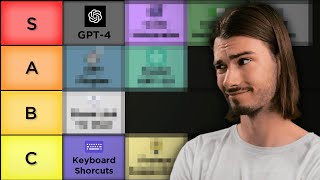
LARRUZ ranks ChatGPT features from most to least useful, including GPT-4, custom instructions, the code interpreter, keyboard shortcuts, and the prompt edit button. He demos each one and explains when you'd actually use it.
Chapters
Since its release in 2022, many things about ChatGPT changed and that's why today we'll talk about all of them and rank them by their usefulness. Some features are big and obvious like the release of GPT4, but others are a little hidden or not available in all regions. I extensively stress tested them all as I made pushing ChatGPT to its limits my calling throughout the last six months. So let's dive in by talking about a brand new feature that just released. It's the keyboard shortcuts, and they hide down here. If you click the question mark and say keyboard shortcuts now you can use these to accelerate your experience. I personally found Open New Chat and set custom instructions to be the most useful. If you're prompting command shift o, it's just super convenient and actually makes my experience in here feel more fluid. And custom instructions are just a game changer that I use all the time now, so it's great to have them available like so the other keyboard shortcuts are meh. I don't mind clicking some of these buttons because a lot of the buttons are right there and I don't use this very often. This feature I'd rank at C tier. Okay, next up, super quick, let's not even spend time on this GPT4, obviously. S tier especially when it comes to content creation or more complex tasks. I just find myself using GPT4 9 out of 10 times. Easy choice S tier okay, so we've been diving deep into ChatGPT's features today, but if you ever wondered how you could explore more about AI and its intricacies in a manageable format, I've got something for you. This platform called Brilliant that is sponsoring today's video is one of the best ways you could learn more about some of these technical concepts, because they make learning both easy and interactive. And what really differentiates it is the fact that it's an interactive platform where you can dive into topics like neural networks, more machine learning algorithms, and even the basics of data science. One course that I'm actually currently taking is How Technology Works. It's unreal how it breaks down complex things like recommendation algorithms within just a few lessons, and it makes you understand how these algorithms predict exactly what content I would like. So here's the deal. When you sign up, Brilliant gives you a quiz to tailor your alert to customize your learning experience. So whether you're just starting out or you're AI savvy like some of us here, in both cases you're in good hands. If you're intrigued, you can dive into Brilliant for a full 30 days absolutely free. Just go to brilliant.org aiadvantage or click on the link in the Description. The first 200 of you will even get a 20% discount on an annual premium subscription. And with that being said, let's get back to exploring some new features inside of ChatGPT. Okay, next up, let's talk about plugins, because this was a feature that was so overhyped before it came out, and when you talk to most people they don't find themselves using this regularly. And I think that's a fair assessment because most of these are very specific and if you're doing a particular task you might need them. But let me tell you, eight out of ten prompts I run, I don't even use plugins. I My most used one is probably Web Pilot as it's a replacement to the Bing browsing feature and it allows you to interact with websites. And there's a bunch of others where I have one or two prompts that use a specific plugin. But you can find many videos on my channel about plugins and what those specific use cases are. Overall, I would say this is a fantastic addition, but not a complete game changer as many people thought it would be. And on top of that, you really need to know what you're doing with them because you need to manually pick them. It doesn't just do it by self. And for those reasons I would rank this as a solid A. Okay, next one is a little hidden and many people are not aware. If you go to the settings and say settings and beta and then go to data controls, you can turn off the chat history and training and then your inputs will not be shared with OpenAI to improve the model. But this does not give you complete privacy and you lose the chat history. And this chat history is just so darn useful that I always keep this on. And if you're sharing super private or financial data with ChatGPT, you might want to rethink your approach here. Anyway, as I always say, if you want to be extremely secure, just don't share anything with ChatGPT that you wouldn't put out on social media. I still think it's a nice to have feature and some folks might be benefiting from this, but I'll still rank it as D as I personally never use it and it just seems more like a feature that they needed to add for some legal reasons that I don't entirely barely understand. But that's okay because What I do understand is the code interpreter. And if you go over here, this is one of the most massive features that they have released. And the reason this is so big is because it allows you to upload files. And now with the new upgrade, early August 2023, you can actually add multiple files. Before this, it was possible to do this if you zip the files into a folder and then added the zip file. But now you can do it just like this and you could start interacting with all of these documents at the same time. So you just upload them, it gives you a summary and then you can start start asking questions like you would a real person. This really opens up data analysis to people that have no idea what's going on in that field. And also this is using an even newer version of GPT4. They didn't officially announce this, but in certain communities people refer to this as GPT 4.5. It interacts differently with data, produces better code, and it can self execute the code, which is absolutely amazing. And here's my little tip to you. If you're completely new to this, one of the best things you can prompt right off the bat is what questions could I ask a data analyst about these documents. So if you have data inside of these documents, it will come up with various questions that you can now copy, paste and send as your next prompt inside of chatgpt. Super simple and very effective. So with this being a more capable version of GPT4, the ability to upload files and execute code, this is definitely a S tier feature that people should start utilizing today. And I created a 45 minute long mini course where I took some of my findings in the initial week and you can find those in this video. But now let's move on to the next feature which are these new suggestions down here. And look, I think if you're new to ChatGPT, this is actually one of the best things you can have. But as somebody who's been using this every single day since release, these are utterly useless to me. I guess it, it just depends on your level. I think it's a great addition, but if you're on this YouTube channel and you're following the content I'm creating, chances are you don't really need these because these are still very basic prompts. And for example, from the free ebook that you get with my newsletter, you get 10 times more of these with examples and formulas. I guess it's a good feature for newcomers. I would be really interested in customizing these if they would give me the Option to put my own prompts in here and maybe show like 16 of them. That would be fantastic. As is, I'll rank this as a C tier as I'll never use this. Okay, next up, let's talk about custom instructions, which I open with the new keyboard shortcut command Shift I. And hey, I can't overstate how big of a feature this is. If you use this correctly and you use the framework that I outlined in last week's upload, you're going to be able to get answers that are so specific. So, for example, here I have this Persona of a serial entrepreneur, and if I use one of these which says brainstorm incentives for a customer loyalty program in a small bookstore, it's not just going to do it generically, it's going to do it from the viewpoint of a serial entrepreneur. So this is the result without custom instructions. Now let's turn them on and regenerate this. And then if I run the comparison, this would be with custom instructions on, as you can see up here. Look at that. They're all concise, straight to the point, and focused on increasing sales and actually building a company. Whereas if I turn them off, create a new chat and run the same prompt. And if you look at the unmodified response, you will find that these are very generic and not as much focused on building a business as these. Look at that. For example, you can offer tiered rewards. The higher the tier, the more substantial the benefits become. This not only encourages repeat purchases, but also incentivizes large purchases with the custom instructions of the serial entrepreneur. It talks about how it gives a sense of exclusivity and encourages higher spending. It's all focused about building businesses because that's what the serial entrepreneur does. And this is the power of custom instructions. You can make it specific to a certain context. So I covered this more extensively in a separate video that you should definitely check out. But we now also sell a new product where you can get 200 custom instructions like this to fit your needs. And there you also get a guide how to customize these to your own needs. Super powerful feature. S tier for sure. Okay, I got a few more quick ones with my favorite coming up in the end. So another one of these new features is the second ability to share your chat, which I find super useful when discussing certain prompt sequences with other people. You can simply copy the link and then people can view your entire conversation. No more screenshots, no more copy pasting. Quick and easy feature that I use regularly. It's actually similarly useful to this copy feature where you just press this and you don't need to select and copy. Slight quality of life upgrade. I'll give this a solid B tier. Okay, so here's a feature you might have overlooked. ChatGPT used to log you out every two weeks no matter what. They removed that. Now it's not going to auto log you out anymore. I don't know. Super small change. I don't mind re authenticating every few weeks. And while I do have two factor authentication enabled, for me this is an extremely minor change. I'll give this a D tier. Okay, two more upgrades that happened. And let's talk about the speed of GPT 3.5, because from back in December to now the difference in speed is stunning and I think this is actually a big upgrade. Not for the reason that in the web interface this might be super useful, but if you're using the API and building apps on top of this, then every millisecond counts because it stops feeling fluid after a certain delay when using the web interface. I don't even mind the slowness of GPT4 most of the time because as it generates I just start reading along. So definitely a nice upgrade, but not a complete game changer. And for that reason I'll give this an A tier. And here's the last feature on the list and I'll just say right off the bat, this is definitely S tier because I use it every single time I do something in ChatGPT and it's this little edit button that is hidden if you don't hover over your original message. And why this is so powerful is that it allows you to alter your prompts and test different things. And if you know anything about prompt engineering, you will know that it's a lot of trial and error. And in this case you can iterate on your prompts way faster because I just changed something in here, it regenerates it, and then I can compare the results super easily. So in this example it's quite clear. Here it asks me three questions and here it asks me five because I changed this. This is especially useful if you're doing a prompt sequence and you might want to change prompt number five. Now you don't have to go back and rerun all the prompts and hope for the same results. No, you just go to prompt number five, hit edit, make a change, save and submit and review the results while maintaining the context that happens in a conversation above. Extremely powerful and underrated feature. And if you're not using this already. You should. And if I had to add a feature, I would probably custom instructions profiles where I have a drop down and where I can preset a lot of these. And I would want to customize these preset prompts here. And then obviously I want multimodal GPT5, but that's just a question of time, right? All right. If you enjoyed this video, here's a playlist on various ChatGPT tutorials that I find super valuable. And the videos in there go more in depth on the features that I outlined here. I'll see you there.










