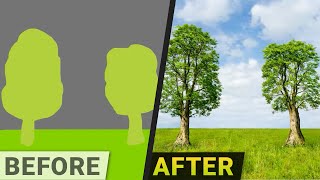
Two Minute Papers episode (host Dr. Zsolnai) presents NVIDIA’s Gaugen 2: an AI tool that converts rough drawings or text prompts into high-quality photorealistic images, supports iterative edits (including live updates after each keystroke), text-guided inpainting, and multi-modal inputs. The video notes rapid transfer from the 2019 Gauguin paper into usable products (NVIDIA Canvas desktop app and a public web app), reports roughly a four-fold resolution improvement over the prior version, and points out a hardware requirement for the desktop app (relatively recent NVIDIA GPU). The episode is labelled #600 and includes a sponsor message from Cohere AI.
Questions this video answers
Episode 600.
January 20, 2022.
The previous Gauguin paper, published in 2019.
Approximately four times higher resolution.
A relatively recent NVIDIA graphics card (explicit requirement mentioned).
Chapters
Dear fellow scholars, this is Two Minute Papers with Dr. Zsolnai. Welcome to episode 600 and today you will see your own drawings come to life as beautiful photorealistic images. And it turns out you can try it too. I'll tell you about it in a moment. This technique is called Gaugen 2. And yes, this is really happening. In goes a rough drawing and out comes an image of this quality that is incredible. But here there is something that is even more incredible. What is it? Well, drawing is an iterative process. But once we are committed to an idea, we need to refine it over and over, which takes quite a bit of time. And let's be honest here, sometimes things come out differently than than we may have imagined. But this, this is different. Here you can change things as quickly as you can think of the change. You can even request a bunch of variations on the same theme and get them right away. But that's not all. Not even close. Get this. With this you can draw even without drawing? Yes. Really? How is that even possible? Well, if we don't feel like drawing instead we can just type what we wish to see. And my goodness. It not only generates these images according to the written description, but this description can get pretty elaborate. For instance, we can get ocean waves. That's great. But now let's add some rocks and a beach too. And there we go. We can also use an image as a starting point. Then just delete the undesirable parts and have it impainted by the algorithm. Now. Ok, this is nothing new. Computer graphics researchers were able to do this for more than 10 years now. But hold on to your papers because they couldn't do this. Yes, we can fill in these gaps with a written description. Couldn't witness the northern lights in person. No worries. Here you go. And wait a second. Did you see that? There are two really cool things to see here. Thing number one, it even redraws the reflections on the water. Even if we haven't highlighted that part for inpainting, we don't need to say anything. And it will update the whole environment to reflect the new changes in by itself. That is amazing. Now, I am a light transport researcher by trade and this makes me very, very happy. Thing number two, I don't know if you caught this, but this is so fast it doesn't even wait for your full request. It updates after every single keystroke. Drawing is an inherently iterative process and iterating with this is an absolute breeze. Not will be a breeze, it is a breeze. Now, after Nearly every two minute Papers episode where we showcase an amazing paper, I get a question saying something like ok, but when do I get to see or use this in the real world? And rightfully so. That is a good question. The previous Gauguin paper was published in 2019 and here we are just a bit more than two years later and it has been transferred into a real product. Not only that, but the resolution has improved a great deal about four times of what it was before. Plus the new version also supports more materials and we are at the point where this is finally not just a cool demo, but a tool that is useful for real artists. What a time to be alive. Now I noted earlier I did not say that iterating with this will be a breeze, but it is a breeze. Why? Well, great news because you can try it right now in two different ways. One, it is now part of a desktop application called Nvidia Canvas. With this you can even export the layers to Photoshop and continue your work there. This will require a relatively recent Nvidia graphics card and 2 there is a web app tool that you can try right now. The link is available in the video description and if you try it, please scroll down and make sure to read the instructions and watch the tutorial video to not get lost. And remember, all this tech transfer from paper to product took place in a matter of two years. Bravo Nvidia. The pace of progress in AI research is absolutely amazing. This episode has been supported by Cohere AI. Cohere builds large language models and makes them available through an API so businesses can add advanced language understanding to their system or app quickly. With just one line of code, you can use your own data, whether it's text from customer service requests, legal contracts or social media posts, to create your own custom models to understand text or even even generated. For instance, it can be used to automatically determine whether your messages are about your business hours, returns or shipping. Or it can be used to generate a list of possible sentences you can use for your product descriptions. Make sure to go to Cohere AI papers or click the link in the video description and give it a try today. It's super easy to use. Thanks for watching and for your generous support and I'll see you next time.