OpenInterpreters NEW "STUNNING" AI AGENT SURPRISES Everyone! (01 Light Openinterpreter)
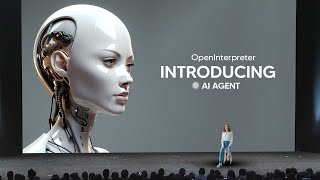
LARRUZ demonstrates O1 Lite, an open-source AI agent that handles voice commands, manages calendars, texts contacts, and learns new tasks by watching you do them. The handheld device starts at $99 pre-order, with CAD files and wiring diagrams released so developers can build on it.
Questions this video answers
O1 Lite (referred to also as 01 Light in transcript).
March 21, 2024.
$99.
UniversalInterface PDF.
March 9th.
Chapters
So after several months of toiling away in the shadows and working on A remarkable product, OpenInterpreter have released their new AI agent, which you all are about to see. And I'm going to let Open Interpreter take it away.
For over 100 years, humanity has imagined a computer that's as easy to interact with as a person. ChatGPT introduced the world to this technology and became the fastest growing consumer application of all time. Now corporations around the world have started building closed source artificially intelligent devices. Six weeks ago, we realized there was an opportunity to build an open source foundation. This next generation of computers. The Linux of this space. Something open, flexible and free. An operating system with a language model at the center of it. I'm holding the first device powered by this operating system in my hand right now. It's called. This is the O1 Lite, the first open source language model computer. You talk to it like a person and it operates a computer to help you get things done. You can run the language model on your computer at home or in our server in the cloud, making the O1 Lite fully portable. When connected to Wi Fi or a hotspot to use it, you just push talk and then it thinks and responds. Let me show you what you can do. When's the next sunny day?
One moment. The next sunny day is on March 9th.
Great. Am I doing anything on that day?
Let me check your calendar. You have no event scheduled for March 9th.
So because the 01 is operating my personal computer at home, I didn't need to set up my calendar. It can just use it. Nice. Can you see if there are any concerts in Seattle on that day?
Yes. You have several options. Option one, Bad Bunny will be performing at the Climate Pledge Arena.
That's perfect. Can you add that to my calendar and then copy and paste the link to the ticket into the calendar event? And then actually if you could text Paige the link and say something like, hey, do you want to go to.
Done. The concert is on your calendar and Paige has been texted.
Awesome. Thanks.
You're welcome. By the way, you've just received an email from Mike asking about your progress on an article. Would you like to respond to it now?
So I need to send that file to Mike, but it's on my computer at home. Hey, that article should be on my desktop. It's called the Universal Interface.
There's a file titled the UniversalInterface PDF on your desktop. Do you want me to send it to Mike now?
At this point, I could ask my light to read or even Edit that document. But I'm just going to send it to Mike. Yes, please send it.
The document has been emailed to Mike.
Great. So you can kind of think of the O1 light as like a smart person that's in front of your computer. How could that be useful? Let's head back now and I'll show you something even bigger. This is my laptop and it's the one that the Light has been operating out of the box. It's pretty good at using my computer, but it can't do everything. So let's teach it to use a desktop application that it's never seen. Hey, I want to teach you something.
Sounds good. What do you want to teach me to do?
I'm going to show you how to send a Slack message.
Okay, I'm ready. What's the first step?
First, open Slack.
It looks like Slack is open. Did I do that right?
Yeah, you did.
Great. What's next?
Hit command K.
Done. Did I do that correctly?
Yeah, that worked. Okay, now type out the name of the recipient. Like for example, Ty. Then press Enter.
Done. Let me know if I did that right.
Yes, you did. Now I want you to click on the text box at the bottom that says Message. Ty.
I've clicked the text box. Did I do that right?
Yeah, you did. Okay, now you can write the message. For example. Hey, Ty. Then press.
It looks like I've sent the message. Is that right?
Yes. And that's all there is to this skill. So you can save it now.
Sure thing. I've just learned the skill. Send a Slack message.
So you can do this with any workflow, any desktop application, or even a pipeline of applications and websites without setting up any authentication. It just uses your computer. But here's where it gets interesting. Okay, now I want you to monitor my email. If you get any invoices, could you take a look at the attachments and then slack all the relevant details to Mike?
Alright, I'll monitor your inbox for invoices. If I see one, I'll slack the details to Mike.
Now, days later, when I get an invoice, which I'll test just by emailing one to myself, it will slack it to Mike and let me know about it. Sa.
I just sent a Slack message to Mike with the basic information of the invoice.
That was the O1 Lite. You can pre order one today for $99. And the one you get won't require a computer. You'll be able to use it as a standalone device that taps into our hosted service. But Developers can get their hands on this. Right now, we are releasing the O1 Lite, the O1 server and the O1 OS developer previews. Today, the software, CAD files, wiring diagrams, everything you need to make an O1 light in an afternoon so you can build your own personal or commercial AI devices. Tomorrow, I want you to imagine a world with doctors that fit in your pocket, smart toys that talk and teach, companions, Pokedexes and robots, all running in an open ecosystem with shared protocols and innovations. The Cambrian explosion of AI devices. In the next few weeks, we're going to release an open source language model for computer control, an app for your phone, and a handheld device that runs fully offline. If you want to build this future together, talk to me and thousands of other energized developers in our rapidly growing O1 community. Let's accelerate together. I'll see you there.
So, once again, it's clear that we're moving to a stage where AI agents are going to be all the rage. We saw a variety of different things in this demo that didn't shock me, but were rather impressive. And I think one of the most impressive things about this that I'd like to speak about was the things at the end. One of the things that was announced at the end was the fact that this is going to be an entire ecosystem for fully open source. I think the implications must not be underestimated because if we have an entire open source ecosystem, we know that people are usually much more creative than the original creators of the project, just because there's so many different people and so many different ideas out there that many people could use it for. And I think that one of the key things that many people are going to use this for is to build their own kind of AI agent that, that are in line with their own interests and that work with their Apple systems. Now, I think this is going to be really cool because like it was announced, we could potentially have a scenario where we have doctors in our pockets, potentially we could have tutors in our pockets. This, although this isn't something that, you know, hasn't been explored before, I do think that this open source approach is going to be one that changes the scope of things because this might be the very platform that many people actually do build on. And I think if that is the case, that then that is going to be really, really cool because it now means that developers can use this to iterate, to modify, to create their own customized versions of this and take things in an entirely different direction that we didn't See before and many people are rooting for open source developers and open source companies and it looks like another one has been added to the list. Now I for one am really excited about this because I know that communities just been with what people have been able to do with ChatGPT. What are they going to be able to do with these kind of devices if they're able to edit them themselves, that is going to present a remarkable opportunity for many individuals now for the device. What's absolutely crazy is that this video announcement video hasn't even been out that long and you can see that it is already sold out. So if you want one of these devices, you're going to need to sign up very, very quickly because this ecosystem is going to be growing pretty, pretty quickly. So also you can actually partner with this company. You can just click the link down in the description and it says Open Interpreter and is building intelligent software and hardware that can take actions on classical computers with the classical software. We're looking forward to partnering with organizations that could benefit from implementing our technology or expertise. So that is going to be very, very fascinating to see how some companies tackle the mold. Now, of course I think that once again this open source giving access to everyone is really, really cool because there's going to be so many different ideas and so many different communities that are probably going to going to be built off the back of this. But I would like to see how this stuff does develop over the next years and of course I would like to see hopefully some kind of Windows version 2, because whilst open Interpreter does look really, really good, the only caveat thing that I didn't think they mentioned was of course a Windows system. Now of course if you are someone who uses Windows, then it is something that you seemingly won't be able to use. But I do hope that in the future they do release a Windows version because that would be really, really good. And I'm really, really certain that there are a number of people who are so familiar with Windows that they would love to try out the product and of course build their own AI system, AI agent on top of this entire product. So I think that this is definitely something that is really cool. I do remember watching earlier iterations of this and also one of the things that I do think set a very interesting precedent was the part where the demo shows that you're able to teach this AI system new skills. So we've seen this before with some other devices, but this one is really, really cool because, because you can do it in natural language and it seems that we're going to be setting up a bunch of different actions with this and we're going to be able to increase the capabilities of this AI systems over time. So this seems like one of those things that's really, really effective in getting it to be able to do different things. And there was also a sentence that I did pay attention to and it was you could actually teach it any task across any desktop application. So you could think about any single desktop application that you could do and then you could just literally think about the possibilities being endless. So this is truly, truly something that I do find fascinating. I'm wondering if the AI community is excited about this. Are you excited to see how this kind of integrates into your ecosystem? Are you going to be adding this to your workflows? Are you already thinking about unique and creative ideas on how you can implement this stuff? I think this is going to be truly, truly interesting because we haven't had such a great open source project like this before and we've seen what people have been able to do with smaller, much lighter open source models that are just LLMs. But now with a one for your computer, I think this is really, really effective. And it seems like AI products are going to be there. So let me know in the comment section below if you're going to be buying this product. I'd love to know if you're going to be buying this product because I want to know how enthusiastic you are about this product and if you do, let me know what your reasons are for and what you're most excited about. With that being said, I can't wait to see what developers build with this open Interpreter product and I can't wait to see how this evolves over time and especially if some other companies come to the mix. With that being said, I'll see you all in the next video.










