RAG from Scratch without any Frameworks
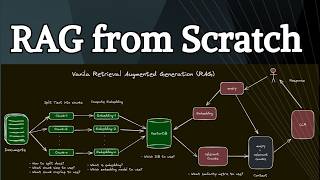
This YouTube tutorial (by LARRUZ) demonstrates how to implement a complete Retrieval-Augmented Generation (RAG) chat pipeline in Python without frameworks. It walks through creating a knowledge base from a Wikipedia article, paragraph-based chunking, computing normalized embeddings (Sentence Transformers GTE), retrieving top-k chunks by dot-product similarity with NumPy, and sending the retrieved context plus query to OpenAI (GPT-4) to generate answers.
Chapters
Let me show you how to build a complete chat with your document system in 10 lines of code. We will implement the whole thing in Python. We're not going to use any frameworks like LangChain, Llama Index, or a vector store like Chroma. Everything that you need to implement this end to end system is here. Okay, so before we start coding the system, let me show you how it works. RAG or Retrieval Augmented Generation is a term used for information retrieval from your own documents. It's a fancy term for a very old concept and the field is called information retrieval. So just to summarize, you need a knowledge base or documents from which you want to retrieve certain information. You usually chunk them into sub documents. For each of those sub documents, you compute embeddings. These are basically numerical numbers which we will use in order to figure out which are the closest documents. And normally you store those embeddings plus the original chunks in a vector store, and you actually don't need a vector store in most of the cases. And I'll show you how to do that without a vector store. Now, this part is called Knowledge based Creation part. Now, when a new user query comes in, you compute embedding for the same query. Then we do retrieval on the vector store. So basically we want to figure out which are the closest documents to our user query. Then in the vector store, we find those, retrieve those, we append those to the initial user query, give those to the LLM. So you get the query plus the relevant documents or chunks, and the LLM will generate a response. This part is called generation, and this whole setup is called retrieval Augmented Generation. Now, there are a whole bunch of frameworks for implementation of this pipeline. LangChain and Llama Index are the two most popular, and they have their own place when it comes to creating robust RAC pipelines. But in order to create a working RAC pipeline, you don't need anything else. You just need Python, your embedding model and your LLM. And I'm going to show you how to build this whole system in 10 lines of code using Python. As I said, this is the whole setup that we'll need in order to build the system. And this example is based on a talk from the creator of ragatui. It's an awesome package which lets you build RAC pipelines using Colbert. I have covered this in my other videos. You can follow Ben, the creator of Ragatui on X. I'm going to put a link to his Twitter account. Okay, so let me walk you through the Code. Now this is more than 10 lines because we will need a lot of auxiliary code. But the basic RAC pipeline can be implemented close to 10 lines of code. First we need to install different packages. We will use Sentence Transformer for our embedding model. You can also use the OpenAI embedding model if you want. For the document we will just load a Wikipedia page, but you can load your own PDF files if you want. And for the comparison of similarity computation, we are going to be using Pure NumPy. And for the LLM we will use OpenAI. So first we need to enable access to the OpenAI API key, since I'm using Google Colab, so I have the OpenAI API key here. My secrets. So we create the OpenAI API client and we will need this later on for the LLM. Now let's first talk about data. So for the data we will use one of the Wikipedia article. This is going to be our knowledge base. Next we need to actually chunk this document into different sub documents. There are a number of different strategies that you can explore when it comes to chunking. However, most of that they don't work. My recommendation is always to look at the structure of your document and based on that determine what chunking strategy is going to work. So in this case we're going to just chunk the documents based on the paragraphs. Each paragraph is going to become its own chunk and that is kind of a logical block which makes sense when it comes to an article written in plain English. Now just to show you how these chunks looks like, we're going to use this text wrap library and I'm just basically printing different chunks. So here's the first chunk. This is basically the first paragraph, second paragraph, third paragraph, and so on and so forth. And since this is based on the paragraphs, so you can see that different paragraphs have different lengths. Now for this specific document it's not going to matter a lot. But let's say if you have some something like tables and images in the documents, then you want to basically extract those separately and embed them using vision models. But in my experience, most of the time if you just look at the structure of the document and based on that figure out a chunking mechanism or chunking strategy that works pretty fine. Okay, so after this we need to embed our model, embed our chunks. Right now for embedding of the chunks, we're going to use an open source embedding model, which is the GTE based English model. You can also use the OpenAI embedding models if you want. So here we are just loading the embedding model and then we are running this command in code on top of the model, provide all the paragraphs. And we also want to normalize the embeddings. So if you look here, there are a total of 19 chunks. And each of the embedding model or embedding vector has a dimension of 6, 766 units. Right? Now the size of the embedding models is dependent on the type of embedding model, because if you use something like OpenAI embedding model, it has a much larger dimension. And here is how the actual embedding looks like. So you just look at the embedding of a single document and these will be basically numbers which are normalized. This is an array. So you can write this array along with the list of original paragraphs into disk and that is going to become your vector store. Okay, so we are done with the knowledge base creation part and we did that in pure Python. So now let's look at the retrieval part. How do we retrieve chunk of documents based on the user query? So the first step is to get the user query. So here's an example user query. Then we need to embed the that user query using the embedding model that we selected. So the next step is to figure out what are the most relevant documents in this vector store. Now in order to do that, one of the simplest way is to just compute the dot product of your document embedding. So basically your vector store and the embedded query. You can see that we are just taking the transpose of this vector in order to make sure that we can compute the dot product correctly. And the result is going to be a vector with 19 entries. So here are the similarities again, these are normalized numbers. So you're going to get similarity score between 0 and 1. And this basically gives you how similar each of those chunks are compared to our user query. Right. Now you can do a simple thing. You can rank them based on the similarity score that you get and choose, let's say top K. So in this case we are just choosing the top three chunks, right? So if I look at the indices of those top three chunks, it says sixth, eighth and fifth based on the similarity score. So the indexing starts from zero. So the six is this one. Then the next one is the eighth one. Then the fifth one is going to become this. So you can get the most similar chunks out of the embedded vectors. Then you can basically take those indices of these embedded Vectors and you can go back to your original chunks of the text and just get those from the documents. So basically it's kind of a reverse indexing process. And here I'm just looking at the top three documents or chunks that are retrieved. So here's the first one. Okay, here's the second one. And this is the third one. Right. So these are the most relevant chunks based on a dot product of our query embedded plus the vector or documents embedding that we created. So now we have a query plus the relevant chunks. All we need to do is just feed those into the LLM to get a user response. Alright, so here's a mechanism of how to do that. I got the query, then I created a prompt where I'm saying use the following context to answer the question at the end. If you don't know the answer, you just say that you don't know. Do not try to make up an answer. Right. So I'm providing a context plus the query. This context is basically what I did was I took all of the three, the top three similar chunks, put them together and these are different paragraphs and we create this prompt, right? And the user query is the original user query. Then we're going to be using the chat completion endpoint from OpenAI. So I'm using GPT4. We will provide this prompt as the content for the user role. And here's the response that you get from the model. So you learn how to build a basic RAG Python pipeline in pure Python. Now you can do a lot more with it. You can create very complex RAG systems if you are interested in that. I created a course called RAG Beyond Basics which goes into a lot more advanced techniques which will help you build robust RAC pipelines. Now in that course I'm using LangChain, so there is space for frameworks like LangChain, Dhamma Index, different vector source. But in general, if you want to just get started with rag, I'll highly recommend to do it in pure Python to get a better understanding of different components. Now, if you're building more complex systems, these frameworks like LangChain can be extremely helpful, especially they have a lot of integrations. So for example, if you're looking at integrating different vector stores or different LLMs, using something like LangChain can be extremely helpful because this will help you just integrate these different components without modifying a lot of code. And they also comes up with a lot of different advanced rack techniques that you can use out of the box. So there's definitely a space for these frameworks. However, I'll still recommend to build your initial Rack setup in pure Python so that you can get a better understanding of how these systems work. Okay. And if you want to go beyond basics, make sure to check out my course. I hope you found this video useful. Thanks for watching and as always, see you in the next one.










