Stable Diffusion: DALL-E 2 For Free, For Everyone!
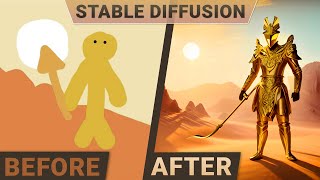
Károly Zsolnai-Fehér walks through Stable Diffusion, an open-source image generator you can run locally. It cost $600K to train but works free. The demo shows interpolation between images, inpainting, animation, and variant generation.
Questions this video answers
Approximately $600,000.
Chapters
Dear fellow scholars, this is 2 Minute Papers with Dr. Today we are going to look at images and even videos that were created by an AI. And honestly, I cannot believe how good some of these are. And is it possible that you can run this AI at home yourself? You'll find out today. This year, through OpenAI's Dall E2, we are entering the age of AI driven image generation. Most of these techniques take a text prompt, which means that we can write whatever we wish to see. On the screen. A noise pattern appears that slowly morphs into exactly what we are looking for. This is what we mean when we say that we are talking about diffusion based models. Now, OpenAI's Dall E2 can create incredibly creative images. And Google's party and imaging AIs are also at the very least as good. Sometimes they even win linguistic battles against OpenAI solution. But there is a problem. All of them are missing something and that is the model weights and the source code. This means that these are all closed solutions and we cannot pop the hood and look around inside. But now here is a new solution called stable diffusion where the model weights and the full source code are available. I cannot overstate how amazing this is. So to demonstrate why this is so amazing, here are two reasons. Reason number one is that with this, we can finally take out our digital wrench and tinker with it. For instance, we can now adjust the internal parameters in a way that that we cannot do with the closed solutions like Dall E2 and Imagen. So now let's have a look together at 10 absolutely amazing examples of what it can do. And after that, I'll tell you about reason number two of how it gets even better. 1. Dreaming. Since the internal parameters are now exposed, we can add small changes to them and create a bunch of outputs that are similar. And then finally stitch these images together as a video. This is so much better for exploring ideas. Just imagine that sometimes you get an image that is almost what you are looking for. But the framing or the shape of the doggy is not exactly perfect. Well, you won't need to throw out these almost perfect solutions anymore. Look at that. We can make the perfect. Good boy. So much easier. I absolutely love it. Wow. 2 Interpolation. Now hold on to your papers because we can even create a beautiful visual novel like this one by entering a bunch of prompts like the ones you see here. And we don't go from just one image to the next one in one jarring jump. But instead these images can now be morphed into the next one creating these amazing transitions. By the way, the links to all these materials are available in the video description, including a link to the full version of the video that you see here. 3. Its fantasy imagery are truly something else. Whether you are looking for landscapes, I was quite surprised by how competent stable diffusion is at creating those. These tree houses are amazing too. But that's not When I fell off the chair, I fell off the chair when I saw these realistic fairy princesses. I did not expect it to be able to create such amazingly realistic humans. How cool is that. 4. We can also create a collage here. We can take a canvas, enter several prompts and select a range for each of them. Now the issue is that there is space between the images. And there is another problem. Even if there is no space between them, they won't blend into each other. No matter. Stable diffusion can also perform image inpainting, which means that we select a region, delete it, and it will be filled in with information based on its surroundings. And the results are spectacular. We don't get many separate Images, we get one coherent image instead. 5. You know what? Let's look at a few more fantasy examples. Here are some of my favorites. 6. Now these are diffusion based models, which means that they start out from a bunch of noise and slowly adjust the pixels of this image to resemble the input text prompt a little more. Hence, they are very sensitive to the initial noise patterns that we start out from. Andrej Karpathy found an amazing way to take advantage of this property by adjusting the noise but just a tiny bit and create many new similar images. When stitched together, it results in a hypnotic video like this one. Random noise walks if you will. Loving it. It can generate not only images, but with a little additional work, even animations. Look, you are going to love this one. This was made by creating the same image with the eyes open and closed and with the additional work of blending them together, it looks like this once again. The links to all of these works are available in the video description if you wish to have a closer look at the process. 8. You remember that it can create fantastic portraits and it can interpolate between them. Now putting it all together, it can create portraits and interpolate between them, creating these sometimes smooth, sometimes a little jumpy videos. And don't forget 9. Variant generation is still possible. We can still give it an input image. And since it understands what this image depicts, it can also repaint it in different variations. And finally, 10. The fact that these amazing images come out of stable Diffusion does not mean that we have to use them in their entirety. If there is just one part of an image that we like, be it the knight on a horse or or the castle, that is more than enough. We can discard the rest of the image and just use the parts that we love best and make an awesome montage out of it. Now we discussed that we can pop the hood and tinker with this AI. That was one of the amazing reasons behind these results. But I promised two reasons why this is so good. So what is reason number two? Is it possible that. Yes, yes, yes. This is the moment you have been waiting for. You can now try it yourself. If you are patient, you can engage in changing the internal parameters here and get some amazing variants. You might have to wait for a bit, but as of the making of this video, it works. Now what happens when you fellow scholars get over there? Who really knows? We have crashed plenty of websites before with our scholarly stampede. And if you don't want to wait or wish to run some more advanced experiments, you can run the model yourself at home on a consumer graphics card. Loving it. And if you are unable to try it, don't despair. AI based image generation is only getting cheaper and more democratized from here on out. So a little open source competition for OpenAI and Google. What a time to be alive. And please, as always, whatever you do, do not forget to apply the first law of papers which says that research is a process. Do not look at where we are, look at where we will be. Two more papers down the line. Here are some results from Dolly1. And just a year later, Dall E2 was capable of this just a year later. That is unbelievable. Just imagine what we will be able to do five years from now. If you have some ideas, make sure to leave a comment about that below. So finally, stable diffusion, a free and open source solution for AI based image generation. Double thumbs up. This is something for everyone out there and it really shows the power of collaboration as us tinkerers around the world work together to make something amazing. I love it. Thank you so much. And note that all this took about $600,000 to train. Now make no mistake, that is a lot of dollars. But this also means that creating an AI like this does not cost tens of millions of dollars anymore. And the team at Stability AI is already working on a smaller and cheaper model than this. So we are now entering not only the age of AI based image generation, but the age of free and open AI based image generation. Oh yes, and for now, let the experiments begin. If you're looking for inexpensive cloud GPUs for AI, Lambda now offers the best prices in the world for GPU Cloud compute. No commitments or negotiation required. Just sign up and launch an instance. And hold on to your papers. Because with Lambda GPU Cloud, you can get on demand a 100 instances for $1.10 per hour versus $4.10 per hour with AWS. That's 73% savings. Did I mention they also offer persistent storage? So join researchers at organizations like Apple, mit, and Caltech in using Lambda Cloud instances, workstations or servers. Make sure to go to lambdalabs.compapers to sign up for one of their amazing GPU instances today. Thanks for watching and for your generous support, and I'll see you next time.










