Eight ways Stable Diffusion is being used now: turning models into videos, making photorealistic custom versions, zooming into scenes, editing in Photoshop, sketching with text prompts, texturing 3D scenes, creating tileable patterns, and restyling digital humans from video.
Chapters
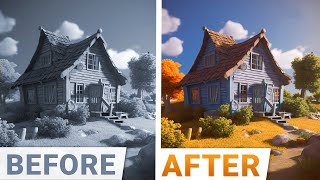
Dear fellow scholars, this is 2 Minute Papers with Dr. Today we are going to marvel at the amazing things that happen when a paper like Stable Diffusion comes alive as a free and open source text to image AI. To say that it is improving at a rapid pace would be an understatement and it gets even better. It also gives you the warm and fuzzy feeling of running it yourself on your own hardware. So here are eight amazing non trivial applications of it. 1. It can be combined with several other tools to create something magical. Yes, here you see a ChatGPT prompt, then a request to a different text to image AI to create the images. And finally get this. These were combined into a video by Stable Diffusion. Lovely work. So cool. 2. This incredible photorealistic image was created by a custom model. These are typically specialized models that are fine tuned to do particularly well at a given topic. This one is for photorealism, but there are tons of other ones out there as well that make Stable diffusion an absolute powerhouse.
3.
We can also create a set of images and weave them together into one of those famous zooming videos. Depending on how we choose the start and end points, we could even make gorgeous infinitely zooming videos. Loving it. 4. I hear you asking OK Caroj, but I already work with existing tools like Photoshop. Can I make Stable Diffusion work with it seamlessly? And the answer is yes. Finally, look at that. You can now write your prompts and even remix your real or generated images by inpainting them. This combines the powerful built in tools of Photoshop with text to image. I absolutely love this. Note that this requires a little fiddling but all the information you need is there in the video description if want to you if you wish to give it a try. This is going to change how artists use Photoshop and make them a lot more productive. What a time to be alive. And five if you do not wish to use it in Photoshop, it can still supercharge your creativity. If you are looking to draw only a rough outline for your ideas and fill them in through text to image, this gives you even more granular artistic control over the generated images. I think applications like this are fantastic because they put the human in charge much more than just generating an image from thin air using a text prompt. So good. OK, but all of these images are 2D. What about 3D artists? Can they also benefit from Stable Diffusion somehow? Does it help them in any way? Well look at that. Wow. It just textured these 3D objects and not one by one. No sir, it textured the whole scene in one go. My goodness. 7. It can also create tileable textures. Why does that matter? Well, if we are asking for a big patch of material, we need to make sure that it is not just one image copied and pasted all over again. But it. It truly gives us a seamless texture that is excellent. Especially if we combine it together with an alternative reality app where we look at our room and just ask a voice assistant to recolor the wallpaper to be a little more corn themed. Wow, that is a little too much corn. What about making it a little less busy and more stylized? Now we see exactly what that would look like. And finally. 8. This is going to be incredible if we have an animation of a digital human and we wish to give its appearance a complete makeover. Look. No more Stable diffusion can take this video and just one image of the new test subject and bam. There we go. We get a completely new video with a much higher quality character. And before we go, I have even better news. Yes, hold on to your papers fellow scholars, because stable diffusion even runs on your phone too. Just imagine having this kind of power in your pocket wherever you go. And don't forget, this is all out there in the open so you can contribute to whether it might be cold prompts, experiments, papers, anything. We are building this together. Oh, and you can also track your experiments with weights and biases and it can even help you optimize the efficiency of your own image generation process. It is super useful. That's why I always talk about it here on two minute papers. So I hope this gave you some ideas to experiment at home or or on the go. And for now, let the experiment begin.
This video has been supported by weights and biases. Check out their recent offering Fully Connected, a place where they bring machine learning practitioners together to share and discuss their ideas, learn from industry leaders and even collaborate on projects together. You see, I get messages from you fellow scholars telling me that you have been inspired by the series but don't really know where to start. And here it is. Fully Connected is a great way to learn about the fundamentals, how to reproduce experiments, get your papers accepted to a conference and more. Make sure to visit them through WNB Me papers or just click the link in the video description. Our thanks to WeightsAndBiases for their long standing support and for helping us make.
Better videos for you. Thank thanks for watching and for your generous support and I'll see you next time.