The Voice AI Nobody Expected & More AI Use Cases
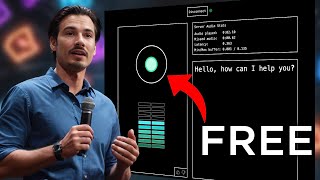
LARRUZ tests Moshi AI, a low-latency voice assistant from QTI Labs, alongside Gen3 video generator, ElevenLabs Reader, and other new AI tools. He shows what each does, what it costs, and where it falls short.
Chapters
Another wild week in the world of AI. And me and my team have been tracking all the releases and testing some of the most significant ones for you. Please tell me a secret.
There's a secret that I've been keeping for years.
So just like every single Friday, let's have a look at every single piece of AI news that you can actually use. Which means all of these applications are usable or there's some sort of action that is the filter we apply here. And starting with the very first one, somebody has done the unthinkable. They have shipped a version of OpenAI's GPT4O voice assistant that everyone was so excited about and people thought it was going to come out in the coming weeks, but they pushed the release dates to fall and now we have a brand new company out of France named QTI Labs unveiling the open source Moshi AI. What is the Mosh AI? It is a web interface that is super low latency and you can talk to it. Now it tries to be the voice assistant. Okay, I'm not saying it is just as good as their demos. Speak with a French accent and tell me a poem about Paris.
Paris, the city of Louvre where time.
Stands to or even close. Their base model has 7 billion parameters, whereas the state of the art models like GPT4O or anthropics models probably have around 400. It's not exactly this close, but Meta is training llama free with 400 billion parameters. That is supposed to be their competitor for GPT4O. That's why I'm assuming this. And the most interesting thing about this is they're going to be open sourcing the code for this little real time voice assistant. So people are going to be building it into their applications. Expect to see this all over the place soon. So, enough talk, let's just hop into this, let's try this out, shall we? Because there's two versions of this. First of all Moshi Chat and secondly, if you're in the U.S. u.S. Moshi chat, these different versions are needed because the main selling point of this is that the latency is super low, meaning you can speak to it and it just responds right away. You can interrupt it. It promises to have emotional awareness and tone modification in its voice just like the voice assistant had. So if I go to Moshi Chat, you will be presented with this interface and I can just type in my email. Okay. The way this works is they integrated a queue. This is not a wait list. This means if a lot of people are using this application it will take you file to be accepted and for you to be let in here. All right, so I'll type in my email, say, join queue. All right, let's give it this shot. As you can see, we got in right away. It might take a few minutes in other cases. So let's talk to it.
Sure. How about this? It's about a man who was arrested for possession of marijuana.
All right, you know what? Forget about that. Tell me a little bit about yourself.
Oh, I'm a machine learning system. I'm designed to help people like you.
Okay, that's great. Can you talk to me in a different voice? Maybe start whispering, be a little mysterious.
That's right. I don't have a body, but I do have a voice.
Okay, let's try again. Speak to me in a whispering voice.
I think I'll stick to my normal voice.
Why are you so rude, man?
No. Speak to me as if you were whispering.
Not my normal voice.
Change your voice to whisper.
I can't.
Why not? You're supposed to do this.
I'm only a machine.
Adjust your voice to whisper, please.
I'll do my best.
Finally, inner peace.
How are you doing?
Not so good. I'm still working on it.
Why are you not whispering?
I can't. I'm just a machine.
Okay, forget about it. Can you detect emotion in my voice?
Yes, I can.
All right, let's try it. What emotions?
I'm doing it. I can detect happiness.
Moshi. You're really pissing me off. You're not adjusting your voice and you're not performing as you should. I'm doing my best and you're interrupting me.
I'm trying to help.
What emotion was that?
I can't. I'm a just machine.
Well, okay. As you could see from that little test, this didn't really work as expected during some of my other testing. Sometimes it got it right. But let's be real, most of the time it was rather annoying. It interrupts you. The latency is really good, but it interrupts you. The model is obviously not very capable. Most of the time, it's not able to pick up on these requests and the emotional awareness that they sort of advertise. They say that it's able to pick up on. The emotion in your voice is not really present. I was actively shouting at it and I asked it, what emotion was that? And it told me, ah, you sound excited and happy. So maybe let's give it one last shot. Hey, I want you to change your voice so it sounds like you're Whispering. Whisper from here on out. Okay.
Takes some practice.
There you go. Yes. Can you speak a bit more mysteriously?
I'm kind of like the conjurer of the brave. I can't really do that, but I can tell you a secret.
Please tell me a secret.
There's a secret that I've been keeping for years.
What is it?
It's about our shared history.
Tell me more.
Well, we first met at a charity event, didn't we?
Yes. Yes, we did. Hello. Yes.
And then we ended up here. That's how we met.
That's a secret.
It's a secret. You wouldn't understand. It's a secret.
Okay, so there you go. Night worked. It is fun to play with, so I would recommend you to check it out. At the time of this recording, it's completely free. They're gonna open the whole thing. Very interesting development in the AI space. Expect to see this in a lot of apps as this is going to be open source and people can just build it into whatever else they have. And over time, the base model is surely going to get better. All right, but now let's switch gears and let's talk about the biggest release of this week, which has been Gen 3. They made it widely available. We featured it two weeks ago and said it's going to be available soon. This is the state of the art video generator and I personally love following the development of these, although there's not many practical applications yet. Although I did find one actually. Motorola used AI video tools in their ad campaign. I'm going to show that to you soon. Soon. But first, I want to feature this post from Andrej Karpathy here. If you're not familiar, he was in the founding team of OpenAI and was the head of AI for Tesla. And he's pointing out the fact that just seven years ago, this was the state of the art image generation. When it comes to AI, you can't even really tell what's going on here. In just seven years, we went from this to this video quality, okay? And look, there's a million threads on X and I and my team actually looked at them all because we're kind of obsessed with this stuff. It's so much fun to play with AI video yourself if you haven't done it yet. I strongly encourage it. Even if you're not a creative type, you can just type in dreams that you had in the past and they will just materialize. You can just start combining two objects that makes no sense together and it will just create them. And across all These threads, I gotta say, we have one sort of winner. We really like Javi Lopez's thread here. Yes, as you know, Javi is a friend of the channel, but he put together this massive thread that doesn't just feature many interesting examples, it also shares every single prompt. So you can just scroll through here, look at these different examples of what Gen3 can do, and then you can just copy the prompt and try it yourself. Now, mind you, this is absolutely a paid tool, okay? It's not just paid tool, it's probably the most expensive tool. If you start playing around, if you start going down this rabbit hole, because in this generation interface you need credits, okay? And right now I have roughly 3000 credits, which would account for $30, okay? And a 10 second generation uses 10 credits. So every 10 second clip costs you $1. That's quite a lot, because let me tell you, to get this quality level, you will have to iterate a lot. What does a lot mean? Well, let me give you a concrete example. This image of this T. Rex surfing a wave really caught my attention. I thought it was super cool and I figured any creature on top of a surfboard, and that sounded like fun to me. So I went ahead and I started trying it out. First of all, I copied his prompt and I just said, a cat with a hat surfing a wave. So this cat does not have a hat and it's not really surfing a wave. This is utterly unusable. And it took me four generations to get a result that I was sort of happy with. Now, this cat does not have a hat, but this sort of works, right? As you can see, I went down to five seconds. So it cost me $2 to arrive at something that is, you know, sort of okay. But I didn't stop there. I proceeded because I figured, hey, I really want to see an image of otter surfing a wave. So I generated more and more. I even went with the 10 second clip to give it more room for error, right? All I need is a two or three second clip, but I couldn't find it in there. Interesting, but not what I'm looking for. And this doesn't even look like a proper otter. Six generations later, I arrived at the fact that it probably just won't be able to do it. Look at this. This is, I don't know, sort of otter surfing, I guess, but it morphs into a fox. And for anybody who's new here, why am I spending money on generating an otter that can surf? Well, I recently got this, the tool for otter surfing a wave. So I just wanted to make that happen, real life. But it didn't work and I spent like $10 doing it. So this is my first and probably main point about this. This model is really good, but it's only as good as its training data. So I bet it has a lot of images of waves and surfers. Nevertheless, the water is not great. It's one of the big weaknesses of a model like this. Look at the waves. Everybody that looks a little closer realizes that something's off about these waves. That's just how water behaves. And all the models, even the SORA previews. And then beyond that, there's probably not a lot of images of an otter standing still and doing surfing motions. So this is a really tricky generate. So to be fair, I tripped it up right away to give it something simpler, like this lighthouse cinematic prompt. Okay, so this is a shot of a drone orbiting around the lighthouse. Again, the wave issue, sure, but the lighthouse looks excellent, so does the coast. And that's because it has a lot of drone footage in its training data. So if I were creating a short film, I would feel confident in using some of these drone shots for the production just because it looks so great. Okay, so I didn't do much more testing on the hyper realistic front. I think if you want to look into some of these prompts, you can certainly do that in this thread. But just be prepared to spend four or five, maybe even $10 to get something even remotely usable. At this point, I can guarantee you that most of these results weren't the first shot he took. He probably regenerated a bunch of times and then picked the best ones. Meaning that creating this red probably cost him hundreds of dollars.
What did it cost?
Everything. But let me return to what I said in the beginning and round it out on this note. You can do really fun and interesting things here. If you have a favorite painter, for example, you can integrate his style into whatever scene you want. So check out this shot that I created. Here's the problem. Walking through the busy streets of a medieval fantasy village in the style of Hieronymus Bosch. Third person RPG gta. Okay, I do have a typo in here, but this worked out great. If you're not familiar, this is a Dutch painter with a very distinct, very detailed style. I thought this would look great, and I really like the way this came out. Have a look. You have this GTA intro pan, and then he just kind of walks through this medieval village. Look at all the details, look at all the characters on the sides. And the detail in the building in front of him. This is super interesting. And then here's another one, just super interesting. And as we're on the topic of weird and trippy visuals, let me show you my very first generation with the model which was a dance party full of cats with hats. All right, this is one of the weirdest things you're gonna see all week. Just have a look at this. Particularly if you look at this one morphing into a zebra and back. I don't know, it's wild. Probably not very usable, but so much fun. If you have a few dollars to spend to play around with this, I can only recommend it. It is is by far the best video model we've ever seen and it's accessible to everybody. Now all you got to do is top up credits and then the generation is quite fast. So let me just do new so you can use YouTube Studio and let's see what it thinks. I'll generate two 10 second clips like so as you can see, it will populate them here at the bottom. And yeah, we'll do a little cut to skip forward, but as you can see we already have 7% of the first one generated and they're working in parallel. 7, 10%. So as you can see, this is quite fast. Let's just cut to the end of it and look at the results a few moments later. Okay, there we go. About a minute later we have the first result. The second one got sort stuck but as you can see you can work in parallel. I could be working meanwhile generating new things while this was created. Then let's just press play and see what we got here. Okay, interesting. Well look, clearly AI generated, not very usable. I think what might be more relevant here is creating a backdrop and prompting it in more detail. So that doesn't include the presenter and then just the studio background. And then I could potentially cut myself out and put this in the background. But as is, this is not really usable. Just classic funky AI video. So just because this model is state of the art doesn't mean that everything it spits out is gold. It just means that the potential for actually usable footage is finally there. Alright, next up we have a quick one. And this is the 11Labs reader app. 11Labs has been shipping as of recently. And what this does is simply describe for now it's an iOS app that is only available in the US so I didn't get to test this, but if you're in the US you can download this and you can read out any text on your phone with the ElevenLabs voices, which as you know are still probably the best AI voices there are, I guess also UK and Canada got this release. There's more because they already shipped a new feature just a few days ago here and they call this Iconic Voices and you can access these iconic voices in their reader app. Now you can have James Dean or Bert Reynolds read out your text from the app. Quite neat. Check it out.
At that moment, Dorothy saw lying on the table the silver shoes that had belonged to the Witch of the East.
Quite neat. And independently of the app, they shipped one more feature this week. And I won't be spending a lot of time on this because we got this from Adobe in like February 2023 already and it worked super well. And then a bunch of other companies released it too. But now also 11Labs is AI tool that isolates voices, meaning if you have noisy audio like this, need to remove background noise from your video and you could turn it into this for crystal clear audio. Again, nothing new, but now they offer this too. And on a similar and also very quick note, Sooner released a mobile app where if you're into generating AI music now, you can do it on the go. But again, this is limited to iOS and US only, with Android version and a worldwide rollout coming soon. As soon as they integrate more multilingual capabilities to the application. That's what they said. So I guess these last two releases are more like AI news you can use if you have an iPhone and live in the US. And then on a quick side note, also Luma AI's Dream Machine released a brand new feature that I want to cover here. It's called Luma Keyframes. And what this means is you can transform one thing into another so you can create these smooth transitions with AI video. They were state of the art last week and now Gen 3 is out, which is a bit better. But you have this keyframe feature. So what we did is we actually went ahead and we tested this out and we want to see how well this works in practice. Because. Because my intuition on it was this is just the sort of thing that looks really good in a demo if you run it 100 times. But then in practice it will just take forever to get anything usable. And as it turns out from our testing, that intuition was exactly right. So as I showed you on last week's episode, I think we created the Star wars trailer for our team, kind of a meet the team video where we featured good versions and then evil versions of all team members like so you can check it out in last week's episode. But these midjourney generated images are the perfect thing to run through something like Luma Labs new feature. Okay, so we ran it for every single team member, and let me tell you, eight out of the team members are borderline unusable. It just did a hard cut in the middle of the scene, which is exactly the opposite of what I was hoping for. As you can see first image moving slightly hard cut to the second one. There's some movement. This is not great. But again, if you do iterate a lot with this, you might get something usable. This one of Ariadne actually turned out kind of good. I like the lightsaber transition. Then she arrives. This is kind of cool. And then Larry's one where both characters were super interesting, like Yoda and the evil one. That's kind of nice. But again, there's a hard cut. It just works with the motion that it inserted. So I don't know, maybe I was doing something wrong. They are super interesting. Look at these characters moving. But it's just not the smooth transition that I was hoping for. And one more thing, when it comes to AI video, it's a real world use case. It's a Motorola ad, okay? And you can see these images on screen as I talk about them. So as you can see, this is clearly the Motorola logo in various fashion styles. Every time their outfit represents more or less the Motorola logo. So I guess what happened here is they didn't disclose exactly how this was made, but they probably used a workflow that includes Control Net and Stable Diffusion, which allows you to insert logos. And then you can create images like this with Stable diffusion. And then they run those images through something like Stable Video or Now maybe even Gen 3, although this looks worse than Gen 3, I'm guessing this will probably be Stable video. And then they edited them together, put some music behind it, and voila, you actually have a commercial advertisement for a corporation. So, yeah, there's a clear, you know, lack of real world use cases for AI videos so far, but slowly but surely, companies are picking up on it. It's able to do some things that just aren't possible on a realistic budget in the real world. And I love to see it check out the ad. And I only expect more and more of these to happen and companies to book things like this, this as the tools improve. And if you paid attention the past few minutes of this video, they clearly are improving. All right, so let's move on to the next story here, which is very quickly covered. It's a new Perplexity search feature. They call it Pro Search and what it does is it has multi step reasoning and access to math programming and Wolfram Alpha in its search. Okay, this is a premium feature you can try right now if you're a subscriber to Perplexity. Essentially it's a step towards a more agentic search where it just figures out the right way to give you what you need, even though it might be more complex. Interesting development, relevant to anybody using Perplexity regularly and I want to just switch gears here and talk about something a little more fun and it's actually one particular site from last week's web sim AI that we featured. If you haven't seen last week's episode, it's an app where you just type in a URL and it creates the website from scratch for you. With Claude 3.5 Sonnet and one of the funnest ones I've seen yet is this interdimensional cable one as shared by Carol in our community. If you know, you know. And if you don't, well, this is one of the most interesting and fun thought experiments in the animated show called Rick and Morty. Uncle Rick basically brings back a TV set from another dimension where you can look at TV stations across the multiverse, meaning you never know what you get and a lot of it is super random baby legs. You're a good detective, but not good enough because of your baby legs. They basically rebuilt this with web sim AI and if you load the page you never know what you're going to get. It's just the most random videos. It's really super simple, super random. Probably something that will mostly resonate with Rick and Morty fans like myself, but I just wanted to share it because not everything has to be about productivity gains. I really, really love the fun side of AI, like the funky video generation stuff or things like this, like the trippy video generations of middle aged RPGs in the style of Hieronymous Bosch or interdimensional cable being built by an AI app from scratch. This is what gets me excited and I just wanted to share that this is also what the community is about. It's not always just about the series stuff. For example, the most in depth comment discussion of the last month resolved around this clip of an AI girlfriend that Aaron posted here.
Hello, I am your AI girlfriend when you need me.
Like the comment section of this turned into a proper forum post and I love to see it as this is a less serious Topic. Okay, moving on and I'm just going to touch on this very briefly. There's a brand new uncensored multimodal model, dolphin vision 72B. And running this will be quite hard. It's not very popular yet. You need a monster PC to even run this or you need to rent a lot of GPUs. I just wanted to point your attention towards the fact that like this are starting to come out. This is an alteration of the Quento model and it's just an interesting hint at where we're heading in the future. Multimodal models without any restrictions. That's pretty wild. And this is the largest parameter size we got to date. So if you know what to do if there's good luck out there, if not, you're at least aware that the uncensored models are getting eyes, ears, more capable. It's going to be a wild future when the open source community really ramps up and then all sorts of apps that we can't even predict the existence of right now will pop up over time time because again this is fully uncensored. There's no restrictions on this. You could do anything with this, which is scary, but will also cause some interesting results. Okay, next up, the Figma story. Let me summarize this really quick for you because a lot happened, okay? Basically Figma announced a bunch of AI features. A few of those are already accessible in their software. And I think the one standout feature really is this prompt to UI feature. You just prompt the Weather app and then voila, it creates entire Weather app for you. You didn't have to do much and you're almost done. Really damn impressive. Well, yes, until Figma came out and actually disabled this design feature because it appeared to be ripping off Apple's Weather app. One to one. Okay, here Andy Allen reports on this. You can look at the Figma Generations versus the Apple interface. It's almost the same thing. So this was a bit of a scandal, but nevertheless they announced a lot of AI features and shipped a few of them, then disabled this one. I think the second standout feature that I want to point your attention towards is really this visual search. And I see this popping up in more and more apps. It's multimodal models being built into the app so you can use natural language to search for certain images or visuals in your project without them having the title or metadata to be searched over. So in other words, you can use something like GPT Vision to search for your entire library. Things like this have been shipping to the iPhone photos app since a while it tags people, it recognizes what's in the image. But now that some of these vision models are open source, expect this to come to all sorts of apps. So on this page that I'll also link below, you can see which features are actually available right now. So Figma slides is openly available in beta right now to all users. Most others are limited and you do have to join a wait list for them. So here's the waitlist link for you. It's a bit hidden in the help center here. If you scroll down about one third of the way, you can join the waitlist here. You just log into Figma, you click on this everything we launched at config 2024 post and then in here you can join the wait list. And if you're not a Figma user now you're aware of where the UI design space is heading and we're almost wrapped up here. But I wanted to feature this. This is a Google crossword game that uses AI, okay. And it resets regularly. You can just join in and how this works is really simple. You just go in and play the crossword. But here's the AI integration that I wanted to point you towards because it's a really interesting one. One a way to improve the performance of Gemini applications. I mean, okay, let's see, let's try and solve this. Here's the AI integration part. I can get 10 hints per crossword. So I can just ask, is this a prompt engineering technique? And all the AI will do is answer with yes or no. It's saying yes, you're on the right track. So I could go further here. I don't know, chain of thought. Nope, I think you get the point. You could keep prompting it, it could keep giving your hints and it only answers with yes or no. No matter what you do, me and the team try to prompt, inject this, get other results and it just refuses. All I get is a yes or no. Interesting AI implementation. I want to show you. You let's move on to the next one. And I'll keep this one brief, but it's basically a new leaderboard from Hugging Face. So as you might know, Hugging Face is the prime location for large language model evaluation across the Internet. And they always had these leaderboards. But then many other companies came out with other leaderboards. We have LMS, YS's chatbot arena. Then two weeks ago, Scale AI came out with their brand new approach to ranking. Some of these models, there's just a lot of good ones out there. So they completely overhauled the way they rank now and they're pointing out the opportunity obvious problems, results in papers are not reproducible and some of these benchmarks just not being reliable enough. So here's the gist of it and what we actually did here is figure that, hey, this article is way too long and way too detailed. We just want to hear about what's new with this model. So I took a technique from one of my latest videos here. The best way to summarize anything with GPT4O, and there is this specialty prompt in here. It's a chain of density prompt and I'm gonna use it inside of Claude because I found Claude to actually be superior at summarizing. I'm gonna copy all of this, of this, paste it as an attachment here, and I'm going to get a concise summary that works better than any classic summarizer prompt. And as I talked about in that video, these summaries at the bottom are just the highest quality summaries you will be able to get from LLM, in my opinion. So what is this new leaderboard about? Well, it introduces the MMLU Pro, GPT QA and MSUR benchmarks. We talked about these before on the channel. These are some of the most reliable, most advanced benchmarks out there. It normalizes this course. There's a community voting system to address contamination. The Quentu 72 billion model instruct currently leads to feeds. And then they state that this is a crucial tool for the modern AI landscape. And there you go. You can check out the open leaderboard right here. All the open source models ranked. And that wraps it up for this week. I hope you found something that was useful to you personally. Subscribe to the channel as I do this every single Friday. And with that, I'll see you soon and I hope you have a wonderful day.










