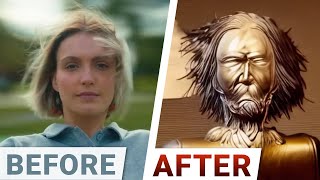
Dr. Zsolnai reviews Runway's AI video tools, including Gen1 for style transfer and background removal, and a text-to-video feature coming soon. The system can expand images, colorize footage, and generate videos from prompts, though realistic human generation still has limits.
Questions this video answers
1500 by 900 pixels.
2023-05-14.
$2.40 per hour.
On Runway's website (signup link in the video description).
Stable Diffusion.
Chapters
Dear fellow scholars, this is two minute papers with Dr. Zsolnai Dr. Papers earlier we talked about two text to video systems, Google's amazing Image and Video and also Nvidia's Video Maker AI. However, to the best of my knowledge, as of today, there are no easy ways of trying them out. Now before we start, just to make sure, tons of video AI related techniques are available right now, many of them for free. I'll show you those, but they're Text to Video system is still in testing phase as of the making of this video. I will show you some results for that too. However, good news, it is also expected to open to the public within a few weeks. So this is Runway. They had a hand in the creation of the amazing free text to image AI tool Stable Diffusion and they have an incredible creative suite for all kinds of AI based video magic. I will tell you about Text to Video in a moment. First they introduced Gen1. This is their Video to video system. Here you can take a video of yourself and then choose a style and bam. You have a completely new stylized video. I think just this one feature makes it worth trying this system as it has tons of uses but it has a ton of other really creative modes as well. We can mask out a dog and only change that part of the video which will get tracked as this good boy moves around in the scene. Lovely. It can also remove the background behind us in a video and track both the foreground and the background over time. Also, if we have an image that we would like to expand, it can also perform text to image with the appropriate constraints and it will expand it in a way that we often can't even tell that something happened here. We can also erase parts of an image and replace them with a text prompt as well. Now wait a second. These are two image related operations, but we are talking about videos here. So what is going on? Well one, these photos can be used for Gen1 as a style to a previously existing video or even better, get this. You can also create a video by adding a few photos that were taken a few seconds apart and like magic, it creates a video out of them. Yes, that means understanding what these photos depict and synthesizing every pixel of every image between these photos. Absolutely incredible. And their suite is full of features we haven't even discussed yet. Colorization with or without using a text prompt, blurring faces while tracking them, and so much more. Now this is what you've been waiting for. Onwards to Text to video. Note once again that this is still in testing phase and will hopefully be part of the main suite within a few weeks. I was lucky enough to be able to try it and it did not disappoint. Before you ask, the answer is yes of course. I generated a video of fellow scholars holding onto their papers. Wow. I was told that it is not yet that good in generating humans and if this is the not good, I can only imagine how good the launch version will look like. This is excellent. My first text to video experience ever. Loving it. What a time to be alive. And here is my other favorite fluid simulations. Well, in this case of splashing liquids which also worked really well, some of the results were not as great so a little cherry picking was necessary here. But in the end I got some really tasty results. I was also told that the system is improved every week, so by the time you're watching this video it will likely have improved a great deal already. The current system supports videos up to 1500 by 900 in resolution. Not bad. And that is easily good enough so that some folks are already creating incredibly good movies with it that are several minutes long. Just imagine that soon every creative person will have access to such an amazing system and can let their imagination run wild. All of us. This is the future of video making. So if you wish to try this sweet note once again, text to video is coming later, but you can sign up for free on Runway's website. The link is in the video description. I will note that Runway is a previous sponsor of two minute papers and had nothing to do with this video. Apart from letting me try it and answering my questions. This is their first time seeing it too. So what do you think? What will you make with this? Let me know in the comments below. And for now, let the experiments begin. If you're looking for inexpensive cloud GPUs for AI, Lambda now offers the best prices in the world for GPU Cloud compute. No commitments or negotiation required. Just sign up and launch an instance and hold on to your papers. Because with Lambda GPU Cloud you can now get on demand H100 instances for just $2.40 per hour. They are one of the first cloud providers to offer publicly available on demand H100 access. Did I mention they also offer persistent storage? So join researchers at organizations like Apple, MIT and Caltech in using Lambda Cloud instances, workstations or servers. Make sure to go to lambdalabs.compapers to sign up for one of their amazing GPU instances today. Thanks for watching and for your generous support. Thanks for watching and I'll see you next time.