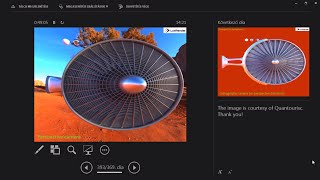
Lecture-style video segment explaining camera models used in rendering, focusing on pinhole, perspective, and orthographic cameras. It describes perspective camera parameters (width, height, aspect ratio, field of view), mapping pixel coordinates to world-space positions on the lens, how field of view affects perspective distortion, and contrasts this with orthographic cameras where rays are parallel and produce no perspective distortion.
Chapters
Lets talk about cameras. I'm just going to rush through this because obviously everyone knows about pinhole cameras. The most basic camera model one can imagine is basically a box. And you make a super, super small hole on the box and you put a film in it. Basically some amount of light will flow into this and it is going to be caught by the film and therefore you are going to see an image on this film. We are not that interested in this model, but what we are interested in is, for instance, a perspective camera. Perspective camera means that I have the lens of the camera. This is what you see the teapot on. And this is where the image is going to be formed. And I have a point somewhere and this is going to be where the rays are starting from. So I have this eye and I'm going to shoot rays towards the lens of the camera. And I'm going to be interested in the continuation of these rays. What objects do they hit and what color they are. But there's multiple things that I need to specify when creating a perspective camera. This plane can have a width, a height, some kind of field of view. And the aspect ratio is given by the ratio of the width and the height. What about the field of view? Well, if you like to play first person shooters, you have probably fiddled with settings like that. But the field of view is basically what you see here. And different camera models or different eye models have different fields of view. So for instance, it's quite different for a horse. If you would like to model how a horse sees something, then the field.
Of view would be much larger because the eyes are on the sides, so it can almost see what's behind it.
And we have a given field of view that we can model here. And this can be arbitrarily changed. If you have a good perspective camera implementation, let's quickly put together an implementation of that. What I'm interested in is that I'm going to give an XY pair. These are pixel positions. Give me the zero pixel in terms of X and the fifth pixel with respect to Y. And this is going to give me back a world space coordinate where this is exactly on the lens. So I'm subdividing this lens into pixels. I only want to care about the pixels because each pixel after each other, they are going to be computed how much light is going through these pixels. And therefore these workspace coordinates are interesting. So if I instantiate such a perspective camera, the height and the width is definitely given and the field of view with respect to the x axis is Also given and the desired pixel positions are going to be XP and yp. Well, what are these variables are supported on? So xp and yp are on 0 and w and H. So these are really the pixels. Which pixel am I interested in? The field of view can be like reasonably arbitrary, but Same choices on 0pi and the field of view with respect to the Y direction can be computed from the aspect ratio. And the other field of view, this is the end result. And before we try to understand what's going on, let's try to play with it. And this I do, because usually if you read literature, math, books, whatever, you never see the journey behind things, you get the answer. And this is usually a huge formula that doesn't seem to make any sense.
So let's get a bit more experience on how to play with these formulae.
How can we understand this?
So for instance, let's forget in X and Y, let's forget these tangent terms and let's just play with the fraction. So I substitute X and y equals 0, x p and y equals 0. So what do I have for the X coordinate?
Well, it's 2 times 0 minus the.
Width over the width. Therefore this is minus 1 and I have the same for Y. So this is 0 minus h over h, that's minus 1. So for the 00 pixels I have.
World space positions of minus 1 and minus 1.
Therefore this is going to be the bottom left. So so far this seems to make some sense. What if I substitute the other end for the pixels? Well, if I have W for XP.
Then I have two W minus W.
Over W. And therefore this is going to be one both for X and both for Y.
So this is going to be the.
Upper right and whatever I specify for.
XP and YP between these two extreme values, then this is really going to.
Give me the world space coordinates of this camera model.
We have forgotten about the tangents. Well, let's put them back. I don't know what I just did now, but it's working again. I wonder why this presenter has like 2 million 500 buttons. But okay, let's not digress.
So I multiply back these numbers with these tangents and then I can see.
That basically what it gives me more perspective distortion. So the higher the field of view with respect to axis, the more perspective distortion I'm going to get. Well, this is already a good enough description that I can put in code. In fact I have already coded it up and this is a very simple function that does exactly what we have been talking about. It's simple as that. So if you don't take the prototype.
Of the function, this is basically five lines and this is still readable.
So this could be even less so not too shabby. I mean a perspective camera in five lines of code. There are also orthographic cameras. This is a large difference between from the perspective camera because the rays of light are also parallel with each other and they are perpendicular to this camera plane. So basically they don't start from one point looking outwards. They are perfectly parallel with each other and perpendicular to this lens. And they also don't meet at the eye. And you can see that the perspective distortion is completely omitted here. So you can see here the same image, the same scene with the same settings, with an orthographic and the perspective camera. And you can see that the realism is completely different in the two. There's another example with Lux render. In the next image you won't see the environment map in the background, but disregard that because the implementation of environment maps with orthographic cameras is in a way non trivial. So lots of perspective distortion. While maybe you don't know this because this is what you're used to, but if you have an orthographic camera, then this is a perfect distortion free geometric shape. And back to the perspective camera. So this FOV gives you a significant perspective distortion.