CS231n Winter 2016: Lecture 12: Deep Learning libraries
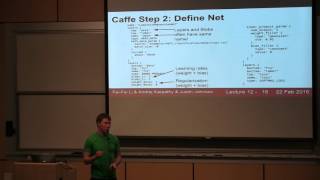
Andrej Karpathy lectures on deep learning frameworks and software tools used to build and train neural networks. The lecture covers practical libraries for implementing the neural network concepts taught earlier in CS231n.
Chapters
Today we're going to go over these 4 major software packages that people commonly use for deep learning. As usual, a couple administrative things. The milestones were actually due last week, so hopefully you turned them in, and we'll try to take a look at those this week. Also remember that assignment 3, the final assignment, is going to be due on Wednesday. So any of you guys done already? OK, that's good. And you have late days, so you should be fine. Another thing that I should point out is that if you're actually planning on using Terminal for your projects, which I think a lot of you are, then make sure you're backing up your code and data and things off of the Terminal instances every once in a while. We've had some problems where the instances will crash randomly, and in most cases the Terminal folks have been able to get the data back, but it sometimes takes a couple days. And there's been a couple of cases where actually people lost data. Because it was just on terminal and it crashed. So I think if you are planning to use terminal, then make sure that you have some alternative backup strategy for your code and your data. So like I said, today we're talking about these 4 software packages that are commonly used for deep learning— Caffe, Torch, Theano, and TensorFlow. And as a little bit of disclaimer at the beginning, I've— personally, I've mostly worked with Caffe and Torch. So those are the ones that I know the most about. I'll do my best to give you a good flavor for the others as well. But just throwing that disclaimer out there. So the first one is Caffe. We saw in the last lecture that really Caffe sprung out of this paper at Berkeley that was trying to reimplement AlexNet and use AlexNet features for other things. And since then Caffe has really grown into a really, really popular widely used package for especially convolutional neural networks. So Caffe is from Berkeley that I think a lot of you people have— know. And it's mostly written in C++. And there is actually bindings for Caffe so you can access the nets and whatnot in Python and MATLAB that are super useful. And in general, Caffe is really widely used. And it's really, really good if you just want to train sort of standard feed-forward vanilla convolutional networks. And actually, Caffe is somewhat different than the others. Other frameworks in this respect, that you can actually train big powerful models in Caffe without writing any code yourself. So for example, the ResNet image classification model that won image— that won everything last year, you can actually train a ResNet using Caffe without writing any code, which is pretty amazing. So the most— but the most important tip when you're working with Caffe is that the documentation is not— is sometimes out of date and not always perfect. So you need to not be afraid to just dive in there and read the source code yourself. It's C++. So hopefully you can read that and understand it. But in general, the C++ code that they have in Caffe is pretty well structured, pretty well organized, and pretty easy to understand. So if you have doubts about how things work in Caffe, your best bet is just to go on GitHub and read the source code. So Caffe is this huge, big project with probably thousands, tens of thousands of lines of code. And it's a little bit scary to understand how everything everything fits together. But there's really 4 major classes in Caffe that you need to know about. The first one is a blob. So blobs store all of your data and your weights and your activations in the network. So these blobs are things in the network. So your weights are stored in a blob. Your data, which would be like your pixel values, are stored in a blob. And your labels, your y's, are stored in a blob. And also all of your intermediate activations will also be stored in blobs. So blobs are these n-dimensional tensors, sort of like you've seen in NumPy, except that they actually have 4 copies of an n-dimensional tensor inside. They have a data— a data version of the tensor, which is storing the actual raw data. And they also have a parallel thing that— a parallel tensor called diffs that Caffe uses to store gradients with respect to that data. And that gives you 2. And then you actually have 4 because there's a CPU and a GPU version of each of those things. So you have data, you have diffs, you have CPU, you have GPU. So there's actually 4 n-dimensional tensors per blob. The next important class that you need to know about in Caffe is the layer. And a layer is sort of a function, sort of similar to the ones you wrote on the homeworks, that receives some input blobs. Caffe calls inputs bottoms. and then produces output blobs that Caffe calls top blobs. So the idea is that your layer will receive pointers to the bottom blobs with the data already filled in, and then it'll also receive a pointer to the top blobs, and it'll— and in forward pass, it'll be expected to fill in the values for the data elements of your top blobs. Then in the backward pass, the layers will compute gradients. So they will expect to receive a pointer to the top blobs, with the gradients and the activations filled in. And then they'll also receive a pointer to the bottom blobs and fill in the gradients for the bottoms. And layer is this pretty well-structured abstract class that you can go and— I have the links for the source and the header file here. And there's a lot of subclasses that implement different types of layers. And like I said, a common Caffe problem, there's no really good list of all the layer types. You pretty much just need to look at the code and see what types of CPP files there are. The next thing you need to know about is a net. So a net just combines a bunch of layers. A net is basically a directed acyclic graph of layers and is responsible for running the forward and the backward methods of the layers in the correct order. So this is— you probably don't need to touch this class ever yourself, but it's kind of nice to look at to get a flavor of how everything fits together. And the final class that you need to know about is a solver. So the solver is, you know, we had this thing called solver on the homework that was really inspired by Caffe. So a solver is intended to dip into the net, run the net forward and backward on data, actually update the parameters of the network, and handle checkpointing and resuming from checkpoints and all that sort of stuff. And in Caffe, solver is this abstract class, and different update rules are implemented by different subclasses. So there is, for example, a stochastic gradient descent solver. There's an Adam solver. There's an RMSProp solver, all of that sort of stuff. And again, just to see what kinds of options are available, you should look at the source code. So this kind of gives you a nice little overview of how these things all fit together, that this whole thing on the right would be a net. The net contains, in the green boxes, blobs. Each blob contains data and diffs. The red boxes are layers that are connecting blobs together. And then the whole thing would get optimized with a solver. [Speaker:ANDREJ KARPATHY] So Caffe makes heavy use of this funny thing called protocol buffers. Any of you guys ever interned at Google? Yeah, a fair number. So you guys know about this. But protocol buffers are this almost like a binary strongly typed JSON, I sort of like to think about it, that are used very widely inside Google for serializing data to disk and for passing it over the network. So protocol buffers— there's this.proto file that defines the different kinds of fields that different types of objects have. So in this example, there's a person that has a name and an ID and an email. And this lives in a.proto file..proto files define a type of a class. And you can actually serialize instances to human-readable.proto.txt files. So for example, this fills in the name. It gives you the ID. It gives you the email. And this is an instance of a person that can be saved into this text file. Then Protobuf includes this compiler that actually lets you generate classes in various programming languages to access these data types. So you can— after running the Protobuf compiler on this proto file, it produces classes that you can then import in Java and C++ and Python and Go and just about everything. So actually, Caffe makes wide use of these protocol buffers. And they use them to store pretty much everything in Caffe. So, um, Caffe— like I said, to understand, you need to read the code to understand Caffe. And Caffe has this one giant file called caffe.proto that just defines all of the protocol buffer types that are used in Caffe. So this is a gigantic file. It's— I think it's a couple thousand lines long. But it's actually pretty well documented and is, I think, the most up-to-date documentation of what all the layer types are, what the options for those layers are, how you specify every— all the options for solvers and layers and nets and all that. So I'd really encourage you to check out this file and read through it if you have any questions about how things work in Caffe. And just to give you a flavor, on the left here, this shows you— this defines the net parameter, which is the type of protocol buffer that Caffe uses to represent nets. And on the right is the solver parameter, which Caffe uses to represent solvers. So the net parameter, um, or so the solver parameter, for example, takes a reference to a net, and it also includes things like learning rate and how often to checkpoint and other things like that. Um, right. So when you're working in Caffe, actually, it's pretty cool. You don't need to write any code in order to train models. Um, so when working with Caffe, you generally have this 4-step process. So first, you'll convert your data. And especially if you just have an image classification problem, you don't have to write any code for this. You just use one of the existing binaries that Caffe ships with. Then you'll define your, your net file that you'll do by just writing or editing one of these proto.txts. Then you'll define your solver, which again will just live— be a proto.txt text file that you can just work with in a text editor. And then you'll pass all of these things to this existing binary to train the model. And that'll spit out your trained Caffe model to disk that you can then use for other things. So even if you wanted to train ResNet on ImageNet, you could just follow this simple procedure and train a giant network without writing any code. So that's really cool. And so step 1, generally, you'll need to convert your data. So Caffe uses— I know we've talked a little bit about HDF5 as a format for storing pixels on disk contiguously and then reading from them efficiently. But by default, Caffe uses this other file format called LMDB. So there's a— if all you have is a bunch of images, each image with a label, then you can call— then Caffe just has a script to convert that whole dataset into a giant LMDB that you can use for training. So just to give you an idea, the way— this is really easy. You just create a text file that has the path to your images and separated by the label, and you just pass it to your Caffe script. Wait a couple hours if your dataset's big, and you end up with a giant LMDB file on disk. And if you're working with, with something else like HDF5, then you'll have to create it yourself probably. So Caffe does actually have a couple other options for reading data in. There's this data layer, the window data layer for detection. It actually can read from HDF5. And there's an option for reading stuff directly from memory that's especially useful with the Python interface. But at least in my point of view, all of these types of other methods of reading in data to Caffe are a little bit second-class citizens in the Caffe ecosystem. And LMDB is really the easiest thing to work with. So if you can, you should probably try to convert your data into LMDB format with Caffe. So step 2 for Caffe is to define your net object. So like I said, you'll just write a big proto.txt to define your net. So here, this is a— this just defines a simple model for logistic regression. You can see that I did not follow my own advice, and I'm reading data out of an HDF5 file here. Then I have a fully connected layer, which is called inner product in Caffe. Then, right, so that's fully connected layer tells you the number of classes and how to initialize the values. And then I have a softmax loss function that reads the labels and produces loss and gradient from the outputs of the fully connected layer. So a couple of things to point out about this file are that one, every layer typically includes some blobs which— to store the data and the gradients and the weights. And the layers, blobs, and the layer itself typically have the same name. So that can be a little bit confusing. Another thing is that a lot of these layers will have two blobs, one for weight and one for bias. And actually in this net— in— right in here you'll define the learning rates for those two blobs. So that's learning rate and regularization for both the weight and the bias of that layer. Another thing to note is that to specify the number of output classes is just the num_output on this fully connected layer parameter. And finally, the, the quick and dirty way to freeze layers in Caffe is just to set the learning rate to 0 for that, for the blobs associated to that layer's weights or biases. Another thing to point out is that for ResNet and other large models like GoogLeNet, this can get really out of hand really quickly. So Caffe doesn't really let you define like compositionality. So for ResNet, they just repeat the same pattern over and over and over in the proto.txt file. So the ResNet proto.txt is almost 7,000 lines long. So you could write that by hand, but in practice, people tend to write little Python scripts to generate these things automatically. So that's, that's a little bit gross. If you want to fine-tune a network rather than starting from scratch, then you'll typically download some existing prototxt and some existing weights file and work from there. So the way you should think about it is that the prototxt file that we've seen here before defines the architecture of the network. And then the pre-trained weights live in this.cafe model file. That's a binary thing and you can't really inspect it. But the way that it works is it's basically key-value pairs, um, where it matches na— where the— in the ca— inside the Caffe model, it matches these names, um, that are scoped to layers. So this, uh, fc7.weight would be the, would be the, the weight corresponding to this final fully connected layer in AlexNet. So then, uh, when you want to fine-tune on your own data, um, when you start up Caffe and you load a Caffe model and a proto.txt, it just tries to match the key-value pairs of names and weights between the Caffe model and the proto.txt. So if the names are the same, then your new network gets initialized from the values in the proto.txt, which is really, really useful and convenient for fine-tuning. But if the layer— if the names don't match, then it— those layers actually get initialized from scratch. So this is how, for example, you can reinitialize the output layer in Caffe. So to be a little bit more concrete, if you've maybe downloaded an ImageNet model, then this layer is going to— this final fully connected layer that's outputting class scores will have 1,000 outputs. But now maybe for some problem you care about, you only want to have 10 outputs. So you're going to need to reinitialize that final layer and reinitialize it randomly and fine-tune the network. So the way that you do that is you need to change the name of the layer in the proto.txt file to make sure that it's actually initialized randomly and not reading from the, from the, from the Caffe model. And if you forget to do this, then it'll actually crash. And it'll give you a weird error message about the shapes not aligning. 'Cause it'll be trying to store this 1,000-dimensional weight matrix into this 10-dimensional thing from your new file, and it won't work. So the next step when working with Caffe is to define the solver. The solver is also just a proto.txt file. You can see all the options for it in that giant.proto file that I gave a link to. But it'll look something like this for AlexNet maybe. So that will define your learning rate and your learning rate decay and your regularization, how often to checkpoint, everything like that. But these end up being less, much less complex than these proto.txts for the networks. This AlexNet guy is just maybe 14 lines. Although what you will see sometimes in practice is that if people want to have sort of complex training pipelines, where they first want to train with one learning rate in certain parts of the network, and then they want to train with another learning rate in certain parts of the network, that you might end up with a cascade of different solver files and actually run them all independently, where you're sort of fine-tuning your own model in separate stages using different solvers. So once you've done all that, then you just train your model. So if you followed my advice and just used LMDB and written all these things, then you just call this binary that is— that exists in Caffe already. So here you just pass it your solver and your proto.txt and your pretrained weights file if you're fine-tuning, and it'll run maybe for a day, maybe for a long time, and just checkpoint and save things to disk, and you'll be happy. One thing to point out here is that you specify which GPU it runs on. This is zero-indexed, but you can actually run in CPU-only mode by setting this flag to -1. And actually, sometime in the last year, Caffe added data parallelism to let you split up mini batches across multiple GPUs in your system. So you can actually add multiple GPUs on this flag. And if you just say all, then Caffe will automatically split up mini batches across all the GPUs on your machine. So that's really cool. You've done multi-GPU training without writing a single line of code. Pretty cool. Cafe— oh, yeah, question? Um, what if I want to initialize, uh, two or several networks with the same set of, uh, initializations? So I'm initially training all of them with the same weights and stuff. Yeah, I think, I think that'll be kind of— so the question is how would you go about doing some more complex initialization strategy where you maybe want to initialize the weights, um, from a pre-trained model and use those same weights in multiple parts of your network. And the answer is that you probably can't do that with a simple mechanism. You can kind of munge around the weights in Python, and that's probably how you'd go about doing it. Right. So I think we've mentioned this before, that Caffe has this really great Model Zoo where you can download lots of different types of pre-trained models on ImageNet and other datasets. So this, this Model Zoo is really top-notch. You've got AlexNet and VGG. You've got ResNets up there already. Pretty much lots and lots of really good models are up there. So that's, that's a really, really strong point about Caffe, that it's really easy to download someone else's model and run it on your data or fine-tune it on your data. Caffe has a Python interface, like I mentioned. I, I, since there's so many things to cover, I don't think I can dive into detail here. But as is kind of par for the course in Caffe, there's not really, really great documentation about the Python interface. So you need to read the code. And the whole— the Python interface for Caffe is mostly defined in these 2 files. This CPP file uses Boost Python, if you've ever used that before, to wrap up some of the C++ classes and expose them to Python. And then in this.py file, it actually attaches additional methods and gives you a more Pythonic interface. So if you want to know what kinds of methods and data types are available in the Caffe Python interface, your best bet is to just read through these two files. And they're not too long, so it's pretty easy to do. Yeah, so the Python interface in general is pretty useful. It lets you do maybe crazy weight initialization strategies if you need to do something more complex than just copy from a pretrained model. It also makes it really easy to just get a network and then run it forward and backward on— with NumPy— from NumPy arrays. So for example, you can implement things like DeepDream and class visualizations similar to that you did on the homework, you can also do that quite easily using the Python interface on Caffe where you just need to take data and then run it forward and backward through different parts of the network. The Python interface is also quite nice if you just want to extract features. Like you have some dataset, you have some pretrained model, and you want to extract features from some part of the network and then maybe save them to disk, maybe to an HDF5 file for some downstream processing. So that's quite easy to do with the Python interface. You can also— actually, Caffe has a kind of a new feature where you can actually define layers entirely in Python. But this is— I've never done it myself, but it seems cool. It seems nice. But the downside is that then those layers will be CPU only. So we talked about communication bottlenecks between the CPU and the GPU, that if you write layers in Python, then every forward and backward pass, you'll be incurring overhead on that transfer. Although one nice place where Python layers could be useful is custom loss functions. So that's maybe something that you could keep in mind. So the quick overview of Caffe pros and cons is that really from my point of view, if all you want to do is kind of train a simple basic feedforward network, especially for classification, then Caffe is really, really easy to get things up and running. You don't have to write any code yourself. You just use all these prebuilt tools, and it's quite easy to run. It has a Python interface, which is quite nice for using a little bit more, for a little bit more complex use cases. But it can be cumbersome when things get really crazy. When you have these really big networks like ResNet or GoogLeNet, especially with repeated module patterns, it can be tedious. And for things like RNN, like recurrent networks where you want to share weights between different parts of the network, can be kind of cumbersome in Caffe. It is possible, but it's probably not the best thing to use for that. And the other big downside from my point of view is that when you want to define your own type of layer in Caffe, you end up having to write C++ and CUDA code. So that doesn't give you a very quick development cycle. So it's kind of painful to write new layers in Caffe. So that's our whirlwind tour of Caffe. So if there's any quick questions— Yeah? [Speaker:AUDIENCE] How would you do something like cross-validation? [Speaker:ANDREJ KARPATHY] Cross-validation in Caffe? So in the train_val.proto.txt, you can actually define a training phase and a testing phase. So generally you'll write a train_val.proto.txt and a deploy.proto.txt. And the deploy will be used on the test set. And the test phase of the train_val.proto.txt will be used for validation. OK. That's all there is to know about Caffe. So the next one is Torch. So Torch is really my personal favorite. So I have a little bit of bias here, just to get that out in the open, that I've pretty much been using Torch almost exclusively for my own projects in the last year or so. So Torch is originally from NYU. It's written in C and in Lua. And it's used a lot at Facebook and DeepMind especially. I think also a lot of folks at Twitter use Torch. So one of the big things that freaks people out about Torch is that you have to write in Lua, which I had never heard of or used before starting to work with Torch. But it actually isn't too bad. Lua is this high-level scripting language that is really intended for embedded devices, so it can run very efficiently. A lot— very similar to JavaScript in a lot of ways. So another cool thing about Lua is that because it's meant to be run on embedded devices, that you can actually do for loops really fast in Torch. You know how in Python if you write a for loop it's going to be really slow? That's actually totally fine to do in Torch because it actually uses just-in-time compilation to make these things really fast. And Torch is— or Lua is most similar to JavaScript in that it is a functional language. Functions are first-class citizens, and it's very common to pass callbacks around to different parts of your code. Lua also has this idea of prototypical inheritance where there's sort of one data structure, which in Lua is a table, which you can think of as being very similar to an object in JavaScript. And you can implement things like object-oriented programming using prototypical inheritance in a similar way as you would in JavaScript. And one of the downsides is actually the standard library in Lua is kind of annoying sometimes. And things like handling strings and whatnot can be kind of cumbersome. And maybe most annoying is that it's one indexed. So all of your intuition about for loops will be a little bit off for a while. But other than that, it's pretty easy to pick up. And I gave a link here to this website claiming that you can learn Lua in 15 minutes. It might be a little bit of an oversell— they might be overselling it a little bit, but I think it is pretty easy to pick up Lua and start writing code in it pretty fast. So the main idea behind Torch is this tensor class. So you guys have been working in NumPy a lot on your assignments. And the way the assignments are kind of structured is that the NumPy array gives you this really easy way to manipulate data in whatever way you want. And then you can use that NumPy array to build up other abstractions like neural net libraries and whatnot. But really the NumPy array just lets you manipulate data numerically in whatever way you want in complete flexibility. So if you recall, then maybe here's a look— here's an example of some NumPy code that should be very familiar by now where we're just computing a simple forward pass of a 2-layer ReLU network. So— oh, maybe black wasn't the best choice here. But we're computing some constants. We're computing some weights. We're getting some random data. And we're doing a matrix multiply, array loop, and another matrix multiply. So that's, that's very easy to write in NumPy. And actually, this has almost a one-to-one translation into Torch tensors. So now on the right, this is the exact same code but using Torch tensors in Lua. So here we're defining our batch size, input size, and all that. We're defining our weights, which are just Torch tensors. We're getting a random input vector. We're doing a forward pass. This is doing a matrix multiply of torch tensors. This cmax is element-wise maximum. So that's a ReLU. And then we can compute scores using another matrix multiply. So in general, pretty much any kind of code you're used to writing in NumPy is pretty easy, pretty much has almost a one-by-one, line-by-line translation into using torch tensors instead. So you'll also remember in NumPy that it's really easy to swap and use different data types. we talked about this ad nauseam in the last lecture. But at least in NumPy, to switch to maybe a 32-bit floating point, all you need to do is cast your data to this other data type. And it turns out that that's very, very easy to do in Torch as well. That our data type is now this string, and then we can easily cast our data to another data type. But here's where— so this next slide is the real reason why Torch is infinitely better than NumPy. And that's that the GPU is just another data type. So when you want to write— when you want to run code on the GPU in Torch, you use this— you import another package. And you have another data type, which is torch.cuda.Tensor. And now you cast your tensors to this other data type. And now they live on the GPU. And running any kind of numerical operations on CUDA tensors just runs on the GPU. So it's really, really easy in Torch to just write generic tensor scientific computing code to run on a GPU and be really fast. So this, like I said, these tensors are really— you should think of them as similar to NumPy arrays. And there's a lot of documentation on the different kinds of methods that you can work with in tensors up here on GitHub. This documentation isn't super complete, but it's not bad. So you should take a look at it. So the next— but in practice, you end up not really using the tensors too much in Torch. Instead, you use this other package called nn for neural networks. So nn is this pretty thin wrapper that actually defines a neural network package just in terms of these tensor— in terms of these tensor objects. So you should think of this as being like a beefier, more industrial-strength version of the homework code base. Where you have this, this, this NDArray, this tensor abstraction, and then you implement a neural net library on top of it in a nice clean interface. So here's the same 2-layer ReLU network using the nn package. So we define our network as a sequential. So it's going to be a stack of sequential operations. It's going to— we're going to first have a linear, which is a fully connected layer from our input dimension to our hidden dimension. We're going to have a ReLU and another linear. Now, we can actually get the, the weights and gradients in one tensor for each using this get_parameters method. So now weights will be a single torch tensor that will have all the weights of the network, and grad_weights will be a single torch tensor for all of the gradients. We can generate some random data. Now, to do a forward pass, we just call net, the forward method on the net object using our data. And this gives us our scores. To compute our loss, we have a separate criterion object that is our loss function. So we compute our loss by calling the forward method of the criterion. Now we've done our forward pass, very easy. And for our backward pass, we first set our gradients to 0, call a backward on the loss function, and then a backward on the network. Now this has updated all of the gradients for the network in the grad_params. So we can just make a gradient step very easily. So this would be multiplying the grad weights by the opposite of learning rate and then adding it to the weights. So that's a simple gradient descent update. Right, so that's all of the— right, so that would have been maybe a little bit more clear. But we have a net. We have weights, grad weights. We have our loss function. We get random data, run forward, run backward, make an update. And as you might expect from looking at the tensor, it's quite easy to make this thing run on GPU. So to run one of these networks on the GPU, we import a couple of new packages, cuTorch and cuNN, which are CUDA versions of everything. And then we just need to cast our network and our loss function to this other data type. And we also need to cast our data and labels. And now this whole network will run and train on the GPU. So it's pretty easy. Now in, what is that, like 40 lines of code, we've written a fully connected network and we can train it on the GPU. But one problem here is that we're just using vanilla gradient descent, which is not so great. And as you saw in the assignments, other things like Adam and RMSProp tend to work much better in practice. So to solve that, Torch gives us the Optim package. So Optim is quite easy to use. Again, we just import a new package up here. And now what changes is that we actually need to define this callback function. So before, we were just calling forward and backward explicitly ourself. Instead, we're going to define this callback function that will run the network forward and backward on data and then return the loss and the gradient. And now to make an update step on our network, we'll actually pass this callback function to this, uh, atom method from the Optim package. So this, this is maybe a little bit awkward, um, but we— you know, we can use, uh, any kind of, update rule using just a couple lines of change from what we had before. And again, this is very easy to add to run on the GPU by just casting everything to CUDA. Right. So as we saw in Caffe, Caffe sort of implements everything in terms of nets and layers. And Caffe has this really hard distinction between a net and a layer. In Torch, they don't— we don't really draw this distinction. Everything is just a module. So the entire network is a module, and also each individual layer is a module. So modules are just classes that are defined in Lua that are implemented using the, the tensor API. So these modules are— since they're written in Lua, they're quite easy to understand. So Linear is the fully connected net— is the fully connected layer in Lua. And this is the constructor. You can see it's just setting up tensors for the weight and the bias. And because this tensor API in Torch lets us easily run the same code on GPU and CPU, then all of these layers will just be written in terms of the tensor API and then easily run on both devices. So these modules need to implement a forward and backward. So for forward, they decided to call it update_output. So here's the example of the update_output for the fully connected layer. There's actually a couple cases— they need to deal with a couple different cases here to deal with mini-batch versus non-mini-batch inputs. But other than that, this should be quite easy to read. For, for the backward pass, there's a pair of methods, update_grad_input, which receives the upstream gradients and computes the gradients with respect to the input. And again, this is just implemented in the tensor API. So it's very easy to understand. It's just a— it's just the same type of thing you saw in the homework. And we also implement an accumulate_grad_parameters, which computes the gradients with respect to the weights of the network. Um, as you saw in the constructor, the weights and the biases are held in instance variables of this module, and accumulate_grad_parameters will receive gradients from upstream and accumulate gradients of the parameters with respect to the upstream gradients. Um, and again, this is very simple, uh, just using the tensor API. Um, so Torch actually has a ton of different modules available. The documentation here can be a little bit out of date, but if you just go on GitHub, you can see all the.lua files that give you all the goodies to play with. And these actually get updated a lot. So just to point out a couple, these, these 3 were just added in the last week. So Torch is always adding new modules that you can add to your networks, which is pretty fun. But when these existing modules aren't good enough, it's actually very easy to write your own. So because you can just implement these things using these tensor— using the tensor API and just implement the forward and backward, it's not much harder than implementing layers on the homeworks. So here's just a small example. This is a stupid module that just takes its input and multiplies it by 2. And you can see we implement the update_output and the update_grad_input. And now we've implemented a new layer in Torch in just 20 lines of code. And then that's really easy— and then it's very easy to use in other code. Just import it, and now you can add it to networks and so on. And the really cool thing about this is because this is just the tensor API, you can do whatever kind of arbitrary thing you want inside of these forward and backward. If you need to do for loops or complicated imperative code or any— or maybe stochastic things for dropout or batch normalization, then any kind of— whatever kind of code you want on the forward and backward pass, you just implement it yourself inside these modules. So it's usually very easy to implement your own new types of layers in Torch. So Torch— but of course, using individual layers on their own isn't so useful. We need to be able to stitch them together into larger networks. So for this, Torch uses containers. We already saw one in the previous example, which was this sequential container. So a sequential container is just a stack of modules that all— where one receives the output from the previous one and just goes in a linear stack. So that's probably the most commonly used. Another one you might see is this paral— is this concat table. So maybe if you have an input and you want to apply different— two different modules to the same input, then the concat table lets you do that, and you receive the output as a list. Another one you might see is a parallel table. If you have a list of inputs and you want to apply different modules to each element of the list, then you can use a parallel table for that sort of a construction. But when things get really complicated— so actually those containers that I just told you should in theory be easy to— be possible to implement just about any topology you want. But it can be really hairy in practice to wire up really complicated things using those containers. So Torch provides another package called nn_graph that lets you hook up things in more complicated topologies pretty easily. So here's an example. If we have— maybe if we have 3 inputs and we want to produce 1 output, and we want to produce them with this pretty simple update rule, that corresponds to this type of computational graph that we've seen many times in lecture for different types of problems. So you could actually implement this just fine using parallel and sequential and concat table, but it could be kind of a mess. So when you want to do things like this, it's very common to use nn.graph instead. So this nn.graph code is, is quite easy. So here this function is going to build a module using nn.graph and then return it. So here we import the nn.graph package. Um, and then inside here, this is a bit of funny syntax. So this is actually not a tensor. This is defining a symbolic variable. So this is saying that our, our tensor object is going to receive x, y, and z as inputs. And now here we're actually doing symbolic operations on those inputs. So here we're saying that a, we want to have a pointwise addition of x and y, store that in a. We want to have pointwise multiplication of a and z and store that in b. And now pointwise addition of a and b and store that in c. And again, these are not actual tensor objects. These are now sort of symbolic references that are being used to build up this computational graph. In the backend. And now we can actually return a module here where we say that our module will have inputs x, y, and z and outputs c. And this nn.g module will actually give us an object conforming to the module API that implements this computation. So then after we build the module, we can construct concrete Torch tensors and then feed them into the module that will actually compute the function. So Torch actually is quite good at pretrained models. There is a package called load_caffe that lets you load up many different types of pretrained models from Caffe, and it'll convert them into their Torch equivalents. So you can load up the Caffe proto.txt and the Caffe model file, and it'll turn into a giant stack of sequential layers. load_caffe is not super general though and only works for certain types of networks. But in particular, loadcafe will let you load up AlexNet and CaffeNet and VGG. So they're probably the— some of the most commonly used. There are also a couple different implementations that let you load up GoogLeNet into, into Torch to let you load up pretrained GoogLeNet models into Torch. And actually very recently, Facebook went ahead and reimplemented the residual networks straight up in Torch. And they released pretrained models for that. So between AlexNet, CaffeNet, VGG, GoogLeNet, and ResNet, I think that's probably everything you need, all the pretrained models that most people want to use. Another point is that because Torch is using Lua, we can't use pip to install packages. And there's a very similar idea called LuaRocks that lets you easily install new packages and update packages. And that's quite— very easy to use. And this is kind of just a list of some packages that I find very useful in Torch. So there are cuDNN bindings. You can read and write to HDF5 files. You can read and write JSON. There's this funny one from Twitter called AutoGrad that is a little bit like Theano, which we'll talk about in a bit. But I haven't used it, but it's kind of cool to look at. And actually Facebook has a pretty useful library for Torch as well that implements FFT convolutions and also implements data parallel and model parallelism. So that's pretty— a pretty nice thing to have. So a very typical workflow in Torch is that you'll have some preprocessing script, often in Python, that'll preprocess your data and dump it onto some nice format in disk, usually HDF5 for big things and JSON for little things. Then you will— I'll typically write a train.lua that'll read from the HDF5 and train the model and optimize the model and save checkpoints to disk. And then usually I'll have some evaluate script that loads up the trained model and then does it for something useful. So a case study for this type of workflow is this project I put up on GitHub, uh, like a week ago, um, that implements, uh, character-level language models in Torch. So here there's a preprocessing script that converts text files into HDF5 files. There's a training script that, um, loads from HDF5 and trains these recurrent networks. And then there's a sampling script that loads up the checkpoints and lets you generate text. So that's, that's kind of like, uh, my typical workflow in Torch. So the quick pros and cons I would say about Torch are that it's Lua. This is a big turnoff for people, but I don't think it's actually that big a deal. It's definitely less plug and play than Caffe. So you'll end up writing a lot of your own code typically, which maybe is a little bit more overhead, but also gives you a lot more flexibility. It has a lot of modular pieces that are easy to plug and play. And the standard library, because it's all written in Lua, is quite easy to read and quite easy to understand. There's a lot of pre-trained models, which is quite nice. But unfortunately, it's, it's a little bit awkward to use for recurrent networks in general. So when you want to have one— when you want to have multiple modules that share weights with each other, you can actually do this in Torch, but it's, it's kind of brittle, and you can run into subtle bugs there. So that's, that's probably the biggest caveat is that recurrent networks can be tricky. Any, any quick questions about Torch? Yeah. When you mentioned that it's easy to— it's efficient to run for loops, so are you saying, for example, in our convolutional layer, we used to have 4 layers in the naive version. And in the fast one, you just— I'm too tall. So do you still gain any benefit to— Yeah. Yeah. You definitely still gain benefit from writing more efficient code. But it's not— oh, so the question was about how bad are for loops in Lua. And Python is interpreted, right? So that's really why for loops are really bad in Python, because it's interpreted and every for loop is actually doing quite a lot of memory allocation and other things behind the scenes. But if you've ever used JavaScript, then loops in JavaScript tend to be pretty fast because the runtime actually JITs— compiles the code on the fly down to native code. So loops in JavaScript are really fast. And Lua actually has a similar mechanism where it'll sort of automatically and magically compile the code for you into native code. So your loops can be really fast. But definitely writing custom vectorized code still can give you a lot of speedup. All right, so we've got now maybe half an hour left to cover two more frameworks. So we're running out of time. [LAUGHTER] So next up is Theano. So Theano is from Yoshua Bengio's group at University of Montreal. And it's really all about computational graphs. So we saw a little bit in nn.graph from Torch that computational graphs are this pretty nice way to stitch together big complicated architectures. and Theano really takes this idea of computational graphs and runs with it to the extreme. Um, and it also has some high-level libraries, Keras and Lasagna, that we'll touch on as well. So here's the same computational graph we saw in the context of nn.graph before. And we can actually walk through an implementation of this in Theano. So you can see that in here we're importing Theano and the Theano tensor object. Um, and now here we're defining x, y, and z as symbolic tensors. As symbolic variables. This is actually very similar to the NN graph example we saw just a few slides ago. So that these are actually not NumPy arrays. These are sort of symbolic objects in the computation graph. Then we can actually compute these outputs symbolically. So x, y, and z are these symbolic things. And we can compute a, b, and c just using these overloaded operators. And that'll be building up this computational graph in the backend. Then once we've built up our computational graph, we actually will want to eval— be able to run certain parts of it on real data. So we call this theano.function thing. So this is saying that we want to take— our function will take inputs x, y, and z, and it'll produce outputs c. And this will return an actual Python function that we can evaluate on real data. And I'd like to point out that this is really where all the magic in Theano is happening. That when you call to function, it can be doing crazy, crazy things. It can simplify your computational graph to make it more efficient. It can actually symbolically derive gradients and other things. And it can actually generate native code. So when you call function, it actually sometimes compiles code on the fly to run officially on the GPU. So all the magic in Theano is really coming from this little innocent looking statement in Python. But there's a lot going on under the hood here. And now once we've gotten this magic function through all this crazy stuff, then we can just run it on actual NumPy arrays. So here we're instantiating xx, yy, and zz as actual NumPy arrays. And then we can just evaluate our function and pass in these actual NumPy arrays to get the values out. And this is doing the same thing as doing these computations explicitly in Python. Except that the, that the Theano version could be much more efficient due to all the magic under the hood. And the Theano version actually could be running on the GPU if you have that configured. Um, but unfortunately we don't really care about computing things like this. We want to do neural nets. So here's an example of a simple 2-layer, uh, ReLU net in Theano. So the idea is the same that we're gonna declare our inputs. Um, but now instead of just x, y, and z, we have our inputs in x, our labels in y, which are a vector, and our two weight matrices, w1 and w2. So we're just sort of setting up these symbolic variables that will be elements in our computational graph. Now for our forward pass, we— it looks kind of like NumPy, but it's not. These are operations on these symbolic objects that are building up the graph in the backend. So here we're computing activations with this dot method that is matrix multiply between these symbolic objects. We're doing a ReLU using this, this library function, and we're doing another matrix multiply. And then we can actually compute the loss, the probabilities and the loss using a couple other library functions. And again, these are all operations on these symbolic objects that are building up the computational graph. So then we can just compile this function. So our function is going to take our data, our labels, and our two weight vector— and our two weight matrices as inputs. and as outputs, that'll return the loss in a scalar and our classification scores in a vector. And now we can run this thing on real data just like we saw on the previous slide, where we can instantiate some actual NumPy arrays and then pass them into the function. Um, so this is great, but this is only the forward pass. We actually need to be able to train this network and compute gradients. So here, um, we just need to add a couple lines of code to do that. So this is the same as before. We're defining our symbolic variables for our inputs and our weights and so forth. And we're combining— we're running the same forward pass as before to compute the loss, um, to compute the loss symbolically. Now the difference is that we actually can do symbolic differentiation here. So this dw1 and dw2, we're telling Theano that we want those to be the gradient of the, the gradient of the loss. With respect to those other symbolic variables, w1 and w2. So this is really cool. Theano just lets you take arbitrary gradients of any part of the graph with respect to any other part of the graph, and now introduce, introduce those as new symbolic variables in the graph. So that, you can really go crazy with that. But here in this case, we're just going to return those gradients as outputs. So now we're going to compile a new function that again is going to take our inputs, our input pixels X and our labels Y along with the two weight matrices. And now it's going to return our loss, the classification scores, and then also these two gradients. So now we can actually use this setup to train a very simple neural network. So we can actually just use gradient descent— implement gradient descent in just a couple lines using this computational graph. So here we're instantiating actual NumPy arrays for the dataset and the vectors. And some random weight matrices as, again, actual NumPy arrays. And now every time we make this call to f, then we get back NumPy arrays containing the loss and the scores and the gradients. So now that we have the gradients, we can just make a simple gradient update on our weights and then run this in a loop to train our network. But there's actually a big, a big problem with this, especially if you're running on a GPU. Can anyone, can anyone spot it? Totally lost. So the problem is that this is actually incurring a lot of over— communication overhead between the CPU and the GPU. Because every time we, we call this f function and we get back these gradients, that's copying the gradients from the GPU back to the CPU. And that can be an expensive operation. Um, and now we're actually making our gradient step. This is CPU computation in NumPy. So it would be really nice if we can make those gradient updates to our parameters actually directly on the GPU. And the way that we do that in Theano is this with, with this cool thing called a shared variable. So a shared variable is another, a part of the network that actually is a value that lives inside the computational graph and actually persists from call to call. So here this is, this is actually quite similar to before. That now we're defining our same symbolic variables x and y for the data and the labels. And now we're defining a couple of these new funky things, funky shared variables for our two weight matrices. And we're initializing these weight matrices with NumPy arrays. And now this is the same as— this is the exact same code as before. We're computing the forward pass using these library functions all symbolically. Then we're computing the gradients. But now the difference is in how we define our function. So now this compiled function only receives— does not receive the weights as inputs because those actually live inside the computational graph. Instead, we just receive the data and the, the data and the labels. And now we are going to output the loss rather than outputting the gradients explicitly. And instead, we actually provide these update rules that should be run every time the function is called. So these update rules, notice, are little functions that operate on these symbolic variables. So this is just saying that we should make these gradient descent steps to update w1 and w2 every time we run this computational graph. So, right, so we include this update. And now to train this network, all we need to do is call this function repeatedly. And every time we call the function, those— we will make a gradient step on the weights. So we can just train this network by just calling this thing repeatedly. And in practice, when you're doing this kind of thing in Theano, you'll often define a training function that you'll call that'll update the weights, and then also an evaluate function that'll just output the scores and not make any updates. So you can actually have multiple of these compiled functions that evaluate different parts of the same graph. Yeah? [Speaker:AUDIENCE] So I'm curious if you know how it computes the gradient. Is it like a numerical approximation, or does it parse out the AST of the command and differentiate it? Yeah, so the question is how we compute gradients. And it actually does it symbolically, sort of parsing out the AST. Well, it's not actually parsing out the AST, because every time you make these calls, it's sort of building up this computational graph object. And then you can compute gradients by just adding nodes onto the computational graph object. [Speaker:AUDIENCE] But it would have to know the operators and what their derivatives are. [Speaker:ANDREJ KARPATHY] Yeah, yeah. So it needs to know for every of these basic operators, it knows what the derivative is. and it's still the normal type of backpropagation that you'll see in other frameworks. But some of the— but the pitch with Theano is that it works on these very, very low-level basic operations, like these element-wise things and matrix multiplies. And then it is hoping that it can compile efficient code that combine those and simplify it symbolically. And that— I'm not sure how well it works, but that's at least what they claim to do. So there's a lot of other advanced things that you can do in Theano that we just don't have time to talk about. So you can actually include conditionals directly inside your computational graph using these if-else and switch commands. You can actually include loops inside your computational graph using this, this funny scan function that I don't really understand. But theoretically, it lets you implement recurrent networks quite easily. Because you can imagine for— to implement a recurrent network in one of these computational graphs, all you're doing is passing the same weight matrix into multiple nodes. And scan actually lets you sort of do that in a loop and have the loop be part of— an explicit part of the graph. And we can actually go crazy with derivatives. We can compute derivatives with any part of the graph with respect to any other part. We can also compute Jacobians by computing derivatives of derivatives. We can use L and R operators to efficiently do matrix-vector multiplies of vectors and Jacobians. So you can do a lot of pretty cool derivative type stuff in Theano that's may be tough in other frameworks. And it also has some support for sparse matrices. It tries to optimize your code on the fly and do some other cool things. Theano does have multi-GPU support. There's this package that I have not used, but that claims that you can get data parallelism. So distribute a mini-batch, split it up over multiple GPUs. And there's experimental support for model parallelism, where this computational graph will be divided among the different devices. But the documentation says it's experimental, so it's probably really experimental. So a lot of— so you saw when working with Theano that the API is a little bit low level, and we need to sort of implement the update rules and everything ourself. So Lasagna is this high-level wrapper around Theano that sort of abstracts away some of those details for you. So again, we're sort of defining symbolic matrices, and Lasagna now has these layer functions that will automatically set up the shared variables and that sort of thing. We can compute the probability and the loss using these convenient things from the Lasagne library. And Lasagne can actually write these update rules for us to implement Adam and Nesterov momentum and other fancy things. And now when we compile our function, we actually just pass in these update rules that were already written for us by, by Lasagne. And all of the weight objects were taken care of us— taken care of for us by Lasagna as well. And then at the end of the day, we just end up with one of these compiled Theano functions, and we use it the same way as before. There's another wrapper for Theano that's pretty popular called Keras, which is a little bit— even more high level. So here we're making a sequential container, and we're adding a stack of layers to it. So this is kind of like Torch. And now we're having this— making this SGD object that is going to actually do the updates for us. And now we can train our network by just using the model.fit method. So this is super high level, and you can't even tell that you're using Theano. And in fact, Keras will actually use TensorFlow as a backend as well. So you don't have to use Theano with it. But there's actually one big problem with this piece of code. And I don't know if you've— if you're experienced with Theano, but this code actually crashes. And it crashes in a really bad way. This is the error message. So we get this giant stack trace, none of which is through any of the code that we wrote. And we get this giant ValueError that doesn't make any sense to me. So I'm not really an expert in Theano. So this was really confusing to me. So we wrote this kind of simple looking code in Keras. But because it's using Theano as a backend, it crapped out and gave us this really confusing error message. So that's, I think, one of the common pain points and failure cases with anything that uses Theano as a backend, that debugging can be kind of hard. So like any good developer, I Googled the error, and I found out that— I found out that I was encoding the y variable wrong, and I was supposed to use this other function to convert my y variable, and that made the problem go away. But that was not obvious from the error message. So that's something to be worried about when you're using Theano. Theano actually has pre-trained models. So we talked about Lasagne. Lasagne actually has a pretty good model zoo of a lot of different popular model architectures that you might want. So in Lasagne, you can use AlexNet and GoogleNet and VGG. I don't think they have ResNet yet, but they have quite a lot of useful things there. And there are a couple other packages I found that don't really seem as good, except— I mean, this one's clearly awesome because it was a CS231n project from last year. But if you're going to pick one, I think probably the lasagna model zoo is really good. So from my one-day experience of playing with Theano, the pros and cons that I could see were that it's, it's Python and NumPy, so that's great. This computational graph seems like a really powerful idea, especially around computing gradients symbolically and all these cool optimizations. Especially with RNNs, I think could be much easier to implement using this computational graph. Raw Theano is kind of ugly and gross, but especially Lasagna looks pretty good to me and sort of takes away some of the pain. The error messages can be pretty painful, as we saw. And big models, from what I've heard, can have really long compile times. So that when we're compiling that function on the fly, for all these simple examples, that pretty much runs instantaneously. But when you're doing big complicated things like neural Turing machines, I've heard stories that that could actually take maybe half an hour to compile. So that's not good. And that's not good for iterating quickly on your models. And another sort of pain point is that the API is much fatter than Torch, that it's doing all this complicated stuff in the background. So it's kind of hard to understand and debug what's actually happening to your code. And then pre-trained models are maybe not quite as good as Caffe or Torch, but it looks like lasagna is pretty good. OK, so we've got 15 minutes now to talk about TensorFlow. Although first, if there's any questions about Theano, I can try. OK, guess not. So TensorFlow. TensorFlow is from Google. It's really cool and shiny and new, and everyone's excited about it. And it's actually very similar to Theano in a lot of ways, that they're really taking this idea of a computational graph and sort of building on that for everything. So TensorFlow and Theano are actually very, very closely linked in my mind. And that's sort of why Keras can get away with using either one as a backend. And also kind of one maybe point to make about TensorFlow is that it's sort of the first one of these frameworks that was designed from the ground up by professional engineers. So a lot of these other frameworks sort of spun out of academic research labs. And they're really great. And they let you do things really well. But they were sort of maintained by grad students. Especially— so Torch especially is maintained by some engineers at Twitter and Facebook now. But it was originally an academic project. And for all of these, I think TensorFlow was the first one that was from the ground up from an industrial place. So maybe theoretically that could lead to better code quality or test coverage or something. I don't know. I'm not sure. [Speaker:ANDREJ KARPATHY] So quick comment on that. TensorFlow's code is super, super dense, whereas Theano's code is pretty readable. So there is the downside. Like if you dig into TensorFlow internals, it's a lot scarier than the Theano internals, which are like your grad student code. Yeah. So I didn't, I didn't try to look into the codebase. I thought they both seemed pretty scary. So here's, so here's our favorite, um, two-layer ReLU net. We're gonna, we did it in all the other frameworks. Let's do it in TensorFlow. So this is actually really similar to Theano. So you can see that, um, we're import, importing TensorFlow. And in Theano, remember we had these, uh, matrix and vector symbolic variables. In TensorFlow, they're called placeholders, but it's the same idea. These are just creating input nodes in our computational graph. We're also going to define weight matrices. In Theano, we had these shared things that lived inside the computational graph. Same idea in TensorFlow, except they're called variables. We, just like, just like in Theano, we computed our forward pass using these library methods that operate symbolically on these on these things and build up a computational graph. So that lets us easily compute the probabilities and the loss and everything like that symbolically. This part actually, I think, to me looks more like Keras, or rather it looks a little bit more like Keras or Lasagne than Rothiano. But we're using this gradient descent optimizer, and we're telling it to minimize the loss. So here we're not explicitly spitting out gradients, and we're not explicitly writing out— writing update rules. We're instead using this pre-built thing that just sort of adds whatever it needs to into the graph in order to minimize that loss. And now just like in Theano, we can actually instantiate using actual NumPy arrays, some small data set. And then we can run in a loop. So in TensorFlow, when you actually want to run your code, you need to use— you need to wrap it in this session code. I don't really understand what it's doing, but you got to do it. Although actually what it's doing is that all this stuff is sort of setting up your computational graph, and then the session is actually doing whatever optimization it needs to to actually allow you to run it. Yeah? [Speaker:AUDIENCE] What's one-hot? In the previous slide, you said y is one-hot. [Speaker:ANDREJ KARPATHY] Oh, yeah. So the question is, what is one-hot? So if you remember in your assignments, when you did like a softmax loss function, the y was always an integer telling you which thing you wanted. But in some of these frameworks, instead of an integer, it should be a vector where everything is 0 except for the one that was the correct class. So that was actually the bug that tripped me up on Keras back there, was the difference between one-hot and not one-hot. And it turns out TensorFlow wants one-hot. Whatever. Right? So then when we actually want to train this network, Then we call— so in Theano, remember we actually compiled this function object and then called the function over and over again. The equivalent in TensorFlow is that we use— call the run method on the session object, and we tell it which outputs we want it to compute. So here we're telling it that we want to compute the train step output and the loss output. And we're going to feed it these NumPy arrays into these inputs. So this is kind of the same idea as Theano, except we're just calling the run method. Rather than explicitly compiling a function. And in the process of evaluating this train step object, it'll actually make a gradient descent on the weights. So then we just run this thing in a loop, and it'll— the loss goes down, and everything is beautiful. So one of the really cool things about TensorFlow is this thing called TensorBoard that lets you easily visualize what's going on in your network. So here is— pretty much the same code that we had before, except we've added these 3 little lines. Hopefully you can see it. If not, you'll have to trust me. So here we're computing a scalar summary of the loss, and that's giving us a new symbolic variable called loss_summary. And we're computing a histogram summary of the weight matrices W1 and W2, and those are giving us new symbolic variables W1_hist and W2_hist. Now we're getting another— symbolic variable called merged that kind of merges all those summaries together using some magic I don't understand. And we're getting this summary writer object that we can use to actually dump out those summaries to disk. And now in our loop when we're actually running the network, then we tell it to eval— to evaluate the training step and the loss like before and also this merged summary object. So in the process of evaluating this merged summary object, it'll compute gradient— it'll compute histograms of the weights. And dump those summaries to disk. And then we tell our writer to actually add the summary. So I guess that's where the writing to disk happens. So once you run this thing, then you get— while this thing is running, it's sort of constantly streaming all this information about what's going on in your network to disk. And then you just start up this web server that ships with TensorFlow called TensorBoard. And we get these beautiful, beautiful visualizations about what's going on in your network. So here on the left, Remember we were telling— we were getting a scalar summary of the loss. So this actually shows that loss was going down. I mean, it was a small— it was a big network and a small dataset, but that means everything is working. And this over here on the right-hand side is showing you histograms over time, showing you the distributions of the values in your weight matrices. So this stuff is really, really cool. And I think this is a really, really beautiful debugging tool. So when I've been working on projects in Torch, I've written this kind of stuff myself. By hand where I'm just kind of dumping JSON blobs out of Torch and then writing my own custom visualizers to view these kind of statistics because they're really useful. And with TensorFlow, you don't have to write any of that yourself. You just add a couple lines of code to your training script, run their thing, and you can get all these beautiful visualizations to help your debugging. TensorFlow— or TensorBoard can also help you even visualize what your network structure looks like. So here we've annotated our variables with these names. And now when we're doing the forward pass, we can actually scope some of the computations under a namespace. And that sort of just lets us group together computations that should belong together semantically. Other than that, it's the same, it's the same thing that we saw before. And now if we run this network and load up TensorBoard, we can actually get this beautiful visualization for how, like, what our network actually looks like. And we can actually click in and look and see what those gradients and the scores and really help debug what's going on inside this network. And each— you see these loss and scores. These are the semantic namespaces that we defined during the forward pass. And if we click on the scores, for example, it opens up and lets us see all of the sub-operations that hap— that appear inside the computational graph for that node. So I thought this was really cool, right? It lets you like really easily debug what's going on inside your networks while it's running. And you don't have to write any of that visualization code yourself. So TensorFlow does have support for multi-GPU. So it has data parallelism like you might expect. So I'd like to point out that actually this distribution part is probably one of the other major selling points of TensorFlow, that it can try to actually distribute the computational graph in different ways across different devices and actually place the— distribute that graph smartly to minimize communication overhead and so on. So one thing that you can do is data parallelism, where you just split your mini batch across different devices and run each one forward and backward, and then either sum the gradients to do synchronous distributed training or just make asynchronous updates to your parameters and do asynchronous training. So you can— the white paper claims that you can do both of these things in TensorFlow, but I didn't try it out. You can also actually do model parallelism in TensorFlow as well that lets you split up the same model and compute different parts of the same model on different devices. So here's an example. So one place where that might be useful is a multi-layer recurrent network. There it might actually be a good idea to run different layers of the network on different GPUs because those things can actually take a lot of memory. So that's the type of thing that you can actually do— theoretically you can do that in TensorFlow without too much pain. TensorFlow is also the only of the frameworks that can run in distributed mode, not just distribute across one machine and multiple GPUs, but actually distribute training the model across many machines. So the caveat here is that that part is not open source yet. As of today, the open source release of TensorFlow can only do single machine multi-GPU training. But I think— but hopefully soon that part will be released too because that'd be really cool. Right. So here the idea is we can just— and TensorFlow is aware of communication costs both between GPU and CPU, but also between different machines on the network. So then it can try to smartly distribute the computational graph across different machines and then across different GPUs within those machines to compute everything as efficiently as possible. So that's— I think that's really cool. And that's something that the other frameworks just can't do right now. One pain point with TensorFlow is pretrained models. So I looked, I did a thorough Google search, and the only thing I could come up with was an Inception module, a pretrained Inception model, but it's only accessible through this Android demo. So that's something I would have expected to be more clear from the documentation, but that's at least that you have that one pretrained model. Other than that, I'm not really aware of other pretrained models in TensorFlow. But maybe they're out there, and I just don't know about them. Bharath says no, so I googled correctly. So the TensorFlow pros and cons from, again, my quick one-day experiment. It's really good because it's Python and NumPy. That's really cool. Similar to Theano, it has this idea of computational graphs, which I think is super powerful. And actually, it takes— this idea of computational graphs even farther than, than Theano really. And things like checkpointing and distributing across devices, these all end up as just nodes inside the computational graph for TensorFlow. So that's really cool. It also claims to have much faster compile times than Theano. I've heard horror stories about neural Turing machines taking half an hour to compile. Maybe that should be faster in TensorFlow, so I've heard. TensorBoard looks awesome. That looks amazing. I want to use that everywhere. It has really cool data and model parallelism, I think much more advanced than the other frameworks. Although the distributed stuff is still secret sauce at Google, but hopefully that will come out to the rest of us eventually. But I guess as Bharath was saying, it's maybe the scariest code base to actually dig into and understand what's working under the hood. So at least my fear about TensorFlow is that if you want to do some kind of crazy, weird imperative code and you cannot easily work it into their computational graph abstraction, that seems like you could be in a lot of trouble. Where in maybe in Torch, you can just write whatever imperative code you want inside the forward and backward passes of your own custom layers. But that seems like the biggest worrying point for me about working with TensorFlow in practice. Another kind of awkward thing is this lack of pretrained models. So that's kind of gross. [Speaker:AUDIENCE] One more comment. TensorFlow is a royal pain in the ass to build. If you're not on a very recent Ubuntu, if you don't have 0.17, it's basically impossible to build TensorFlow. Most Stanford GPU clusters don't have this. So you can't actually run TensorFlow on basically any standard system right now. You can actually run it on AWS. [Speaker:COLTON_OGDEN] Oh, yeah. So actually, a point about that. Even installing on Ubuntu on my own machine that I had sudo to was a little bit painful. They claimed to have a Python wheel that you can just download and install with pip, but it broke and I had to change the filename manually to get it to install. And then they had a broken dependency that I had to update manually and download some random zip file and unpack it and copy some random files around. But it eventually worked. But installation was tough even on my own machine that I have sudo to on Ubuntu. So they should get their act together on that. [LAUGHTER] So I put together this quick overview table that kind of covers what I think people would care about on major points between the frameworks, like what are the languages, what kind of pre-trained models are available. Question? [Speaker:AUDIENCE] Just to be clear, none of these support Windows? [Speaker:ANDREJ KARPATHY] The question is, is which of these support Windows? And I'm sorry, but I don't know. I think you're on your own. Um, you can use AWS from Windows. Um, okay. Uh, okay. So I put together this quick comparison chart between the frameworks that I think covers some of the major bullet points that people care about. Um, talking about what language it is, whether they have pre-trained models, um, what kind of parallelism you have, and how readable is the source code, and whether they're good at RNNs. So I had a couple use cases in— let's see, we've got— holy crap, we got through like 150 slides and we still have 2 minutes left. So let's play a little game. Suppose that all you wanted to do was extract AlexNet or VGG features. Which framework would you pick? [Speaker:AUDIENCE] Caffe. [Speaker:ANDREJ KARPATHY] Yeah, me too. Caffe. Let's say all we wanted to do was fine-tune AlexNet on some new data. Yeah, probably Caffe. Let's say we wanted to do image captioning with fine-tuning. Okay, I heard a good distribution. So this is my thought process. I'm not saying this is the right answer. But the way I think about this is that for this problem, we need pretrained models. For pretrained models, we're looking at Caffe or Torch or Lasagna. We need RNNs. Caffe is pretty much out. Even though people have implemented this stuff there, it's just kind of painful. So I'd probably use Torch or maybe Lasagna. How about semantic segmentation? We want to classify every pixel. So here we want to read an input image. And then instead of giving a label to the whole output image, we want to label every pixel independently. [Speaker:AUDIENCE] YOLO. [Speaker:ANDREJ KARPATHY] OK. That's good. So again, my thought process was that we need a pretrained model here most likely. And here that we're talking about kind of a weird use case where we might need to define some of our own logic. So if this layer happens to exist in Caffe, that would be a good fit. Otherwise, we'll have to write it ourselves. And writing this thing ourselves seems least painful in Torch. How about object detection? No idea? Yeah, so Caffe is an idea. So my thought process, again, we're looking at pretrained models. So we need Caffe, Torch, or Lasagna. We actually could— with detection, you could need a lot of funky imperative code that it might be possible to put in a computational graph, but seems scary to me. So Caffe plus Python is one choice that some of the frameworks we talked about actually went this route. And I've actually done a similar project like this, and I chose Torch, and it worked out good for me. How about if you want to do language modeling? Like you want to do funky RNNs, and you want to play with the recurrence rule? [Speaker:AUDIENCE] Torch. [Speaker:ANDREJ KARPATHY] Torch. What are you guys saying? Yeah, I would actually not use Torch for this at all. So here, if we just want to do language modeling and do funky kind of recurrence relationships, then we're not talking about images at all. This is just on text. So we don't need any pretrained models. And we really want to play with this recurrence relationship and easily work with our current networks. So there I think that maybe Theano or TensorFlow might be a good choice. How about if you want to implement batch norm? Oh, oops. OK, OK, bug in the slides. Sorry about that. So here if you want to rely— if you don't want to derive the gradient yourself, then you could rely on one of these computational graph things like Theano or TensorFlow. But because of the way that those things work, as you saw in the homework, for batch norm, you can actually simplify the gradient quite a lot. And I'm not sure if these computational graph frameworks would correctly simplify the gradient down to this nice efficient form. Question? Is there an un-ugly way of combining an RNN in Piano with a pre-trained model from a Torch other than like dumping the weights to disk and reloading up and all that? I think— so the question is how easily is it— how easy is it to combine like a Torch model with a Theano model, and I think it seems painful. But at least in Theano, you can use Lasagna to access some pretrained models. So plugging together a Lasagna model with something else, I think theoretically maybe should be easier. So here, if you want— if you have some really, really good knowledge about how exactly you want the backward pass to be computed and you want to implement it yourself to be efficient, then you probably want to use Torch. So you can just implement that backward pass yourself. So my quick recommendations on frameworks are that if you just want to do feature extraction or maybe fine-tuning of existing models, or just train sort of a vanilla straightforward task, then Caffe is probably the right way to go. It's really easy to use. You don't have to write any code. If you want to work around with pretrained models but maybe do weird stuff with pretrained models and not just fine-tune them, then you might have a better job in Lasagna or Torch. 'cause there it's easier to kind of mess with the structure of pre-trained models. If you want to— if you really, really want to write your own layers for whatever reason, and you don't think it can easily fit into these computational graphs, then probably you should use Torch. If you really want to use RNNs and maybe other types of fancy things that depend on the computational graph, then probably— then maybe Theano or TensorFlow. Also, if you have a gigantic model and you need to distribute across an entire cluster, and you have access to Google's internal code base, then you should use TensorFlow. Although hopefully, like I said, that part will be released for the rest of us soon. Also, if you want to use TensorBoard, then you've got to use TensorFlow. So that's pretty much my overview, my quick whirlwind tour of all the frameworks. So any last minute questions? Question? [Speaker:AUDIENCE] How do you compare the speed of these frameworks? [Speaker:ANDREJ KARPATHY] So the question is about speed. Speed. So there's actually a really nice page that compares speed, benchmark speed of all the different frameworks. And right now the one that wins is none of these. The one that wins is this thing called Neon from Nirvana Systems. So these guys have actually written— these guys are crazy. They actually wrote their own custom assembler for NVIDIA hardware. They were not happy with NVIDIA's CUDA tool chain, so they reverse engineered the hardware and wrote their own assembler. And then implemented all these kernels in assembly themselves. So these guys are crazy, and their stuff is really, really fast. So their stuff is actually the fastest right now, but I've never really used their framework myself, and I think it's a little less common than these. Although for the ones that are using cuDNN, the speed is roughly the same. Right now I think TensorFlow is quite a bit slower than the others. For some silly reasons that I think will be cleaned up in subsequent releases. But at least fundamentally, there's no reason TensorFlow should be slower than the others. [Speaker:ANDREJ KARPATHY] I'm just curious about a show of hands, by the way, and how many of you people are thinking of using different libraries. So how many of you are thinking of going with Caffe right now? OK. Or Torch? OK. What else was there? I guess Theano-based, Carousel Lasagna. OK. Or TensorFlow? All right. All right. Or how about assignment code? [LAUGHTER] That's actually not crazy. There were quite a few teams last year that actually used assignment code for projects, and it was fine. So it's interesting. We have a very broad distribution. Yeah. I should also mention that there are other frameworks, but I just think these four are the most common. Question? How would graphing be like in TensorFlow? —with NumPy, we have— Oh. So the question is about graphing in Torch. So Torch actually has an IPython kernel. So you can actually use iTorch notebooks. That's kind of cool. And you can actually do some simple graphing in iTorch notebooks. But in practice, what I usually do is run my Torch model, dump the data either to JSON or HDF5, and then visualize it in Python. Which is a little bit painful, but it gets the job done. Question? [Speaker:AUDIENCE] Does TensorBoard give us the ability to dump our raw data so we can later plot it in Excel? [Speaker:ANDREJ KARPATHY] The question is whether TensorBoard lets you dump the raw data so you can plot it yourself. They're actually dumping all this stuff into some log files in a temp directory. I'm not sure how easy those are to parse, but you could try. It could be easy or not. I'm not sure. Question? [Speaker:AUDIENCE] So other than TensorBoard, are there any third-party visualization tools out there that you guys think are useful for, say, monitoring your network? [INAUDIBLE] [Speaker:ANDREJ KARPATHY] The question is whether there are other third-party tools similar to TensorBoard for monitoring your networks. There might be some out there, but I've never really used them. I've just written my own in the past. Any other questions? All right. I think that's it.
More from Andrej

Skill Issue: Andrej Karpathy on Code Agents, AutoResearch, and the Loopy Era of AI







Andrej Karpathy: Tesla AI, Self-Driving, Optimus, Aliens, and AGI | Lex Fridman Podcast #333