Kenny Keller describes how he turned his pilot training notebook into an online membership course. He recounts failing a pilot checkride, consolidating scattered materials into a single notebook, having it transcribed into a 330-page PowerPoint, and recording lectures in front of a green screen while screen-capturing the slides. He launched an initial product of roughly "10 modules" (site went live March 1, 2012), iterated after user feedback by reorganizing content to match FAA Practical Test Standards, and later began building a comprehensive syllabus-based private pilot course. He also offers practical production tips (sit ~3–4 ft from green screen; keep videos ~5–15 minutes; use a clicker; avoid hour-long recordings) and notes that launching before completion can still yield sales.
Questions this video answers
330 pages
March 1, 2012
10 modules
About 3–4 feet (he says ~4 ft)
Short segments of about 5, 10, or 15 minutes (avoid hour-long videos)
Chapters
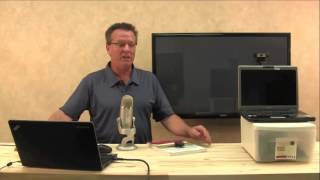
Alright, so let's talk about creating content. What I want to do is give you some of the background to what I've done and this will hopefully help you with some ideas for your content for your membership site. You're here at this point because you've got something you want to teach. So you already know what it is, the field, the niche, whatever it is you are a teacher in, or an expert in, or whatever your specialty is. So I'm just going to kind of tell the story to help you maybe come up with some ideas. So, as an instructor, I based a lot of my training on my old notebook. You'll see in this video here. And the beauty of the notebook is this thing traveled with me when I failed my first private pilot checkride. I went home devastated and I didn't go back for six months. And then when I decided to go back and try it again, I was frustrated over all the things that I had to learn and all the places there were to study and just the wealth of information that was out there to get your helicopter's license and get the knowledge that you needed. So I thought, you know what, instead of trying to study all these books I had scattered all over the place, I wanted one place to study. So when I got serious about studying again and going back and trying to pass the test the second time, I went down to the local drugstore and I got a big thick notebook that you see here. And I didn't pull it out because this thing really is getting frail and it's fallen to pieces. But that's what I used to get through my test. And then I became a commercial pilot and I became an instructor pilot. And once I started teaching, you know, again, we had all these different books and materials that there were to use when prepping students. And just by chance, as we would get to the end of a student's training, I would pull out my notebook because I had notes just jam packed full in this notebook in a random order. But I put them in this notebook in a way that made sense to me. All the things that I had trouble remembering. So this notebook was random. So when I would sit down with students and get ready to do the last phase of testing, just to check their knowledge, I would start leafing through this notebook and honestly, if they could answer a couple questions from every page and I could get through the majority of the book, I knew that they were ready to take their test. It's just kind of the way it happened. So back when I got started with this online thing, I was talking about my notebook. And Nick Logan, that gentleman I mentioned earlier that helped me get started in all this, he says, why don't you start a ground school and base it on your notebook? So that's what I did. So my sister took my original notebook that you see here, and she transcribed the whole thing into a 330 page PowerPoint. And all I did was in my little office down the hall that I just showed you a little bit ago in the Green Screen video. I would sit in that room in front of the camera, in front of the green screen, and I would bring up the PowerPoint on the laptop and I would just sit there and I would actually, I'm going to pause the camera for a minute. I'm just going to set this up so you get an idea of what it looked like. So it looks something like this. Had these plastic boxes on a table, had the laptop right here with the PowerPoint on it, with my camera behind the laptop. And that Canon is actually the one I'm shooting with now. But this is a webcam, but just for example purposes, couple of boxes, laptop with a PowerPoint on it, camera up here. So when you're looking at the laptop, you're trying to get the audience to think that you're doing this from memory because you're so smart. You just remember all these things that you want to say and all these things you want to talk about and teach. So I sit back by the green screen. Another tip. On the green screen, you want to be about 4ft out from the wall with the green screen. I failed to mention that earlier. I learned if you're too close to the green screen, it won't work. And if you're too far away, about three to four feet out from the green screen is where you want to be sitting. So back to this. And I have my little handy clicker. So I'd be sitting in a chair four feet away from the green screen, looking at this camera and. Or looking at, at the PowerPoint right here. And then I just had a handy dandy clicker. And I would just sit there and just click the screen on the PowerPoint. And I was actually also doing a screen recording. So I'm filming myself sitting in front of the green screen and I'm also recording the PowerPoint on the laptop. Then I would take those files, put them together in. At the time Pinnacle, before I started using Camtasia, and the way I did it back then, the process was really long because I would render the green screen and I would do like hour long files. Well, here's another tip. Try to do your videos in five or 10 or 15 minutes. Doing an hour long video, it's hard to render, it's hard to work with. You get wore out trying to edit it, edit it. So try to keep them, don't get too carried away. And again, you go to render something, it's an hour long, it takes forever. So that's how I built my first what we call 10 modules. And it was set up in the Kajabi site, very similar to the site you're looking at right now. That training is still housed in that same site. And I just called it 10 modules of training. And I just started going through and just shooting the training that was in my notebook, just going right through the book, going through the PowerPoint. And I can tell you that I launched my online site prior to even having it finished. I had about six or seven of the 10 modules done, promising to finish the other modules, which I did. And when I went live with it March 1, 2012, people started buying it right away. And it took me probably a couple months to finish those other modules. Because in the beginning all this stuff is so time consuming and a person like me who's working on their own and just figuring out how to do these things without any help, you know, it's time consuming. So the neat thing is I did launch my product before it was even finished and I didn't have one customer complain about that. I get the online membership site up and running, start selling it, and you know, it was a little slow in the beginning, but I would still sell something, sell a few every month, sometimes some months would be better than others. And about a year or two into it, I had a member that wanted to do a refund and he just didn't like the fact that my training was really unorganized, that it was random. You know, he even said, well, if you later come up with something that's a little more practical in another order, you know, let me know, I might come back and rejoin. So after that I built a whole another new section of training. Basically took the content that I'd already built in the first 10 modules, reorganized it to what we call the practical test standards. It's a book put out by the FAA that has a 10 sections of exactly how the checkride is going to go, how their test is going to go, and all the knowledge areas and flight areas that they're going to have to cover. So I reorganized my content, took some of the content that I had made originally and repurposed it. Some of the things that had maybe really bad audio from one of those mics I used in the beginning, you know, some of them I redid and added some new training to the newer section. But it releases released it as what I called the Practical Test Standards and that changed everything once I released that. So I'm still selling the original modules 1 through 10 people, some people like them, other people like the more laid out Practical Test standards section. And now I'm even building a whole nother new section that is everything a person needs to know from day one to private pilot, every single thing based on a training syllabus. And I've been building this one for three years now. And I'm getting closer to launching it now that I'm getting faster at what I do with servers and some better equipment. You know, it is moving along, but you do get faster with time. And that's one of the main reasons I created this course is to help you save time and not go through all the headache and heartache that I went through to get your membership site up and running. During hovering flight. Also called tail rotor drift, it's one of the three T's that everybody screws up. Effective translational lift, transverse flow effect and transit. So you want to learn about an online business selling your information product online? That's what we're here to talk about. I'm going to show you all kinds of cool stuff and I'm going to tell you the story.