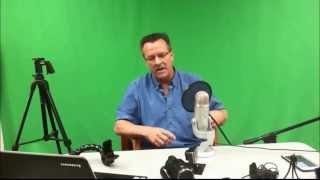
Kenny Keller (speaker) surveys camera equipment for creating online-course and marketing videos, tracing his progression from Flip-style pocket camcorders and basic Microsoft webcams to a mid-range Canon Vixia HF M41 and the use of smartphones (iPhone 6 Plus) and iPads as primary or secondary cameras. He discusses inexpensive accessories (tripod mounts for phones/tablets), GoPro uses (basic and Wi‑Fi-enabled models), and live-event camera options. He emphasizes that modern smartphones often suffice for getting started and previews a later video on editing software.
Questions this video answers
Canon Vixia HF M41
iPhone 6 Plus
About two and a half years
Originally about $700; he bought it for around $399
Around $30–$35 each
Chapters
All right, we're going to start with some cameras because you're going to need to get yourself some content around and ready that you're going to try to sell online. And then of course, you're going to do some introduction videos and, and film your content. So going back to what you've seen already, started with the small flip video, and then I moved to a little bit bigger, little better flip video camera. And these cameras had their own, their own software with them that you'd plug right into the computer, download it right to the computer. And it was pretty cool. You know, at the time to get started, it was cheap, it worked well. And, you know, it's old technology now, but that's what I started with. And I'm shooting here with a Microsoft webcam, basically. I'm also shooting over here to the iPhone 6 plus that's on a little tripod with a little cool thing you can kind of see there. So I'll show you as we keep moving forward. So this video, good or bad? This is what I started with this webcam for the videos in the trailer, along with the flip video. And then after I was doing videos for probably a year, I scrounged up the money for a fairly nice Canon Vixia HF M41. So I've been using this camera now for about, I've been using it about two and a half years, and it's a really nice camera, works really well. It was about, at the time, a $700 camera. I got it at Best Buy for around, I think, $399. So to get me started, it was really good. And I'm still using this camera today. Use it inside, use it outside, do all kinds of stuff with it. And basically you set your camera up. I have a couple of tripods. Tripods aren't real expensive. I have two. One here and one that the camera's on now. I think both these tripods, I paid around 30 bucks for 35 bucks, just like at Best Buy and Walmart. And, you know, the, the cheap tripods work pretty good. Eventually I want to get it an even better one, but again, not too, too expensive. And so the Canon, the way this works, when I bought the Canon camera, it came with the software to download your computer. And that's what I do now. I shoot the video with the Canon, download it to my computer and render it from there and then move it to my software that we'll get to on another video. So that's the main camera I've been using and What I want to show you now is these iPhones. The quality is awesome. What is so cool is you can get these mounts for your iPhones. This is for multiple smartphones. So it's a small little mount that you put right on your tripod. They have adjustable sizes here where you can change these, and you slide your iPhone right into it. Sometimes I shoot video with an iPhone. I've shot video in the helicopter. I've shot as a secondary camera. I've used iPhones and iPads, so this is very cheap. You can get them on Amazon. You can get them anywhere. And then you have the option of shooting with your iPad, and I've used these as well. Another cool unit that you can get is this unit here that you mount your iPad on, and you can mount this thing right to a tripod. You might be able to come up with some other ways of mounting it. And I have shot videos, again with the iPad. I've used the iPad along with the Canon. When you're coming up with multiple shots, like you want to talk to the camera here and talk to the camera there, or get a shot from the side looking at you talking to the other camera, you know, you can be inventive and come up with all kinds of ways to, you know, try to make things interesting so you're not always just sitting, shooting from the same position with the same camera. That is the video equipment I use. And again, the choices are endless. You can start very small and, you know, work your way up. As you get more advanced, you can always move up to a better camera. But I will have to say, you know, the quality is getting so good on these iPhones. And I'm sure Android's probably the same way that it's amazing some of the quality that you can pull out of these phones. So there you go. You're already ready to get started. If you just have a smartphone, you don't even have to go get a camera. You could use your smartphone. And we also, of course, have the famous GoPro, which these are incredible cameras. You can get the cheap version, which I use, like for in and around helicopter stuff and doing some stuff in and around a vehicle. You know, the one small camera, the cheap one, works good for just certain shots where you know you're going to turn it on and just leave it on. And then you have the newer GoPro that you can completely activate from your iPhone, which is incredible because you can mount the camera, you can test it, you can look at your iPhone to see what the camera sees. You can start and stop recording from your iPhone. So the technology with the GoPros that is getting pretty crazy too. You can use a GoPro indoors, outdoors, you can put them on selfie sticks just like any of these others. And you may want to do some live events. I was mentioned earlier I'm looking at you through a Microsoft webcam. I've got a couple other versions I've moved up to and they get even better technically with the things you can do to them and you can actually move the camera and zoom in and out and do all kinds of crazy stuff. Those live events is another important part part of an online business. It's a great way to get interest, bring people in, talk to them. I've used several different online sites and we will talk about that in another video on live events. So now move on to the next video and I'm going to show you the software that I use for editing my videos and I'm going to tell you the story.