Kenny Keller prints and comb-binds the first four chapters of his book using a Canon MG7500 printer and half-inch comb binder, then starts proofreading. The video shows exact print settings, cover sizing, hole-punching, and how to thread pages onto the comb.
Questions this video answers
Canon MG7500 (MG Canon MG 7500).
Chapters one through four.
How to Build Your Online Business.
Chapters
So I now have chapters one through four. I'm going to print those, and I'm using the MG Canon MG 7500 printer. You go down, you pick on, print both sides and flip pages on long edge. So here we go. Let's print the first four chapters.
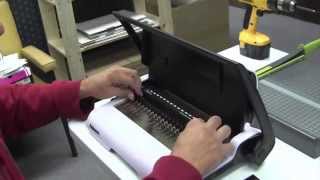
Here we go. The beginning of my next book, how to build your online business. First, we get out our covers, and there's two lines here. One for your cover and one for your actual paper, the size of your paper. So we insert just like this, just this to cover. Then we punch our holes just like that. I only do about maybe 10 sheets at a time. And we have different comb sizes depending on the size. I'm gonna do half inch because I figure the first time around, the book's gonna be pretty big. We insert this in here like so. Do this. Put on one cover sheet. Now we do about 10 sheets. I don't know, six or eight or 10 sheets at a time. Gonna move this back to letter size, Punch our holes, move it onto the binding comb. Next bun. Second batch of paper, line up on the comb, put on our cover, move this up like that, and voila. I'm now ready to start proofreading chapters one through four.