Lauren Bateman’s tutorial explains how to add chapters (timestamped sections) to YouTube video descriptions to improve viewer experience and search visibility. She demonstrates how chapters must start with 0:00 so each timestamp becomes a clickable link, shows how chapters create timeline segment markers that let viewers jump to sections (which can increase watch time), and gives an analytics example where a video spike (~10,000 views on June 13) was driven largely by external Google search traffic. She recommends using chapter titles with keywords to surface specific sections in both YouTube and Google search.
Questions this video answers
0:00
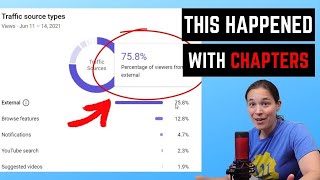
A spike of about 10,000 views on June 13.
75.8% external traffic.
98% from Google Search (of the external search traffic).
Chapters
Hey, YouTubers, in this video I'm going to go over how to properly use chapters in your video descriptions to get you more views.
So chapters have been around for a little while, but not a lot of people know about them, especially if you're new to YouTube or how to use them properly to rank for keywords not only in YouTube search, but outside of Google search. So I'm going to pop over to my laptop real quick to show you why you'll want to incorporate chapters into your video descriptions. Now, whenever you think of search, everyone thinks of YouTube search, but there's another search function that's very important and that is Google search. So I'm just showing you some videos here. I did a search for how to play a G chord on the guitar and you can see some of the videos that are popping up. There's actually chapters, and here's one of my videos here, five ways to play a G chord. And there are actually chapters that show up with different keywords. And if I click on any of these, like this one finger G chord. So you can see here it is playing the right to that time point, one finger G section. Just to show you what chapters does. While I'm in this video, you can see this timeline down here has little indentations and breakup points in it. If you did not have chapters, it would be a solid line and you wouldn't be able to scroll through and see the different sections of this video. Now I'm going to show you in a little bit how to do this in your video description and set it up, prepare. But a great reason to add chapters to your video is to increase watch time. Now, someone might watch a section of your video and they're kind of done with it. If you answer their question. They might be dumb, but someone might scroll ahead in your video to see if there's something else that might spark their interest. So where a viewer might have cut off on watching at two minutes of your video time, maybe they'll scroll ahead and they'll start watching again at the five minute mark and finish out the video. So you can see this is a great feature to add to your videos, especially if you're trying to increase watch time, which as you know, is the most important ranking factor for YouTube videos. So I'm going to pop back over to YouTube here and we're going to go into our YouTube studio and I'm going to show you how I did this in one of my videos. We're going to go over to our content and let's Just pick this video here. How to hold a pic. Now, this is a scheduled video, so it's not live yet. But I want to show you how I set up these chapters in in the video. So how to hold a Guitar Pick is my video. And you can see here I've got this little section called chapters. And you have to start with this.00. If you do not start with this, the chapters are not going to work correctly. They are not going to become clickable links because each one of these timestamps is going to become a clickable link that will take people right to that section of your video. So you see here, I've broken this up into multiple parts before you hold your pick grip technique how to hold a pick Best guitar grip for picks Lighter pick Guitar picks. So some of these are also keywords. So the main keyword I was going after for this, this video was how to hold a guitar pick. But best grip guitar picks was also a keyword that I had looked up that was getting some search. I said, hey, I can throw it here in my chapters. Now, what might happen when I release this video is, is someone might type in that keyword best grip guitar picks and Google will show them that section of my video as the answer to their search query. So what I'm going to do is I'm going to just delete this real quickly to show you what this would look like without the chapters. And then I'm going to go and put it back in. So here's this video and you can see the timeline is just a single timeline with nothing showing up at the bottom. So let me go back and add those chapters again. Okay, so I added those chapters back into my description. I'm going to save, save it. And now I'm going to reload this video. And you can see now the chapters have popped up on the bottom. And when you go into the description, each one of these timestamps becomes a link. That's why you have to have this 0 colon 00 or it's not going to work. So if I click on 202, it'll take me right to 202 in the video. Now, why is this important? Because like I said, YouTube is not the only search engine and sometimes my video get more views externally off of YouTube than they do on YouTube. Let me show you an example. All right, so I pulled up a video in my content here, and you can see there's kind of like this big spike in views. It got like 10,000 views on June 13th and you're like, wow, that's a pretty big spike. It was. So where did all of this traffic come from? Well, when you click over here on Reach and you scroll down, you'll see that most of my traffic, 75.8% of that traffic, was coming from external sources. And if we scroll down even further, you're going to see my traffic search for external Google search was accounted for 98% of the traffic on this video for the first two or three days. So what happened with this video is I probably released it and it got picked up really quick by Google Search for some of those keywords, like maybe the, the guitar chords for Stand By Me or the strumming pattern for Stand By Me. I don't know what got picked up, but something in my video, most likely in my chapters, was causing Google Search to put my video on the front page. Hopefully I've shown you guys the importance of using chapters. And if you're interested in growing your channel more and learning more tips just like this, I do have a free training below this video. Go and check that out if you're interested in learning more. Also, YouTube's going to pop a couple more more videos up over there. Go check those out and I'll see you guys in another video.