These TWO Things Helped Me Triple Productivity
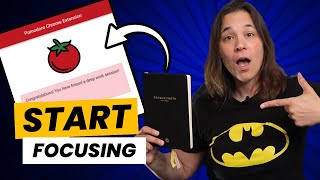
Lauren Bateman uses a free Pomodoro Chrome extension and the Intelligent Change Productivity Planner to triple her output. The Pomodoro timer runs 25-minute focus sessions with 5-minute breaks, while the planner limits her to five daily priorities and tracks completed sessions. She carries unfinished important tasks to the next week instead of letting them pile up.
Questions this video answers
25 minutes
5 minutes
15 minutes
Intelligent Change Productivity Planner (purchased on Amazon)
Chapters
Hey, content creators. I am so excited to share a little productivity hack that I learned about recently that has been very helpful in me getting the things that I really need to get done each and every single week. I'm the typical entrepreneur where I'm just someone who sometimes does a lot of busy work. And you know, I think I have so much to do and I'm sometimes just, I'm keeping myself busy versus really working on the things that are going to push my business forward. So I'm going to share a couple little tips with you that I learned about very recently that have been super helpful in getting me on track and making me a more productive business owner and content creator. So what I talk about today is a free Google Chrome extension. You can use it, no cost, it's absolutely free and it is called Pomodoro, you know, like a tomato. And as an Italian, I love that it's a tomato. All right, so you can see I'm here in Google Chrome and we have this little tomato up here. And you can see here it says start focusing. And it says I have two pomodoros until a long break, six Pomodoros that I've done so far today. So I've basically each one of these is 25 minutes of work and in between you get a five minute break. So this is about equivalent of doing three hours of work this morning before I hopped on to these videos. So all it is is a little Google Chrome extension. If you go to Google and you type in Pomodoro. So right there, just Pomodoro, Chrome extension. You click this, you add it to Chrome. I already have it added to Chrome. Up here you can see my little tomato. And it's just a very simple interface that allows you to time productivity. Now this comes standard, set up with a 25 minute setup here. So you can see here you can have, you can start a Pomodoro cycle, which for me is 25 minutes, you start focusing. Okay? So focusing is when you're doing your work. You could start a short break which is set for five minutes, or, or you can do a long break which is set for 15 minutes. You can check your history. So you can see here my Pomodoro history that I've been using just to show you I've been using this a lot. And when you click the little tomato, you can see here, it just started a new session, 25 minutes. So it'll turn red when you want a new session. Now you can always change the settings for this. So Some people are like, oh, I don't want to do, I don't want to do 25 minutes. So you can change it, you can make it 30 minutes, you can make it 45 minutes. I like the shorter stiff, the shorter shifts, stiffs. I find 25 minutes is perfect. It's a good amount of focus time. If you want to do the full 30, you could, but I do 25 minutes and then I get a five minute break, which puts me at 30 minutes. And I leave the desktop notifications on because I want it to tell me when it's time to take a break. You can see here my short break set for five minutes. A long break is set. For every fourth break you get a slightly longer 15 minute break. So that just shows you how it works. Oh, I don't have the sound on, but I'm going to turn the sound on. Look at that, it's going to ding. Actually, I like that because that's one thing I didn't like. If I was working in a different extension or I was working, I didn't always see it pop up. So I like that there's going to be a little ding now. But you can see here's the timer. It's just counting down and it's going to give me a long break, a short break. And if I work for 24 minutes, so something's going to pop up on the screen, it's going to say, hey, it's time to take a break. And for me, this was super important because I'm the type of person who can work straight through without taking a break. So I'll sit here at my desk and I can work two, three hours straight and not take a break, which is not good. All right, I'm getting older. I'm sitting too long is not good. So this has been super helpful for me. Not from a productivity standpoint because I don't tend to have too many issues with being productive, but it's helping me to take a break, to get up, stand up. I have a long hallway here and I just walk up and down the hallway. Or, you know, maybe I'm going to go get some another glass of water. I got to refresh my water. Or maybe I'm drinking coffee in the morning and I'm going to go get a new cup of coffee and it's good. I just gets me up, gets me moving, refreshes my brain. I come back, I hit start. And I start just another session, which makes it really great. I've learned to connect it with this productivity planner. And I learned about this from a coaching program that, that I am taking and it was super helpful. I'm like, I really like this planner. I'm going to give it a try. And it works really well with the Pomodoro extension right here. So I'll put a link in the description below. I got this on Amazon.com it's the intelligent Change Productivity Planner and I really like it. There's. There's kind of like intros that tells you how to use the book. But the cool thing I'll pull up today for you and you can see there's a page that I can write my notes, but then there's a page over here and it asks you, I'm grateful for today, I'm grateful for. But then it lists your top five priorities and the number one has a star. And it's like the most important task for the day that you have to complete. And then your secondary tasks of importance, like what's most important after that. And then it's additional tasks that you, things that, that might come up during the day or things that you have to fill in. And sometimes what I do here is I take notes if there's something that comes up but maybe isn't, doesn't need to be in my important tasks. I just make a note here, maybe it's going to go on the next day, maybe it's going to go on the next week. And then at the end there's highlights. There is a little daily planner here. I don't typically fill in the planner as much, but there's little circles that you can fill in when you're doing, when you're doing Pomodoros. And right now I'm on secondary task of the day, which is filling film business content, which is I'm doing right now. And I'll fill in my pomodoros when I see how many I've made so far. But this has been super helpful, this weekly win section. And basically it's weekly review. You know, what are your wins? What worked well the week before, what didn't go well, what can you improve upon? And what I found from, from using this book, I said, you know, what did I learn last week? And I want to read this one because I think it was, it was important. I said, I'm not feeling super motivated about my work, right? It's the summer, the weather's nicer, that always happens. And I said I need to find a way to better connect and film content that I find inspiring and I really liked this product. So I thought this was a great way to kick off recording new content. And it said, next week, what actions will you take to ensure your week is productive? And I said, I'm going to focus on more or less is more. Okay. I really have to pin down filming days, which I did today without getting distracted or pulled away. So I have the bad habit. And when I started this, you know, there's your five most important items, then five secondary tasks and then five additional tasks. So there's 15 things you could fill in here to do over the week. And I was getting in the habit of like filling in the entire page. And then I was getting super stressed because I wasn't checking off all these items. And I'm like, you know what, I'm just going to fill in the top five and maybe add a couple to secondary that I think are important. But I'm going to leave the rest open for things that might come up in the weeks. That's something new I'm trying because, you know, last week, I'm looking at last week's and it's like, I don't know if you can see it here, maybe I can take some pictures. But I only checked off about half of the things and I had five important things and I only got three of them done. So then you kind of rate yourself on your week and being like, okay, what needs to get done this week? So any of those top five that I didn't finish last week became the top things of this week and filming this content was, was one of them. So it's a great little book. I've been finding it really helpful in keeping me organized again. I'll put a link in the description below. It's the Intelligent Change Productivity Planner. It works really, really well with the Pomodoro software. And you can see here, it's still clicking down here. I'm down to about 20 minutes. So what I'm going to do is I'm going to pause the video so that you guys can see what the Pomodoro looks like on a short break right now.
And this is the Pomodoro section. When you take a short break, you click on short break and the little timer up here goes to about five minutes, which tells you it's time to take a short break. After you do this a few times, you get a longer 15 minute break. But it's telling you get up, move around and then come back refresh to work. And this is what happens when you click start focusing on the Pomodoros, you click, start focusing, and it takes you back to whatever you're working on. And you'll see up here you have a timer that says 25 minutes. So that's when your next pomodoro starts and then you get to work.
So if you're someone like me who really needs help getting organized and focusing on high priority tasks, I highly recommend that you go grab the Pomodoro Google extension, it's absolutely free. And you grab the productivity planner. It goes really well with this. And I feel like I've been so much more productive the past month since I started using this. And I'm really enjoying filling in the tasks in the book. It gets me organized. Not only for the week, but it gets me organized each day. And I'm not feeling as overwhelmed with all the stuff that I have to do because I'm running multiple businesses, I have multiple YouTube channels, multiple products that I'm working on. So it's really helping me focus on what's the most important and getting that done. And if you're someone who feels like you're really, really feeling overwhelmed, then I highly recommend you go check out this video over here where I show you how you can stop doing everything yourself and being overwhelmed as an entrepreneur and doing something different instead. Go check out that video right over there.