This is a YouTube video titled "How to Grow Sales with Amazon Vine | Peak Season Tips" created in November 2023. The content features a single speaker named Sam sharing detailed tips and strategies for Amazon sellers to boost sales during peak seasons, including insights on the Amazon Vine program, listing monitoring tools, targeted email campaigns, review management, and gift options. The video is instructional and focused on e-commerce best practices for Amazon sellers.
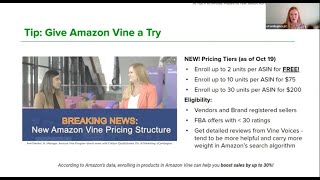
Foreign. So the first tip that I want to share with you today is regarding Amazon Vine. I recently sat down with Ami Pandya. She is the head of Amazon vine and I was in Seattle for Amazon Accelerate back in September and she shared some exciting news about the Amazon vine program. So if you aren't familiar with Amazon vine, look it up. It's a great way to generate reviews in a compliant way through Amazon's top reviewers called Vine Voices. But first of all, you must be brand registered and your product must have less than 30 ratings. So it's great. For those of you who are launching a new product, you simply enroll in the Amazon vine program and you send your products to the Vine Voices to review. And up until recently, this program cost $200 just to participate. But now, or as of October 19th, there are new pricing tiers, starting with a free tier, completely free to enroll up to 2 units per ASIN. So there's nothing to lose. You can enroll up to 10 units per ASIN for $75 and 30 units per ASIN for $200. So the way that this works, you are not guaranteed positive reviews. So you must make sure that your product and your packaging and your listing is optimized before you enroll in the program so that you are more likely to get strong reviews. But the good thing is the Vine Voices tend to give very detailed reviews, often with photos and videos, and they tend to carry more weight than Amazon's search algorithm. And Ami actually shared with me that Amazon's data shows that vine can help you boost sales by up to 30%. So especially with the free tier, you have nothing to lose. So there's my plug to give Amazon Vine a try this holiday season. I want to share is important all year round, but even More so in Q4 when you're at your peak season. So it's crucial that you monitor your Amazon listings daily in order to protect your sales and your listings on Amazon. There's always a risk out there of potential threats that are just lurking, such as listing hijacking, suppressed listings, buy box changes, and listing changes. But keeping track of all this manually is nearly impossible. So that's why at EcomEngine we created a tool called Seller Pulse, which helps sellers save time and money by monitoring your products 24, 7 and alerting you to these potential threats. So the way it works is sellerpulse sends email alerts with important details and recommendations to help you solve the issues right away. So if your listing is hijacked, sellerpulse will send you an alert right away, as well as a cease and desist template that you can send directly to the unauthorized seller and the process or detailed steps to file a claim with Amazon. If your item is buy box suppressed, then Seller Pulse will give you the tools that you need to get that unsuppressed. So it's a great way to make sure that you don't miss out on holiday sales when you're at your peak. You can lose a lot of revenue if there's a listing issue or something. You know, buy box suppression just in a few hours, much less than a full day. So make sure you're protecting your sales on Amazon by monitoring your listings every single day. And my next tip is about a tool in Seller Central called Amazon's Tailored Audiences. If you have not used it yet, you're in for a treat. This is a great tool to boost sales on Amazon by sending targeted emails to specific audiences such as repeat customers, your highest spending customers, and your most recent customers. So it's a great way to build your brand and improve customer loyalty. And this program offers really detailed reporting on the email campaigns that can give you some great data to help you learn more about your customers and help you grow your business. So don't just use the email campaigns, make sure that you take a look at the data behind those email campaigns as well. And this tool is found in Seller Central. Just go to brands and it's under Customer Engagement. And then my last mention about this is just in August Amazon launched Brand Tailored Promotions, which is an extension of this that allows brands to send promotional discounts up to 50% to their highest intent customers. So take a look at this program. Start using it now to boost your Q4 sales. But it's also a great way to make some post holiday sales in January. So someone who may have purchased your item as a gift, maybe if you send that targeted email that will entice them to buy the product for themselves after the holidays. All right, and then my next tip is about your review management process. If you don't have a process in place, now is the time to do that. First of all, it's important to request reviews on every order. Everyone has more orders during the holiday season, so more orders translates to more reviews. But to really maximize your reviews, you need to make sure you're asking for them. I also highly recommend a B testing your review request to see what converts best. Is the request a review button working better for you or a more personalized custom email? Just make sure that you're always compliant with Amazon's policies. And if you need help, I'm happy to take a look at your email. But again, a B test See what works best. Also monitor the reviews on your products as well as your competition. You can learn a lot from reviews, see Kind of you can identify trends that might signal a change that you need to make to your listing or your product or packaging. Or maybe you'll get some ideas on how to bundle your products with other items to try to increase your sales. And then lastly, with negative reviews, make sure you familiarize yourself with what to do with negative reviews. Brand registered sellers can contact the buyer using the templates found in Seller Central and if the review is against Amazon's community guidelines, you can submit a claim to Amazon to have it removed. And lastly, I wanted to point out that you should consider using Amazon's Gift Options to offer gift wrapping and gift messaging to customers. This can help increase your sales conversion rates by offering enhanced buying experience, especially during the holiday season. So as long as your items are eligible, it's at no extra cost for FBA sellers. And you have two options. You can either choose Amazon Gift Message or Amazon Gift Wrap or both. But again, this is not automatically enabled, but it is free. So you just need to take the time to go through the steps to enable this. And the steps are super simple. Just go to your main your main settings menu in Seller Central, up in the top right corner where it says Gift Options, select that and then use the slider button to enable the services that you want to do, whether it's the Gift Message or Gift wrap and make your adjustments. So again, no extra costs for FBA offers, so just take a few moments and set this up in time for the gift giving season. But it's great to offer all year round as well for birthday gifts and other things all throughout the year. So wishing you all a great Q4 and thank you for letting me share these tips with you today. Sam.