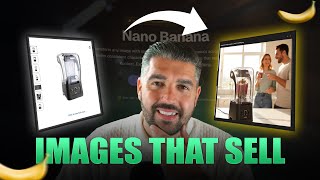
This is a YouTube video titled "Google’s Nano Banana Just Changed AI Image Generation Forever" created in August 2025. The content features a single speaker, Michael Elliot, demonstrating and reviewing Google's new AI image editing tool called Nano Banana (Gemini 2.5). He showcases its capabilities for generating photorealistic images from simple prompts, discusses potential use cases for businesses, and provides a tutorial on how to use the tool within AI Studio. The video is an informative presentation focused on AI-driven image generation technology.
Things just went bananas guys, because Google have released Nano Banana and it is one of the most impressive image editing tools that I have ever seen. It's called Gemini 2.5 Flash Image Preview inside of AI Studio if you want to use it, I'll show you how you get there in a moment. But this, the quality of what this does off of basic simple prompts has changed image editing forever. Right? This is not play DOH stuff. This is not me telling you in my previous video I was a massive advocate of producing stuff that you can actually use it for businesses. And it is salable. Well, this is salable once you start to generate and you build flows around it that allow you to be able to create Facebook imagery, Facebook image ads, for example, without the need, need for human models, etc. Let's jump in and I'm going to show you. Firstly, I'm just going to quickly show you Google's release page from their blog. So Nano Banana Image editing in Gemini just got a major update upgrade. You can see some examples of some of the images that it has produced and some of the things that it's done. But it's the same old story of what anybody would say when they release a tool. It's the power of the tool that we want to see. Well, I uploaded a simple image of myself, very basic here and I asked it to please create a photo of me drinking coffee from a mug in a cozy living room. And that's what it produced. Now that is ridiculously powerful. Well, let me zoom out slightly. That is ridiculously powerful. And the funny thing is is that it's like almost copied the. The only thing is it's short sleeve. But that's exactly what I was wearing. Cream. Cream chino beige chinos. And the cream polo is exactly what I was wearing in the, in the. In the photo. So Google's got some style. Now when it comes down to the use case for this, I'm not going to hammer away inside of AI Studio, but if you want to use this, come into AI Studio, go to chat, not, not generate media, go to chat. And then up at the top you want to see Gemini 2.5 image preview. It'll be selectable here. New literally just select it and I have set up an individual flow, a very small flow, but one that we're going to use just to test this out. Okay. Just to test a few, a few individual things. So I'm going to off the dome them. Please create me an image of me of doesn't have my image in this of Nala and Simba playing around a camp fire with tents in the background. Now, one thing I'm going to say is the safety on this is ridiculous. I'm not sure if they're going to fix it, but it does fail often. From a safety perspective. It will tell us in the output of the HTTP request if that's the reason why it failed. So if you do see in this video a couple of failures, then you know why. But generally speaking, it performs extremely well. You don't want this to be used maliciously, which is, you know, you don't want images to be able to be created. It's quite a scary place to be if you think about image generation and creation in general. Because if you can just go and create images of anybody doing anything, then obviously it's a. It turns the world into a bit of a circus. So there you can see Simba and Nala playing with tents in the background. Absolutely perfect, exact. Exactly what we wanted. Now lets say please create me an image of a huge crowd of people outside the Empire State Building having fun in the sun. We're going to get a bit more granular as we go, but let's see, let's see what we, what we come up with here. Converted image view, like ridiculous quality imagery. It's a joke how good that is. I'm very surprised that there's, there's, there's younger humans in, in the, in the photo that surprised me. But obviously they're just having fun in the sun. So that's, that's quite interesting. Let's go back, let's hit it with a few more. Let me, let's try something else. Let's try this. Let's say, please, I need a creative that has a. I need a creative that is for my blender, recently released with cutting edge technology. But I would like, it would like photo realistic, real. If I could spell, it'd be all right. Realistic images. Image I want, would like a photorealistic image of the blender on a countertop in a modern contemporary kitchen. All right, we fire that off. Now what I'm gonna do is I'm gonna show you this image and take a look at that. Like you won't want to use that as a creative, but if you had introduced. Look, I mean, look at the quality. That's what we're trying to go for here. The prompts are so vague that, you know, I'm not prom. Prompts, engineering, nothing. I'm just showcasing you the power that this, that this, that this has so let's do one more. Please create an image of New York from above and let's see what it produces. Now, once this is done, I'm going to go through a few things and I might hop back into AI Studio and see if we can make it. Make it perform. Now, what I'm trying to show, all I'm trying to showcase to you now is the image quality that we can generate. Okay, the image quality that we can generate. But if we go to. If we go into this AI, let's let me start a new chat because I'm finding that the safety thing is a lot more. There's a lot different. Can you. No, actually joke. We're going to do blenders. We're going to search for a blender for blenders. And let's go here and let's. Let me click that so you imagine that image of the blender. Yeah. Okay. Like what the image is. Now let's go into Google AI Studio. Can you please create me a photorealistic image of my product below, exactly as it appears in the image, but in a beautiful, realistic setting. Realistic setting. I'm going to use it for advertisement. And let's paste this in. Let's turn the temp down and we're going to hit run and hopefully we don't get the safety note again. Very soon it will be inside of Nan. Very, very soon, inside of nan. Literally, you'll be able to just add the Gemini node. Google Gemini messenger model. I think that's what we're doing there. Messenger model. Choose a model. Yeah, choose a model. And very soon it'll be. It'll be available in here, but it's not as of. As of yet. So what can you do? There's. There's not really a lot that we can. That you can do at this moment in time, but I wanted to get to it. Now, that's a bit steep for a blender. I've just realized the price of that blender. But let's go and see what it came up with. So it came up with a photorealistic image. Okay. So now what I'm going to do is I'm going to delete this and delete this and delete this and delete this. Because it does bug. It seems to bug out on the second image. Now what we're going to do is we're going to use a system prompt. We're going to ask AI Studio to create a system prompt that is just using Pro. Please create me a system prompt for an image generator that Creates an advertisement of my blender. There should be people in the room and yet great lighting and the product fully prominent product prominently on show. So I'm not doing other for temperature on one now stop. Run. So now what we're going to do is we're going to try and amplify a little bit a prompt for this. I've asked for a system prompt. Probably shouldn't have done but literally I'm off the dome in this as I always usually do unless there's a presentation involved because of the power of it. And I'm going to show to you now like what this is simple direct prompt. Can you fill in the required edits so they match a contemporary and modern kitchen. Let's fix this. Fix the typo. I could have just done that myself to show the manipulation of it. Maybe we do a head to head. Who can write the best prompt. So a blender from the image. The blender central focus on a clean white marble kitchen island. Inside the blender is a delicious looking smoothie. In the background people are happy and enjoying themselves with with warm morning sunlight streaming through a large window. The overall mood is energetic. Shot with a DSLR camera. Cinematic quality. Shallow in depth field. Now let's give this a whirl and see what this comes out with in terms of advertisement quality. Now that we've given it a little bit of a. Of a. Of a system prompt based approach. Now obviously that's like half blended, half not. But from a perspective of image quality of what you're looking for when you're talking about Facebook advertisements, etc. That image in comparison to what you see on here is absolutely ridiculous. There are a stupendous amount of individual use cases for this Nano banana is absolutely frightening. Go around and play around with it. Make sure that you, you know, you. You keep your eye on the ball when it comes to the editing. Use yourself. Post in the comments some of the interesting things because I've just tried to showcase this to you and basically like release it to you to make sure you're aware that it exists. That is a photorealistic advertisement. You'd want to change the contents inside of the smoothie and you could use that on your Facebook ad and it would be photorealistic and it would be lifestyle imagery. Businesses will pay you if you can produce that at scale and you can produce that at scale using this tool. That's why I wanted to show you this. Guys. My name is Michael Elliot. Thank you for watching. Nana Banana is absolutely bananas and it's something that I'm going to be using. You're going to see it in videos upcoming and it's definitely something you should try out. Let me know your thoughts in the comments, like subscribe. Catch you next time. Cheers.