NetLease for Firms Event - Webinar
Webinar (NetLease for Firms) introducing ASC 842 adoption challenges and practical solutions using Net Gain's lease-accounting software. Speakers (Casey Stewart, Caleb, Kelly McGlinchey, Marie Calabrese) cover the background and effective dates for ASC 842 (public companies adopted in Jan 2019; private companies delayed to Jan 2022), common entity policy elections (short-term/low-value leases — ≤12 months; non-lease component aggregation; discount rate options: rate implicit, incremental borrowing rate, Treasury/risk-free rate), transition reliefs (use of hindsight, practical expedients package), and demonstrate Net Lease for Auditors (lease wizard, modification workflow, journal entry and disclosure reporting, audit trail, client–auditor integration). The panelists discuss firm/client readiness, training benefits, and time-savings vs. Excel.
Chapters
Get started. As our landing page says, say so long to Sally. Auditing ASC 842. The new lease accounting standard is now upon us. So no more same as last year as we're so accustomed to do as auditors. We'll start with a few introductions. I'll begin. My name is Casey Stewart. I'm here at Net Gain. I currently work out of our Denver office, but we're here today in our Utah office for our presentation. I'm a cpa. I have a background in auditing. I worked for KPMG for a little while and then I jumped ship to work for a smaller consulting firm where we did a lot of pre IPO and audit readiness for private companies looking to go public. I now work to support our CPA firms, specifically getting them up and rolling on software to tackle the new lease accounting standard, as well as help their clients get adopting software to help this transition be a little more smooth than otherwise would be. We'll jump to Caleb and then we'll have Kelly introduce herself, followed by Marie.
All right, thanks, Casey. So my background's pretty similar to Casey's. Actually did a short stint in audit before moving over to consulting. Casey and I were actually at the same consulting firm. Got a lot of good technical accounting experience as well as some controllership experience. And a lot of my technical accounting experience was surrounding 842 and helping public companies specifically become compliant with the new standard. So had a lot of great experience there as well as some painful experience, which is part of why I'm here today to help others avoid some of the pains I experienced. Let's hand it over to Kelly now.
Hi there.
I'm Kelly McGlinchey. I'm with Linkenheimer LLP CPAs and Advisors. We're out of Santa Rosa, California. I have over 10 years experience in public accounting. My experience is primarily in assurance consulting and transaction advisory services. And I currently run our assurance department.
Great. Thanks, Marie.
Hi, my name is Marie Calabrese. I'm a CPA with Gris, Mendelssohn and Associates. We have two offices. One's in Baltimore, Maryland where I sit. And we also have a presence in Fairfax, Virginia, which is a suburb of Washington, dc. I'm a principal in our audit account in accounting department. And I work primarily with construction contractors, architects and engineers. And I'm happy to be joining you guys today.
Yes, we're very excited to have Kelly and Marie. They are both currently using some of our software Net lease for auditors, so they'll be able to provide valuable experience with using software to tackle the new new leasing standard A Little Background on netgain we are lease accounting experts and leaders. We've been in the space for years now and have built products to help comply with all three accounting standards, ASC 842, IFRS 16 and GASB 87. Our company was founded by former auditors and CPAs, so the tools we built and provide to the industries are really built for accountants. It's not like it's a lease management tool that tacks on lease accounting. These tools that we're going to be walking through today are lease accounting tools. And of course, our ease of use with Net Lease is something that's highly revered in the marketplace. As far as our agenda today, I'm sure most of you on this call have probably sat through quite a few CPE trainings on ASC842 by now. So we're going to spend the majority of our time focusing on solutions now as opposed to just pinpointing the problems. But we will still give the FASB their due and go and talk about ASC842. We'll walk through the implications of the balance sheet with the new standard. We'll touch on some policy elections and transition relief options that are able to make the standard a little more tolerable through this first year of adoption. And then we'll spend the majority of our time on how software can help both firm and clients make this transition smooth and touch on some other resources that we provide here at Net Gain, like outsourcing. But we're going to spend the majority of our time today focusing just on that software to touch on some history and effective dates around ASC842. This is something that has been in the works for quite a while now. It dates clear back to the 70s when the two classification style of leasing came into play. Fast forward to January 2019 is when private or public companies, excuse me, were required to adopt ASC840 and start disclosing the right of use, asset and lease liability balances on their balance sheet. Public companies had quite an issue adopting the new standard and so because of that we saw a delay in private company adoption. It was supposed to take place January of 2020, but in October 2019 the FASB elected to delay that effective date for an extra year and then Covid tacked on one more year of delay for private company adoption. Which brings us to January 2022. So so technically the lease standard has been in effect since January, but most private companies are not going to display the balance sheet impact until year end. So coming in the next couple of months, that all being said, the standard is now upon us. It's time to look at solutions instead of just worrying about the problem. And that's what we're hoping to identify here today.
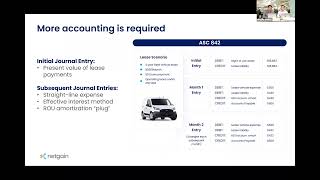
All right, so let's talk about what actually changed here. The big point here of discussion is the fact that we can no longer play games like we were able to under the old leasing standard where you can keep leases that have a large liability off of the books. So we're going to see, you can see on this diagram here, all of these off balance sheet rights and obligations are now moved onto the balance sheet classifications. Didn't change significantly. Something that was a capital lease is just going to be a financing lease. Operating remains an operating lease. But the big impact again here is no more playing games. So let's actually take a look at what the impact really is here on your journal entries. So under 840 you can see here a very simple lease, three year vehicle lease, $500 down, $500 per month payment, zero down, basic operating lease. It was a pretty simple entry, should have been straight line, still under 840. But a debit to your vehicle, expense credit to your payable. You could easily set this up as a recurring journal entry, not have much to worry about. We take a look now. Under 842 though, you can see we went from two basic lines to quite a bit more here. So now we've got this massive gross up to the balance sheet. Again, this was only $500 a month for three years and we have over $16,000 impact on the balance sheet. If we take a look at month one and month two as well, one of the more challenging changes here for those that were booking these entries is you're going to see that your lease liability and your right of use asset amortization entry changes month over month. So you're still going to have your debit to your lease expense and credit to your payable, but you're going to have your lease liability debit every month. That's going because of the effective interest method that we're using. And that right of use asset accumulated amortization entry is going to be a plug figure. Good news here is that 90, 95% of the work to become compliant with 842 happens now. So once this is all said and done and hopefully the software we're providing here is going to make this way less painful than you're anticipating, you get that done and then it's going to be fairly smooth sailing going forward. All right, so we're going to turn here to our panelists, Kelly and Marie, and just want to hear from them a little bit. We'd love to know what your clients have been doing to try to prepare for 842. And let's go ahead and start with Marie here.
Yep. So generally our clients haven't done a great job being prepared. Many of them seem to think the standard is going to continue to be delayed, although I've assured them many times the standard won't be delayed. But for my clients that are preparing, you know, I'm having them start by just getting a list of all their leases ready so we know like what population of leases we're working with and then talking them about to them about what type of solutions are available once they have those leases ready.
That's great. Kelly, what are you doing to try to help educate your clients? Because I'm assuming it's the same for you. Probably a lot of your clients aren't necessarily very prepared. What are you doing to try to educate them?
Yeah, our story is very similar. Almost none of our clients have, you know, been proactive in preparing for it. I think less than 1% of them have so far. But we're trying to make sure we get the guidance in front of them, which we've been doing for the last few years, kind of like Marie said. And, you know, it's not going to be delayed anymore. So this is what's going to happen. This is what's going to look like. Are you talking to your bankers or your investors? Do they know that it's coming as well? And I think that's something that the NetGame team has done really well. There's a lot of tools and, you know, one pagers things where the client doesn't have to read pages and pages of guidance on what's going to change.
Great. Thank you so much.
Thank you. And one thing I failed to mention is we are open for questions. If you want to just toss any of those in the chat feature, we will be monitoring those and we'll open up things for a Q and A to both our panelists who are using the software as well as Caleb and I here at NetGain to help with anything you might need relating to 842 and the software or to ask about panelists experience. So go ahead and toss those in the chat box if you have any questions come up. We wanted to touch on some of the Entity policy elections that are available to companies and also discuss what we're seeing in the marketplace here at Net Gain. I mean, much to your benefit and our dismay, we are spending all of our day worried about lease accounting. We're experiencing a lot of policy elections that our clients are using or not using and have lots of detail around those stats. So we'll start talking through these and discuss again what we're seeing in the marketplace. The first is the short term or low value leases. Now this is a big one that's typically elected across all of our client bases. And what this does, it allows you to leave off the balance sheet any short term leases, meaning leases with periods of 12 months or less or low value leases. And in typical FASB fashion, they did not give a bright line dollar figure of what that low value is. But what we're typically seeing is companies utilizing the same fixed asset capitalization policy. So sometimes that's 5,000, 10,000, whatever that might be. So that's an easy way to keep some of those immaterial leases off the balance sheet. Next is not separating lease from non lease components. And I'm going to read from the slide here. It says a lessee may choose not to separate non lease components from lease components and instead to account for each separate lease component and the non lease components associated with that lease component as a single lease component. Now, there's lots of components, there's a double negative there. So I like to just give an example to illustrate this policy election. Let's say a company has a leased office space that they're paying $1,000 a month for. 900 of that is outlined in the lease as base rent and $100 of that as CAM charges. If you utilize this policy election, you can just combine those two charges and record your lease payments as $1,000 a month. Where if you don't elect this policy election, you have to separate those out and do a standalone selling price analysis on what that CAM charge actually is. Just because the lessor says it's $100 fixed fee doesn't necessarily mean that the standalone selling value would be $100. So because of that analysis that has to take place, we're typically seeing this one elected and just combining those two charges. Next is our discount rate. Private companies have three options to choose for our discount rate when we discount minimum lease payments to get to our present value to get our right abuse, asset and lease liability. There is a hierarchy around these three options. So I'll start with from the top and work my way down first is the rate implicit in the lease. And this really represents the profit margin that the lessor is going to make over the lessee on the life of the lease. Because of that, this is typically not stated in the lease and hard to figure out from the lessee's perspective. So let's jump down to number two, which is the incremental borrowing rate or the ibr. FASB defines this as the rate at which funds would be borrowed at to purchase a similar asset for the life of that lease. Again, this is one where the details needed to come up with that amount are hard to come by. And so we're typically not seeing that used for private companies because they're allowed to use the third option, which is the treasury rate that as simple as it sounds, is just pulling a Treasury from the government's website to figure out what a Treasury that matches the life of the lease would be. So a three year lease, you just pull down a risk free rate of a three year treasury and use that to discount your lease payments. This is what we're typically seeing in the marketplace for private companies. It's an easy rate to select, it's an easy rate to support. You can just jump to the Treasury's website and sure it has a higher balance sheet impact, but because it's a gross up to the balance sheet, meaning both asset and liability, this is what we're mostly seeing in the marketplace. Lastly on this slide is the portfolio approach. If you have a group of homogenous leases, you can elect to utilize the portfolio approach to account for a group of leases as just individual lease. However, we're not seeing this elected in the market as much as you might think because of the one and really the only downfall is that if you have to pull one of those leases out of the portfolio, it can become tricky to track that lease on an accurate basis going forward. So because of that downfall, this is not as commonly as elected as it might sound like it should be. Next, we'll jump to our transition reliefs. Now, these are one time transition reliefs that are allowed by private companies during this year of transition. The first is our use of hindsight. This has to do with the inherent nature of accounting being historical recording. So if an entity wants to elect this use of hindsight, they can use the benefit of now knowing what took place in the past to adjust the lease length and any impairment that could have happened to the lease asset. To give an example, today is November 14th and we're going to be recording the right of use asset and lease liability as of 1:1, 2022, if in October we decided to exercise a renewal option for another five years that we weren't certain to exercise back in January, if we use the use of hindsight, we can go back to January and account for the initial right of use, asset and lease liability as though we exercised that five year extension in October back in January. Now, because of the incremental increase of accuracy, this is really not one that we see elected on a regular basis. Sure, it's more accurate, at least commencement, but because this has to be applied on a lease by lease basis, it's not worth the extra analysis that has to go into every single lease on the lessee and lessor side by companies to get that extra accuracy. So we're not typically seeing the use of hindsight used as a transition relief, but the next the package of practical expedients is one we are seeing elected pretty much across the board. And as Caleb does a demo of the software today, he'll even show you how this policy election or transition relief is even built into our software because it is so unanimously adopted. And what this is is you have to elect these three practical expedients as a package. You can't pick and choose. But that's not a bad thing. There are three good practical expedients. The first is whether a contract is or contains a lease. There's no need to revisit contracts that have commenced prior to adoption date. You can just use the same analysis that took place of whether the contract is or contains a lease from 840 under 842 if this transition relief is used. Next is lease classification. The FASB has defined five new criteria that trigger the financing classification under ASC 842. But if you utilize this practical expedient of transition relief, you can just use the same lease classification from 840 as 842 for leases that commence prior to adoption date. So operating leases will just continue to be operating leases and capital leases will now be basically just rebranded to financing leases. Lastly, is our initial direct costs. The definition for what meets an initial direct cost has tightened up a little bit from 840 to 842, but the FASB allows us to just use the same definition from 840 under 842 if we elect this transition relief. All right, this slide illustrates what we're seeing in the marketplace. As both Kelly and Marie outlined, clients are not taking the new standard as seriously as they probably should. There's going to be large balance sheet implications associated with this new standard. And because of that lack of preparation this first year shown at the base here, auditors are likely going to be educating clients on this new standard and probably just sending over topside compliance entries. During this first year, lots of companies are going to just be relying on auditors, but hopefully going forward we will have clients owning that process and getting back to more of a standard audit where clients have ownership and are preparing the lease accounting entries and auditors are just reviewing. However, that doesn't have to be the case, especially utilizing software, we can expedite that process to get companies owning that process on a quicker basis. And as we walk through the software today, hopefully you see that it's not as bad as some might think that this new lease accounting standard is. Using software makes the process much quicker. Especially getting both firm and client on the same software can make the transition much more streamlined. So now I wanted to touch on the two sides of the product. We're going to be showing Net Lease for Auditors today, but we also have our Net Lease side which is the client owned and operated side. The two sides of the tool are really just that, two sides of a tool. Not two separate tools, but two sides that work together. On the left here we have Net Lease for Auditors that is built to audit any lease calculations from any system. Doesn't matter what ERP your clients are using. Net Lease for Auditors is cloud based and reports are generated just in Excel so you can review calcs from any erp. We offer this tool to firms for a flat annual fee, so I assume that most people don't know how many leases they're going to have to be auditing as of right now for the next year. Because of that, we offer our CPA firm side of the tool for that flat unlimited, flat fee for unlimited auditors, unlimited clients and unlimited leases. We also have access to our team of technical accountants and CPAs here at Net Gain for firms. They can tap into our resources, ask us how to enter certain leases into the software, or ask us what we're seeing in the marketplace when it relates to ASC 842. And on the bottom we see how the two sides of the tool integrate with one another. Clients can own and operate their side of the tool on their end and enter leases real time. And then auditors can see what clients enter on their landing page. And all this might make a little more sense when Caleb's actually demonstrating the tool. So you can put a visualization to what I'm describing here. But on the right with our Net Lease, the client owned and operated side, this is where clients can purchase access if they don't want to get hit with these giant top side adjusting entries come audit time. And they can get that transparency by owning and operating their own software, getting access to the tools, seeing what the implications are going to be on their balance sheet. We do offer that for free for any clients who have three or fewer leases to clients of firms who are also using Net Lease for auditors. After that, the client side of the tool is on a priced on a per lease basis and we even have discounts that we can further describe if you get in touch with us later for clients of audit firms. But then again on the base we see how the two tools interact with one another.
All right, I'm going to give Kasey a break here and let's actually jump in and look at the software here. All right, so the page I'm on right now is going to be the firm landing page. So again, if you're an auditor and you log in, this is what you're going to see. And just as Kasey mentioned here, this is a cloud based tool so you don't have to download anything to your software, to your computer. Just pull up the website here and log in. You've got access. So you'll notice on the left here that I've got a list of all of my clients. So only the auditor is going to have this view. Let's just click on one of these demo clients we'll use Casey's here. So if I click on this and take a look at his lease portfolio, this is now the landing page for an audit firm's client. So if you do happen to have a client that hops into the software and has their own instance, this would be their view here. So let's go right ahead and create a new lease. It's quite simple. Up here on the top right, I'm going to click on New Lease. Now this is your landing page to create a lease. We've tried to make this as simple as possible, but we recognize the first few times might be a little intimidating. So up here on the top right we've got this button called Lease Assistant. I'm going to click on this. And this is just a basic wizard to make it a little bit easier and kind of walk you through the process. So let's just call this Net Gain Office Space. Click Next here. And now it's going to prompt us to determine what type of lease we want to use. Default is going to be these four land equipment vehicles. In real estate, we've built a lot of features in here that allow for some customization. This is just one quick example that you can create custom lease types like servers and computer hardware. So we're going to call this real estate and click next. Okay, it's now going to ask me what our classification should be. So you'll see here that this little help box is larger than the last two help boxes we looked at. And that's because we recognize the there are certain fields that are going to be maybe a little more complex, easier to get caught up on. So we're trying to provide a little more guidance to help you understand. What should you be putting here? We're going to call this operating though. We'll come down here and now it's going to prompt us to enter our commencement date. We are going to assume that this is a lease that had existed prior to the standard 842 here. So we're going to use the commencement date here the same as the effective date. We'll click next and we're going to call this a five year lease. Okay, we'll click next. Now it's going to ask us what our discount rate should be. Again. This is one of those fields that we know can be a little more challenging. So you'll see that we've got a little button here that says this link. If I click on that, it's going to open up our help site. And I'll just briefly mention anything that we're touching on today here, including some of the technical guidance that Kasey discussed earlier that's going to be found on this help site here. So under our technical accounting section here you can see we've got this discount rate page. It walks you through the implicit rate ivr, the risk free rate and there's even a tool I'm not going to open it up now but would help you if you are calculating a risk free rate, help you calculate that and then be able to save that as support here. So let's just assume we're looking at a 1.5% rate for this particular lease. Click next. And it's now going to prompt us to add our payments. So let's step through that process. The software recognizes that our effective date and commencement date line, so no need to change anything there. And now we're going to add our payments. We'll say for this first year we've got $10,000 payments. I'll click next and it's going to Ask me what my frequency is. We've tried to anticipate any frequency you may come across here. We're going to use monthly for now. We'll click next. And now it's going to ask us if our payments change. So if you have escalating payments, this is where you're going to be entering those. Or maybe you've got first few months that are free. You know, you would have entered zero here in that. First we click yes here, click add a payment. And now we're going to add in our future years. All right, let's do 2024 here. And we jump up to $12,000. Click next next. And we're going to say, no, no more escalations. Okay, so that was not very many inputs I had to do here. I'm going to click Create and it's going to pull us up here, our lease schedule. So not a lot of work that I had to do here. Now, don't get me wrong, there's a lot of preparation that goes into this. You've got to have your lease agreements and make sure you've got all of your inputs. But once you actually get to this point, it's very quick to now have our lease schedule. So I'm going to walk you through this real quick, what this looks like here. Each row is going to represent a period. You've got your massive gross up, this over half million dollar gross up on our balance sheet, straight line lease expense here and our payments. We can scroll down here. We'll be able to see our escalation to $12,000. And then if I scroll all the way to the bottom, we can see that the liability and the asset have burned down. So pretty easy. And you've got everything summarized just like that. I want to give a chance for our panelists to just respond here to how this compares to how they've done this, you know, in Excel when they've tried to prepare this for their clients. Kelly, do you want to chime in here on how this compares?
Yeah, definitely. So when we first started, you know, trying to implement the adoption for lease accounting with our clients, we started by trying to build out an Excel schedule. And for anyone else who's done that, I mean, it takes a long time and even if your sheets are protected, you, you know, you want to make sure that all the inputs are correct. You want to make sure nothing's being changed and they've checked the outputs and the calculations. This is just a lot more streamlined. It's easier for our clients to use we don't have to teach them the Excels and the ins and the outs. It's very clear on what goes into it. And then they really like the, you know, you press the button and the amortization schedule generates. We really like the disclosure reports that come out. So that's just like step one is getting the inputs and amortization, but step two for the disclosures and the other information. You know, this is a central platform for all of that. So a lot easier, a lot more streamlined, a lot less cross checking and training.
Great. Thanks so much, Kelly.
That was even a little teaser for the disclosure feature coming up.
That's right.
Marie, anything to add here on the amortization schedule generation and the tool?
I was going to highlight the disclosure tool as well. A lot of people, I think, underestimate the new disclosures that are required and you might be able to build the amortization schedule reasonably well in Excel. But the disclosures, I think that tool's the best part.
Yeah, I'll echo that, Marie. You know, when I first joined the firm and I saw the disclosure package, I thought, oh my heck, I would have loved to have this back when I was doing consulting. Just saves so much time with that. Let's actually take a look at some of the reporting features as well. We've got up here some journal entry and disclosure reports. There's a lot that we can do here, and I'm going to show you each one of those. But I did remember one thing I want to show you real quick actually, on this page before we jump into those. So right now you'll notice that we're in draft status. This is an opportunity for you to come and make sure that you're comfortable with all the inputs. Once you do that, you're going to need to come in here and click Commence lease, though. And this actually tells the software, hey, we're ready to run reports. This is now a live lease. Now, in this first year, it's unlikely that you're going to have modifications necessarily, but I do want you to be aware that is one of the more challenging aspects actually of doing this in Excel. I've had to run these modifications before in Excel and it's not fun. So we've got this little tool here. I'm going to click Modify and lease and just show this to you to show you how easy it is to do this in here. All right, so we've got three different types of modification. An impairment, decrease in scope, and just a standard remeasurement modification. So I'm going to very briefly run a modification for you just to see how quick this is compared to doing it in Excel. So this was a five year lease. Let's assume that there was an early renewal option. It was not anticipated that was going to be exercised, which is why those two years were not added in originally to the schedule here. We're now going to say it ends in 2028. I have to set my effective date again. This is the date that the lessor and lessee agree upon the modification. Just for ease, today. We're going to assume that that date is today. And then the FASB states that when you run a modification, you now have to update your discount rate to reflect the new length of the lease here. So we're going to just make up one again, say it's 1.8%. We'll come down here and assume they've got one more escalation now in 2026, we'll jump this up to 14,000. Okay, so again, very few inputs I had to do there. I can click on modify lease here. This is going to load real quick and you'll be able to see immediately the impact of your modification on your schedule here. And we'll be able to see this also in the journal entry report that we're going to run right afterwards. Okay, so if we scroll down now here very briefly, I'll just Show you on 11.1 and 11.2. It split this line so we can see our additional gross up to the balance sheet. Got to scroll this over real quick here. All right, so you'll be able to see that we have a gross up on the balance sheet here of our additional $324,000 because of our new two years. And if I scroll down, you'll see that it burns down to zero at 84 months. So immediately you can see the impact of that modification without hours of effort here. Okay, so now let's actually take a look at these reports here. So we're going to start with our journal entry report. Now there's three type of journal entry reports here and we're just going to focus on one. Today we've got a go live long term, short term reclass, and then our lease activity. This report here is by far going to be your most commonly run report. So we'll take a look at that. You can do custom date parameters. We're just going to look at this full year. For now though, we've got some great customization I mentioned earlier, including some segmentation. You can set up here we've set up geography department and fund segmentation, but you can customize that however you'd like. You also have the ability to group entries into a single date. This is really helpful if you're a firm and you've got clients that maybe aren't wanting to do anything here for implementation. They're saying this is all on you as a CPA firm. You can check on this little group entries into single date button here. And what that's going to do is rather than showing the entire year's activity, it's actually going to summarize it into one single entry at the end of the date parameters that you've got here. So I'm going to uncheck it just so we can actually look at the entire year's activity. Go ahead and click submit on this and it's going to pull open our package here. Let this pull up and we'll show you how quick and easy this is to have your entries. All right, so we just created this net gain office space, but you'll see any lease that you got in your portfolio are going to be summarized here. So let's just open this up. All right, so right here we have got our initial balance entry. You'll be able to see here. Got a debit to the right of use asset, credit to the lease liability. Your massive gross up of again over half million dollars for a short five year lease here. Your first month's entry is just going to be right above here. Highlight this so you're able to see it as well. Debit to your lease expense, debit to your liability, credit to your amortization of your rou asset and credit to your lease payments. And you can scroll down month by month and you'll be able to see this. I also want to show you though real quick. When you make a modification, there's also going to be an entry here for that additional gross up. So very, very simple here to be able to have a nice clean journal entry report. You do have the ability again just another example of customization to add actually account numbers and custom account names. So whether you are a client or a firm user here, you, you can set this up so that when you actually need to upload this journal entry report, it's already mapped to your gl. Okay, let's close this out here real quick and let's take a look at our other report. So let's look at our disclosure reports here. You'll notice when I pull this up it's going to be very Similar format. I'm going to select all of them so we can look at the full disclosure package. But you can choose individual disclosures if you want. All right, so this is where we're going to look at the exact same formatting. We'll use the same dates here and you can again filter on some custom segmentation. Well, let's just run this report and take a look at this. All right, let's open up and I'll.
Point out that all of the quantitative footnote disclosure requirements under ASC842 are included here in our default disclosure report.
Great. So let's just look at this real quick and I'm going to show you the formatting first. But you'll notice at the top left here we've got three levels of grouping. The way that we've set this file up for you is if you click on this very first grouping, it's going to summarize the data on each tab here by what actually needs to be disclosed in your footnote disclosure. So I submit that I close this up and now you can copy and paste this and drop into your footnote disclosure. Let's open this up just so you can see what's contained here. So just basic supplemental cash flow or balance sheet info. Our next one here on the scan the lease maturity waterfall. You'll be able to quickly see the next five years, plus your thereafter total lease payments, your interest by lease here, and then your total lease liability. So this bottom number here again is going to tie out to the balance sheet. And again if I just click up here, it's going to group it and there's your disclosure. Let's just quickly step through each one of these. I don't want to spend a lot of time on them, but we've got our supplemental cash flow information disclosure, the components of your lease cost and impairment report, short term lease census, and lastly your weighted average term and weighted average rate. Now these ones, I mean, it's not like we're doing anything super complicated here, but if you've had to do this for a large lease portfolio, you know that this can be painstaking to have to do these calculations by hand. So it's really nice to be able to have this done automatically here. And we can expand and see lease by lease here, all of our numbers and we can summarize again for disclosure. So really, I, I know that both Kelly and Marie touched on this. This was instantaneous put together here. And you don't have to do any manual work here to be able to Pull these together. So a huge time saver. All right, let's close out of this here. So we took a look at just what your landing page looks like, what the landing page looks like for a user, like a client. How to add a lease, modify a lease, run basic journal entry reports and disclosure reports. There's really. We've tried to make this as simple as possible. There's so much that this software can do. But we wanted to show you here today. It's very, very easy to use and very quick to have your schedules done. I'm going to pull this back up here and hand things over to Casey.
Thanks, Caleb. So, just a summary of the way the information gets into the software tool. In the middle we have Net Lease for Auditors, which is the tool we just viewed. So either a, your clients have gone in and they've decided to purchase Net Lease because they want that transparency. They want to be able to understand what this is going to do to their balance sheet. They've entered leases themselves and they auto populate into Net Lease for Auditors that you can see on the audit side as your clients enter those leases. Or on the alternative down below, auditors enter leases into Net Lease for Auditors. So the same way that Caleb just entered a lease is the other way that information gets into the software all in one centralized location. We do have some onboarding and support options. We, like we mentioned earlier, we do have our biggest takeaways, our transition support, where you have the option to have access to a team of technical accountants and CPAs for how to enter leases into the software. Like, like we just saw, the software makes this pretty simple, but there's still some information you need to know what to put into the software. And sometimes that can be tricky. Just a couple weeks ago, we had a client come to us and say, hey, there's this large prepayment option that our client could make with this lease annually, or they can pay full price but pay monthly. How do we enter this into the system? We were able to walk them through what types of lease payment information they need to enter for that particular lease. And again, these slides are going to be available. We'll send them to all attendees today, so you'll have this for reference going forward.
All right, so the remainder of time, we want to have some time for our panelists to be able to answer some questions. And it's also going to be some Q and A for you. So any of you have had any questions throughout the. Whether it be about the standard itself or about the software that we've shown, or if you again have any questions for our panelists, now will be your chance to ask those questions. So we'll start with some questions that we've got for our panelists and then we'll go from there. So our first panel question here for both Marie and Kelly is just how has having, you know, both sides here, an auditor and the client, have access to Net Lease, impacted the way that you're getting ready for the end of the year here? Trying to get compliant with 842?
I can take that one. For us, it's really helped from a staff efficiency standpoint. We have about 50 different staff on our team. So rather than me having to train staff in three or four or five different types of software, we train them in one software. And, you know, our clients will be using that software and we'll also be using that software as well.
That's great. Thanks. I don't know, Kelly, anything you want to add to that?
No, I mean, I really would just echo that. I think having the continuity, you know, from the staff to the client. And I also, you know, having our clients really learn how to use the software, which I think is another, you know, great aspect of it. So they're kind of taking that ownership of getting their inputs into the software and we can check it on the back end.
So.
And then when they have questions, I can jump in and help them with that and see what they're doing on my end as well. So I like being able to do that and work with them.
That's great. And that, you know, that's a feature we hadn't even touched on that there's an audit trail function in this software. So as an auditor, you can quickly jump in and see what changes have been made, and it allows you to be able to advise your clients even better. I wanted to further ask, and we've touched a little bit about, on educating clients here on the new leasing standard. Either of you, Kelly or Marie, I'm curious to hear, how do you feel like your clients are. How well are they grasping the significance, you know, the big impact that this standard is going to have on them?
I can start this one off at first. Not at all, you know, and that kind of goes back to who's adopted it. Right. We keep saying it's going to have an impact, it's going to have an impact. And then, you know, a little bit more this year talking to bankers, investors or users, you know, this is what it could look like on your financial statements. You know, and for some of them, it's tens of millions of dollars. Right. That are going to be hitting their, their financial statements. So it's really, it's really important for them to know, like, the breadth and depth of what their lease account is going to do.
Yeah, that's great, Marie, anything you wanted to add on to that?
Yeah, I'd agree with Kelly that we've made a lot of efforts in the last year to try to educate our clients. We've had a couple different webinars. We've also created some handouts. And what seems to make the most sense to clients is putting together an example financial statement. So we've actually put together an example that shows like, this is what your financials look like or sample financial before, and this is a sample financial after. Getting them to like visualize where it's going to be on the balance sheet and then also visualize how, how it affects some ratios and debt covenants has really been the most impactful thing we've done.
That makes a lot of sense. And I'm glad you brought that up because I was actually going to ask you, Marie, like, do you feel like having a tool like this that you can very quickly create an amortization table, just a, you know, a demo one here, fake lease, is that going to help you, you think, educate your clients and help them kind of grasp the gravity of, you know, this impact?
Yeah, I think so. I've shown a couple clients, you know, the tool and how quickly it is to generate the amortization and how quickly it is to just like quantify the numbers. So I think the tool for sure has been helpful.
That's great. Thank you. I would be curious to hear from both of you on this one. What prompted you, both of you and your firms to explore a software solution versus just sticking with Excel. You know, you're bright, you're coworkers are bright. Why'd you decide to use software instead of just sticking with Excel?
I think kind of going back to what we've talked about a little bit, but really streamlining the process. So our staff know, you know, we're all in one, one software in one area. They're educated on the inputs and the output. Same with our clients, having the transparency between our clients inputs and work and leases. And our team, and I think I mentioned we tried Excel, we actually looked at a couple other softwares too. But finding something that made sense for our team, some Net gain has a great support team. So our clients have questions and they can ask us or they can reach out to you guys. I think that's something else that's really important in a software platform for the leases. So I think kind of bringing all those aspects together was why we really wanted to have software. And then I guess finally a tool where our clients can kind of take this on by themselves going forward. We didn't want to really have them being relying on us every year to help them generate these. So I think that's the biggest thing.
Yeah, that makes a lot of sense.
We kind of saw this like we see fixed assets. A lot of our clients have a tool to track their fixed assets, and we help many of our clients with their fixed assets. But many of our clients also do their own fixed assets. So we were really, from the get go trying to find a tool that would be easy to use, like our fixed asset tool, and minimize the number of errors. We've noticed how many errors happen when clients use an Excel file for fixed assets. So we imagine there'd be just as many errors in a lease file that would be in Excel as well.
Yeah, that makes a lot of sense. I'm curious also to hear from both of you how I know you're early on here. A lot of your clients, you're still just trying to educate, but as you're starting to have these conversations, do you feel like your clients have a good handle on knowing even how many leases they're going to be dealing with here?
I can start this one. I don't think so. We're very much in the fact gathering stage with many of my clients. I requested that most of them, especially ones that have multiple locations, they're the ones that seem to have less of a grasp on their number of leases. Like reach out to each location, the office manager, the person in charge of those locations, and ask them to gather every vehicle, copier, printer, forklift, you know, in addition to the real estate lease. So I would say generally, no.
Yeah, our experience has been similar, I think gathering the information and getting the leases into place. We also have a lot of clients with related party leases with a lot of different facets of the leases. So really getting those all into one spot so we can help them identify the different components of it and if they need to update their leases so that.