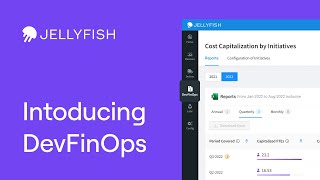
The video is a product demonstration aimed at engineering leaders who struggle with answering finance’s question about how much software development effort can be capitalized. It introduces Jellyfish’s new R&D cost reporting feature within its DevFinOps platform, which automatically correlates HR and financial data with engineers’ hourly effort to calculate capitalizable software costs. The demo walks through the Cost Cap reporting dashboard, showing how users can view historic and current capitalized costs by month, quarter, or year, filter by date, see metrics such as full‑time‑engineer equivalents and total cost, and download reports to Excel. It also explains the Configurations tab where initiatives can be marked as capitalizable, triggering automatic updates across reports. The presenter points viewers to additional resources—a explainer video, a launch blog, and a case‑study on Optimizely—and encourages subscription and site visits for more information.
Chapters
If you're an engineering leader, you probably aren't thrilled when your finance team asks you, "How much of our software development efforts are capitalizable?" Now you're faced with long evenings spent in spreadsheets. This isn't what you signed up for when you became an engineering leader. Well, put your calculator away because Jellyfish has you covered. Introducing R&D cost reporting, a new feature of Jellyfish's DevFinOps solution. By correlating financial HR data with an hourly understanding of the effort of every engineer is dedicating to each project, Jellyfish can accurately break down the cost of software development, automatically generating reports that can drastically speed up the process of software capitalization for finance and decrease the burden on your engineering team. Wanna know how it works? Let's take a look. This is a Cost Cap reporting dashboard where you can look at all your historic and current capitalized cost for the year. You can view the period of capitalized cost reports on a monthly, quarterly, or annual basis. Or refine your search even further using the date picker. The dashboard displays the status of the report, the period it covers, how many full-time engineers' worth of effort was capitalized, and total cost that effort represents. It also displays when the report was created or updated. You can download all the financial reports for a given period to Excel using the button here. Clicking into the Configurations tab, you can categorize which of your development initiatives are capitalizable. Jellyfish will automatically detect the changes to capitalizable statuses of these initiatives and cascade the update across your financial reporting. Heading back to the Reports tab, we can see that Jellyfish has flagged their statuses as updated. That's all for now. If you'd like to learn more about why cost capitalization is important for engineering teams, watch our video explainer. We've also written a feature launch blog as well as a case study on one of our customers, Optimizely, who've been benefiting from the feature. You can check out all of that in the links below. Be sure to subscribe to our channel for more videos like this and visit jellyfish.co to learn more. [MUSIC] [MUSIC]