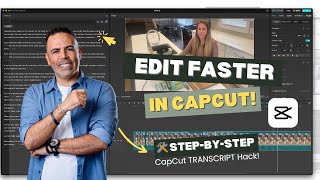
CapCut's Transcript Edit feature auto-generates a script with timestamps, letting you click to remove silent gaps instead of manually splitting tracks. A 7-8 minute video can be edited down in minutes. You can also search keywords to jump to specific moments and trim repetitive sections.
Chapters
Hello there! This tutorial will save you a lot of time on video editing, especially for long-form videos, if you use this new feature in CapCut. All right, so let me show you how to use it and how to benefit from it because it's really amazing. Let's move this. All right, I have a video here. It's like a 7 to 8 minute video for my client, okay, where it has a lot of spaces or scenes I need to remove. So first step, what I do, I'll go to the video here and add it to track, okay? So I'll press on the plus. The video will be here on the track like any, like, what you usually do. Okay, now before start editing this, okay, before start cutting the scenes, I recommend you, if you want to make any general adjustment for the whole track, like if I want to raise the audio a little bit, I can just drag here the dB up, okay, make the whole sound, because it it needs just a little bit of adjustment, like 10 to— yeah, 10 dB. It can't hold up to 10. Here is good without going red on this, so we're good here. I, I adjusted the audio, and now I can also adjust the, the image if I want the video. Okay, I can do auto adjustment for the color. A little bit color match. I don't need to do color match actually, color correction, just to make adjustment to the whole video. So now I'm ready to edit this and remove all the empty spaces. Okay, you see here there's a lot of empty scenes that we don't need it. So instead of going and using the split to cut each scene, what I can do, I can simply press on the track here, on the video inside the track, and go here, use this Transcript Edit feature. It's free for the Pro account, it's free for non-Pro account. You have limited time of using it, I guess, but it's worth it to, to purchase the Pro if you edit a lot of videos for social media. So what I'm going to do, just to press it here for one time and look what will happen. This transcript window will open and it say edit videos based on scripts. So now it's transcribing, it's taking a minute to do the transcript, to do the script, and once it's done, I will be able to edit the video based on the script. So look what's happening here. This is the, the, the whole script for the video. Okay, first of all, you can copy this. That's a good thing. You can copy. And the second thing, look here. This is the space, 3.7 seconds. This is the 3.7 seconds in, in the beginning of the video. So what I would do, if I press this, remove, it will remove it from here. Okay, the second space is like a second and a half. I can press on it and remove. So now it removed it. The third one, same thing, remove. Fourth one, 3 seconds, remove. Then 4 seconds, and then 4.7 seconds. So now what's happening the video here, it's cutting the scenes. Okay, I can continue. It will take me like 2 minutes to do the whole things. Okay, continue. This is another 2 seconds, 3 seconds, 2.5, and so on. All right, and you, you can go through all the video and you will see that now this video, all the spaces been removed. And also, if you want to jump to any part of the video, if you're looking for, for example, this word magic, okay, I'm sure the cursor here go to it.
Look, 10 to 30 minutes. At first you might notice a quick trip to the restroom. Don't worry, that means the magic is working.
You see? So the magic—
the magic is working.
So you can go directly to that word also from here if you're looking for something specific you said in your video. So go ahead, give it a try. Don't forget to remove all the spaces. Okay, then watch the video and choose the scenes that you want, especially if you're repeating yourself in some scenes. You know, this is a very, very useful tool. All right, so make sure to do it, give it a try. It will save you a lot of time. And if you have any questions, uh, please feel free to comment, uh, below.