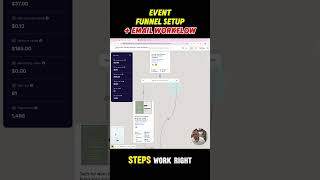
A funnel for webinars and masterclasses starts with a free opt-in page offering a VIP upgrade. Non-upgraders skip straight to thank you, while upgraders hit checkout. Automation tags registrants by event, sends a confirmation email, then reminders at 2 days, 24 hours, 1 hour, and 5 minutes before the event.
Chapters
Hello coaches, I want to share with you this question I always get: what is the best funnel setup for an event or opt-in page for an event or a masterclass? So what I do, and it works great with me and with one of my clients, is setting up an opt-in page with a free-to-join option like this one, opt-in page with the free-to-join option, and an option to, uh, for VIP upgrade. So, uh, if they decided to upgrade to VIP, so I set up here a conditional split step. So if they say yes for VIP, they go to the checkout page here, and if they say no, they simply go to the thank you page here. Okay, so So this is a very simple setup we can use. We can have this on ClickFunnels or Mastermind Business Hub or any other platform you're using if it supports funnels. So this is how the 3 steps work, right? Opt-in page, upgrade, VIP upgrade, where checkout, they do the credit card, and then the thank you page. Now for the workflow for that, you can set up the trigger when someone registered to this event, you tag them, right, to know which event they are opting in, and then get notifications, send them a confirmation email, wait 2 days before the event, send them a reminder email, first reminder email, then wait 24 hours before the event, send them a reminder email, then wait 1 hour before the event, send them 1 hour before and tell them we're starting in 1 hour, then 5 minutes to tell them that we are live. This is the best setup that I do, and it's working great for me and for my clients. Let me know if you need any help with that and comment funnel below.