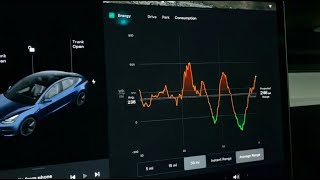
Rob Greenlee shows how to use Tesla's Energy app on a 2022 Model 3 to track battery usage and efficiency. The app displays real-time consumption graphs, range data (around 246 miles), and tips on regenerative braking and climate control. It also logs idle metrics like screen-on time while parked.
Chapters
Hey, back with you in another episode of Behind the Wheel. My name is Rob Greenlee and I'm in my Tesla Model 3. This is model year 2022, so it's a fairly new car. It's only got about 10,000 miles on it, but I wanted to show you kind of what I've been noticing. If you go in here and you click on this little green icon in here, that's your stats for the vehicle. So if you're a Model 3 owner You can get in and see kind of how your car is performing around its, its miles and how, how efficient it's using the battery. And it will show you kind of as you're driving where your energy usage is going. So if you want to, to see what that looks like, you can just go in here and you can see like, like the last time I was driving, it was like 5.8 miles, and, and it has like a consumption versus trip projection. So, and if you come up above, up here, this large graph up here will kind of show you your, your last trip. So I used about 5.3 miles, and you can see, um, the progression of the battery usage of the vehicle over that time. And it also has here, it says range tips down here. It says brake pedal use cost you 0.2 miles. Use our regenerative braking where appropriate to improve your efficiency. That just means just don't use your brake pedal, just kind of coast to, to a stop is, is what they recommend here. And then this other list down here has, you know, your climate controls and how that may impact the battery consumption on your vehicle too. So So I appreciate you being here, but that, that's a little kind of behind the scenes of your software that you may not have noticed. So if you click up here to park, it'll actually tell you also your, your screen time and other data as you're just sitting in the car. And then this button here is your, is your consumption of your battery and how that varies over like a 5-mile, 15-mile, or 30-mile kind of trip. And then it can also give you instant range too, so how far that you'll be able to drive on your current battery that you have right now. And your average range, uh, looks like on my car is 246 miles. So that's, uh, that's kind of a brief run-through of the Energy app that's on your, on your Tesla vehicle. So thank you so much for tuning in. This is Rob Greenlee, and I'll be back with more videos on the Behind the Wheel series, um, all about the Tesla vehicles. So thanks for watching. Bye.