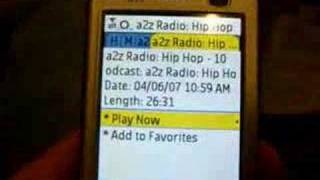
In this video Rob Greenlee, representing Melodia Mobilecast, demonstrates MobileCast, a Java‑based mobile podcasting client running on a Nokia N73. He walks through launching the app, loading the podcast catalog from Singular’s media net, and using core features such as keyword search, favorites, bookmarking, and streaming playback. The demo highlights the app’s support for high‑fidelity AAC+ audio, a catalog of roughly 9,000 feeds, and exclusive music podcasts (e.g., A‑to‑Z Radio, KEXP) that are streamed only (no download). Greenlee showcases the UI – album art, buffering indicator, volume control, pause/play via the phone’s center bar – and explains how the app remembers playback position and adds items to a user’s favorites list. He enumerates the breadth of content categories (music, comedy, news, tech, business, sports, weather, etc.) and lists partner sources such as MSNBC, BBC, AP, New York Times, MarketWatch, CNET, Fox, and others. Distribution details are provided, noting that users can obtain MobileCast via the mobilecast.com website or through carriers like Cingular, Altel, Rogers (Canada), and 3UK, with more operators planned. The video ends with a call‑to‑action to try the beta client.
Chapters
Okay, here is a little demo of MobileCast. It's a mobile podcasting listening application. It's actually a Java application that runs on many, many cell phones. The phone you're looking at here is an N73, and I've set up a shortcut link, as you can see right in the lower corner, for MobileCast. So I can listen to podcasts pretty much anywhere I go. I click on Mobilecast, the button there, and it should load here in a second. There's the— application's launching. The first thing that the Java application does is it makes a request on the server to load a new catalog of podcasts. And I just need to connect to Singular's media net to get access to the catalog. So it should load here in a second. I don't know if you've ever listened to a podcast if you're watching this video, but there's thousands and thousands of audio content online. And very soon, Mobicast will actually support video too. So what you see— and this is the latest version of the Mobicast beta that you can get. It's the beta 5. And it actually supports what we call a higher fidelity audio. It's basically an AAC+ audio codec, so it plays at very high quality. So what you see at the top there is My Favorites and enables you to create your own favorites list of podcasts. And it also enables you to search by keyword. We got about, oh, about 9,000 podcast feeds in the database. So there's lots to choose from, and you can search by podcast or by episode to get the podcast that you're interested in if it isn't already in the default catalog, which is presented here. The top category is music, and we have a bunch of podcasts in there from sources like KEXP and A to Z Radio, which is actually published by Melodia Mobilecast. So these are exclusive podcasts that are only available in MobileCast and they're music podcasts essentially. So let me back up in there. They're about half hour long and we actually put these out on a regular basis so people can get access to really high quality streaming music. So let me play the latest hip-hop version. It's about 26 minutes long. It's dated 4/6 and I'll play that for you. Now we have disabled the ability to download this. So it is only a streaming experience right now, but you can add it to your favorites and get to it on a regular basis. And it has a terrific selection of hip-hop songs. You can see the red bar going across, that's buffering into the phone. And so you can hear it here. So it displays a little album art, but you can listen to the audio a little bit there. So you can control the volume up and down with the center bar on the phone here. To actually control the volume, you can actually even pause it if you want to just by pushing that center bar on this this particular phone. Most phones work that way. So you can turn it back on again, start streaming, and if you wanted to actually check out a different podcast, you can actually do that too, and it'll actually bookmark it for you. So it'll remember where you left off. So you can also add it to your favorites list. So if you really enjoy the Hip Hop Podcast, it just goes out and makes a request on the server. It adds it to your list of podcasts that's then available in your phone. So if I back out here and go up to my My Favorites. Now I will have to reload or refresh is the term we use the podcast catalog, and once I do that, then it will show up in my My Favorites list. So it's really set up the next time you load the application, that podcast will be there. So here comes loading in, and it should show up at the top up here. So you see A to Z Radio Hip Hop. So you come in there and you can select from A whole bunch of episodes too, so you can go in here and click more episodes. Let's say you listen to all 3 of those episodes, so there's a bunch of half-hour-long songs basically. There's usually probably 6 or 7 different tracks and they're very popular music, so it's, it's really cool. And so we have a variety of categories. We got comedy, entertainment, news, Nashville Public Radio, which we have an agreement with, and the MSNBC folks, we also have an agreement with them to provide content. We also have tech, business, sports. We've got a good selection of podcasts from a variety of— MarketWatch, New York Times, even Twit, This Week in Twit with Leo Laporte. And we even have a daily audio weather forecast for the United States, and CNET Radio. And, you know, there's some really, really good— you can see it on the screen here— really good podcasts. I've gone through and made sure that we have the very best. And we also have some sources, some podcast sources from folks like Fox and BBC and the Associated Press and around the whole area of entertainment. So there's a lot of stuff in here to keep up with 24 if you're a big fan of 24, and even The Simpsons. And the MTV Daily Headlines is also available, BBC, and even Real Time with Bill Maher. So there's, there's a bunch of stuff in here. Like I said, there's plenty of other tracks in here too. All Songs Considered is another very popular podcast. We have country music in here, we have other hip-hop, we have the indie feed source, Martha Vineyard Radio, New York Times. So you can kind of see, and even Tektronik music and the Fader magazine music podcast, which is very good. So anyway, I appreciate you watching the video. I know it's gone a little long, but I tried to give a, a really good demo of how MobileCast works. And all you have to do is go to our website at mobilecast.com, and actually just drop the E from the word mobile, and you get right to our website. And right on that front page, you just click and get the latest hi-fi rock and music client and send a little text message to your phone, and you can download it into your phone. Or you can get it through, um, Cingular, um, Altel, Rogers in Canada, uh, 3UK. And we're going to be rolling out more operators here in the future. So thanks for watching the video. I appreciate it. And, and give us a try. My name is Rob Greenlee, and I'm actually with Melodia Mobilecast up in the Seattle area. Bye-bye.