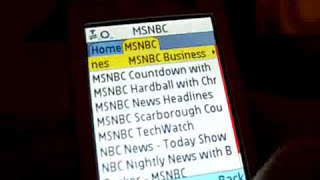
Rob Greenlee demos MobileCast, a podcast app for Nokia N73 phones in 2006, with 7,500 titles from NPR and NBC. The app streamed or downloaded episodes over GPRS, synced playlists to Melodio.com, and let you resume where you left off. It was dead within two years.
Chapters
My name is Rob Greenlee and I'm with Melodio MobileCast up in Seattle. I wanted to give you a quick demo of MobileCast here, and that's at melodio.com or MobileCast. But what you see on the screen here is a request to get a fresh catalog, so I'm gonna hit yes and yes again, and I'm going through the Singular MediaNet with a Nokia N73 phone right now, so When I click yes and see if I can get a little sharper here, it should be loading the catalog right now. It's— this is a comprehensive catalog, default catalog essentially, and it's loading through the Singular MediaNet, which is GPRS, which is essentially dial-up, but it should come in here. And this is— this gives you the ability to listen to podcasts right on your mobile phone. What you see at the top is New Today, and what's in that is a list of the most current episodes of the podcasts that are in the default catalog. Now you can do a search on MobileCast or within MobileCast to find your favorite podcasts. We have about 7,500 podcasts in the database. So let's just go to the first one here. Let's go to the AP News Headlines for today. I'll just click on that, and what you see here is some metadata. See, it's about 1 minute long from the 5th of January, and you have 3 options. You can listen now, save for later, which basically enables you to download it, or you can add this podcast to your favorites list, and it'll show up within the catalog here. And when we go back to the main screen, I'll be able to show you that. But to click listen now, it gives you a little player. And what it's doing right now is it's starting to buffer in, and right there on the screen there, that reddish-yellow area is the volume control, and you can control that with the little controller right in the center of the phone. I will go back to the player here and turn the volume down so you can hear me. But, so you go back to More, and what it gives you is album art. And some more metadata and some other controls where you can fast forward and go back and listen. Now if you get a phone call during this podcast, playing this podcast, you can take the phone call and then come back and listen to where you left off. So it's very powerful. You can pause the podcast right here too. So it gives you full control and it even bookmarks and remembers where you left off. So when you come back to it you can actually not have to start from the beginning. So anyway, let's hop out of here, go back to the main screen. We have podcast picks of the week. These are podcasts that we've selected as cool podcasts that we think people would have an interest in. So there's a little bit of a selection process that we go through to help you find the coolest stuff out there. So let's go back. In the My Favorites folder, which is what I talked about earlier, you can select any podcast from. So you can do a search of the 7,500 podcasts in our inventory and go ahead and add it to this list. We do have the ability to synchronize with Melodio.com. You can create an account at Melodio.com, create a playlist there, and get a little code from the mobile center of that website and enter that code into the application. And it will synchronize the two playlists between mobile and your website account. So it's, it's a very cool way to custom set up your application. So let's go back. We also have popular picks. These are the most popular podcasts within the MobileCast client. And then we have some content deals with National Public Radio and MSNBC folks also have areas within the catalog that have all their TV show podcasts. Which are very good. You can get even the NBC Nightly News with Brian Williams. Sometimes you get that even earlier than the TV broadcast. So that's basically— and then we have comedy, music radio, which is very popular, music podcast, horoscope, news, movies, TV, podcast, sports, business, technology, right down the line. And you can also do a search by keyword to find your favorite podcast. And refresh the podcast. And here's the link to web that I was telling you about earlier from Melodio.com. You basically get a code from Melodio.com after you create an account, enter it in here, and any podcast you add to your favorites list with Melodio.com gets added to your favorites list on your mobile application. So it's very cool. Well, thank you for listening and watching this video about MobileCast. Please go to Melodio.com, get the application, or go to Singular, Altel, Rogers, wherever you happen to have a wireless carrier that we have a relationship with, you can get it through them as well. Take care, thanks. My name is Rob Greenlee with Melodio. Thanks, bye-bye.