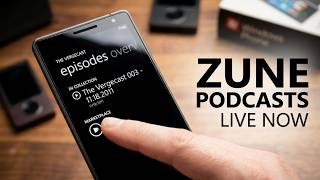
In this 5‑minute product demo, Rob Greenlee walks through the Podcast Marketplace that is built into the Music & Video Hub of Windows Phone 7.5 (Mango). He shows how the hub provides access to the full Zune podcast catalog (≈25,000 titles) via featured, top‑ranked, genre‑based, and searchable lists. The demo illustrates browsing, selecting a show, viewing episode metadata, and the two playback options: streaming a non‑downloaded episode or playing a downloaded one. Greenlee demonstrates subscription management – subscribing, setting a “keep only 1 episode” policy, and unsubscribing with optional deletion of local files. He explains the data‑plan constraints: episodes larger than 20 MB download only over Wi‑Fi, while smaller files may use 3G. Finally, he shows the automatic resume feature that restores playback controls after the phone is turned off or a call interrupts listening. The video ends with a call‑to‑action to share the demo with others who have not tried podcasts on the phone.
Chapters
Hello, my name is Rob Greenlee and I'm going to give you a quick demo of the Podcast Marketplace experience that's now integrated into Windows Phone 7 Mango, which is the latest version of the Windows Phone operating system. And let's, let's go into the Music and Video Hub, which the Podcast Marketplace currently lives. So you have the marketplace, which is all the content, all the 25,000 podcasts are currently available in the Zune software, the Zune Marketplace software on the PC, are now available directly on the phone. And then you, you have your own podcast collection. These are all the podcasts that you've downloaded to your phone currently and all your subscriptions. But this, if you want to find some new podcasts, you go into the Marketplace and you can see apps, games, music, and podcasts are right here. So you can browse and discover new content right here. So let's go into the podcast area. So what you see here is all— is a list of featured podcasts. Now these are the featured podcasts that are currently featured in the Zune Marketplace software today. You can get it right on your phone. And then also if you scroll over, you get the top podcasts. These are the most subscribed podcasts that are currently being subscribed to via the Zune software as well. So it really gives you the the latest and greatest and hottest podcasts that are available out there today, right, right on your phone. And then also any new podcasts that have been added to the catalog also show up in this list as well. So, and then we also have the full genres of all the different podcasts, all 25,000 podcasts. So if you go into like the entertainment category, you see all the comedy podcasts are listed right there. Audio and video, so you can scroll through and discover, or you can go down here and click this little button at the bottom down here to actually do a search for podcasts as well. So you can just type in, you know, the name of a podcast. So let's say I type in TED Talks. Talks. So as you can see in the search results, it comes up a whole list of different TED Talks podcasts you can subscribe to. So let's say I go into the business one and it shows up right there. You can see Bill Gates right there. And let's go into that. And this is the experience that you will see with every podcast that are currently on the phone itself. So you have a list of the most current current shows from that series, and then your collection view, which actually is a list of the podcasts that are currently on your phone. Now I don't currently have any episodes currently on the phone from this podcast series, but let me hop out and I'll go to one that I do, and we can see that more clearly if I go out to my my collection view, which is— this is the Music and Video Hub again. So you can see here podcasts. So this is the list of shows that I currently subscribe to and ones that have been downloaded directly to the phone. So you have that option as well. So let's go into Vergecast and I'll show you how that works. Okay, so you can see at the top up here there's the most recent episode that's been downloaded to the phone that's available, and then down here is like what you saw on that other screen. It's a marketplace experience which gives you access to all the episodes from the podcast feed that are currently available. So it's, it's really easy. So if I don't have this podcast and I am wanting to listen to it, I can do it one of two ways. I can click this little icon right here, this little play icon, and this is a podcast that's not been downloaded to the phone, but I can start playing it right away just by clicking that button. And it will actually start playing. So it's a streaming way to get to it, so you don't really have to always download the podcast in order to start listening to it. But I do have a podcast that's, or a, you know, the most recent episode that has been downloaded. And you can see if I click on, there's two ways to click here. There's one to actually start playing, which is that little play button, and if you want to get the metadata and then play So let's say I want to see what's in the episode, then I just click the text and it gives me all of the show notes and all that kind of stuff right from the podcast. So then at the bottom of the screen I can go ahead and click play as well. So that will start playing it right there. So I've got player controls up here that I can just hop out. I can also replay over and over again. There's some controls here too as well. So let me hop out and— so you've gotten a really good rundown already. So let's go into subscribe and unsubscribe. So, so let's say I want to unsubscribe from this podcast. I can do it right here on the phone. So I can unsubscribe and delete all episodes. So let's say I want to not do that. But it does give you that option to, to do that. But if I happen to want to go into a podcast and find something new, then I can just go in here and let's say I want to listen to some college basketball. So let me go in here. So at the bottom of that series it says subscribe, so I just can click subscribe and what that'll do is That will give me this page that I can adjust the settings. So let's say I want to only keep 1 episode at any given time. So that would be the most recent episode would be saved on the phone, and then I would just come down here and confirm that. And then here in a few minutes, it should start downloading to the phone because I have a Wi-Fi connection to to this phone. So there's a limitation through the wireless carriers that if the podcast file itself is larger than 20 megabytes, then it has to be downloaded over Wi-Fi. But if it's an episode that's less than 20 megabytes in size, and you don't really know that, then it will download directly to the phone over 3G. So that's a little bit of a kind of a data plan kind of issue. But it's hard to know right when you look at an episode how big it is to know if it's going to download. Really, you can only try and give that a try. So I was able to download that, so that should show up in my collection now. So you can see it up there. So I have an automatic subscription, so I'll always get the latest podcast file. From this series right on my phone, and then if I scroll over here, I can always get the overview and the album art right there from the show. So then the last thing I wanted to show you is that— so let's say I'm listening to one episode of the College Basketball Podcast, and let's say I need to pause it, I need to take a phone call or something like that, and that gets me knocked out of the user experience. I've turned the phone off. If I turn the phone back on again, you can see at the very top, right on before I've actually logged in, it actually gives me player controls for the latest podcast file that I was listening to before, and I can just click there and start listening to it. So it's really, really convenient to get access to the stuff that you just paused. That's the podcast experience on Windows Phone 7.5 Mango. I appreciate you listening or watching this demo video, and please let your friends know that this video exists. And if they're not currently using podcasts, go check it out and share it with your friends. So thank you, and this is Rob Greenlee.