Sachin Sharma walks through ProcureDesk, a procurement platform that handles purchase requests, approvals, purchase orders, and invoicing in one system. It connects to 200 vendor sites, automates three-way matching between POs and invoices, and offers over 50 pre-built reports for spend tracking and budget visibility.
Chapters
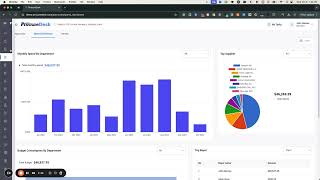
Welcome to this quick overview of procuredesk. Procuredesk helps companies automate their purchasing and accounts payable processes while integrating with their accounting system so that the data can be easily transferred between both the systems. What you're looking at right now on your screen is a purchase request dashboard which any employee can see where what purchase requests they have placed, they're buying office supplies, it supplies, or any raw material for manufacturing and so on. You can also track easily in terms of what requests are pending approval and with whom. So for example, if I want to see this request how it's pending with Mark, I want to send a reminder. I can easily do that from here. Now we made it super easy for the end users to create purchase requests. No need to fill in long forms in terms of entering data, copy pasting from different websites and so on. It's it's all baked in here. So we have punch outs enabled with close to 200 vendors where you can just easily navigate the website, pick what you want to buy and so on. You can also build your own catalogs if your procurement team wants to create a list of commonly purchased items that can be just added through the catalog and the end user can pick up a catalog and so on. The workflows are all enabled here, so approvals based on, let's say chart of accounts or amount or delegation of authority, whatever is your purchasing process that can be easily configured into the system and any other additional information that you need to capture within procuredesk can be added through custom fields. It also supports the ability to track the budgets so you can track how much money you have available, how much is requested, and what will be available after the purchase. Comments makes it super easy for you to kind of track or at least have collaboration within the system. So that's the purchase request part. Now from an approval standpoint, once you submit the purchase request, every approver have their own dashboard where they can see a list of all the items that are in their queue. You can easily open any request, kind of review it and then approve it from there. Whether it is you're approving a request for a new purchase or approving a exception that is processed for invoice or something like that. You also have the ability to kind of see your overall dashboard at any time as an approver, so you know where you are spending money. All the purchase requests, once it's approved, we automatically generate the purchase orders and there is a lot of tracking information available within procuredesk. We track the purchase order's Delivery, whether the vendor has opened an email or not. You can ask for vendor acknowledgment so you can actually track whether the vendor has actually acknowledged the purchase order or not. You can also track the delivery of the product. So if you have a tracking number which most of the vendors provide to us directly or whatever the case might be, you could just kind of track it here very easily, right? So that's kind of the tracking information and so on. Now, once the purchase order is delivered, you can also capture a receipt. And the idea behind a receipt is that you can capture the packing slip and so on, packing number, what quantity was delivered, all that can be easily tracked. And this functionality is also available through your mobile app. Now, in terms of once a product is received, you also have the ability to create or upload supplier invoices once the supplier invoice is uploaded. Within procuredesk, we can do the matching. So we have built in OCR for automatically creating the invoice from a document. We can also then match an invoice to a purchase order and a receipt and system can automatically check what is the problems. If it is missing a receipt or there's a price difference, it can identify that automatically and then routed to the right person for approval. All that process, very sophisticated matching process built in within the tool, you also have the ability to kind of see the reporting, right? So overall, from a management standpoint, if you want to understand where you're spending, with whom are you spending, it's all on your fingertips. Here you can see the spend history, payment terms by department, budget versus actual all that is available here. In terms of reporting, there are close to 50 plus reports that are already created for you. For example, if you want to track your accruals or you want to track your open purchase orders, all that is here. You also have the ability to create custom reports which is very straightforward. You just click on a button here, select for which document you want to create a report, select the fields that you want, arrange it the way you want it from a sequence standpoint, and then just schedule the report. It's as simple as this. So hope you find this helpful. If you need more detail about how procuredesk works with your accounting system, just set up a quick demo and we'll walk you through. Thank you.