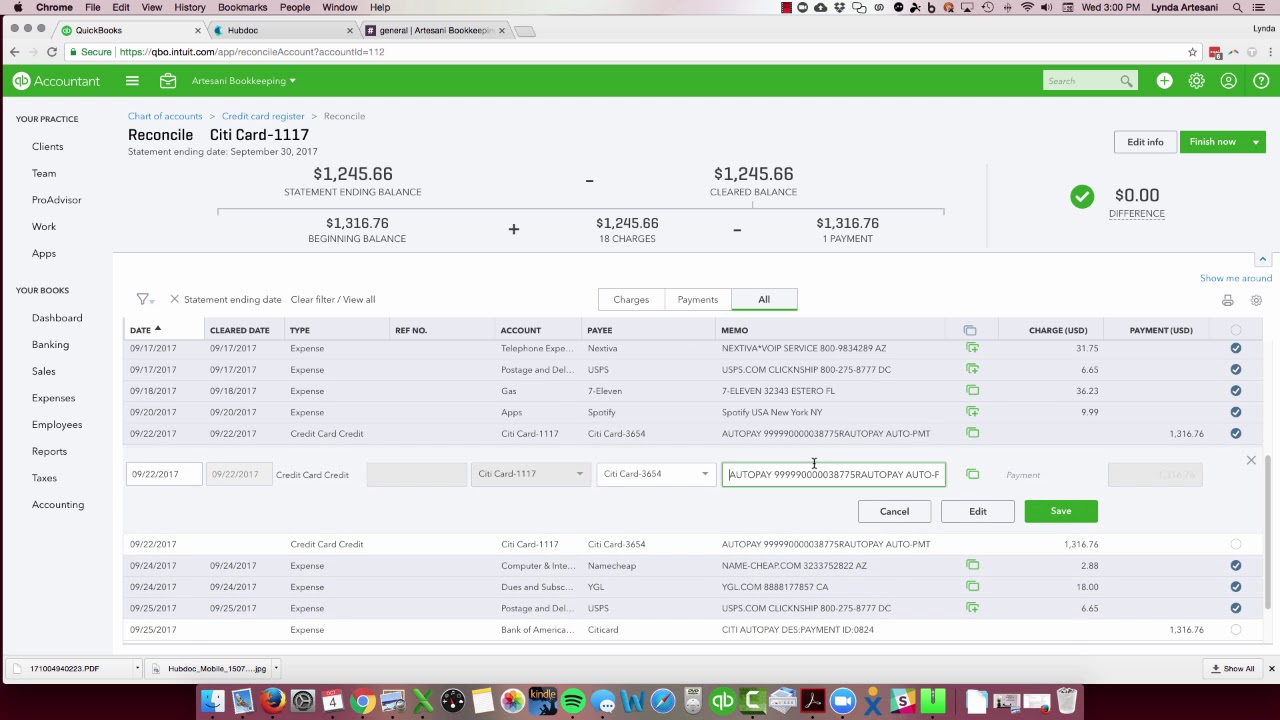
Linda Ardisani shows why duplicate transactions appear in QuickBooks Online bank feeds and how to fix them. Auto-rules and transactions downloaded on both bank and credit card sides cause most duplicates. She walks through verifying clear dates, deciding which duplicate to delete, and completing reconciliation without accidentally removing the wrong entry.
Chapters
Hi there, Linda Ardisani, Ardisani Bookkeeping. I wanted to go over how duplicate transactions can end up in your bank feeds. There's a few reasons for it. I'm still trying to figure out actually one of the reasons, but I wanted to show you, I've been seeing this in the community forum. I'll just bring one question up where somebody asked, they get duplicate downloaded transactions, and the answer from Intuit looks like Giancarlo. Community Support Specialist is that sometimes you can have an auto rule in place. And I have seen that if you have an auto rule that every time a QuickBooks payment fee, like the little 50-cent fee or the fee for your merchant account, comes in, what it does is if you have it set up to automatically go to bank feed, in the bank feed to go to bank charges, it comes in kind of pending. And if your auto rule is in place, it'll actually put it into the Into the register, and then when the payment settles into the bank account, it'll actually download it a second time. It will only match on the one, so you'll have these duplicate transactions. So it's a good idea not to make an auto rule for those particular transactions. Well, let's go to my bank account. So I actually have my, my credit card account here in place, and I'm going to reconcile. So as I come over here, I've already entered my ending balance here. And the date, so that's all in place. And normally you come in here and it'll match up perfectly, right? You've downloaded all the transactions and it should match perfectly to your banking. I'm off by $1,087, and I'll get into that a little bit later, but I wanted to show you the transactions. First thing I do is look here to make sure my clear date, everything's in within the range. The credit card statement ran through 9/30, so this cleared on the 28th. And it should be checked off, but if I check it off, it's going to throw this balance off by more. So I need to look on the statement to see if it actually did clear. And I can see right away the $1,087, but that also cleared on the 26th of September. So the 30th, you would assume that shows on your register, but let's take a peek and see if it did. So that was for Namecheap. So let's see if the $1,087 is on there and the $69.50. So we'll come down here. So here's the end of my statement. And there is no 1087. You can kind of come right through here and see there's no 1087. So I do need to take off the 1087 amount, which is going to reconcile me. I also did not see the $6,950 here. I see the first one for payroll, but I don't see the second one. So it just didn't make the statement, even though the statement range is within the parameters of my date range here, and the clear date is within that. It just didn't make my statement. So now I'm reconciled. Okay. But I found this weird transaction. So when I reconcile this particular one, which I've done now, you can see the zero balance. When I go to do that, I'm going to create a payment to pay this credit card because I know I have it set on autopay. As you can see, I have autopay here and it's going to be paid on the date it's due. So I don't have to worry about ever forgetting to pay my credit card. I always pay it in full. But why do I have a with a credit card payment here, and then I have it again as a charge and then again as a deposit. And this has just started. It's the first time I've seen this happen in QuickBooks Online, so I'm thinking it's a glitch with their bank. They've been working on the bank reconciliation a little bit. Every time you see these updates or these problems with the system, you know, they're usually working on something. So I know they're working on this. Where did this transaction come from? Was it a transaction I downloaded? I'm thinking since I had it in place for the actual bank account that this particular transaction here, since it doesn't have a match and neither does this one, now I know I can delete this because it's not from the banking. I need to go into this one and edit it and see how it was in play. So here it is, it says it's got an online bank match. I'm thinking it came through on the credit card side of the download. So when you go to your download, you'll see the transaction on both sides. But as you can see here, it's a payment to Citi Card and it's to Citi Card, but it says Bank of America. So I'm not sure why it's showing on both sides. Go to the bank detail and it's just showing the payment which was manually entered. So if I try to remove it, it's probably gonna tell me that it's reconciled. So I don't wanna remove this transaction. So let's go to this Other one that's also going to match. And let's take a peek at that to see what that one says. So that's the autopay, and it's from Citicard to Citicard, so it's hitting the same account twice. This is the one I want to delete. I don't want to delete the one that's attached to the bank account because I've already reconciled my bank account. So this is probably from the credit card side of the transaction. This is the one I want to delete. So you'll know when you click in here If I come in here and delete this, are you sure you want to delete it? There's nothing in there that says it's been reconciled. So this is the transaction I want to remove. I'm going to say yes. Now I'm off by the $1,376. Now this is sitting here not with a match. So let's go back, let's open up a separate tab and see if I can get that to see that transaction and maybe connect to it. Let's wait for it to open. Let's come to City Card. Now it's matched it, so I'm going to match it. This just came in today. I'm very excited— my stand-up desk— because I get very tired. I sit sometimes, especially when I'm teaching QuickBooks. I can sit for 1 to 2 hours and I just need to stand up. And this was really inexpensive, so if you're interested, just reach out to me and I will give you the information on this. But the stand-up desk This is how I'll add it. I have not opened it up out of the box yet, but I know it's a good one because a friend of mine actually, um, has it and has been using it. So let me hit enter here, add that name, and it's going to be office, office supplies because that's what it is. I'm going to add that to my amount. So now that's in the account. So now I've matched up. We'll come back here and see how it's still not matched, but that's because I opened a tab So I don't have to lose my place in this screen, so I'm just going to cycle this through to refresh the screen. So now it'll bring it back and it will have it pre-checked off, and now my balance is zero. So I'm going to hit Finish Now, and I've reconciled it, and I'm going to pay the whole bill. So I'm going to create that payment, and I just want to put my CitiCard vendor up here, and now I've paid my payment. So another thing I like to do is also add my statement that I've scanned to my payment so I have that in my records. I have a totally paperless office, so I'm really excited about that. That was a goal of mine for 2017, and I've accomplished it. So all my documents are here. So here's my Citi card statement. I've already scanned it. I'm just gonna slide it in here and attach it to my actual full payment. And because it's paid when it's due, it's ACH, and it gets paid around the 20— well, let's look. Payment due date is the 24th. It's set to autopay on the 24th, so I want to show that as being paid on the 24th, so I'm just going to put the date of the 24th here. And now I'm done. Yay! Reconciled my account. Success! So I'm done here. So be wary when you come to the downloads. You want to make sure that you're entering them properly and you don't get duplicates, but that's a way of fixing the duplicate transaction. You just want to be really careful because it can get really messy if you delete the one that was on the reconciled side. You want to make sure that when you go to delete it, you look— read the warning. So don't just get really fast and click-happy. And I'm saying that as someone who has done that in their own work. I've hit it and I've clicked it and I'm like, oh crap, that wasn't the one I wanted to delete. So you just make sure you delete the correct one. Thank you so much. Bye now.