Linda Artesani walks through QuickBooks Online's redesigned bank reconciliation screen, showing how to fix a $500 discrepancy and use the new Undo and Batch Undo features to revert entire reconciliation periods without needing an accountant's version.
Chapters
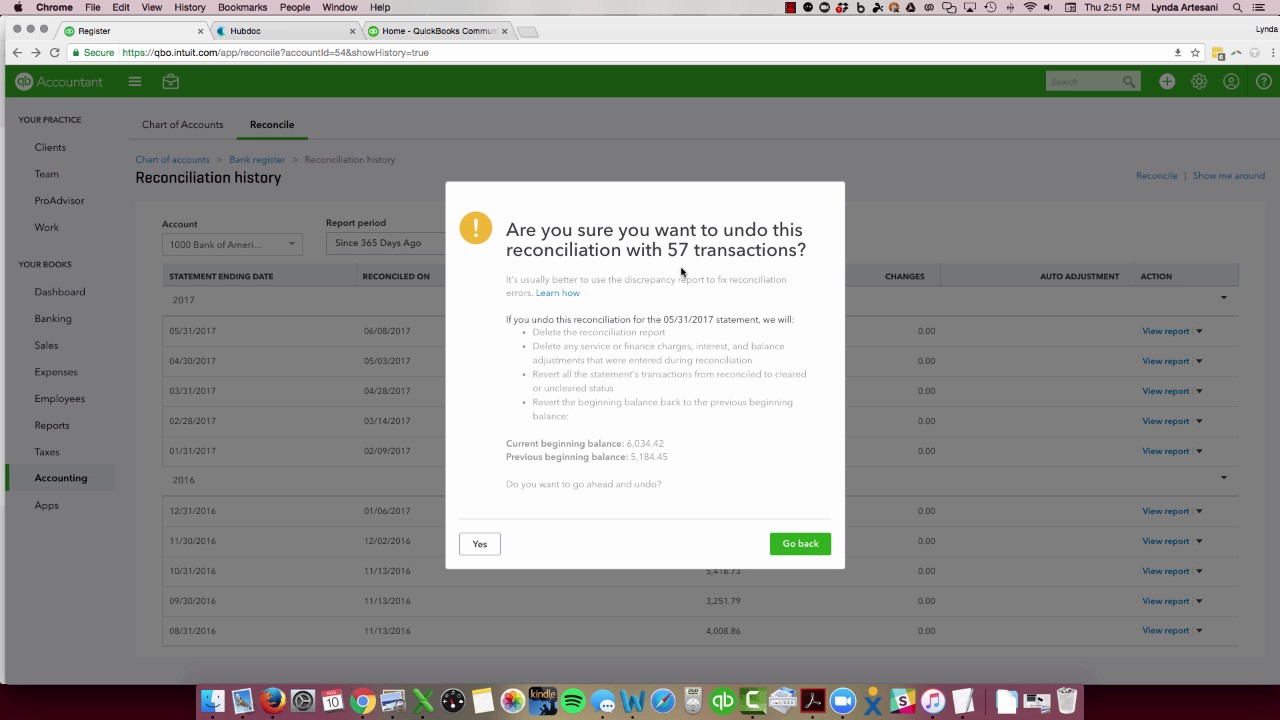
Hi there, Linda Artesani, Artesani Bookkeeping, and you're on my online tutorial site. And today I want to talk a little bit about the new bank reconciliation screen, more as in a way, we're here, it's here, it's here to stay. I actually practiced a lot with it in the beta version when it was being tested, and then it went away for a while. It came back, and a lot of people don't like it. I really like it. Let's go to it. So I've got my sample file, and to go to reconciliation, I'm in an accountant's copy, so I'm going to go to reconciliation and reconcile my account. And you'll see it's just one clean page now. It used to have this long list, and if you made any changes, they kind of stood out. It looked, looked pretty bad if you've had to make any changes in a prior reconciliation. In fact, it was my company's policy, we would actually, if we ended up having that happen, I would have them undo the bank rec and redo it because I just couldn't stand looking at a screen that showed changes and it looked, looked really sloppy. So this is really nice and clean, I think. I'm going to go to Bank of America. And here's the first thing you can see. It says your beginning balance doesn't match your ending balance. It's off by $500. Let's fix the discrepancy. This is one of the things I really like about it because it actually shows you where to go, where before you really had to go find it yourself in the audit trail. You can see here there's a transfer on 5/22 that was changed on 6/10, and now it's showing as unreconciled in the register. So I should be able to see this. I'm just going to put 0 in here, ending date 6/30— oops, 6/30/17. Yeah, let's go to the calendar, it's a little easier. And I'm going to hit Start Reconciling, and I'm going to see that $500 is going to be Right here, the 5/22 transfer that's not cleared and had been cleared in a prior transaction. So my beginning balance is actually going to be off by that $500. So you've got 2 ways to fix this. One is I could click this transaction when I actually reconcile my statement here, and that will re-reconcile it basically. I prefer to go to my bank register, so I'm going to look for the 5/22 transfer. And get rid of the problem altogether in the beginning. So I'm just going to slide down to 5/22, hopefully find that transfer. You can see there's no R here, so that's the thing that's changed. And I'm just going to click this till an R comes and then hit Save. And I'm going to get a warning that you shouldn't do this, but I want to do it because it was actually there before and for some reason it became unreconciled. So now if I go back here, You can see now they don't have all that warning in the fix or anything there, and now I can continue reconciling. The other thing I really like about this is prior to this reconciliation change, in order to undo a bank rec, you actually had to call an accountant or someone who had the accountant's version of QuickBooks Online. You couldn't do it unless you clicked every transaction to unreconcile them manually, which is really a pain in the neck. You had to really print the You had to print the bank rec from the prior period and actually go through and uncheck it. So if you had a lot of transactions, it was quite a tedious project. So if I want to unreconcile May's reconciliation, I want to come over to reconciliation history, and I want to unreconcile this particular one. So undo is now here. So you can see view report, and that's going to bring me up to the report the last time I reconciled it. But what I want to do is I want to unreconcile or undo my last bank rec. So I'm going to click here. You can see where I can print the report or I can undo my bank rec. Then it's asking me, are you sure you want to do this because your current bank beginning balance is $6,034.42? It's going to undo all those 57 transactions. It's going to revert everything back to what it was. Prior to me reconciling May. So if you hit yes, which is why it says go back. If you hit yes, there's no going back. There's no going back. You have to either hit yes and you go back, or hit go back and get out of the screen. So I'm going to do that because I don't want to undo the whole thing. But I want you to see that that's available to you. You can go back to even here March. I can undo March. What would happen is you see the word change to batch undo. That means I'm going to undo March, I'm going to undo April, and I'm going to undo May here. So I'm going to undo a lot of transactions if I actually click that. But sometimes there's reasons you've got to go back and undo a bank rec. It's just a mess. If I find a client that's reconciled it and they reconciled it without, without making it match, and it makes this foolish transaction called reconciliation discrepancy account. And it'll put the difference in there. So yeah, you may have hit reconcile, but it wasn't ready to be reconciled. It didn't go to zero. So you really never want to do that. So if I see a client did that, I'll undo it and redo it myself. Let's go to reconcile screen so you can take a look at the new one. So the new one is very large. So I have a very large screen, so it's very easy to work off. And I've heard people have trouble with that. You can see right here what I like about it. You can see all the matched transactions. So for the most part, it usually equals out. To zero. I put zero in for my balance, but usually it'll zero out to zero when I put my ending balance in. I don't usually have to click anything. If there's things here that didn't come from the bank feed, then maybe they didn't really happen. Maybe they're incorrect transactions that should have gone to another bank account in order to be matched. Usually reconciling your bank account is a very simple system of putting the ending balance in, clicking next, coming to the screen, and you'll see that it all equals out Quite easily. If you come to— you can come to and look at your payments. You want to look and see, does my beginning balance match? Do my deposits match? Do my payments match? If your payments don't match, then you can come in here and just select them one at a time until you get the right total in the page. Same for the deposits. If your deposits didn't equal out, you can do it that way as well. So that's really it in a nutshell, and you can hit All. If you find that maybe a transaction cleared that didn't come through on the bank feed, that can happen. But if you find that that happened, sometimes when I do that, when I go into an account with a client, I'll go back to the banking and just look. Did they exclude this transaction for some reason? Is it not there because it's, you know, it was in the excluded and maybe something like this, this belongs in there so I can click undo and put it back. And as you see, it changed to 8, so it'll be back under review. So that is it in a nutshell if you're interested in the new reconciliation screen. I really love it. I love how clean it is. I love how easy it is to navigate in. It's a lot different than what was there before. There were a lot of problems, things not lining up in the other one, so there's a lot of bonuses to the new one. I know people really don't care for the— how big it is on the screen, but I have a big screen, so it kind of eliminates that. But if you have a smaller screen, it can be a little troublesome. If you have any questions or comments or want to reach out to me about this topic or perhaps suggest another topic for a future video, reach out to me on Facebook and I'll provide a link in the actual blog post itself. Thank you for watching. Bye now.