Sarah Williams plans an eight-email holiday campaign running Thursday to Tuesday, mapping each day's product focus on paper first. She writes copy for five emails, creates three templates with names like "Better Than Black Friday Day 3," then schedules them in her email platform to send automatically.
Chapters
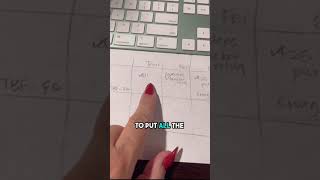
I am setting up my emails for one of my holiday promotions, and I wanted to come on here and show you how to do this, how my brain does this to make it easier for you. It's hard when you don't know what to email, so I'm going to show you how I break that down. I start by just mapping it out on a piece of paper. So my promotion is going to run Thursday to Tuesday, and then I have early access emails here that I want to send. So I'm going to send a total of 8 emails, but I don't want all 8 of these emails to be the same. So you can see here, I'm going to put all the products in the first email I'm only going to put sweaters and trucker mugs in this email. I'm going to break down the $25 purses and the swag bag in this email. I'm doing the holiday hot mess email on Sunday, $20 Dollar Besters, and I'm going to talk about that swag bag again. And then my last chance email is going to have all the products again. Once I get that sketched out, then I start to write the emails. So here I have 5 of the emails already written out. I need to do 3 more. I'm saving them as templates. So every time I get done writing the email, I'm saving it as a template. So that I can come back and use it and update it next year. So each one of them are named Better Than Black Friday Day 3, Day 2, Day 1, and then here's our early access emails. Once I have the templates made, then I just schedule the campaigns and I don't have to worry about it. You can see every day I have another email going out.