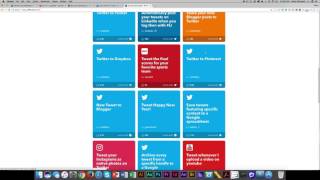
In this tutorial, Shaun Whynacht of Blue Cow Marketing introduces viewers to IFTTT (If This Then That), a free online service that automates interactions between different web platforms. He walks through the IFTTT website, showing how to search for and select "recipes" (now called applets) that link services such as Twitter, Instagram, Blogger, Facebook, and more. Shaun demonstrates the step‑by‑step process of authorizing Instagram, enabling an applet that automatically tweets Instagram photos as native images, and notes that his Twitter account is already connected. He highlights a variety of other popular applets—sharing new Blogger posts to Twitter, sending Facebook photo uploads to Twitter, receiving daily quote notifications, setting anniversary reminders, and getting sports updates—emphasizing the breadth of IFTTT beyond social media. Shaun also explains how users can turn applets on or off, manage notifications, and explore additional integrations, encouraging viewers to experiment with the platform. The video concludes with a call to check out more content on the Blue Cow Marketing YouTube channel.
Chapters
Hey, it's Shaun Whynacht with Blue Cow Marketing. Today's video, I want to talk to you about a cool service called If This Then That. If you've not heard about it, this is really a great simple solution for integrating different platforms and systems out there to do different things. So for one, the website is ifttt.com, so ifttt.com. So when you go there, you can sign up completely free to do so. So I'm already logged in, so I'm going to flip tabs here. What it allows you to do is you just go to the top and search, is you can do a whole bunch of different things. So for example, let me just click on Twitter here and it's going to come down with things that are called like recipes, not like edible recipes but recipes in the way that things interact with each other. So as you can scroll through there, you can see like Twitter to Bitly. Let's scroll through and see here, share your new Blogger post to Twitter so automatically and a lot of people have said to us, you know, how do you get your Instagram posts on Twitter and so forth. Well, you can do it manually but that's not the most efficient use of your time. So you want to use something like If This Then That to do this. Here it is right here. Tweet your Instagram as native photos on Twitter. We're going to go ahead and click on this. We're going to say turn it on. What it's going to do is IFTTT needs permission to access Instagram so I'm going to click OK and it's going to then ask me to log in. To my Instagram. All right, so now that I've got access to it here, it's going to say Authorize, and perfect. So tweet it, it's on, and we are good to go. Now I have already connected my Twitter account to this, so I'm able to then let it go. So every time I post an Instagram photo, it will tweet that out for me. If you need to come back, you can always come back and turn it on for Apple notifications, or you can delete it. Later on. So there's some really cool stuff in here. You can go in and discover it. You'll find yourself that you will spend a lot of time in here just checking things out. I mean, like, every morning of the week, get a quote. So this can be something that can be sent to you. So it's more than just social media integrations that are in here. So send photo uploads on your Facebook page to Twitter automatically. So I know this has been a common thing that a lot of people have asked for, even getting a reminder a week before your wedding anniversary. Guys, great thing to integrate right here. So check it out, there's a whole bunch in here. You can search, you can discover. If you wanna get sports updates, you can get that as well. But it's all here, ifttt.com. Thanks for watching and check out more of our videos at youtube.com/bluecowmarketing.