In this lesson Shaun Whynacht walks through ActiveCampaign’s automation builder, showing how to create, configure, and manage automated marketing sequences. He starts with a real‑world example: an ebook opt‑in on the CRM Guy site built with Thrive Themes, which triggers a tag‑based automation that sends a download email, follows up with a physical‑copy offer, and finally adds the contact to a marketing list. He explains the various trigger types (list subscription, tag applied, form submit, email opens, clicks, page visits, custom events) and the actions an automation can perform (send email/SMS, add/remove tags, start another automation, notify users). The lesson covers conditional logic such as if/then splits and tag checks to prevent duplicate sends, as well as time‑based waits, including scheduling sends at a specific time in the contact’s timezone. Shaun demonstrates building a new automation from scratch, selecting a start trigger (tag applied), adding steps (email, wait, another email or automation), setting naming conventions, activating, deactivating, copying, and deleting automations. He also briefly mentions pre‑built automation templates and advanced features available on higher‑tier plans (sales automation, deal stage changes, score changes, pipelines). The tutorial ends with a preview of the next lesson on creating and using lists.
Chapters
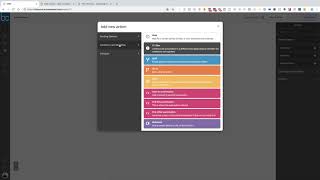
All right, here we are in lesson number 3. We covered contacts, we covered campaigns, and now we're looking at automations. So this is very similar to Infusionsoft's campaign builder. This is where you can build out a lot of different structures and powers within your ActiveCampaign account. And it could be very simple too, and I'll show you some, some examples that we have set up here in our business. So what I'm going to do first is I'm going to bring up one of the websites that we have called The CRM Guy. This is one of the brand websites that I've created, and the idea behind this website is to talk about CRMs and the importance, but that's not what we're here to talk about. I'm just going to scroll down to show you this part right here. They get a free copy of my ebook, The Small Business Book of Digital Marketing. So you've got a web form here that people can go and they can get the free book. Okay, this is where they can opt in. Now we're using Thrive Themes to build this form. But it does integrate fully with ActiveCampaign. And if we build a website for you, then we've integrated Thrive Themes in that. So coming back to here, this is the automation that's connected to that. So if we go ahead and click on this, what happens is when somebody fills out this form, they are connecting to ActiveCampaign and they are being added to the list like we talked about lists in previous lessons, Customer Experience Book. So this automation is saying, hey, sit here and wait until somebody new gets put into that list and then do this stuff right here. So what's going to happen here and what we've built out is it's going to notify me that somebody has, um, subscribed to the free Customer Experience Book. That's going to tag them with Customer Experience Book Download, and then it's going to email them You can see the email here with the book, right, where they can download it. And now what we're going to do is we're going to wait 30 minutes and then we're going to send them another email that talks about, hey, you can now get a physical copy of the book if you just pay the $2.95 shipping. So this is, this is our flow and our structure. Um, but as you can see, this is where stuff will automatically happen. You, once you build it once, you don't have to worry about doing it again. Now you may have already thought through this. We may have had a conversation about what kind of stuff we need to build within your campaign, within your CRM, and this is how we do it. So we're gonna send that email out, and then we're gonna wait a day, and then we're gonna wait till that current contact's time zone at 7 AM, and you're gonna send another email that's sending them a link to that option. So what I've done here is I'm making sure that automation is happening and following people through a whole customer journey. And then at the very end, we are then subscribing them to our marketing email list, right? So now the campaign, the automation— sorry, that's the campaign, still talking in Infusionsoft speak— but the automation can take them from the current list and put them into a second list. Okay, so we want to make sure that people then get onto our marketing email list so that anytime we have marketing emails we want to send out, we're broadcasting it out to our marketing email list. But if we go back and we look, we have our core funnel, which everybody who comes on our marketing email list, whether it's coming from some other lead magnet like that ebook or just signing up to our newsletter email list, comes in here. Now this is watching for that marketing email list, and it's going to come down here and says, okay, did the contact already have the customer experience book downloaded? Because one of the first things that we offer here is an email that says, "Hey, welcome to the list. Here's a copy of our eBook." But if you've gotten it previously, you don't want to get it again so there's a lot of conditional stuff that can go in here that says, "Hey, have they already received the book?" It's looking at do they currently have the tag. If they don't, then we're going to send them over here. We're going to send them the free email or the email with the free book and then we're going to tag them they've got it so that they came back again, they're not going to get this again. Then again, does it break out into indoctrination? Now this is going to look— Um, you know, pretty complicated if you've not built any of this out, but over time when you start to think of the flow, this is what you can do in here. So it's not just linear. It's not just a do this, wait time, do this and so forth. It can say conditional things like, oh, do they have this tag? Are they a contact? Have they engaged with this? Have they bought this product? If so, do this. If not, do that. Right. So that's how that works. Now you may be saying, well, how do you build this? Okay. So let's go ahead and do that. We're going to click new automation and now we can see, okay, there's some recommendations here. You can start from scratch is what we're going to do. Or we can scroll through here and say, okay, let's see if we can use some of the pre-built stuff. So product interest, targeted follow-up, engagement tagging, um, product interest, abandoned cart. If you've got shopping carts, uh, up, uh, upgrade incentive and outreach, right? There's a bunch of different pre-built stuff in here that you could go through and you can put it in, check it out, delete it if you want or not. But we're going to go in and go start from scratch. We'll click continue and it's going to start and pop up and say, how are we starting this automation? And this is a great screen to show because you can see all the different things that can happen. They can subscribe to a list. You can unsubscribe to a list. You can submit a form, can open or read an email. You can click a link in an email. You can visit a webpage on your website. Uh, an event is recorded. So this is when somebody does a custom event that you specifically specify— specifically specify, I don't know if those words go together, but we're going to run with it today. If they share an email, right? So if they share an email using the share function, they forward an email, reply to an email, because all this stuff is tracked. So just start to think about how you can use this. A tag is added, tag is removed, a field is changed, goals achieved, date-based, or an RSS feed that are here. Now if you have a more advanced package, you got the, the sales automation, then you've got deal stage changes in here, abandoned carts, score changes, pipelines, purchasing, and so forth. In most cases, it's either going to be subscribing to a list or having a tag applied. So we're going to actually use tag applied. I'm going to click on this and click continue. And then what tag? So remember we created that test tag in the first lesson. We're going to use that one. And then you get the option of once or multiple times. So if the tag is applied, if you have this on once, it'll only happen once, right? You apply the tag, and even if you took the tag off and put it on the contact again, they wouldn't go into this automation a second time if it was set to once. If it were multiple times, then yes, you can do that. You can also segment at the time of entering. So if they're coming in here and they have other tags on their file, then don't put them in. But we're not going to get into that part. We're going to click Add Start. So there it is. Now what's the first thing you want to have happen? Here are the options. You can send an email, you can send an SMS to the contact or the admin user, or it can notify somebody like I had. Or under conditional workflow, you can wait, you can do if-thens, split, go to another section, goal. A lot of these are more auto advanced features, but in the most cases you're going to be going between waiting and sending emails. That's really what you're going to do. Maybe every now and then you're going to add another tag when they get to a certain point Or you might want to put them into another automation that you built. So let's say we're going to send them an email. It's going to say create an email. What's the title of that email? So we're going to go test, create. And now this should be very familiar to when we were looking at the campaigns in the previous lesson. So you go through and you can build out that email. We're just going to use this one. What's the subject line? We're going to say test. We're not going to actually build it. I'm just going to use that template and we're going to hit next and finish just so there's an email in here. And now we want to add a plus sign. So we can either hit a plus here or we can go on the right-hand side and drag one of these over to one of these pluses until that pops up. And you can say wait a specific period of time. So we could say wait a day, we can do minutes, hours, years, months, right? So we're going to do one day. And here's the thing that a lot of people were stumped on. Let's say we want to send it out at 10 AM. You have to do the wait a day, but then you also have to do another wait option, and until specific conditions are met. And the condition is going to be a date and time, and we're going to use current time is 10 AM and hit save. Now it's always going to be 10 AM in the time zone of that contact, and we're going to hit save. And now it'll wait one full day from when they hit this point and then wait until 10 AM for that to happen. And then you can send out the next option. So if you want to go over here, you can either go over here like I showed you, or you can hit the plus sign and you get this familiar one. So you can send out another email. Okay, if you want to send them into another automation, you can go to conditional workflow and you can say, oh, start another automation right here, and we're going to put them into the core funnel. And then if we're done this, we can always say conditions and automation. So it'll actually remove them from this automation. They're not just sitting in this waiting. At the very top, you can go ahead and label it. And I always recommend that you come up with a naming convention. So we're going to call this test campaign. It's saved. So it's saved on the list. That's where you do that. And always remember to make it active when you're ready to go. So now if you put a contact into the system or add this tag to that contact record, they will start to flow through this automation. If you ever want to turn it off, just come back and hit inactive. If you want to work on it, if you want to delete them, you can either check this, hit delete, or under the right-hand side, you can drop this down and you can hit delete. Agreed to these 4 terms that you're deleting everything, you can't get it back once it's gone, too bad, so sad kind of thing, uh, and away you go. So let's say you create a nice funnel option here, a nice automation for a free lead magnet like customer experience book, and you want to do that again for a new one you created. Well, you can go ahead and you can start all over from scratch, or what I do all the time is I find the one that I've created before I drop this down and I click copy and it will make an exact duplicate. And then you can go in and just change the items that are in it to make it what you need it to do. That right there is your custom automation side of ActiveCampaign. And like I mentioned, we will be going in a bit deeper, uh, in the future, not within this intro course on the advanced side of this, but you could really build out a lot of different automation sequences., and funnel options within this system for your business. So a lot of power here is within the dashboard as well as the ability to do a lot of simple things that are going to save you a lot of time. So that was our lesson on automation. Next, when we come back, we're going to go diving into lists. How do you create them? What's the purpose of them? And how can you use it to better your CRM?