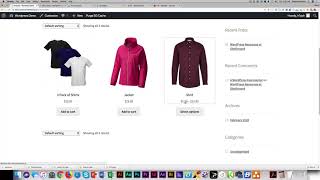
In this tutorial, Shaun Whynacht of Blue Cow Marketing walks viewers through configuring cross‑sell and upsell products in WooCommerce using a simple clothing store example. He first references a prior demo on creating simple and variable products, then introduces three products: a variable shirt, a jacket, and a 3‑pack of shirts. Shaun shows how to edit the shirt product, scroll to the "Linked Products" section, and assign an upsell (the 3‑pack) and a cross‑sell (the jacket). He explains the conceptual difference—upsells encourage buying more of the same item, while cross‑sells suggest complementary items. After updating, he demonstrates that upsells appear on the individual product page under "You may also like this product," whereas cross‑sells appear in the cart and checkout area. The video concludes with a call to subscribe to the Blue Cow Marketing YouTube channel and follow on Facebook.
Chapters
Hi, it's Shaun here with Blue Cow Marketing. In this Learn WooCommerce demo, we're going to talk about cross-selling and upselling. So if you've seen our previous demo on adding a simple and variable product, then this is a natural progression to understand that. But if you haven't, go back to our YouTube channel and check out that lesson. You're going to find that very beneficial in using WooCommerce in your business. So here we have our demo account., and, uh, just for the sake of making this simplistic, uh, we're gonna be using clothing as the example. So we see here we got 3 products. We've got our shirt, which is a variable product, ranges small, medium, large from $5 to $15. We have a jacket and we have a 3-pack of shirts for $25. So what we're going to do is we're gonna go into the shirt and we're gonna add some cross-sells and upsells in there. So let's go back to the product list and we're gonna go in and we're gonna edit that shirt product. And once we do that, we're going to scroll down here to Linked Products. And this is where we put our upsells and our cross-sells. So to simply explain the difference, an upsell is you're selling, um, you know, more of a product. So because we're talking about shirts, our upsell naturally would be our 3-pack of shirts. So we're going to go ahead and we're going to look for that product. So there's our 3-pack of shirts. So that's our upsell. A cross-sell would be selling a, a product that would sit next to it. So let's say we've got our shirts, maybe somebody wants a jacket, right? So I'm going to go here and you look for our jacket product. So just think about that in your business. What would be an upsell? Selling more of a product. And what would be a comparable or pairing product? So once we do that, we're going to go ahead and click update. And now if I go back to the site and I click on the actual product, as you see here, we're going to see, you know, our small, medium, larges like we did in a previous demo. And then down here it says, you may also like this product, right? So this is our upsell in here. So when we go ahead and do that, and then we go ahead and add this to the cart, what we're going to see when we go look at our cart Here is the shirts from, um, previous demos we put in here, but now we say you may be interested. So this is our cross-sell. Upsells show up on the product page. Cross-sells show up on the cart. That's the difference. Okay, during checkout you're going to see your cross-sells, but on the actual product page is when you're going to see your upsells. So that shows up under your linked products. So if you like this, please subscribe to our YouTube channel here at youtube.com/bluecowmarketing. And also you can find us on Facebook, facebook.com/bluecowmarketing. Thanks for watching.