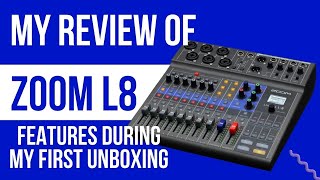
In this video Shaun Whynacht reviews the Zoom L‑8, a compact 8‑channel mixer designed for podcasting and mobile audio production. He highlights the solid build, compact size, and intuitive layout, noting the device’s flexible power options (USB, battery, optional AC). He walks through the input architecture—six XLR/¼" combo jacks plus two versatile line/USB ports that support a mix‑minus phone connection and sound‑pad activation. Output routing includes master outs, four monitor outs, and selectable Mix A/B/C feeds for individual guests. Each channel offers high‑mid‑low EQ, pan, and a suite of on‑board effects (reverb, delay, chorus, etc.). A key feature is ISO multi‑track recording to a standard SD card, with the display showing remaining storage. The menu is navigated via a central knob rather than a touchscreen, which Shaun prefers for durability. He demonstrates software integration: installing the Zoom driver lets the L‑8 appear as a multitrack audio interface in Adobe Audition, enabling simultaneous SD and computer recording. Sound pads allow live playback of intros, jingles, and outros. Concluding, Shaun recommends the L‑8 as an excellent, versatile tool for podcasters and anyone needing a portable production studio.
Chapters
Hey guys, I'm gonna give you a review of just what I think about the Zoom L-8. Now I just got this model in for a client and I was so impressed without actually doing any recording, just playing with it initially, that I actually ordered one for myself to use as a mobile production studio, not only for our productions and our podcasts here at Blue Cow Marketing and for other brands that I'm working on, but also to be able to go out and do some mobile recording for clients. So throughout this video, we're going to talk about just functionally what we see on the board here and tell you what I absolutely love about it. So first thing I noticed when I came and got it and got it out of the box was, you know, that it's, it's a nice size, right? It's very compact. Everything is well laid out here on, on the main interface. And as for weight, I mean, it's not flimsy, it doesn't feel like it's plastic or anything like that. Very nice. The sliders, you know, have some nice resistance in there so they don't flop around. A lot of cheaper mixers have that, and I'm not a big fan of that. So let's go ahead, we're gonna fire it up. So the other thing that I absolutely loved about it was I didn't have to have a dedicated AC plug for it. This is actually connected through the micro USB in the back, and it's just run into my laptop sitting next to to it. It also comes with a, a plug, so if I wanted to plug it in. But the other cool thing is it runs off batteries as well. So on the back, if we just flip it over here, we've got a spot here we can open up and put in, uh, a couple batteries for that. So would allow you to record anywhere you don't have power. Uh, that being said, even if you didn't have that and you had your, your laptop charged up, you could power it that way., and it would work really well. So let's just flip on the switch in the back here. It takes a second for it to power up. You got the little display that shows up, lights should go across the front if that makes you excited or not. Um, but yeah, it's a great interface and, uh, standard size SD card on the back, not a micro SD card. And, uh, yeah, let's get into looking at some of the different features that I love about this. Okay, let's start up at the top up here with different inputs. So it's an L-8, which means that there's 8 inputs. You can visibly see that you've got 6 that are here that are XLR inputs, mic inputs, as well as a quarter-inch jack that can go in there as well if you didn't have the 3-prong XLR cable. Then we move over here, we've got inputs 7 and 8. Now these, Inputs here have multiple uses. So as you see here, the light is on for line. So the little selector here can then go down to USB. So you could actually have a USB connection plugged in. And then you go a step further and lights up the sound pads that are here. So there's preloaded sounds in this when you get it. Sorry, you can't see it there on the screen, but we'll see that here in a second when we go down to the next level. Over here, same type of thing. You've got your line. Then you go to your phone, and you can see that on the screen there. It comes with a little cable that can plug into your phone. Now, if you've got an iPhone that has the Lightning jack, you have the little Lightning jack to headphone adapter connector that will allow you to plug in your phone. What we love about this is the fact that you can actually go ahead and call out and have that caller come in here, and it's a mix-minus, so they don't hear themselves coming back. They'll hear anything that you're feeding out through the board, and then if you bring up their obviously their channel, then you'll hear them as well. And then we can go down to USB, and again, the next step goes down to the sound pads, which we'll look at in a second. As we work across, we've got outputs here for master outputs, which gives you the ability to then run these either to monitors that you have in your studio, or if you want to be out doing a live production, you can run these out to a set of speakers. At your event as well. As we pan over just a little bit here, we're gonna see that it comes with 4 different monitor outs. So if you were running live out to stage speakers and then you wanted to have monitors as well, you could obviously split this out and send that feed to yourself. But for headphones and then any of your guests here, you can go ahead and give them dedicated mixes, dedicated levels. You have Mix A, Mix B, Mix C selectors here as well. So Even from the top down, a really great feature set that we're seeing immediately. Now as we move down to the midsection here, we're looking at each of the channels. We've got our high Z cuts, our -26 dB cuts here for your different inputs. You've also got your 48-volt phantom power, one easy-to-find selector here. A lot of other mixers, they're on the back, and sometimes you can knock them and not know if they're on, so you can quickly put it on. And turn it off, which is fantastic. As you're coming down, you've got selectors here. So this selector is letting you do the controls for each of the channels. So you've got a high, mid, and low range here. You got panning and you got effects. So there's different effects that you can actually control through the actual interface that's in here. So depending on which channel you wanna work with, you can select that, make your adjustments, and then move on. Down here, you're gonna see record and play. These selectors, and this is one of the reasons why I decided that this model was what I wanted versus the RODECaster, was it's very easy to be able to ISO record certain channels. If you've got 3 guests on the podcast, you can record obviously the mix, the main master mix over here, but you can also record those channels individually to the file. So if there's something that messes up in the mix, you have each of those solo channels to run into your, your, your DAW and then be able to do any kind of editing after the fact. You've got mutes here so you can mute the channels and then obviously your faders as well. Perfect. As we look over here, we've got a really clear setup interface for the different controls: record, play, stop, skip. Tempo settings. You've got your ability to change settings here, so you notice these change when you're doing mixers. So you can play with the different mixes that are here. You've got your effects, so you can go choose your halls, your rooms, your plates, your delays, your chorus, your vocals. Have different scenes, so you can preset scenes that are throughout it, and then your recorder will come back to here. So very versatile, a lot of features packed into a very small space. Just with the ability to do this and go through those different elements. Now, as we look at the display, it's fairly small, but you don't really need a big display for what this has. As we look on the screen here, you're gonna see that, you know, we've got a 64GB card in there, and right now we're recording the main mix. So it's telling us that we have 725 hours of record space. As I go ahead and I'm gonna add in one ISO track to this, you're gonna see that that number will change and go down. So the more that we're recording, it's telling us how much space we have. So no guessing as to how much space you're going to have left when you get started. So it's really great that way. When you go through here, you're going to be able to go in and do different things with the settings. Sorry, I get my hand in here without being able to cut the video off. Um, but let's say we go into settings. All your controls here are done by this knob. So as you scroll through and you want to go ahead and do something you can go ahead and push on this, it clicks in and then goes into the menu a bit deeper. So really easy, really simple to go ahead and make adjustments. I'm a fan of this type of control versus a touchscreen display, because if there was a touchscreen display in this area, maybe you're making adjustments, you can easily touch it, something could bump it as well. I really like this type of interface for that. So overall, looking at the LiveTrack Zoom L8. Obviously there's others in the family, the L12 and so forth, but this is the podcasting model that came out. Because of these soundpad adjustments here, you can actually go ahead and load in maybe your intro, you got some sound effects, outro music, commercials, whatever it is you want to produce live right through this, you can go ahead and do that. And then also that phone, that mix-minus, is a really great option for this. This shows up as a complete audio hardware when you do connect it to your computer. So we run Audition, and when you go ahead and you, you put in the driver, download the driver, and plug the USB in, you will also see that you can assign these channels directly to the different multitrack channels in Audition, which means that you not only are able to record to the SD card on here, but you can simultaneously record into your software right on your computer. So a great platform, a great piece of hardware, and an amazing tool for any podcaster or anyone doing any kind of mobile production. I highly recommend the Zoom L-8.