My Virtual Phone System Review Grasshopper, CallHippo & Tresta
In this video Shaun Whynacht shares his personal journey of moving from a cell‑phone based business line to a dedicated virtual phone system. Over a few weeks he opened three accounts—Grasshopper, CallHippo, and Tresta (Trusta)—with two of them in trial mode, and evaluates each platform on pricing, feature set, usability, and support. He walks through the Grasshopper desktop app, extensions, unlimited calling, and its somewhat convoluted setup; examines CallHippo’s credit‑based outbound calling, robust integrations, strong chat support, and lack of a desktop app; and reviews Tresta’s low‑cost unlimited plan, flexible auto‑attendant menu builder, mobile app, and call‑recording features. Shaun then compares the three solutions, recommending Grasshopper for solo users who work at a desk, CallHippo for larger sales teams needing reporting and integrations, and Tresta for mobile‑centric small teams that want advanced IVR at a lower price. He also notes his experience canceling CallHippo, the responsive customer service, and encourages viewers to use trial periods and watch reviews before deciding.
Chapters
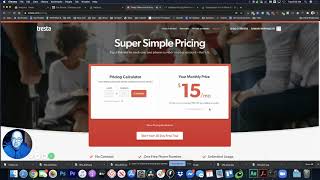
Hey everyone, welcome to this video review. We're going to be looking at 3 different voice over IP phone systems that you could be using for your small business. Now, why am I doing this video? It's because I just went on a personal journey over the last couple weeks where I have looked at transitioning my cell phone, right? So taking my, my cell phone, which has my company number on it, to using a phone system. Now, over the last couple years, I've used this system right here that you see on the screen called Grasshopper, uh, and I actually used another one called EasyPhones prior to that. Now, Grasshopper is great, uh, you know, very basic in its nature of what it can do. But then I started to look at, you know, I, I Google searched Grasshopper one time after I signed up, and I saw this, this article came— article that came up that was Grasshopper versus CallHippo. So I checked out CallHippo and I signed up for the trial and I liked that feature set and I was thinking of changing. And then I saw another one, so I thought, you know what, I right now as of this moment have 3 active accounts, one with each of them. 2 of them are in trial mode so I can test it out. And what I want to do is I want to talk about the features of each of them and tell you what I think about them and really lean towards which one I'm going to go with. Now for different people, you'd have different uses, and some of them have different feature sets. So let's first take a look at Grasshopper. Now with Grasshopper, the one thing that I love about it is the fact that there is a desktop app. So here it is open on my computer. I can actually go ahead and dial out from it. And if somebody calls through, it'll ring through on my computer, which I absolutely love. You can also see your inbox for your voicemails, and you can do text messaging right right here by clicking, and you can actually send a text message to anyone out on the system. So that is one of the features that I love about Grasshopper that you don't get with CallHippo and Tresta. You can't have the incoming calls ring in, or at least easily. Tresta tells me as of right now that you could have it ring in on your desktop. I haven't yet to have that happen, right? So anyway, and I haven't had any issues with it. The other feature with Grasshopper here, and I'm going to log into my account, is you can go ahead and you can set up different extensions. So with our extensions, I have myself. I've got it set so that, you know, people that call through get the prerecorded message saying, welcome to Blue Cow Marketing. You know, if you'd like to speak to somebody in our office, please press 2, right? And our extensions here for new projects is set to ring through to the desktop computer. If you want to talk to me specifically, you could talk to extension 700. Right now that is set to the desktop too, but I could have this forward to my cell phone if I wanted to as well. Okay. And then I can build on other extensions in there to forward to other team members as we grow our team and go to their cell phones. The other benefit with Grasshopper is you don't have to pay for another user account if you're creating an extension to forward to a cell phone, right? So if it's going to an existing cell phone number, you don't have to pay per extension for that. The other thing too, with your fee, and I'm paying $29 US a month for this, which is fairly minimal, is it's unlimited calling incoming and outgoing, okay, which will be key as we start to look at some of the other accounts that are in this. One of the downsides I find though is it's a little confusing in the setup. You know, when we go to extensions, or actually we go into our settings here, you know, we can go look at our numbers. So I've got 2 numbers here. I actually port forwarded my cell phone number, which my business, over to Grasshopper, and I'm thinking actually moving into one of the other ones. Haven't decided yet. Um, but you can set the main greeting here. And then within the main greeting, you have to know what your extensions are. So then under your extensions, you have to go in here, right? And you say, okay, extensions, we're gonna edit this extension. And then who's it gonna email to? And then what's the voicemail greeting on that extension that's here? Now you also, under your settings, and here's what I mean by it's getting complicated, is if you go to your users, Each of your users here, if we edit those, we can make them administrators and different things and time zones. Your time zones are then connected to your availability and things of that nature. So if you want to get pretty in-depth with different extensions and things of that nature, it's not as user-friendly. I'm not saying that it's extremely hard, but when we look at the other ones that are in here, It's not as easy. But again, the bonus to these guys here at Grasshopper is they've been around quite some time now, several years that I've heard about them. They also have connections with Ruby Receptionists, and the fact that you can have incoming calls very easily through this. In addition, you also get the mobile app. So the mobile app will allow you to receive calls, but also when you dial out from your phone and you hit call, it'll ask you, do you want to call from your cell phone or do you want to call from your Grasshopper line?. And in that case, your cell phone will call a toll-free number, which is Grasshopper's, and connect you through to the call. Your caller sees the number coming through from your Grasshopper number, which is great. Okay. So the second one here that we're going to talk about is CallHippo. They are noted for their amazing support. Oh, and one thing coming back to Grasshopper, support isn't as great. You do have phone support. It's not 24/7. But you don't have chat support and everything. The chat support in CallHippo is phenomenal. They will answer any questions. They'll actually want to call you sometimes to help you out with stuff. So in here, when we look at the pricing, right, they've got cheaper pricing here. Now, keeping in mind, we look at the Bronze and the feature set, so free number, forward to device, SMS, voicemail, all this kind of stuff. You know, you're like, okay, $14 a month, that's great, but you don't get unlimited calling, right? You have to put in credits and pay for credits for time for outgoing calls and also incoming calls. Now we go up to the Silver plan here. You've got everything, which is unlimited incoming calls, which is up to, I think it's like 1,500 minutes a month or whatever it is that's in there. Then you've got the option for an IVR, which is where you have the menu system where, uh, you know, it's a virtual receptionist where they press 1 for this person, 2 for that person, that kind of thing. Um, live calling, uh, all those different elements, your working hours. Um, but again, outgoing calling, you still have to put credits into the system. So even though at Grasshopper I'm paying $29 for unlimited, this here is $18 a month, but I have to pay for the outgoing calls. My volume's not as high. Maybe it'll be cheaper that way. Okay. So, um, the only thing that I didn't like about this was I wasn't able to get it to ring that easily on my desktop. And they don't have a desktop app. You actually have to go and call from a browser tab, and I'll show you these once I get through this pricing. And then your Platinum, it's just a higher-end level. It wasn't anything that I was looking at for that. So let's go ahead and look at CallHippo in the dashboard. Much more in-depth in the way that it's laid out for stats. I think this is a great system if you have multiple people on your team, but if you are a small business right now, where you're just you using one phone line, then, you know, maybe you got a couple people that you can afford to cell phones, then Grasshopper is a better option than CallHippo in my opinion. Like I said, if you got multiple people here, this is a great option for this. Now let's just look at the dialer. Now in order to dial, I have to open up another tab, sign in, and then dial from here so that I'm able to go ahead and make those calls. Now they tell me that if I have the dialer open, on this tab, which who really wants to keep another tab open, then it would ring through to here. Okay. One of the other features that I love about this that I don't get with Grasshopper is its integrations. And it does integrate with multiple different systems. They do have an app for dialing, but you can use HubSpot, Salesforce, Intercom, Zapier, Dynamics, Shopify, a ton of different options here for integrating the API as well. Now when we look at the system here, right, see, so free incoming calls, minutes, right? So if I had a lot of call volume, you might burn through those. And then my credit here is $1.85. When I signed up, you got $2 in credit for, for doing that. So they tell me this is about— they said 200 minutes for $2. I don't think that's accurate because, you know, I went through 15 cents for like 10-second test calls, so not sure exactly what their credits schedule is. The other cool thing that I do like about this is when you call somebody and you don't get them and you hit end on the call, it says and prompts you, do you want to have a reminder call? So you can say yeah, tomorrow, 2 days, whatever, and it'll actually come up in the call planner side that you actually see your next scheduled calls and you'll get reminders of those. Now the third one, which I came about last evening because I got retargeted by them by going to their competitor's site on Facebook, and I checked them out is one called Tresta. Now, business communication simplified. So if we go here and we look at the pricing on this one, right, $15 a month, unlimited calling, first number free, only $5 for an additional number per month, which is still great. All right, so the pricing is good, unlimited usage, some good reviews here, everything's free, web and mobile apps for this, unlimited calling, texting, local numbers, dynamic calling, auto-attendance, all this, everything we ever wanted in here. Okay. And the pricing was great, so I signed up for them. And let's go ahead and look at that account. So in here, you know, again, shows you your graphs, obviously not as elaborate as the other one. Does allow for recording of all calls, right? So you know when you call someplace and it says, "This call may be recorded for quality assurance," right? That pre-recording will happen. So you do have the compliance side if you have your recordings turned on. You can see the list. It'd show your recordings here. I haven't done any yet. So your voicemails, your voicemails will show up here. You can actually search for them. So no longer that issue of, you know, I know in my cell phone I have a limited amount of space for voicemails. So I don't have that issue that come across. Now here's where I kind of fell in love with setting up some of this stuff. Okay. So in the settings, we come down here to call flows. Right? So here's the number. I got a toll-free number when I signed up for this. My message then can go to here, and it says if no answer after 30 seconds, go here. Okay? So that's some options for that. If I set up my auto-attendants, I can go in here and I put my main menu. So I got my main greeting, right? That plays. So it says, you know, welcome to Blue Cow Marketing. You know, to reach, you know, our office, please press 1, right? Right now it's only me in here. It goes here. Press 2 for this. But if I want to go ahead and edit this, let me just go ahead and click Edit. I have other options here. So let's say if I want to do a menu 3, so click to activate. Here's my options. I could read an audio file, I can go to another auto attendant, so you can have different auto attendants set up. I can forward to a number, I can have it scheduled, I can have a submenu of options. Right? So, you know, press 1 to learn about this, you know, and then it has another menu. A user group. So if you have, you know, different users, let's say a sales team, and you say, hey, you want to reach our sales department, press 3, then it will auto-ring out. You can either do it through cascading styles of, you know, go to first person if they don't answer, second person, or you can actually have them ring all, or you can prompt it to go right to a voicemail. Also, after playing the audio file, what do you want to do next? So you can either hang up or route to another destination. So really easy to lay this function. You know, let's say you've got a business where, you know, you want to keep people updated on things. So I know there was always like a movie hotline for our local theater. So that would be, you know, having a number where they call and they press a button and it will actually read an audio file. So all you got to do is upload those new audio files every day. So a lot of functionality that way. Your extensions, your schedules, so you can set up different schedules. So when you're open, so in our case, what we have is, you know, from our open times, it'll give the main auto attendant.. And then when we're closed, the message says that our office is currently closed. Please leave a message and we'll get back to you. So a lot of those different elements that are there. Pricing. So, well, here's what I love. Pricing, I love their app. I love, I love their app better than CallHippo. It's very much on par with Grasshopper for the app. I'm just going to bring it up so I can remember it. I know you guys can't see it here in the video. I dialed with it yesterday. It was great. The texting works very responsive. Pulls in all my contacts, um, shows me my outbound, my answered, my all calls. Um, very easy. I don't know if you can see it there on the screen. Um, but if there's any images on your contacts, it shows up in there. Um, so like I said, I haven't fully tested this at the time of doing this video for incoming calls, but outgoing and outgoing text and incoming text works really great. I just have to test it now with, uh, getting it to ring when people call. Now, It does say web apps on their website. I'm yet to find the web app to see if it's going to be for incoming calls. If I have it set to then call through to my phone, I'm fine with that at the cheaper price. Okay, I don't necessarily need incoming calls to be coming to my computer in my business. So this may be the option I go with versus Grasshopper for the savings and for the functionality that's here. Okay, so that's, that's what I'm saying in that. So looking at those three, you got Grasshopper, CallHippo, and Tresta. It's gonna be— my recommendation is if you're small, if it's just you, Grasshopper is probably a good option for you because, you know, especially if you got a, you know, you're not mobile and you're at a computer and that's really where your office is where you're making calls. You can obviously put the app on multiple computers and log in and also call from your phone, but Grasshopper is solid. Never had any outages, never had any issues, right? Some of the reviews on Trusta have that, you know, there's been some outages and things of that nature for calling. So I haven't experienced anything in the 24 hours that I've been playing with it. But CallHippo is great for if you got a larger sales team and you need that reporting. I would recommend going CallHippo. And Trusta, if you're okay with using your mobile phone and you want that functionality of the menu system like I do, where I've got, you know, 1 or 2 other team members that are using their mobile phones then I could go this route and have those extensions forwarding to those other numbers. So that's my recommendation. Again, take it with it, you know, any way you want. I strongly recommend anytime you're doing any kind of software reviews for yourself, check out the reviews, um, you know, just watch videos just like you just did with this. I showed you what I liked about it, uh, and then ultimately make your decision. CallHippo, Trusta all have trial periods, so you can always sign up for the trial. If you don't like it, you can cancel. Anyway, now CallHippo, one thing I tried to cancel the other day, uh, and they contacted me right away and asked why. I told them why there was a feature missing because I wanted to have it so that if somebody called through, uh, and they would press 1 to talk to me or press 2 to leave a voicemail and get a callback, they didn't have that functionality. I would have had to buy a whole nother user license for that type of functionality. And then when they said, hey, we'll actually build that functionality for you within the next 30 days and we're going to give you a free second number. And then all we'll do is set that number up as an extension, say there's no availability to force it to go to voicemail, but they're actually going to build that functionality in there. So really great on that customer support, but that was a lacking element that I was missing in there. And the setup of the menu system was not as easy for me to figure out in there. So again, thank you for watching these videos. Subscribe if you like this type of video and all the other stuff that we do. Share this, comment. I do respond to almost every comment that comes through my videos. Maybe not right away, but I do get to them. If you have any questions about this video, any other videos, or any questions along the way, please reach out to me. I'd be happy to hear from you. Thanks.
More from Shaun


Julie Vanexan recognizes Shaun Whynacht from Blue Cow Marketing at the Nova Scotia House of Assembly








