A step-by-step walkthrough (video transcript) explaining how to adjust draw length and related settings on the 2023 Elite Verdict bow's new SPX cam system. Covers required tools (T15 Torx), default factory setting (mod position 5 = 29 in), how to change positions (slide cam, loosen/install screws), handling larger changes, quarter-inch mid-positions, and verification steps (front window and laser-engraved marks).
Questions this video answers
T15
Two Torx wrenches: T20 and T15
Ships in mod position 5, which corresponds to 29 inches
Position 1 = 31 inches; Position 2 = 30.5 inches
Numbered positions are half-inch (0.5 in) increments; halfway between positions yields a quarter-inch (0.25 in) increment (e.g., between 5 and 6 = 28.75 in)
Chapters
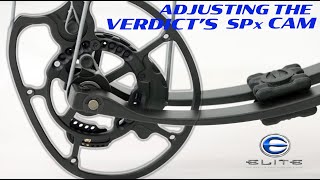
The 2023 Elite verdict has a brand new SPX cam. Paired with the industry's first V2 micro mods. The SPX cam system allows you to get the exact draw length, the exact holding weight, and the exact back wall preference you desire all within one system. Today I'm going to do a deep dive and show you what you need to do to get those exact settings for yourself. If you're familiar with any of the other cam systems, the Asym Tri track like we're on. The result. The cure, the encore, the remedy. The new SPX cam system is very similar. In the past, you've needed two Torx wrenches to change the draw length. You needed a T20 and a T15. This all new cam system, you just need a T15. And you only have two screws to set the draw length. When you receive your bow, it should come in the number five position, which is 29 inches on the verdict. On the elite bows, number one is always the longest. So number one on the verdict is going to be 31. Number two is 30 and a half. Number three will be 30 and et cetera, et cetera. Like the other cam system, there's a well defined window right here where you can clearly see the number. And number five is dead center right there, top and bottom. So I know this bow is set at 29 inches. If you want to make an adjustment, whatever you do on one cam, you do on the other. So you need a T15 Torx wrench. You need to loosen both screws. And if you're just going a quarter to a half an inch, you won't have to remove the second screw. Your first screw you're always going to have to remove because it's going to change positions. But the second scre rides in a track, and it may just slide ever so slightly to get to the correct hole. If you're going a long range, 2 inches plus, you're probably going to have to remove both screws and find a matching hole for it. So let's just say we're going to shorten this a half an inch. I need to go from a number five to a number six. I would just slide it till number six is dead center of the window. Find in my cam below which screw hole lines up perfectly. Reinstall that T15 Torx head, snug it up, snug the one back in the track. And then whatever I did on this cam, I want to do on this cam. And I've shortened my draw length to half an inch just that fast. Something to note in the longer draw lengths on the SPX cam system for the verdict. If you're trying to get the Mod to position one through 4:31 down to say 30 and a half, you're going to find that your screw holes line up exactly with the cable or with the limb. It's an easy fix. You might just have to put some tension on the cable. You might have to put a little tension on the string to get the screw to line up exactly where you want. They won't just drop in, they might be hidden just a little bit by the cable or the limb. So that's something to note. If you find that a half inch is too much for you and you just need to go a quarter inch, we offer that as well. If it's on the exact number I said that's your half inch increment. If you go between the numbers, if you go dead between five and six like what we did, that would put us at 28 and three quarter. Five was 29, six was 28 and a half. If I go right between them, that would give me 28 and 3/4. And if you're unsure if you of exactly where you are this year on the SPX cam system, on the back side there are numbers with a laser engraved marking that you line up exactly. It'll be right on five. It'll be right between five and six. It'll be right on six. So you know exactly where you're at. If you're not sure by looking through the window on the front side of the cam again, whatever adjustment you make on one cam, please make on the other. Double check your work. Check the windows on this side. Check. Check your laser engraved marks on the other side. Make sure you have everything working in perfect synchronization. If you don't know where you need to be, please check out the mod chart. If that still doesn't get you where you want to be, please see one of our retail partners and they will fix you up.