Craig from BoQuest walks through setting up a Rainfall NFC tag on your bow or mount. Tap the tag with your phone, add photos and events with dates and videos, and know that once you create an event it's permanent on the blockchain. The tag preserves your hunting memories for future generations.
Chapters
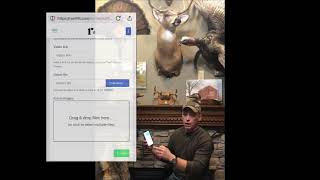
Hey folks, Craig with BoQuest again. So last video we went through actually accepting the the transfer of our bow tag or mount tag through our email and getting our account set up on rainfall, our technology partner. What I want to do now, now that we actually have our bow tag or mount tag mounted on our bow or our mount, let's talk about how to actually use a tag a little bit. So once you accepted that asset transfer, it became yours. You have an account now on Rainfall, so you're all set up there. And wherever your tag is mounted, you're simply going to take your phone. If it's an iPhone, the near field reader is right up here. If it's an Android, a lot of times it's in the back center. On our website in the FAQ section there's a link that shows where all the different phones and the readers are. So if yours isn't working, you can try that real quick. But basically on an iPhone, it's real simple. You're just going to take that speaker piece, hold it right up there and you're going to see a little pop up and that window pops up and I'll have a close up up here on the side that you can look at. But basically that's what your bow tag looks like. So the first thing you're going to want to do is go up here in the corner and hit my wallet. And that takes you into the area where you can actually edit it as the owner of it. The first touch doesn't know who you are and it doesn't care really. That's if a friend walks up and you're like, hey man, check this out, check the story out on this mount. Anybody can touch that and they can see the whole story and the videos and the pictures and the journals that you put in there about the great hunt you had, which they're all great related to that mount there or your bow, all the adventures you've taken. But when you hit my wallet, you'll see the asset again. In here and here you've got some options. If you hit details, that just shows you the view that everybody else can see. If you hit on the right hand side, if you hit more and then customize, you can actually go in and upload a photo of your bow or your mount unique to that. So if you've got multiple tags in here, which of course we hope you do, if you've got multiple tags, you can tell what's what just by the picture. Looking at it there instead of our default photo, you'll Have a picture of your own mount or your own bow. So you can do that. And then the next thing you do there is hit add event. And this is where you're going to add your first event. This is kind of an important step. We'll follow through. I'll have a video detail in just this. But you add a title, your description, date, your location is optional. We don't always want to share that secret hunting spot. So maybe you make the location a little generic. Maybe you make it exactly where you were. That's up to you. The next thing there is a video link I can upload if I have a YouTube or an external link I want to put a URL link to. Or I can actually hit browse and upload a video right from my phone that will be stored on my bow tag or mount tag. And the last thing is I hit upload a photo and choose my local photo library there, and I can upload whatever pictures I want. Once I'm done with that, I hit create. Events are created by date. That's how they're ordered from newest down to last date. Here's what's important to understand when you hit create. This chip is connected to Blockchain in the cloud, and we'll do another video on Blockchain. And how all that, I'll, you know, nerd out a little bit on that. But once the event is written, it's forever, right? It can't be edited, it can't be undone. It's forever. That event is now archived and associated with a digital twin of your bow or your mount, and it's there forever. That's how we make sure it's preserved for generations to come. So it can't be changed. So my recommendation, when you go through and create an event, go back up, go through it one more time. Make sure you got everything spelled like you want it to spelled, and you didn't accidentally put somebody's name in wrong or something like that. Double check it one time, make sure you got all your photos. Hit, hit create, and that event will be created. Now what do you do if I want to add something to it, though? So what I do, if I'm out hunting, I'm out in the stand, I take some videos, and we'd like to think we're all out there tuned in, but once in a while, you know, maybe we do check our phone. So I touch my bow and I take a video of some deer I saw walk by, a few pictures of me and the kids, upload them there and Create an event of that hunt. Maybe later on, we get a deer that night, we're taking some pictures with the family. And I want to do that. I just create another event for the same day that will show multiple events on that day. They'll be grouped together there, and they'll stay that way. So that's one way around that. If you want to add some events, just make them the same day. It'll group them right together in the app for you. And then anytime you come up, just touch your phone to the device, open it up, and you'll see all those events, those memories that you made with your family right there. So appreciate it. I hope you love it. I hope it's cherished for generations to come as you pass down your mounts and pass down your bows or just tell your stories in a way that you've never been able to tell them before. If you think about it, we all create all this media. We got all these pictures. I know my phone has thousands of pictures over the years, and they're just random and scattered. There's not a place that I can take my photos and my videos and my journals and aggregate them with the actual physical object that they're related to, like my mount or my bow. And that's what this does. So they'll be there for you. You can pass it on down to the kids or friends and family for generations to come. So thank you again for giving us a chance. Hope you love it. We'll catch you next time.