How to improve your Excel skills
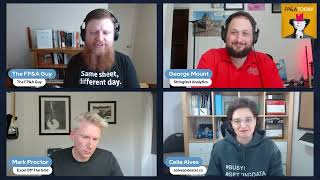
This is a YouTube podcast episode titled "How to improve your Excel skills" recorded in May 2023, featuring Paul Barnhurst as the host along with guests Mark Proctor, Celia Alves, and George Mount. The discussion centers on Excel skills enhancement, focusing on tools like Power Query, VBA, and Python integration for financial planning and analysis (FP&A) professionals. The conversation includes personal backgrounds, practical advice on Excel automation, data structuring, and the impact of AI on Excel usage. The episode also shares resources and learning recommendations for viewers interested in advancing their Excel capabilities.
If you would like to earn CPE credit for listening to the show, visit earmarkcpe.com FPA Download the app, take a short quiz and get your CPE certificate. If you would like to earn continuing education credit for your FP and a certification from the association of Finance Professionals for listening to the show, go to the Show Notes for details on how to earn the credit. Finally, if you enjoy listening to FPA today, please go to your podcast platform of choice, click the subscribe button and leave a rating and review of the show. And now on to the show from Data Rails.
This is FPNA Today.
Today we're going to talk about how to improve your Excel skills. Joining me here in a few minutes, they were on the other broadcast and they've had to switch over will be Celia Alves, Mark Proctor, and George Mount. All right, great. We have George here and I'm going to throw George one question while we're waiting for the other guests to to get on. I appreciate your help here George. So maybe we'll start while rating better, can you tell us a little bit about yourself and your background and when did you first realize that Excel could be a difference maker for you in your daily work?
Yeah, absolutely. Well, thanks Paul for putting this together. I think we're seeing the testament of technology, its powers, and also the double sided sword of its nature. But for me, Excel started back when I was a new financial analyst. Like a lot of you started in that role and did not have the preparation to succeed in that. Coming from more of a liberal arts kind of background, I just remember, I think there was one particular task where my manager shaded different rows with a different color and wanted me to be able to sort by color. So I actually went through and manually sorted that whole worksheet by color. It took me like a couple of hours. I didn't know that you could sort by color in Excel. Right. And there's just like constant things like that that I was just spending hours and hours and getting nowhere and making mistakes and giving the wrong numbers to people and I was just not really fulfilling my primary role, which was to make life easier for the people who I work with. Right. And that really got me thinking about the power of Excel and from there just the power of right automation and data analytics in general. So really all started out with just that primary motivation to give people what they need in a timely and accurate manner. And I think that Excel is so powerful on that front. So just really cool to see so many people, including our two fellow MVPs here tuned in around the campfire talking about this stuff today.
Yes, thank you Mark and Celia for being able to join us again. As I told everybody else, I'm not sure what happened, but when I tried to log in it told me the broadcast had ended and it won't let you re log into a LinkedIn Live broadcast, so we had to just go live on LinkedIn. So thank you for getting back here with us and looks like we got most our audience or at least quite a few people back in. So George did a little bit of an introduction there about himself. We'll go to Mark next. Mark, can you maybe give us a little bit of your background? And then when did you first realize that Excel could be a difference maker in your daily work?
So my background is I'm a qualified accountant. I qualified back in the early 2000s and to be honest, in most of the 2000s I thought I was pretty awesome at Excel because I knew Vlookup, so therefore I was golden. Right? I knew Vlookup, therefore I didn't need anything else. It wasn't until I started a new role in 2015, where I'd already planned a vacation before I started this role. And it turned out that I needed to save a day and a half on our five day reporting cycle, which was going to be a bit of a struggle. So I thought, you know what, I'm going to give macros a go. And within five hours I wrote a macro that saved me that day and a half and that was then used in that business every month. So that five hours has probably saved a thousand hours worth of effort. So that was like the real first taste of what could actually be achieved. I then went into a, it's called a global reporting analysis role for Finance, which is a fancy term for FP&A. And through that we had our month end packs and everything else and we had month ends that we'd work till 11 o', clock, 1 o' clock in the morning, just trying to get everything done. And it was, and it was a pain. And then through that I was like, we've got to, we've got to find a better way. And eventually it was like bit by bit we chipped away, it created tools and then we could automate everything from all the way from here's our inputs. Click. Refresh goes through, it creates updates, your Excel documents, it then goes through, creates PDFs, it creates emails, it sends them out. You can do all of that from inside Excel. So it's not just a tool for calculation, but actually your complete end to end can handle it. So that's kind of my background. And for the last eight years since I started that previous role, that's what I've been doing. Trying to save as much time as I possibly can to spend more time doing something else more enjoyable.
Thank you. Mark and Celia, will you want to give us a little bit about your background and kind of when you first realized that Excel could be a difference maker in your daily work?
Oh, thank you, Paul. My case is a little bit different because I, the work that I was doing did not require much of Excel. I almost accidentally got acquainted with Excel in around 1994, my first year as a high school teacher. I went to a teacher's, my first teachers conference and I happened to choose one of the workshops to participate in. It was about Excel, maybe two or three hours workshop, I can't remember. So, so I was born and raised, I was raised in Portugal and studied mathematics. That's my background, academic background. I got a licensing degree and a master's both in education and mathematics. And I started the teacher's teaching career. I taught mathematics up to grade 12, 7 to 12 for about 19 years. And so I got acquainted with Excel my first year as a teacher. I figured it all out. I thought, okay, this is, this is Excel. I understand the formulas, I understand that I can make a chart, couple of things. And I used what I learned that day during years and years. And I felt like the queen of Excel when I would enter those teachers meetings with all my students, students, marks and averages and charts representing them, nice spreadsheets printed on paper because we were not carrying laptops at that time to our meetings. And that's what I was doing with Excel. And then 2013 I moved to Canada with my husband and kids. And in 2015 I decided to try freelancing online. And I decided that I was very good at Excel. And my first gig, I got acquainted with Vlookup. So I beat you, Mark. I was able to work for 20 years without even knowing using Excel, without even knowing about Vlookup. And then I discovered that the task I was given, I thought I could do it with Vlookup. Like Mark, he thought Vlookup solves everything. Not in that case. So I started with VBA. I discovered forums in Excel, about Excel, online YouTube videos, and that's when my journey started. And later I got hired by a company to help them with their Excel systems that were already in place to improve them. And I learned a lot from There. So that's when my journey about learning how to automate tasks in Excel started. Those two events there.
Thank you for sharing that, Celia. Next question I'm going to throw over to you, George. So you started your career in finance, if I remember right. And you've commented previously that when you work in finance, you were disappointed with technology within finance. Can you talk a little bit about that? What was it that you were disappointed? Where do you think finance was falling short?
Yeah, it's kind of wild. So I started in finance maybe 10 years ago, and at that time, all this about data science and machine learning, data analytics, it wasn't really a thing quite yet to the common everyday office worker. They hadn't really heard those terms before. So it was finance had such an opportunity that they just kind of let go in a lot of ways, particularly just having that mindset of if something can be automated, then maybe we should think about it. You know, not everything should be automated, but there are a lot of things that should be thinking about really looking at data as an asset that can be used and reused and, you know, given life to help guide the business. And I just didn't really see that mentality in the departments that I was in. I mean, to be fair, I think especially back then, a lot of organizations, a lot of departments weren't really thinking like that. But that really got me into data analytics more so than finance just because I found it a place to really dig into the technical aspect, learn more about programming, learn more about statistics, and make a bigger impact in the organization. So it's kind of cool to see. Finally, now finance is starting to see what it can do in this arena. It took it a few years, but I think that having the finance background personally has been helpful for me because we do have a lot of people, especially in the Excel world. There's a pretty strong overlap between Finance and Excel, so we're still pretty well poised or finances to make a big impact when it comes to data analytics and automation.
I think one of my favorite stories, I remember early in my career I took a VBA course and it was taught. It was when I was working at American Express and the guy who was teaching it shared the story. When he started his career, the guy still had, you know, a 10 key on his computer and next to his computer. And the guy entered all these numbers in the Excel spreadsheet and then he added them up all on his 10 key and wrote the number down at the bottom. And the new guy said to him, I'm pretty sure you can use this something. I'm pretty sure I'll add it together. He's like, I don't know about that, but this is how we do it. And sometimes I feel like that's what we do with Excel or Finance is we just stick with the way we know. And it's often time consuming and very inefficient. And so one of the things I've seen with Microsoft, and I think many people have seen this, is over the last decade, Microsoft has made massive updates to Excel. We've seen Power Query, Dynamic Arrays, Lambda Power Pivot, lat and more. But. But it feels like despite all these improvements, many people are either not using them or not even aware they exist. Mark, any thoughts why that is?
There's a phenomenon that I think exists in workplaces where everything returns back to the lowest common skill set. So what happens is that somebody starts a new job and let's say they're all up to date with everything that Microsoft are doing. They're fantastic at Power Query and everything else. They'll implement whatever solutions, they'll come along. This is the way we should do it. They'll improve things. Eventually they'll get bored or maybe they get promoted out of that role, they go somewhere else and then from there what happens is that they then leave that job, Someone else comes in who has less knowledge or less experience, they don't understand it, and therefore they start to change things back to how it was, which means that things always end up reverting back to that lowest common skill set that people have. And so really it's about a training piece. It's about making sure that people have consistent training to stay up to date. The problem is that also within workplaces, people say people have an issue in Excel issues, so they ask their colleagues, how do I do this? And their colleague only knows one way to do it, and that's the old way. So those ways tend to get replicated over and over again. And with Microsoft, even though they create these new tools they like, here's a tool, go and use it. It takes a long time for that impact to really happen. And we see that with Power Query. I mean, it's been around for over a decade now, for about a decade, and yet it's now starting to pick up more and more pace. So it needs that adoption and knowledge before people even accept it. And I think it is a case of why, when something works, would you try and look for a different solution? It's only once you've really got a problem that you then look for something else. So unfortunately I think it's inherent in how businesses operate, how people operate, that it just doesn't get adopted as quickly as it should.
Yeah, no, I agree and I like the point. AJ said. I put it here on the screen. The issue is tribal knowledge and living in silos. Right. As you said, people know how to do what they know. Making a change means taking a risk. Sometimes things can go sideways. So I definitely think there's some truth to that. I think a lot of things you said as well, Celia. What's your thoughts on that? Why do you think the adoption takes as long as it does?
Yeah, I agree with Mark and it made me recall a situation where I was trying to implement something in an organization with a client and they say, oh, people are not Excel savvy. We need to make it simple. So there's always these pushing back, trying to make things easy because otherwise they will get problems, right? That something will stop in the middle of the process. So they, they tend to, like Mark said, lower things down. And then I also think there's a lot of lack of inquisitive. Inquisitive mindset, curiosity. I, I mean, I just told you my story. I went off to use Excel the way I learned it that day for 20 years without questioning, can it do something else? Is there something else? I didn't even bother to explore all the buttons that were in the ribbon that I was not using. I was just using what I knew the best I could. And of course we are always busy, so we just want to. I'll leave it to the next time and then the next time never comes. I also think that Microsoft does not do a great effort on marketing the product. So they do put things outside MVPs. Like us. We do our best to tell the world about the new features available. But if you are not already aware that there is something out there that maybe you can hear from this person or that person that you follow online, you will never get to know about it. So it's kind of a vicious cycle there.
I agree. And I think I know you guys do a great job of socializing new things, the MVPs. And we see LinkedIn I think has helped a lot for people that get on LinkedIn. They can see all the different things from Excel and people announce the new Excel things. But Microsoft itself hasn't done a great job announcing it. I mean, I remember the first time I heard about Power Query and Power Pivot. I briefly heard about it, saw something I don't know it was 2015 16, but I had no idea what they were. I didn't even touch power query until 2017 when I was trying to figure out a project and all of a sudden I'm like, oh wait, this has been here for a couple years. How did I miss this? And it then became something that I used all the time. And so let's jump into Power Query because I think in my opinion that's one of the biggest opportunities for Finance and FP&A professionals to automate streamline work. I see George nodding his head there in agreement. So that's good. So you know, studies have shown FP&A professionals spend up to half their day wrangling data. And if that's one of you out there, just comment saying yes or how many hours. I think we talked about how many hours you spend in Excel. So you know, what are some of the things? I know Power Query is one. But Celia, what are things you'd recommend people learn in if they really want to get better at dealing with data? Whether that be pulling files together, kind of that transformation, extracting data. What's your recommendation for them?
The first thing, even before starting dealing with learning Power Query, I think is understanding the difference between the two layouts. The layout to store your data and the layout to represent your data. Finance people and other professionals, but in this case we are talking mostly for financial people tend to want to see timelines with the months and the years along the columns. And that's not the way you should store your data. But what happens is that a lot of times people tend to input the information the way they want to see it at the end. So for example, they are recording expenses and they go, oh, I have January, February, March. I have three expenses in March. So they go to the cell for March in that category of expense and they put in a formula equal 20 plus 100 plus 200. And then it's a nightmare. Having to scroll back and forth to find the correct cell and to put in the information. That's not the way people should do it. People need to make their minds, to prepare their minds to work with the tabular layout. Tag tables, rows and columns is the way to store your data. So you need, if you have three expenses for March, you need to have March 1st this amount, March 10th this amount, March 15th this amount. And then you use other tools to aggregate that information, to summarize it and represent it the way you want. Then you can use pivot tables. Then you can use Power Query to modify the layout and give it the final layout that you want. So that's my first advice is start by understanding why you need to learn and use tables in Excel and then go to Pivot Tables and Power Query.
Thank you so much Julia. I love that you brought up tabular data and tables. Learning how to set your data up properly is critical. For Pivot Tables for Power Query for Power Pivot. When I teach my courses, I often say if you want to unlock modern Excel, you need to understand first how to structure your data in a tabular format. Because if you don't learn that, you're missing out. The habit we often do is we want to summarize it, we want to put it in the format, we want to see it. But what we want is we want it in kind of almost like a database format where each record is its own row so that we can summarize it so we can work on it and transform it. You know what it is like 13 different spreadsheets emailed out to 23 different budget holders. Multiple iterations, version control errors, back and forth updates. You never really feel in control of the consolidation and collection process. Yep, I've been there. Stop breathe. Datarels is the financial planning and analysis platform for Excel users. DataRails takes data from all your company's disparate sources. No organization is too complex, consolidating everything into one place, secured in the cloud. Now all your data finally talking to each other. Everything is automated back into your report in Excel. Cash flow FX conversion, intercompany transactions now automated and up to date. Drill down and variance analysis in seconds. Don't replace Excel. Embrace Excel. Turn your Excel into a lean, mean FP and a machine. Find out more at www.datarails.com. anyone who follows me knows I'm a huge fan of Power Query. And so George, we'll ask you first, then we'll go to Mark. Can you just give a summary maybe of what Power Query is, a little bit of what the tool does and why people need to learn it?
Yeah, I can definitely do that. And before I even start with that, with this topic of the primacy of having your data in a machine readable format. I know AI is all the rage right now and I have a little demo I'm working on that I've showed in a couple of workshops already that even with the Analyze Data feature in Excel that lets you query your data using natural language and brings these machine learning insights into your data, that doesn't even work if your data is not in a proper tabular format. So that skill is not going to go away just with AI and everything happening. You need to have your data in a proper machine readable format. So that really is before we talk about any of this. So important. As far as Power Query goes, it really is the repeatable data cleaning tool inside of Excel. If we think about this ETL process that some of you may have heard of, it's a lot fancier sounding than it really is. You extract your data and I think we've all done this. Think of all the places and if you want to leave in the comments, places where you eat your data from, whether it's a data warehouse, maybe you're going to Salesforce, maybe it's just a series of CSV files, or maybe you have a whole folder of a bunch of CSV files. Wherever that data is coming from, you can bring it in via Power Query and then do all those things that we all know and love week after week, right? If you think about all the filtering and the right sorting and maybe you need to merge some tables together or whatever, those kind of manual tedious tasks that you do. And sometimes you get in trouble because you don't remember. Maybe you forget a step one week and then the whole thing breaks. Or maybe somebody's out of town and you can't talk to them about what they did. Power Query is going to lose a lot of those frictions for you because everything's going to be auditable. You can literally see step by step what's happening. I sorted my data here, I renamed the column here, so there's not going to be any more gotcha surprises about what happened. And then from there you can load your data into a variety of formats, including if any of you all are using Power Pivot or the Data model, you may have heard of that to build a little bit more robust of a reporting structure in Excel. The really good news with that, if that doesn't sound cool enough, this is all very applicable to Power BI as well. So if that's on your learning roadmap as well, you really get a 2 for 1 deal here if you're going to learn Power Query, because a lot of this stuff is equally applicable. It's really the same engine that's being used there in Power bi. So sure, everybody has their own way of explaining Power Query, but for new people, I just like to use that ETL structure. It's been around for a while. I think everybody knows the pain of that manual weekly report and when they hear, oh my God, I can just build a menu that people click and it runs week after week. I think that that's a pretty good sell without even seeing how easy the product is to use.
Thanks, George. So, Mark, what would you add about Power Query and using it?
I'd step back a stage and go, right, what's the context in terms of fpa? What's the blueprint that we're trying to follow in terms of all of our work? Ultimately, everything that happens in that finance realm in terms of reporting and analysis, there's an underlying blueprint or method that we follow. So we start with our inputs, we then reshape our inputs into data. We take that data, we calculate on it, we take those calculations, we visualize them, we collect those visualizations together in some form of presentation, and then we distribute it so everything we do falls into that pattern. And we might go from input up to a visualization stage that might be a journal or an adjustment or something else. We might then push that back into that input phase and ultimately we go through this loop over and over again. So Power Query fits in that piece that goes from your inputs to then creating your data. So it's right at the start from taking your input and changing it into something useful. So if you want to automate anything or change anything, the bit at the start is where that happens. The analogy that I often try and use is if you want to decorate your house, if you want to paint your. The room in your house, if you've got an enormous hole in your wall, the first thing you shouldn't do is start painting. The first thing you need to do is to fix the holes, right, and then plaster it. And then once you've got this smooth surface, you can then start decorating. What often happens is that people take their data and their data is like that wall with an enormous hole in it. And then they take it and they start using formulas, which is like just going from a hole in the wall to painting. What they need to do is to get that smooth surface first. They need to get that data into an optimal layout so that the painting, which is the formulas, are then exceptionally easy. And that's the thing. If you set up your data correctly at the start, the formulas you need and the complexity of formulas you need, suddenly reduces down to a much lower level. Actually, the Excel, if you use Power Query, the Excel skills you need later on are significantly lower than if you don't use Power Query. You're doing yourself an enormous favor. And actually you need less Excel skills later on because You've prepared everything in the right way. That analogy of it's really just trying to get that smooth surface and everything in the right place before you even start decorating is the way I try and describe Power Query. And the next week, the next month, when you start on your painting another room in Power Query, you click refresh and it automatically fills those holes and you're ready to start painting all over again. So that's how I would describe Power Query as that form of analogy.
Thank you. I really appreciate that analogy you gave there. I had never heard it that way. But filling the hole first, getting everything smooth before you paint it makes it much easier, which is really true. If you clean up all your data, it's much easier to work with than trying to do it all with these complex formulas. You know anyone who's ever written a long formula to try to clean up data? Right, mid, left, right, fine. You get the substitute. You get this big, huge, long formula where you're trying to do something that might be quite easy. In Power Query, for example, learning it. So I can definitely relate to what you said there, Mark. And so I'm going to ask each of you here, you know, if someone's never heard of Power Query, where would you recommend they start? Kind of that learning journey. And George, we'll go ahead and start with you.
Yeah, that's a good, good question. I mean, obviously going to one of the MVP scare is a good start. I have a white paper on. If you're an Excel user, here are five things to know about Power Query. I'm sure I could distribute that in some way, maybe in the show notes for the podcast or something like that. But yeah, think about, I mean, also to Mark's point, right, Think about where are those lumps in your wall right now, right? Like, what are those steps that you maybe forget or that could cause your whole project to go crashing down when you try to update things? I think having that kind of wish list, right, because you do want to begin with the end in mind, is important. And then from there, starting to see getting that mental model behind what Power Query really is and where it fits in that workflow is pretty important. A lot of good resources for that. In terms of the tactics, I'll definitely throw my little white paper into the mix. And I know our fellow MVPs have other resources they've liked to share as well.
One thing that I want people to be aware of is Power Query lives inside Excel. When you learn how to open the Power Query editor, it looks a Little bit like the Excel grid, but it's not the same. Then there's a different mindset, a little bit of mind shift that we need to do, because in Excel, we can treat our data cell by cell. We create a formula that looks into that cell and does something to that cell to produce, and maybe with other cells to produce the final result. In Power Query, the logic goes mostly in columns. So when we set set an action to happen to something into our data, most of the times we do it to happen to the entire column. So the reasoning is a little bit different. We also Power Query.
While you have that little itch, right, your conscience is telling you there'll be a better way to do this. Try it out. Right. That's all I'm saying. Python is a great place to start. There are some ways to automate Python. I'm sorry, automate Excel with Python, obviously, if you're looking to get into more advanced statistical analysis, machine learning and stuff like that, it's an option. I can hear the crowd, the throngs of, well, why would I learn Python when there's Power Query? And it's an absolutely good question, but the only thing I'll say to that is it's not in Excel right now, unfortunately. But if you go into Power Bi, the Power Query editor in there has an option for inserting a Python script. So you know it's there for a reason. I think that the product folks at Microsoft probably know the product better than we do. So that's all I'll say about the matter. And you can make your own choice, because I think that trying to sell Python, I don't know, people are going to either do it or don't. You can't sell to somebody who's not ready to be sold to. So that goes for the book as well. But yes, it's an option. We'll leave it at that.
All right, so we had a question here, and I'm going to throw this one to you, George. I'm going to put it up here. So someone asked, how can they automate Excel Report using Python? Looks like I use Query, but I only know the fundamentals of Python, so I think you talked a little bit about that. So where would you recommend they start if they're wanting to kind of bring a little bit more of Python into what they're doing?
Yeah, so I'm a big fan of books. That's my preferred way to learn. There's a great one by, I don't think I have it with me, by Felix Zoomstein called Python for excel. It's another O'Reilly book. It'll look like this, but it's got a snake on it. It's not actually a python, so people get confused about that.
I know which one you're talking about. I've seen that book, the snake on it.
It's a. It's a really helpful one. There are a lot of possibilities. You know, maybe there are things that. I mean, the nice thing with using Python is it's one language, right? So whether it's, you know, we talked about. Mark kind of talked about this whole workflow of your bringing your data, you transform it, you're going to build your visualizations. It does feel a little bit siloed at the moment in Excel, because the way that you build your charts is different than the way that you build your formulas. It's different than the way you build your data model. And everything's in a little different of a bucket. It's hard to integrate that sometimes. Python's really good. It's even called. Many developers call it that glue language. Whatever you're trying to do in that workflow, Python's got the option for that. I definitely check out that book. I would look at maybe starting with one slice of that process, because there are ways to, you know, maybe do one thing in Excel and another in Python. So, you know, take the. Take the tricky parts of your process, see if you can automate it. And it is going to take some time, right?
You and the structure that you get from that. So I appreciate that, Celia. Mark, what would you recommend if someone wants to start today on learning Power Query?
So Power Query is easy until it isn't. Okay. When you first start, you're like, I can get this data mirror. I can do this, I can do that. I'm almost jealous of the people that can get their data from a structured database, because you know what, you can pull that stuff in and it's already in a pretty good format. The problem is that often we're connecting to Excel files. We have multiple header rows, we have a lot of transformation, a lot of cleaning. We have, you know, you get exports from accounting systems, columns might be in different places or with different names. So there's actually initially, Power Query seems easy, and it is easy, but once you've got past the point of I can get stuff in, there are a lot of more complex transformations. And that's where. If you just stick with YouTube or blog posts, that's generally where most of them tend to finish. It's how do you combine all the files in a folder Celia's got on her YouTube channel? She's got loads of stuff about dealing with tricky problems. I've got loads of stuff on my YouTube channel. I blog about dealing with tricky problems. George, you've got loads of stuff about dealing with tricky problems. Yeah, he's nodding. See, he has as well. It's those tricky problems that then frustrate people, right, because they start learning PowerPoint, it's easy, and then suddenly they come across a format that it just doesn't work in that simple context. And that's where, if you have a structured course that actually you can, then it helps to join those dots. And it's not just about clicking a few buttons, actually. You might have to go a bit deeper and actually change some of that M code. Nothing difficult, nothing hard. But you have to understand the basic concepts and if you don't, you'll get to a point in Power Query where you'll get stuck and you go, it doesn't work for me. And then you'll go back to the old methods and all your chances of automation will then disappear completely. So I would say you can start searching Google, you can search for blog posts and YouTube channels. There are. There's lots available, but books and courses.
Wave website. I'm also a big fan of Ken Pulse's book Mastering your data with M, I think is what is called. Now, the version I have is still the original Data Monkey version, but that's a great one and there's a lot of others. I have a few books back on my shelf here around that I know some other people mentioned. Leela Guarani, Shandu is another one that was mentioned. So there's someone else said the Excel MVPs, you know, the three here are great ones to learn from and I'd.
Encourage you, so don't. I guess the other word of advice, if you're looking to Python, is like, don't uninstall Excel.
All to go to their website. You can see them mentioning, you know, their businesses here, but there's also many others because we all, we all have different people that we gravitate toward, for whatever reason they may. You know, we feel comfortable with their learning, the way they teach, so there's plenty of resources out there. So we're going to do just a couple more questions and then we're going to wrap up here. But what I want to ask is, so Excel is coming up on 40 years and, right, we've all seen AI.
I'm sure it's not what anybody's saying and you're not going to hear obviously from MVPs that this whole like Python is better than Excel and you don't need to use Excel anymore. That's. Don't, don't listen to that either. So. Right. Or that it doesn't have a use either. That it's worthless. It's somewhere in the middle for everybody. There's like a specific.
All of you have probably played, played with ChatGPT or Bard or seen, you know, generative AI and all these developments kind of transforming technology. You know, how do you think that will change Excel and do you think there's any risk that Excel may go away one day? And we'll start with Mark. And by one day I mean in the near future, anytime.
So the answer.
So you'll just find where you fall on that spectrum.
Great point. I think that, you know.
Good point. The answer to that short question is I don't believe Excel will be going away anytime.
Is you find out where you fall and what you want to use it for and how much you want to dig into it.
Because the biggest thing with artificial intelligence AI is that if you mix artificial intelligence with actual intelligence, then that fantastically.
Install Excel because well, I'm learning Python now so I don't need Excel. They can be used together, they can.
Be complimentary our ability to do work and to be efficient. Unfortunately, if you combine artificial intelligence with actual ignorance, what you do is that.
You create this tools just like just because you've learned Power Query doesn't mean you have to forget how to use.
A lookup enormous snowball of a problem. And what I can see as a future is that people who have relied heavily on AI, they've created a solution. Here we go. They've delivered it. Their line manager next week then says oh, can you update that source is.
Mentioned in the comments. So one person mentioned, you know, some.
Great to change this one bit. And at that point they don't know how they really solved that first problem, how they then change it and iterate over it. They're then relying on something that they didn't understand to start with.
And I think website I'm also a big fan of Ken Pulse's book mastering.
Your data with that's the biggest issue in terms of AI. If you already understand the topic, have a base understanding of how things work, then AI can help you be more efficient. But if you don't really have that understanding, you need to use it more of a learning tool. The problem is that It's a learning tool that openly says this may give you the wrong answers. So as a learning tool, it's there, but has some limitations. I think in terms of Excel, it's all about augmenting our actual intelligence rather than us taking entirely from artificial intelligence. Because if we just rely on that, then we're in real trouble. I mean, even in, even when you're building a data model, what field should be connected, what fields shouldn't be connected, all of those things are. If they get it wrong, it causes a huge load of pain. And I don't think any business in their right mind would want to devolve all of that decision making to something that doesn't understand the context of what it's responding to and the consequences of that response. So Excel isn't going away anytime soon. But AI can definitely help us. If we're applying actual intelligence, if we're applying actual ignorance, then we've only got ourselves to blame.
Well said, Mark. I think you summed it up very well. There is binding human intelligence with artificial intelligence can make us more effective. When you combine it with ignorance, you're just going to end up with problems because you have to be able to validate that it's right. You have to know how to ask it the right questions. There's a level of knowledge, you need to take advantage of it. And so I really like that answer. So the one question I want to ask, we'll start this one with ciliate. Well said, Mark. I think you summed it up very well. There is. What is the one thing in Excel that you cannot live without? If you had to pick one, what would it be?
Tables. Because I wanted to say Power Query, but with Power Query I can do build Tables, maybe Power Query. It's so hard. I can't pick one. It's like asking me to choose one of my children.
I figured you might say that. I get it. So Tables and Power Query, we'll go with those. We'll give you two. We'll go with those two. George, how about you?
I had a very similar process. I think tables kind of are the, like, Ohio is the heart of it all. Tables are the heart of it all at Excel, so I think I'll go with that for now.
All right, Mark, I'm just going to.
Refer to my, to my Learned, you know, MVP colleagues here. They. Yep, I would agree with them 100%. Power query and Tables Master. That job's a good one.
I'd probably say the same myself. Tables and Power Query. So Anyone else, feel free to jump in and mention what yours is. But just as a final parting words, if people want to get in contact with you, anything you want to share with the audience? I know some of you had mentioned some offers, ways to get a hold of you. We'll give you each a chance to just go through and share that with the audience here and we'll make sure we put anything you want in the show notes. George, your article. I know Mark, you sent a special offer, as did you, Celia, on some of your courses. So those are out on my website. We'll also put those next week in the show notes. But maybe we'll start here on this one. We'll give George first opportunity. Any kind of final words or how can people reach you if they want to learn more about you?
Yeah, not chatgpt because it'll tell you that, you know, I wrote a book on accounting and 1967 or something, so AI right, you gotta have that subject matter expertise. The best place is either on LinkedIn, where we all are now. You can just click through. I've left a few comments, so go ahead, click through there. Follow me. Connect if you wish. I also blog pretty regularly@stringfestanalytics.com so it's just my business name without the space. If you go there, subscribe. I've got a pretty extensive resource library with all sorts of outlines, checklists, anything that you could imagine for building your analytics arsenal in terms of what to learn, how to learn it and so forth. I think those are the best sources for me.
Thanks. Thank you, George.
Mark, yeah, in terms of me, so pretty much everything runs from excelofthegrid.com so there's six years worth of blog posts, seven years worth of blog posts there now starting in the early days with VBA and then since about the last six years have been heavily on Power Query and how we automate our workflows. So there's also links there to my YouTube channel and you can find me on LinkedIn. Happy to connect there. If people want to contact me directly, there is a contact form on excelofthegrid.com in terms of a special offer. If people want to find out more then if they go to excelofthegrid.com FPA there they can download I've got two free of my ebooks you can download, one on macros, one on dynamic arrays that people can have for free. And then there's a special offer for if you want to join my training course, which is how we automate Excel from that first point of input going through those seven stages, including Power Query, all the way to how we distribute at the end. So that's there if people want to take advantage of it. Excelofthegrid.com FPA Great, thanks Mark and Celia.
We'Re going to go ahead and give you last word.
Oh, thank you. So I'm on LinkedIn, I share my content, other people's content, news About Excel on LinkedIn. I have my newsletter that those of you interested in knowing when Excel releases something new can subscribe and I also tell about any Excel events that might be going on that people might be interested in participating in. So that's the newsletter. There's the MSXL Toronto Meetup group where you can learn every month from a new presenter about a different topic. And you can have the recordings on my website that is displayed there under my name solventxl.ca. you can connect with me there. I'm also on Instagram if you like more the kind of short tips. I also publish those on Instagram and there's a 20% off for my course about reporting automation of reporting procedures in Excel that you can grab and take advantage of for a couple of days. I believe Paul has the link for that. If you cannot find information, feel free to connect on LinkedIn and I'll give you the information.
Thank you. Celia and I just want to give a special thanks first to our guests here. Thank you.
Find information, feel free to connect on LinkedIn and I'll give you the the information.
Thank you. Celia and I just want to give a special thanks first to our guests here. Thank you George, Celia and Mark for joining me into the audience. Thanks for staying patient. As I know we had a few technical issues and it took us a little while to get started here. But thank you everybody for joining today and please feel free to reach out to any of these with questions you have or myself and we'll look forward to seeing you next time. Thanks.
Thank you.
Thanks Paul. Thanks everybody.
More from Paul



Trust and Leadership Lessons for FP&A From 100+ Top Leaders with CFO Jon Laudie






