Robert Ta and Jonathan demonstrate a closed-loop workflow using Meta's Codex to generate and refine UI/UX automatically. The system iterates through prompts, screenshots, and visual evaluations until designs meet specifications, potentially replacing traditional design tools and cutting costs compared to hiring designers.
Chapters
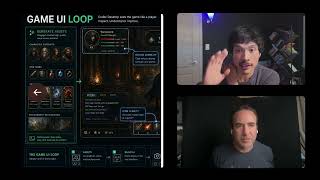
This is the design loop that makes Codex a magician at UX and UI. The full guide by Meta Alchemist on X or Twitter. Here's what it means for AI builders. So a really good image to ground on is this Codex design loop. A good Codex design happens through an iterative loop, not a single prompt. And the whole idea is you could iterate, validate, and ship. You number one prompt, define the goal, audience constraints. Codex builds the thing, runs the thing, you get a preview locally, it creates a screenshot. This is a key thing. Codex reviews the visuals for hierarchy, spacing, text fit, contrast, states, consistency, et cetera. It will click and test it like a real user, revise, um, and then compare and then choose the best option or iteration and then go back and forth until it reaches the stated outcome or a goal. This is really cool because Here's a really quick example. And even this image itself was generated from Codex. You could see just like, you know, a year ago, we couldn't get accurate text on something as complicated as this or even very, very simple images. But now you can see the text is— it works. It just works. And one of the metas that we've been going over as a team is just creating images of complicated process flows and sharing them with each other. So Jonathan recently did that with our stacked agent harness architecture that we're building for other AI builders to be able to easily incubate agents and see with quality gates, uh, when it's ready for primetime to help you with our harness engineering. In this article, it goes over ImageGen versus Vision. It goes over the loop around how this is probably going to change things from a design perspective. Like where's Figma in any of this? You don't even, need it here. And for the designers that are, you know, pixel-perfect perfectionists, which I know a lot are, please don't take that as blasphemy. It's more like I think we can get really good one-shots with an agent running in a big autonomous loop if you set a good goal. There's a really cool prompt here around using Codex Desktop as a visual design loop to get that closed loop around a target UX/UI outcome. Here's an example of a game UI loop. So this kind of stuff used to take forever and was very specialized, but look what Codex could do now straight from Codex. You don't have to leave Codex to go to Figma, wherever the hell else, which is very time-consuming. And then also the generation of these types of assets, like these assets, you would've had to normally pay graphic designers a good amount of money for these 2D assets. Nowadays it's just the cost of tokens. Yeah, Jonathan, from your perspective as our CTO, what are your thoughts on this Codex meta where you can get this visual design loop?
Yeah, a couple interesting vectors here. I mean, one is the capabilities of Codex itself. In this case, we're seeing both the, the vision skill and then the image generation skill work together, right? And, um, that creates a closed loop agentic system. That's really where I think that the magic happens is like you can both generate a hypothesis, and then you can look at any sort of errors that, that were generated and fix those on the fly. Um, this is, I would say this is an early version of these kind of closed-loop systems for generating UI, but it gives you a preview of what the future is going to look like and how powerful it's going to be. I think this one's kind of early because it's still like, Imagen's kind of slow, and you know, if you run this prompt, you kind of like, uh, it's very sort of time-consuming. But, uh, the, the basic premise of creating a closed loop and being able to iterate on UI and being in coherence with the machine. Like, because a lot of times, like, pages of text are very hard to say, like, oh, I'm on the same page as the machine right now. But if you generate a UI and it's a— it's got to have specific visual assets and specific interactions, it's actually a way to talk, you know, to the machine and say, this is what I want, and, you know, work in that closed-loop system to, like, get the output that's going to get you results.