What 100x Engineering Actually Looks Like
Robert Ta shows how Claude Code and custom commands can rebuild a legacy React Native app in one workflow, from design to 100% test coverage. He demonstrates compound engineering, where each PR's decisions become reusable knowledge that speeds up future work. Claude's multi-agent approach beats GitHub Copilot for brownfield projects.
Chapters
Hey, this is Robert, CEO and co-founder of Epistemic.me. I run an AI startup. I've also spent over 10 years in the enterprise software game, seeing products from product market fit all the way to scale from millions of dollars to billions of dollars. Now I'm building my own AI-native startup, and this video is about some of my workflows that I actually used for a particular customer. And I shared this with hundreds of developers. I run workshops with developers to just share them how I use AI-native development workflows from the front lines to go from 1 to 2 pull requests a week to now hundreds and in the future probably thousands. And so the problems of AI-native development end up becoming as a team, how do we make sure we minimize the amount of slop going to the codebase, always minimize regressions for any code changes, and then ensure our pull requests or code changes move the needle on our product towards stakeholder and customer goal alignment. So enjoy the video. You're going to get a lot out of it in terms of how I think about structuring research plan and implementation phases of my AI-native development workflows. Hello everybody. I, it's nice to be back. So yeah, Radu and I were talking on the side and since I've left, I've been really like focused on growing my business and really using Claude Code. Actually, that's my tool of choice. So Radu asked me to come and just demo some of my AI-native workflows with Claude Code. So that's what I'm gonna do today. And I'm actually gonna show you like a real customer that I had, how I revamped their whole app, basically one-shotted it with Cloud Code. I'll show you what I did in my steps to design the revamp and then plan in Cloud Code. And then my GitHub structure for this concept that I want to lay out, which is this idea that's floating in Silicon Valley of compounding your work or like compound engineering. So the more that you invest in the code base and the better that you optimize the context with each investment or PR, you should be compounding your engineering. Let me just start with maybe a fun thing too, cuz I know a lot of— I used to run these demos, so I know a lot of the demos were about like doing stuff, but I think we never really talked about what's your like development situation workflow. Let me show you a video I took of how my desktop and my like screens and monitors are set up when I'm coding. Let me know when you see my screen here, like a video, maybe. Do you see something? Yes. I'm like—
we can see it.
A guest in Teams or whatever. So I don't know if I have sufficient privileges, but this is— I have a laptop on the right and then I have literally like 10 terminal— terminals open running Claude code. And I'm actually, every single time one finishes, I'm talking to it and just treating them like little intern agents. And so that's kind of my setup. I have two like 32-inch monitors and I have every quadrant with a terminal. I might have it in different repos if I'm doing parallel work. In this particular case, I literally had a bunch in just focused on revamping this app that I was tasked to revamp. So let me share what the before was and what the after it was, and then I'm going to show you my steps to go from start to finish and then the GitHub structure for—
and then we're going to convince Adam that Claude code is what we want, right? Adam is with us and—
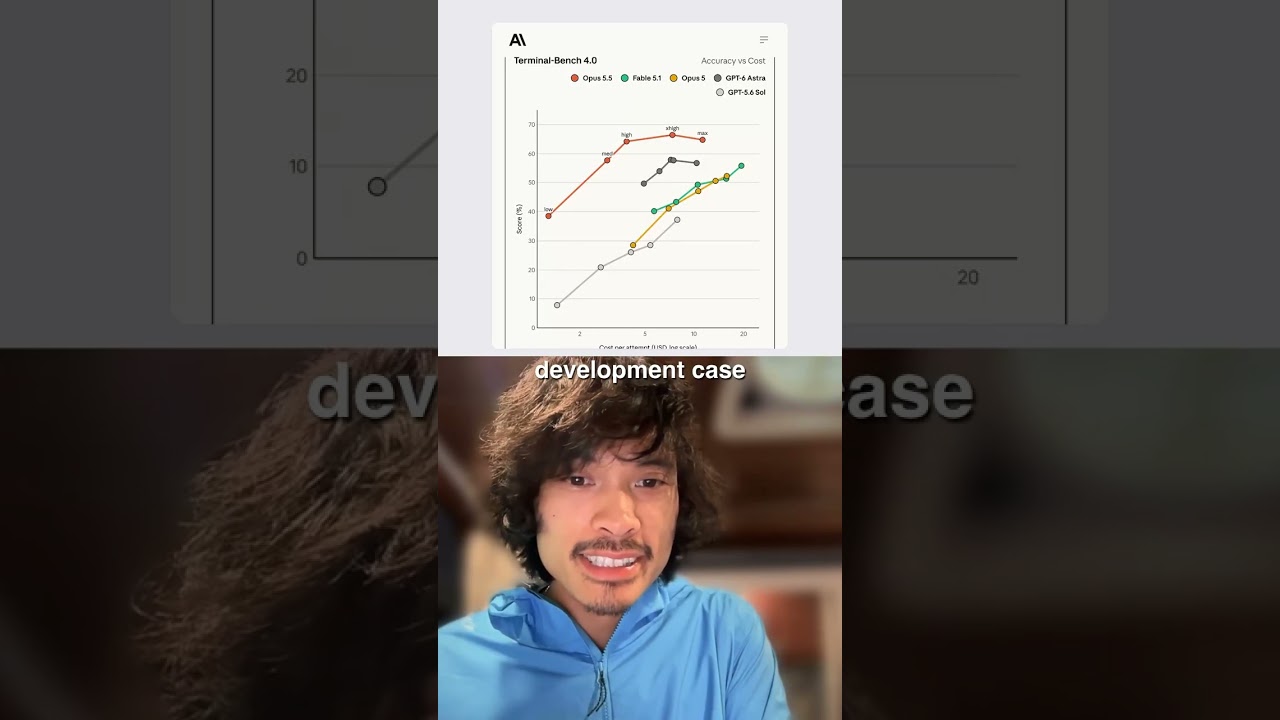
Claude code's the way. Claude code's the way. I'm just going to say that. Tried everything and Claude Code and with Opus in particular, a tool NB for Opus 4.5 and Claude Code. Yeah, no, none of the other models even compare. It's not even a competition. It doesn't even matter. Claude Code Opus is the way.
We're lining up at Adam's door and we're gonna knock, see if, how to get it. And here's proof. Take it away, Robert.
Okay, sweet. So let me show you the before and then show you the after. Okay. Can y'all see this? One of my first customers, I just got them live. We have, we, we do AI personalization, but they also needed some non-core work done, which is, hey, Hey Robert, fix my mobile app. It's broken. This was the current mobile app. It's a digital tarot reading app. I didn't know this, but digital tarot reading is a $3 billion industry. Who would've thought? So this is like psychics and stuff. They need personalization for their AI to unlock supply side constraint. So what I'm showing you, like in particular, it's pretty jank. Look at this psychic profile. So this app just coming out of Dayforce context, right? Cause I'm, I'm coding against this app, not Dayforce for now. This is like a supply and demand marketplace. The supply are the tarot readers, and then the demand is seekers, like people that want readings. So like Airbnb, for any sort of marketplace, you need good profiles and reviews and a good way for people to understand what's the supply side on the demand side, and how do I pick the right supply or the right reader? So if you look at this profile, all these buttons are all over the place. The UI/UX doesn't make any sense, and it, the app is just very legacy looking. Okay. And then I'll show you what I actually pulled up and just ran iOS simulator. So this is live running on local. So you can see the side-by-side and it's been modernized with a lot of just like text accessibility things. Like even this top reader thing, it was on the left. I centered it, things like that. And then if I go to the profile here versus on the right here, way better. You can immediately see like a job to be done by a seeker is what are the reviews? It's the first thing I want to know when I'm looking at a profile, reviews and then years experience, and then I I can click chat, so there's a clear call to action, right? So the UI/UX drastically improved on the left, and I basically one-shotted this, like the whole app. And I'll show you how I did it. This is a tool that I like for if I already have an app, I take its taste and then I talk to Magic Patterns. This is an app that I use, and I asked it to recreate it with a modern feel, and then I inserted my own taste, and then I like went back and forth on certain things, like how the filter should look, how the profile should look, things like that. And you can see a lot of it came out in the actual live app. In production. I started here first. I was like, okay, the app's messed up and I want to create a new design. So I took screenshots of the entire application, fed it into Magic Pattern, and I was like, here is where I want changes, in particular the reader profile and stuff like that, and give me back a design. I actually ran like maybe 5 of these because nowadays AI generation is pretty cheap. So it's non-deterministic. So my strategy is construct a pretty good prompt of what I want and then shoot it off 5 times and pick the best of everything and then bring it into one design. So that's what I did here. And then what I did was actually went and you, you can do this in a couple different ways here. You could export it to Figma and actually bring it to your own design system and then talk to Figma NCP. This client didn't have Figma and Figma NCP and things like that. So I was like, all right, I'm just gonna take screenshots of this. Okay, let's get into the codebase structure and look at like this concept of compound engineering. So the way that I've been doing this is this is like the root directory. And in particular, there's this.clod.commands folder for every project or repo. I will have certain commands and then I have global commands. In my local development environment. For this one, I have certain commands that just do a lot of admin stuff for me that I don't wanna think about ever, but I want it to be on repeat. What I mean by that is I'll have start PR, execute PR, verify PR, these things, and I'll show you the output. So when I start a PR, what happens is Claude goes to this docs folder, and this docs folder is where all the work actually happens, where the human review happens. So my philosophy with this, with the idea where I'm like, okay, I want every single PR to then compound so that the next one is easier and Claude Code will have context over all the work we've ever done. So in this folder, there's this PRs folder. Every single time I'm planning a new batch of features or implementations, this one's the actual UI/UX overhaul. I always have 3 documents that I have Claude Code focus on. So I have it research the code base and I'm like, let's— so I took screenshots. I seeded this with those screenshots in the root folder here. You could see that. And then I gave it a PRD and I was like, hey, go make the research and plan based on the screenshots and analyze the codebase and plan out exactly all the UI components we gotta replace. So it went and it did that. And I read this and I'm like, yeah, this got it right. And it actually got the whole codebase structure, screens, how we do navigation, the shared components. So we're not like recreating things, the themes, current color palette, design changes needed. Um, all of this is documented here. And then I could, as the master orchestrator, read this and then human verify. And then I'm like, okay, cool, let's go ahead and make a plan. So then we made the plan based on that research. And then this is the part where you might iterate a little bit. You read the English and then you determine, okay, AI got this right, got this wrong or whatever. And I spent way more time planning and researching than I did shooting off Claude and letting him run off and just implement the thing. So this is where most of my time is spent is like designing, researching, planning. And then I'm like, all right, Claude Code, go ahead. Just go implement this now. Claude Code will look at the plan and the research markdown files and use this implementation file as like a checklist. By the end of this, what we ended up getting was that app I showed you where it went in. And what's nice is with Claude Code, I could actually just be like, all right, Claude, run, run. There's a React Native app. So run expo go and run a local iOS simulator. Cool. And I actually even told Claude Code, run iOS simulator. Click through every screen, screenshot every screen, and verify against the original screenshots I gave you. And then go fix anything that doesn't look right. Think about if you had to do that yourself, right? If you had to sit there, watch Claude, then update a UI, and then you're like parsing together side by side. I'm like, no, Claude, you screenshot it and then you fix it. And then you update the implementation plan. That's what I ended up doing. That's a really great use case of Claude because it has MCP hooks to like anything. So I could even have it run on localhost, like the React Native web app and say, use Chrome DevTools to test it and actually write, iterate until you get to 100% test coverage. That's another strategy. For here though, my client was very focused on the mobile app. So I was like, all right, I'm going to use the iOS simulator as a test bed. Cool. So that's like high level. How did I like nearly one-shot a whole app rewrite of the UI/UX and bring it to like modern times? The other thing I wanted to show you is just more like this PR philosophy and strategy. What I mean by compound engineering is the way I think about it is any engineer or developer or designer, PM, the technical, could go in here and be like, what the hell did we do? Then in particular, I want Claude code to also understand what is done, what is not done, what's planned. I have this workflow where at the root of the PR folder is this active PRs folder. In my Claude commands, every time I ship a PR, I have it go to this active PRs folder. I'm like, okay, now update all this. Then every time it starts, we know the current state. That's really nice. There's another thing here that I started doing as well, which is adding architectural decisions. A lot of times engineering work is determining— and architecture work is determining what are the best paths forward. And that's why your human brain is valuable still, even in the age of AI. AI will give you 100 different things, but you're like the human that's in control and being like, yeah, we should probably go with this database choice, or we should go with this pattern versus that pattern. But if you lose that context and you don't put it in the code base, then Claude will maybe circumvent you next time or not remember. So I've started just keeping architecture architectural decision records of every PR when I plan and design and research where I, as the human, I'm like, okay, I think this is the way to go, this database thing, this UI thing, or this pattern. So we, there were some things here, chat reliability. I had to figure out the backend and we had certain bugs where like multiple messages coming through on the backend didn't service the client well. The tech stack on the backend was this tool called PubNub and there's 5 different vendors like PubNub. So I did research and I was like, okay, we're gonna keep PubNub and then we're gonna invest in implementing this other feature PubNub has. And I had it actually just document that whole decision so that next time we're messing with the chat sync, we're— it's already a decision that's made. It doesn't go off into non-determinism land and like figure out, oh, let's now integrate a whole new tech stack into our chat application. So that's what I mean by compound engineering is like the markdown files basically become this compounding asset over time where if you optimize it, like I have. As I work, it has gotten easier to work in this codebase once I've cleaned it up in this way. And I'll, let me show you live, like one of the workflows. So that's like a, so here's like a fresh terminal. And then let's say like I was looking at this new feature. Another thing that Claude Code has is how to start it. So I could just click start, but I YOLO it and I put in this flag called dangerously skip permissions. So every time Claude wants to write to the file system, it'll ask me things, or if it wants to use like grep or CLI stuff or whatever, it'll ask me and I'm like, I trust you, Claude. Go ahead. So I'm just going to start Claude with dangerously skip permissions so that I don't have to approve every single thing it does. You should guardrail this. There are ways to guardrail this. Don't just YOLO it. Look up how to guardrail this. I could send you some stuff after, but for now that's what I'm doing. So I have a bunch of commands here, so I'm going to go ahead and do start PR and I'm going to say we're going to add a journey feature, which is another tab on the main nav bar. I will give you some screenshots of what this looks like and a PRD context file generated by Magic Patterns where I did the design work. Great. And now I'm gonna go ahead and just find the screenshots here where I have to— yeah, these 3 screenshots. So I'm gonna toss these in there. That's in there now. Now it's going to go, and I like Cursor for looking at my file system. This is the psychic app. You can see that same structure here on the left. I'm not even using Cursor for the agent stuff. I think I had to update Visual Studio Code and then I just decided I just need to go look at the file, so I'm using Cursor, but you can use whatever you want to read the files. So what it should do— see, it's like reading the active PRs folder to see what is happening in your codebase. This is the compound engineering stuff that I'm talking about. So the commands are very— I've designed these commands with Claude to make sure that any single thing I ship, the next time we ship easier. That, that's my philosophy. So now it's creating a research file. It's looking at the screenshots and now it's creating the plan file. Great. Okay. So I should see this. On the left. Great, I see a research file. There's stuff here. Now it generated the plan file. I can't read all this right now live, but what I would do next is go read it and then I would make sure like the original UI/UX revamp, I would make sure that it's actually doing the right thing. Before I let Claude run off to the races and just change the whole app and implement a whole thing, I'm like, what is this? See, it's updated the active PRs. File. So then there's always context of if multiple developers are working in the code base or whatever, it's— I just find that it's nice to have that. Cool. So now it's created the research file, the plan file, and a base implementation file. Okay. They need a way to view their journey. Yeah. 3 main views. Cool. That got it right. Awesome. And I'll say, can we put those screenshots in the folder itself? And I'll just reattach it because I like being nice to Claude. Then once I do that, I would actually just go and use my— once I read all this and I might iterate on it, I've actually created some commands to iterate on a plan like research the whole codebase, research the internet for best practices, and then iterate on the plan based on all that research. If I wanted to, I would iterate on the plan here and I'll just say, I'll just literally just hit this command. I find that I get a lot of gains out of treating Claude code as another good engineer to be like, hey, check my plan, Cloud Code, but Cloud Code generated the original plan. Act as another engineer and check this plan. That's what this command does. Cool. Now it's added those screenshots. Perfect. On the left, those are all here. That way when it's executing, it could just reference the screenshots and validate itself against iOS Simulator and screenshotting it. Then if I want to implement, I would go to execute PR, and also verify every single UI change against iOS simulator and screenshot yourself and iterate until we're feature complete with 100% test coverage. Cool. Now what it's going to do is actually go and execute and then it'll update all the PR, active PR folders, the decision records, the architecture records like I mentioned, Then I could go get a coffee or something and come back and I check out iOS Simulator and it should change. This might take a little bit more time. This usually takes for a big feature set, it might be like 10 minutes, 20 minutes. For a small thing, it might be like a few minutes. All of this I'm using Opus because Opus I found to be the best. Cool. I'll stop there if there's any questions. Hopefully people found that helpful.
Awesome insight into this capability and the tool that I know engineers love. I know we don't have it at Dayforce. Have you used Copilot to compare like how the tooling may be different?
It's way worse. I'm sorry, y'all. It's just Cloud Code is just way better. And yeah, there's just no comparison. Just think about it this way. If I were able to one-shot a whole app and this app was pretty legacy. Their last release was a year ago. So there were so many SDK dependencies, library updates, reference updates, something like that. And my thinking is this: if I could do this in less than a day and one-shot a whole app after very rigorous— I had to design it, I had to research it, make the plan, iterate on the plan. But let's say all that work got done in a day. My thinking is with Cloud Code, I could do that in a shorter amount of time. If it took me 2 days, 3 days with Copilot or whatever else, Codex, like I'd rather pay for more premium tokens to get the right result faster than to just have it, the AI spit out more stuff that maybe doesn't even work. Like I think the SWE, the software engineering benchmarks, there's like a SWE AI benchmark, Claude Opus, I think it was like 86%. I think it was like 4 or 5% more than the next, I think it was Codex or maybe even DeepSeq. That 4 or 5% is an insane gain is what I have found in my own work. And this is not, it's not just like side project stuff. Like I'm getting paid to do this.
Yaghi would even tell you that Cloud Code or the Codexes, they're already obsolete. They're going to be put out of business by multi-agent approaches. So even Claude, which may be the only one at this point in time that actually can do multi-agent interactions, have comms between agents, because you have a massive issue in cutting that much code, right? Because your agent, you got one agent building on an API it's expecting and another agent changing it. You can't have a developer keeping track of that. You need to actually have agent to Agent Comms. I don't know if you're familiar with Steve Yegge, but if you want to look up something interesting, Y-E-G-G, he worked for Google and Amazon and rewrote Amazon's Monolith.
Yeah. Cloud, like there's greenfield, right? Which is like pretty easy to do greenfield with AI.
That's different.
Brownfield is where it's, that's where it really matters, the model.
And his argument is this, which is really cool. You're never going to refactor code again after getting into this. You're just going to rewrite code. There's no upside to refactor. You're just going to go write brand new code because maybe a new pattern new ways of doing it come up. Now, the only scary part of that is you're never gonna have a code base that looks the same based on the way LLMs actually process. So it's always gonna be somewhat different. So it really comes down to making sure the requirements you're building are like the requirements, 'cause I wrote about this on LinkedIn, they better be rock solid because you need them to build great tests. And if you don't, you're gonna spend not your time coding, you're gonna spend all your time reviewing. And what you really need is really great requirements to be able to drive the right code build in order to actually reinforce then the testability of that code so you're not spending too much time in the review cycle as a developer.
Yeah, no, 100%. And I think for me what I found as game changers were two things, which is the full feedback loop between it's implementing and then how does it validate its own implementation without me. I want to get in there at some point, but like the small stuff along the way, for example, like right now I just had this kick off and I already see on the this Journeys tab started. And so I could see, I followed this and it started taking screens of it. Like I told it to test an iOS simulator itself so that it could iterate on its own thing like an engineer would. So the two things that I found were game changers to get to some level of almost determinism in— I wanted to converge on this feature and all the tests work. Tell it to test with Chrome DevTools, like actually spin it up in your local environment. It, it is a React Native app, so I did that and it uses Chrome DevTools and Claude could get all the console logs by clicking through and stuff. So I might actually— here, I'll tell you, run this in Chrome DevTools and test the feature as well.
For this, there's lots of frameworks that do this where the automation is chromatic and Playwright capabilities to do for the UI on output and taking the screenshots and evaluating the diffs.
So anyway, I know that took a lot of time, but hopefully I— people found this helpful. I've been really enjoying using Cloud Code in the latest Opus model, so I'd highly recommend it. Copilot is a very very effective at a whole range of tasks. If you're looking for fast code generation, boilerplate generation, it's a wonderful tool. And obviously the model, it makes it even better. Claude is at the moment much more effective in terms of the, the deeper, more architectural planning and execution. And I think that there's probably a good mix between a combination of Copilot and Claude, but we've got to find out that best usage. So here it is, I sent it in chat, so feel free to save it. Multiple friends of mine have taken a look at this and just cloned it, and they have found it useful.
Thank you so much for joining us, folks, tonight. Another great session this year with all this exciting content. We'll have another one tomorrow for North America, and we look forward to seeing you again in 2 weeks with great conversation and great content. Thank you for being with us. Thanks all. Great demos.
Thanks everyone.
Thanks for hosting, Radu. Thank you guys. Thank you, Kevin.