This content was created by Tim Draper. This content was uploaded by Tim Draper. This is a YouTube video titled "The Features of Invision | Jonathan Hau" (created 2017-01-11) featuring Jonathan Hau giving a product demo/presentation of InVision. He walks through the 'boards' feature and collaboration tooling—explaining how designs are uploaded from external tools (Sketch/Photoshop), how to create inspiration boards and asset libraries/style guides, annotation and commenting, automatic color-palette and hex extraction, automatic font rendering, share links, unlimited boards for paid licenses, and use cases for remote teams.
Chapters
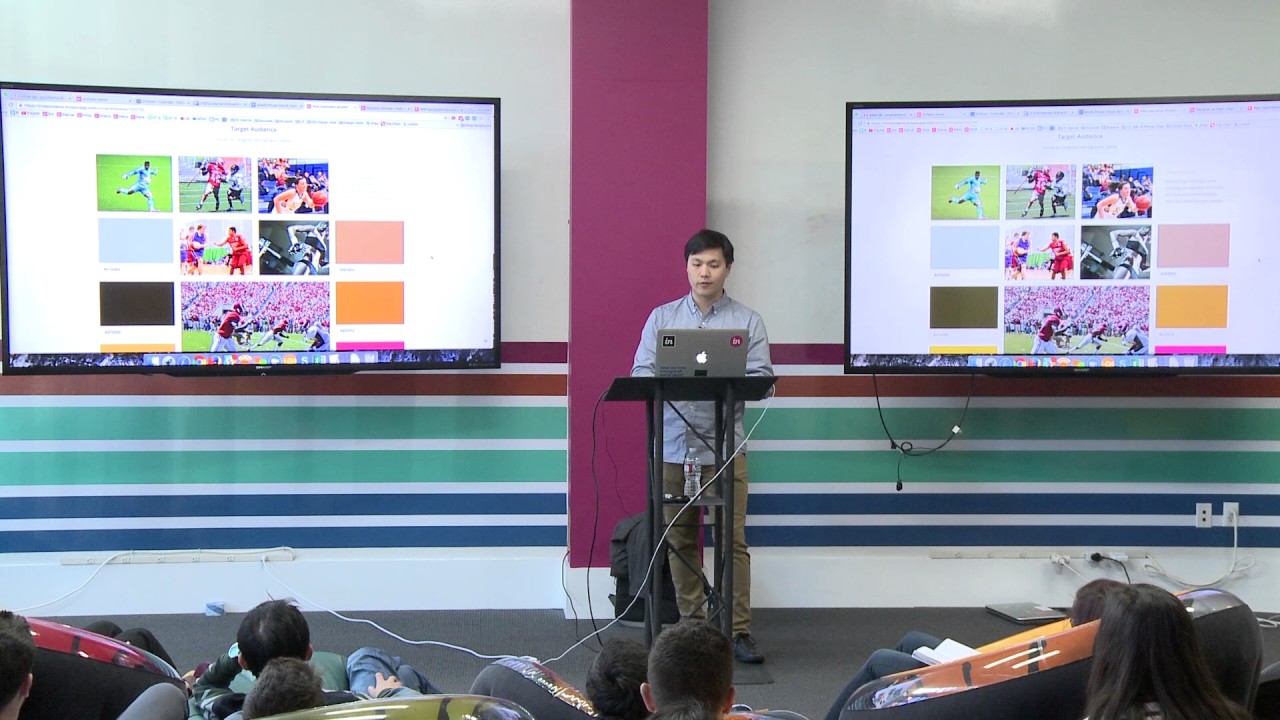
One other thing that you'll notice inside InVision is there's nothing that allows you to necessarily build your product inside InVision. All of the design work, all of that happens outside. So all of the designs that you might make inside Sketch or Photoshop, you would do externally and then bring those images into our platform. So that's kind of how most people use InVision. All right, any general or specific questions around our platform before I kind of dive into the product? Yeah. OK. All right. Let's dig in. All right. So the first thing that I'm going to kind of show you guys is this boards feature. If you have a professional license or higher, you can create unlimited boards and upload unlimited content. Everything that you do inside InVision, you can do unlimited for free, so to speak. Quote unquote. So if you have a paid license, you can upload unlimited content into that, create unlimited sections, and create unlimited boards or stacks of prototypes. So I'm going to go through 3 different examples of how you can leverage boards. But boards was developed because we needed the space to collect our ideas, then perhaps use it as an asset library or a single source of truth for our assets share among our team members. And then finally, we needed a place to kind of present our ideas as an executive-level brief. So for those of you who don't know, InVision is a completely remote company. All of us work from home, all 200 of us. When I started about 4 years ago, or 3 years ago, I started with about 20 employees. And we've grown a lot since then. But all of us work remotely throughout the world. We don't have— well, we have a headquarters in New York, but I'd say there's maybe 5 or 6 people there. I can show you really quickly where we're located. But this is our team map, and we're located all over the world. Cool. Cool. So that's that. All right. So here's sort of an example of an inspiration board. What we've done with this board is we've just sort of added a hero image that sort of, I guess, sets this tone for this board. We've invited some members. We've set a description. We've identified a problem, and we've outlined it in this section here. We've identified some project goals and uploaded that here. We've uploaded some images or screenshots as our target audience. I have a question. And anything and everything that you upload into InVision is commentable. So if I click on any image here, you'll notice that I can have a conversation around that. So as I'm hovering over this image, you can see there's a sketch drawing over this image. And everything here is annotatable. For every image that you upload into InVision, InVision will automatically create a color palette. And for each of these colors, we'll automatically pull out the hex values for you so the designers can just— That's awesome. grab those hex values, and then talk about those colors. I can download this image. I can also generate a share link to the image and send it to anybody in the world with that share link. And anybody with that link can download that and comment on it as well. Jumping back, I can expand or contract the images on this page to show emphasis on the page. And you can see this Pinterest-style method view of seeing all of your assets in a single space. It kind of easy for you to kind of see all those assets in a single space. So here we have some inspiration from competitors, where we've just uploaded some screenshots from other companies. And really, the whole point of this board is just to kind of brainstorm ideas and hash out, like, are these the hex values that we want to use for this brand color? Are these the assets that we want to use? So this is sort of one example of an inspiration board. Another use case of a board— would be to use it as an asset library or a style guide. So this is sort of an example of Uber. We've got some Uber logos here. We have some approved copy that we've uploaded. We have some brand colors that we've uploaded here as well. We have some type fonts. For every type font that you upload, InVision will automatically render those fonts for viewing purposes. So you don't have to upload a separate screenshot image of that font. We have some design anatomy, other color swatches, some icons, and other things. So all this is really intended to kind of bring together the whole design process and allow you to kind of work with your designers, talk through the design, the branding, the concepting, and enable everybody to kind of get on the same page on your assets.