LeadSmart Demo Snippet
Tom Burton and Kevin demo LeadSmart, a Salesforce CRM for managing leads across partner networks. A 30-day test drive costs $450 (normally $1,250) with setup and training for up to 1,000 contacts. The tool uses color-coded aging rules and automated workflows to track lead engagement across multiple channel layers.
Questions this video answers
30 days (can be extended up to 45 days).
$450 (normally $1,250), credited back if customer purchases LeadSmart after the test drive).
LeadSmart Pro: $135/user/year (annual prepay) or $150/user month-to-month; LeadSmart Connect: $105/user; Salesforce app option: starts at $48/month.
Up to 1,000 accounts and contacts.
Two to four weeks.
Chapters
We're going to go through in the demo is a scenario where we have a business here called Acme Manufacturing. So Acme Manufacturing makes different products, different safety products actually in our example here. And what happens is, is that Acme Manufacturing actually has a couple of levels of partners that they work with. So they have a representative manufacturers, representative groups that they work with, and then those groups then end up selling or working with distributors for the actual sale to take place. So in there, in this example, in the demo that we're going to go through, there's actually two partner layers, two channel partner layers that Acme wants to be able to collaborate with and work with in order to really drive sales and increase the revenues that are being going through that partner. The reason I show these other screens here and we'll see these here in the demo, is that the rep group, as we talked about, will be getting weekly or regular emails about the leads that have been assigned to them. And then they also have a partner portal that they can access directly with all of their leads that you're going to see this as well. So each of that partner portal is personalized to the individual manufacturer's rep or the individual distributor rep and so on. And all of this is tracked right through the system that we're going to see here. So again, as you look at the demo, keep that in mind, is that Acme Manufacturing is working through two different partner layers.
I think that's important to note, Tom, there, that we can literally you could run this with your inside sales team, with your external sales team, your third party channel partners like the reps. But oftentimes when you have that independent layer in between there, you've got a dealer, a distributor or a wholesaler where you have multiple levels of channel partners.
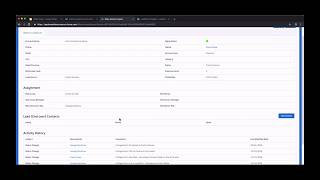
Absolutely. And you know, just so we're clear, these terms and this terminology can change based upon your situation. Right. Because not everybody has rep groups or distributors. Maybe they're dealers and brokers or whatever, resellers. Everybody has different terms for that. We don't care about that. We can configure that, but the process would basically be the same. Okay, with that in mind, I'm going to jump over here and what you're seeing here is an example homepage in Lead Smart Pro. And as Kevin mentioned earlier, first and foremost, Lead Smart is a CRM and it's built on the Salesforce Lightning platform. So we have all of the standard, you know, traditional CRM functionality, accounts, contacts, reports, dashboards, all those types of things that you would normally have as part of a CRM are all built into the system here. But really that is where I guess the similarity ends between Lead Smart and a traditional CRM. So going back to our pieces that we went through, here are three key points we talked about. Point number one being, you know, your CRM or you need to be able to extend your CRM and your sales process to include your partners. So let's take a look at how Lead Smart does that. So going back here, for example, if I click over here to where it says Smart Lead center, where what you're going to see is a number of leads that are in the system. But what you'll notice over here is that these leads in this case have been assigned to the partner channel, to the third party partner channel. And based on our examples, we had rep groups and distributors. So these leads have been assigned to specific rep groups and in some cases have been assigned to specific distributors. And even one step beyond has been assigned to specific manufacturers reps, individuals and specific distributor reps here. So this lead, this is really where that collaboration starts is through the fact that this has been assigned. And the way that that's done is if I go into one of these leads, you'll see here there is a assignment tab and I can just go in here and assign the distribute or the partners that I have in my business, so they're automatically connected to that lead. Now what happens is, is that as soon as these partners are assigned, they get notified. And what happens is now I'll use the example here of George Bradshaw. George Bradshaw then gets a link to their own personal partner portal. So this is a link that is a real time link, will stay up to date. As you know, there are changes to the leads and so forth. And now George can go in and take a look and filter different leads, look at different leads that have been assigned to George Bradshaw at Industrial Reps. He can go in and drill down on any of these leads and get more information. He can see the activity history that has happened either between the internal sales team or the partner. And if he wants to make updates, he can go right here, change statuses, do other things right here within the framework of the lead. So each partner, as we talked about, has their own lead portal where not only can they see the lead data, but provide information about the lead. And this creates that collaboration that we've been talking about. And all of this is included, as we mentioned, or all this is included with unlimited partners. So we're not charging for every single partner that you bring in. If you have 10 partners or 1,000 partners. All of them will have the capability to use this portal. Have anything you want to add there?
No, I think you're covering it. Great, Tom.
Okay, so let's move on to the second point, which was automated lead development and how Lead Smart deals with that. So if I come back here, you'll see here that I have this tab called a lead development center. And I also wanted to point out, you know, Kevin mentioned that everything we're doing in Lead Smart is we're optimizing the user experience. We're optimizing through processes and workflows. And here's an example of that. We try and look at everything we do as a process, right? Because the goal is to take a lead and as we talked about it, get them into that conversion zone and then move them into a customer and so forth down the line. So we always want to be looking at that visually and tracking that. In this case, these are leads that are actually being developed and are moving into that conversion zone. So I can quickly see which leads are in which status. I can have different layers say that there's specific actions that you want to be able to track, like they watch some certain video or they downloaded some white paper or they did some action. All of that can be tracked automatically in here. And we also track the engagement. So when you see this flame, for example, this means that that lead has recently been engaged. And by engaged, meaning that they engaged in some content, they've engaged on the website, they've done something that is on that road into the conversion zone. When you see the snowflake over here, this means that the lead hasn't been engaged through some defined time period. And so you'll see in a minute how we can use some of this data to help better drive what we're doing now you may be wondering, well, how does this all happen, right? How does this take place? And what's happening kind of behind the scenes is we have built in this lead development and marketing automation system that Kevin talked about earlier. So built right into Lead Smart, we have the ability to do email campaigns, manage contacts and so forth, build email lists, all of those types of things. But more importantly, we have these automations. These automations are what drive behind the scenes, the lead development. So for example, if I go into this automation here, I can see that if somebody attended a webinar, for example, then there's a whole series of follow up steps that occur with that lead to, you know, intelligently know where they're going based on Their behavior, all those types of things and then move them through the process and the lead development. So when you purchase Lead Smart, a lot of these automations are prepackaged and are included with the system, which makes it really easy to start building lead development and setting up your, your own lead development process and moving people into that conversion zone. So that's just a quick overview. And again notice that all of this is tracked and in fact, let me go back to one place here. I'll just go show you one last thing here. If I go into for example, Arkansas can steal instruction, you'll see here they visited a pricing page or they went and did something here. If I wanted to drill down on one of these other leads here. Let's take a look at Davis Manufacturing. You can see here for example that they clicked on a demo video, then they watched 25% of a video, then they visited the pricing page. All of that is recorded and tracked back here inside of LeadSmart. So that's really the key way that we're going about the lead development process.
Tom, that's really, really valuable, that last little piece that you were able to show there. Because while you can do a lot of different things with some of extremely expensive marketing automation tools that are on the market and available out there, they're not truly integrated into your overall business development system here, which we have with LeadSmart with our CRM, our marketing automation and our channel collaboration. So these tools being fully entrenched within the system really make it a value to the user.
Yeah, and you can do it with other marketing automation systems, but it requires a lot of work and IT people and all that.
And cost.
Cost, right. So we just wanted to make it, you know, seamless as possible. And before we leave here, I wanted to point out, you see up here, Kevin, there's actually some intelligence as well that we can build into the system. Because if you remember what we talked about in lead development is to get a sales ready lead that is in that conversion zone that is in ready to be assigned to a partner. So based upon the activity, for example, in this case, because this lead has gone through so many different things, right. We can set up some algorithm behind the scenes, so to speak, that would say based around this activity, this lead is now approaching the conversion zone. You get this alert and it even went so far to suggest the partner, again based upon how you set this up, that this should be assigned to. So we have like a little alert here basically that's saying we're getting close to being in the Conversion zone. So just a lot of power behind the scenes to make sure that we're providing and helping generate sales ready leads for the partners and for the team.
That's great.
Okay, so let's go back to the third piece here. And that was the real time ability to track and manage leads assigned to the partners which result in accountability. So again I'm going to go back here and I'm going to go back to the smart lead center. And you notice over here on the left is we have this red, yellow and green. And we talked about that before, but the red, yellow and green is really represents how long has it been. And this can be configured based around your business. How long has it been since this lead has been updated? So in our example here, we have it set so that if a lead has been updated in the last 21 days, then we, we set it to green. If the lead has not been updated say between 21 and 45 days, it's set to yellow. And if this lead has not been updated by either a partner or by our internal team within 45 days, it goes to red. So this gives us the quick visibility on the red, yellow, green of that lead. Now what's interesting is when you combine that with this engagement data that's coming from the lead development system and you take Arkansas for example, you can see that Arkansas has been engaged and active, but yet there hasn't been any follow up for the last 45 days. So that kind of sets a flag, right, that maybe there's something that needs to be done here or looked at or whatever. So we get kind of this visual view of everything that's going on here with this lead and these different leads across the partner and what they're going on there with.
And I think what's great to add to this, Tom, before you leave here, is that with the ability to sort each one of these columns, if you're a marketing manager that wants to track engagement, or even more so if you're a sales leader that is managing this function, this is a great way to literally manage every day and every week of your time to be able to look and say, well, if I look at the first line here, I've got an opportunity here with $175,000 worth of revenue and they're engaged and it's at the green level. So I know that my channel partners are engaged, I know that the customer is engaged and I know this is moving down the right path. But if I were to look down to line six, I have an issue here. I have a $43,000 customer potential here and they're engaging with the content as Tom was describing with the flame there. But it's been over 45 days since anybody's contacted them. I know what I need to do with my time that day. This gives us this really insightful, as we keep saying, visibility and, and accountability. Because I know now right here when I look at this line 6 is that I need to speak with somebody. In fact, I need to speak with Jeff Harvick at United Sales and get a clarity from Universal Medical and Chip Jensen, who are my channel partners working with this customer with what's going on. But there's not guessing anymore. There's not this spreadsheet that got sent out and we hope back and forth that somebody gives us information. We, we clearly know how our partners are performing and what we need to do next.
Yeah. And all of that collaboration is occurring again through the lead portal, all the way through. So you're absolutely right. I think you can really start to see. Right. Given the old school way that we started this webinar with and this sort of automated way here, you can truly exponentially increase the results of what you're doing for your partner.
Well, you can't fix and you can't track what you're not aware of.
Right, Yep, that's a good point. So again, we also can have different reports and dashboards. I won't go into all of these, but you know, there are a lot of different variants of reports and dashboards. If I wanted to drill in, for example, and see leads that need, that have that red status, I can do that. Here's an example of some leads that came in from different sources. So if I said, hey, I want to know all the leads that came in from organic search, I can click there, look at those leads and you know, provide good information and data around those leads based around how it came in here. And so this, in this case shows that these are two leads that came in for organic search. And you know, obviously that they're the red status and so forth. So lots of things that can be done here with reporting and dashboards. To further take this to another level.
This is great stuff, Tom. So we really can see how this channel partner collaboration really becomes critical with us being able to have visibility into what's going on.
Yeah. So anyway, that wraps up the quick demo here. Hopefully you see, you know, how you extend the sales process and the collaboration, the lead development and the real time tracking great stuff. So hopefully that demo Gave you some real good insights into what's possible with Lead Smart. And you're probably now wondering, well, okay, if I put all this in place, what can I expect and what's the bottom line?
That's a good point, Tom. Let's talk about the bottom line that comes out of this. So really what you can be thinking about is if you were to implement a program like Tom's just described is you can expect to minimally double lead conversion rates. Now, that is an extremely conservative number. Most companies are doing single digits of lead conversions and if you could double that, that is a significant impact to your overall revenues or your business. But we think it can go much higher than that. Additionally, you'll have increased goodwill and loyalty from your partners. If you're providing leads to your channel partners that are sales ready, leads that you're able to truly partner with them on in the development of those leads and take them through a sales process that integrates within your entire system. It's really going to help them and increase the goodwill you have. Additionally, you'll have much better insight in that term. I keep using that visibility and accountability into your business. You will know what's going on in the sales and marketing side of your business like never before. Again, we'll increase revenues and when you increase revenues, you always sleep better at night. That becomes a critical piece for us is we bring some peace into our business because we understand clearly what's going on because of that visibility and accountability of who's responsible for our lead, what stage it's at, and what's the next steps that are required. So that's the bottom line that we come back with.
Yeah, and you say that humorously, Kevin, about the sleeping better, but we've definitely had clients that said how much more they really do sleep better and they feel a lot better because they have that visibility into what's going on in their business. Right. Especially at a C level. Money is being invested in lead generation, trade shows, all of that. And to have the visibility that those leads are now getting turned into revenue and are moving down a path of revenue, that's a big, big deal. The second thing here I want to emphasize is, you know, I'm sure everybody, all of you probably have plans on how you're going to grow your business and what you're doing to grow your business. And you know, what we're looking at here is how do you get more out of what you already are investing in? So how do you get more dollars, more results, more customers, and more goodwill out of the money that you're already investing in your marketing and lead generation activity. Most people think about growth saying, well, I have to go buy or do more marketing or more lead generation. Well, that may be true in some cases, but you want to get as much as you can out of what you're already doing. And that's really what we're emphasizing here as well. So what happens next? And you're probably going, well, God, I'd really love to possibly have an opportunity to try out relatesmart and you know, do you have a trial or something like that? Well, we do not do trials. And the reason we don't do trials is we found that it's really important for us to work with you to see that result and to see that you're getting the result and impact that you expected from Lead Smart. So what we've done is, is we have put together program, kind of think of it as a full service trial where we're going to work with you and help you use LeadSmart in kind of a risk free model so you can try it out over the next 30 days and to demonstrate that Leadsmart can really achieve these bottom line results that we just talked about. If you can see that, and we've seen this with our clients over time, right, if you can see that LeadSmart is getting those results, then you're of course going to take the next steps to move forward because it becomes a no brainer. But I'm sure all of us have questions and potentially trepidations on whether this was working. And so we really want to do and work with you in more of a full service model. So as a result we have created a test, what we call a test drive. And that test drive has a few different parts to it. It starts off and in fact, if you'll see a button likely below the video here to the side to paint upon if you're on a phone or watching on your computer, but you'll see a button there that starts this test drive process where you can answer a few questions about your business and what you're trying to accomplish based upon that questionnaire. Then what we'll do is schedule with you a discovery and blueprint consultation call and you'll be able to do that right? As you end the questionnaire, you'll be able to go and schedule the call right away. And after that call is done, then we'll work with you to actually set up Lead Smart Pro, which is our premium option based on your partner structure, sales process and terminology. We'll help you load up to say 1000 accounts and contacts so that we can start testing and seeing those go through the system. We'll set up and work with you on building some lead development processes and campaigns using those thousand contacts. We'll help you set up your partner assignments so you can see how this would look when you actually do start getting your partners involved later on. And all of this and then last but not least is we'll conduct lead smart training with your team. So this test drive is, like I said, it's a trial, but it's a trial where we're working with you in a very specific process so that you get the best results and that you can actually see that bottom line results and the benefits that we just went through.
That's really, really good explanation of that, Tom. And I think it's important point that you made about trials is virtually all SAS model products that are out there, people can click a button and start some type of a free trial. But when you really start talking about really wanting to change, change results within a business, it's much more important than clicking a few buttons and seeing if you like something and bringing it into your organization and putting it through really a test drive and kicking the tires on something and really getting a feel for how it works. So we can do this as you described, with either truly touching your channel partners or just setting the system up so that you're able to see all of the way that it would exactly work or as I mentioned, truly having it so that your partners are involved with it and let them get a look and a feel of things as well. So that's really why we've developed the test drive.
Yeah, we're all about the result, right? So if we're not, if you're not seeing the result then clearly, then there's not a great fit. And it's hard to know until you actually try it for yourself. So what we've done here is created a special test drive program for those of you that are on this webinar. And what is involved in this is that if you complete the questionnaire that I just talked about and you schedule your analysis and discovery call within the next seven days, then there's some special opportunities and bonuses and discounts that you're going to receive. So what does that mean? Well, first off, if the test drive looks to be a good fit, you're going to receive this full test drive program that we just went through for just $450. Normally we charge $1250 for the test drive because we are working with you and we're setting everything up so you have a live environment. So we're really literally slicing that by a third or close to a third. And you'll be able to get received the full test drive program again for just $450, which is virtually nothing. We also will, if you want to allow you to test drive, extend the test drive up to 45 days. So normally the test drive is 30 days, but if you want an extra 15 days to play with the system more, get more people involved, however it may be, we're welcome to extend the trial up to 45 days. Again, we don't do this for everybody, but we're doing this as part of this special program. And if you end up moving forward to Lead Smart after the test drive, the $450 will be credited back. So with that, what means you basically are getting the test drive for free. You end up moving forward. And there'll also be some other special discounts and bonuses that we'll make available to you if you decide to move forward with Lead Smart as well. So this is a special test drive program that we're making available for you that have spent time with us on the webinar here today. And this is not our normal test drive is only available. And I want to emphasize this, if you complete the questionnaire and schedule your discovery call within the next seven days. Oh, and then one other point that I can be may be confusing is, is that you're not going to be charged the $450 until we've completed the questionnaire questionnaire and done the analysis and discovery call. Those are really how we both work together to decide if this looks like it's going to be a good fit. If it looks to be a good fit, then we would move forward with the $450 and the rest of the pulse drive program.
Very good, Tom. So the next question that might come up was, well, if I do the trial, then how much does LeadSmart cost? I think that's an important piece for us to talk about as well. LeadSmart comes in three different packages or formats. We have LeadSmart Pro, which is what we've been talking about today. That includes all of the features that we've described. We call this our CRM Marketing Automation and Channel Collaboration suite. If paid per month for the entire year up front, it's $135 per user. It's $150 if you pay on the month to month yearly plan. But by paying month to month, if somebody was in a position that maybe they had a marketing automation solution already and they just needed to use the CRM and channel collaboration suite, then we have our Lead Smart Connect system, which is $105. And then if you needed to use this as an app on top of Salesforce that you may already have in your organization, then it starts at $48 a month. So people often look at this and when they have, after they've been through our presentation, we're to look at the pricing on this and think that it's actually quite low based upon the fact that we're basically bringing a CRM system, a marketing automation system and a partner relationship management system. If you bought all of those separately, you'd probably be paying 3 to $500 per user per month. And we've all done this at the price of comparable CRM solutions. So we've really tried to build the program so it's accessible, attainable, and then we get these results going for organizations quickly.
So from that, and I think we should touch on the fact that, and I know we may have mentioned this earlier, but you are not, you know, the partner portal. We're not charging you as you add partners. So as more partners come on, you can bring on and add more partners and bring on more partners that you're collaborating with, because that's really the key to the whole thing. And we're not charging you for additional partners which I don't think exists with any other types of these types of systems or situations that are out there.
Well, let's move on and talk about some questions throughout the the webinar that we've done today, a few questions have come in for us. You may have some questions of your own as you're listening to this replay. And so what we've added to that is the opportunity for you to bring any questions to us@saleseadsmartech.com the question that came in was do I have to replace my current CRM to use Lead Smart? Well, the answer to that is that ultimately you may choose to bring Lead Smart into your company as your full CRM marketing automation and channel collaboration suite. However, you might really appreciate the value of just doing the test drive. So you would do this test drive in a side by side solution to what you're currently using now and then you could bring it in as a full solution later. Another question that came up is what if I already have salesforce.com, we briefly mentioned that earlier that LeadSmart is available as an app as well, that can be layered over the top of your current Salesforce system that you're using. So that will certainly work for anybody in that scenario. Whatever works best for you and your organization is how we want to help you get started again. We just want to see you, you and your channel partners collaborate better and achieve great results. The other question was, what if I already have a marketing automation system? And as you saw from the pricing slide, that that's not a problem. We offer a version of lead smart called LeadSmart Connect, which includes our CRM and channel collaboration components, but is not part of our. Does not include our marketing automation component of that. So it looks like those were. Well, the last question we have here as well is how long does it take to implement? So this would go much quicker if you had done the test drive as well of the program. But typically we see two to four weeks, depending on both you and the amount of data that you have within your organization. We provide you with templates and help you work to get all your data loaded in and the customizations that you would need. But two to four weeks is a good number, probably quicker if you've completed the test drive.
And there's one more question that just came in here, basically saying, you know, hey, well, it's great that you're helping me, you know, turn more of these leads into revenue, but I don't have enough leads or I would like more leads. You know, how can this help? Well, if you don't have enough leads, drop us an email@saleseadsmartech.com we can give you some direction and some things that we've learned on how to get more leads and really get more out of that. But really what we're focusing on here is how to take the investment that you've made in leads. Again, almost all of you are going to have something from trade shows, something from online. There's some form of leads that are coming in, and whether it's a small investment or a large investment you're making in that to turn those leads into revenue and make sure that if you're working with a partner that you're getting the most that you possibly can out of that. So if you don't have enough leads, please email us. And we're happy to help you and provide you some direction there. But really our goal here is to help you make sure every lead turns into as much revenue and much as many customers and results as possible.
So that really covers things for us today. We appreciate everybody's making the time to join us. We hope that you get a chance to take advantage of our test drive, and if you have any other questions or thoughts, please feel free to provide an email to us and we'll look forward to partnering with you in the future, potentially.
Yeah, thanks Kevin. Appreciate everyone being here. And again, the next step on the test drive is just click the button below the video, I believe, and you'll go ahead and start the questionnaire. And please go ahead and get yourself scheduled in the first seven days so you can take advantage of the special test drive and all the bonuses and everything that comes along with that. And thanks again everybody and have a great day.
More from Tom

What does AI actually mean for a wholesale distributor #WholesaleDistribution

If your systems don’t talk to each other, your AI won’t either #AITransformation



This is why one AI agent isn’t enough for high-stakes decisions #WholesaleDistribution