Steve Snap (speaker) explains how LeadSmart simplifies collaboration with manufacturing representatives by prioritizing email-based workflows so reps don’t need extra apps or logins. The demo shows a responsive weekly email (Gmail/Outlook) that lists assigned accounts (example: five), uses a red/yellow/green "aging status" (here based on last contact) to drive behavior, and provides direct links into channel-facing partner pages where reps can edit records (e.g., contact, units, assign to distributor). All updates feed into a shared activity history visible both to the channel and internally in LeadSmart dashboards, keeping everyone aligned.
Chapters
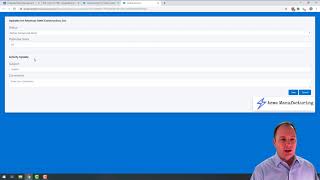
Hi, my name is Steve Snap, and I want to thank you for joining us today on this episode. Today we're going to talk about this idea of collaborating with our. With your manufacturing reps. And in some of our other videos, Kevin and I talk about what it means to be a manufacturing rep. He was in this industry for 30 years. He was a manufacturing rep for a significant portion of that. And so we talk in detail about what was going through his brain and what were his priorities and what really mattered to him as a rep. So we took a lot of that and we baked it into LeadSmart. And our goal that we were solving for was how do we make it exceptionally easy for your manufacturing rep to collaborate with you? Which meant for most cases, we didn't want the manufacturing rep to have to log into a separate system. We wanted to be able to decide what things we wanted to send them, not only in terms of assigning leads, but also in terms of what things we wanted feedback on. So the idea of LeadSmart is that as leads come into your leadsmart. Org, how do you assign them and then how do you share that with your channel? So in this example, what I'm going to show is a very simple example of an email. And I should stop by saying that one of the main things we were solving for was we didn't want to give the manufacturing rep an app, necessarily. Now, if a manufacturing rep wants an app, we can give that to them. We didn't want to give them an app. We didn't want them to have an extra login. We didn't want to ask them to do necessarily anything out of their normal routine. Now, I know that we are paying them commission, but our goal here was to align as best we could with. With their sort of natural tendencies. No criticism here, but as you know, they have very particular preferences. They're all individual reps, so they have a lot of individual preferences. But we wanted to make their life exceptionally easy. So we decided, why don't we send them an email? In this case, we're doing it once a week. And then in that email, we give them the ability to basically navigate from that email into the Lead Smart Partner pages, but to do it in a way that was baked right into kind of their normal routine. So in this example, I'm showing the email that goes out on a Sunday night. And what you'll see in this email, I'm looking at this email, by the way, in my email browser, which is Gmail. So you'll see what it looks like in Gmail. It looks almost exactly the same in Outlook. It's responsive, which means it looks different on your phone. And I can navigate directly from that. And so what that means is right from within the email, I can take action on these records. Now, in our other videos, we talk about this idea of aging status. And the idea is that we want to decide what to measure using in this case, aging status or this red, yellow, green concept. So in this example, we're just using red, yellow, green to show us the last contact that they had with this record. Now, that doesn't necessarily mean it's the same way that you'd want to do it. You might want to bake other metrics into the aging status. There might be other things you want to communicate with a red dot or a green dot. The point I'm making is we want to create a behavior within our channel that red is bad and green is good. Thankfully, most people know red is bad. So the idea there is, what are we going to ultimately bake into or build into that red, red dot? In this example, it's just, when was the last time you had contact with them? There might be other metrics that we want to bake into them. We talk about that in a little more detail. So in this example, I've got five manufacturers, or five accounts rather, that I've assigned to this manufacturing rep. Now, what I'm asking them to do in this email is to update this record. So right from this record in the email, so again, I'm not in an app. They can click on their pencil, they can go in and they can put in their information. All of this information can be tailored. So in this example, these were the kinds of things that this client, in this example, wanted them to record. So in this example, we just want the manufacturing rep primarily to make contact. So if I go ahead and make contact, identify the number of units, all of that information can be recorded. And once it's posted against that record, it then moves that record from, in this case, red to green. In this example, I'm just going to go ahead and leave the status information the same and I'll just say quick chat or whatever. So once they save this, then that information gets saved and that record turns from red to green. Now, one thing to note is that because I'm in an email, this email is static. This email was sent a couple days ago. It's going to stay the same, but the information that they're working on in the account changes. So if I go into the account link again, I'm in the partner portal page or their page. But I got to it through an email. I didn't have to log in and I don't have an app I need to manage. All I need to manage to keep my manufacturer happy in this case is I have a weekly email that I need to work through. The beauty of this is we can decide what information to put into that email on a weekly basis. So we can decide do we want just accounts that haven't been updated, do we only want to see certain accounts that have certain opportunity and what their dollar amount is and those need to be updated. So again, I just want to give you some ideas, thinking about, well, how do I solve this? But the main essence or the big idea that we're trying to solve for is how do we make this super easy for your channel? So just a couple of things to touch on before we wrap up. Now that I give them access to this record and this access is a direct link into my lead Smart Data. They can do other things. They can edit information about the account if they have that information. Some of our clients want the manufacturing rep to be able to assign this to a distributor. So we've given them a mechanism to do that if that's the appropriate role. They can also update information about our contacts. This has historically been a huge problem. The manufacturing reps don't necessarily want to share their Rolodex. Now, this doesn't necessarily solve the desire for them to share or not share the Rolodex. It just makes it easy for them to do it. And if we build part of the metric into that red dot information about their contacts, we could certainly incentivize them to give us more information. For example, you could have an account if it's only got one contact that might be red, and if you have three contacts, it might be green. Not sure that's a perfect example for your situation. But the idea there again is that we want to create a reaction to red dots and we want everyone to move towards green dots and we can bake all kinds of other information into that. And then finally we give our manufacturing rep visibility into what's going on with the account. So one of the things that is a real challenge is if the prospect is doing certain things, whether it's with us or our channel, it's very difficult for us to see that and it's very difficult for the channel to see that. So any contact that we've had with this prospect through our marketing efforts or through any email campaigns or any nurturing efforts, that we're doing or any other conversations that they might have internally, all of that information is revealed here down the activity history. And anything the manufacturing rep does in this example also goes into the same place. So we're now all looking at the same information about these prospects in the same location. Now, in this example, if I want to look at this information in LeadSmart, back over in my Leadsmart system, when I go into, let's say, one of my dashboards and I'm looking at this information, that same information, just to give you a little bit of sort of visibility of what you're seeing on the back end, is that when I drill into one of these records, that same same type of information that we're seeing in the channel view is also available in our internal view. So now I'm inside your company looking at my internal view. All of the activity and all the information that I've captured or that has been captured by my channel is all available here in the activity history, all of the details associated with this account that you see here. So just to show that, again, internal view, external view. So this is channel facing, this is internal facing. The point is that we're all using the same information. We're all accessing it from the same place. One is obviously used inside and one is outside. And the beauty, while we can give them a login and a portal, if that's required, or if that's a valuable thing for them to have or for you to give them. The main goal that we were trying to solve for in our app was how to make this access ubiquitous, which means they can do it from email. They don't have to change anything. They don't really have to learn anything other than what your expectations are and what red, yellow, green mean. So, again, the whole goal here was super simple. We wanted to align as much as we possibly could with sort of a natural inclination in the channel and fit in, for lack of a better word, into the way that they were so that you can get the information that you need, collaborate with them very easily, and not necessarily have to push that rock uphill. All right, well, thank you very much for the time that you've taken to watch this. If you have any questions, please see the link in the description below. If you'd like to have a quick conversation with one of our founders, and we look forward to chatting with you. Thank.