Reimagining the Designer’s Toolkit with AI | VIZCOM
Jordan shows Vizcom, an AI platform that turns sketches into 3D renders and color variations in one canvas. Hector and Claire from AIX Creative explain how they've helped Vans, The North Face, and Timberland adopt AI for design work, stressing the need for low-fidelity exploration and learning to speak AI's language.
Questions this video answers
Not yet; vector export is planned for a near‑future release.
They are surprisingly good but not 100 % perfect; they serve as a strong starting point but may need manual refinement.
AIX Creative recommends dedicating team hours to stay current, following thought leaders, learning the ‘language of AI’, and partnering with peers to double learning speed.
Upcoming updates include better proportional accuracy, multi‑image input for richer 3D generation, and post‑generation editing tools.
Chapters
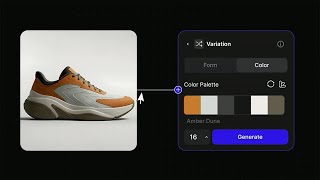
Another AI thing, right? I know, so there's just so, there's just so many of these, but I promise this one's interesting. Okay, okay, none of the other ones, they're all interesting, right? Okay, so the thing we're gonna be talking about today is reimagining the designer's toolkit. So before I go too deep into it, once again, yeah, my name is Jordan, and thank you guys for coming out to support here as well. Hector, and we have Claire, Blair, But this is where Vizcom originally started. So that's my living room. That's my co-founder who I've known since middle school. And my background is in industrial design. So I love drawing and then figuring out ways to turn those drawings into physical products, right? That's kind of where it all began. And of course, the Costco hot dogs, because that's all we could afford at the moment. So that's day zero of Vizcom. And we all, starting from a sketch, right? And if we kind of look around us, the world around us kind of started out as a sketch, right? A lot of world-changing ideas start out as drawings. You'd be surprised at how many people don't realize this. And this is a very lengthy process of turning these drawings into physical products, right? We've all are a part of this in some way. But that was kind of the main problem we really focused on. And it still is today. It's like, how do we kind of allow you to essentially hold your ideas into the real world? And instead of asking ourselves, how can we automate this away, we really kind of more so focused on accelerating this, really leaning into what designers are already good at, and just making sure that that's been able to be done much faster. So that's kind of the focus of VizCom, 'cause I feel like, and a lot of you guys have seen this, my mom sends me a lot of AI cat videos, and there's really no intention behind these things, right? It's kind of just like slop, right? The slopification of everything. You know, there's like, people call like the Cava Chipotle bowl like bowl slop, right? Food is just in a bowl, just given to you. So that's AI without intention. It creates these things that aren't really creative in a lot of ways. So we really believe your ideas deserve better, right? Like these things should really serve the things you're good at, which is being creative, and not necessarily dilute it. A lot of things you'll see today that I'm showcasing around how the tool works very much leans into a lot of these principles. So yeah, in the age of slop, we believe designers' taste is paramount, right? One thing you guys are all super good at is having taste and a good perspective on things that's super unique. And so a lot of people on the team, they were ex-designers themselves. They come from the Keyshots, the RISDs of the world. So our team is filled with a lot of people just like myself. And this is kind of the, the, the core, I would say, process or workflow where Viscom really fits in. It's really going from that sketch, visualizing that sketch, creating 3D models, and then kind of adding a little bit of motion to that. So that's it at a high level. There's a lot of many different things you can do, but to kind of just show you guys some context, right? So I'm just gonna walk through the flow. So like, say for example, you have this tech pack where you've kind of already defined the color and proportions, but you simply just kind of want to visualize that. So that's kind of the first step of the process, is helping you kind of visualize something that's normally 2D into something more realistic. And another aspect of that is then actually animating that, essentially allowing you to fail faster, is what I like to say, is what a lot of these things are doing. It's allowing you to really see something about a design that you maybe normally wouldn't have, or it would have just taken much longer. And then once you do that, you can then actually put that on someone to then try and see what that might look like in the physical sense, once again, failing faster. So that's kind of like a quick look of what the flow— oh, there's music here. OK, sorry. I didn't realize this had audio. Sorry about that. I literally said back there, I was like, there's no audio. But there actually is one here. And so the really cool thing about this is it all happens in one place, right? You can draw inside of Viscom. There's this idea of a canvas. You have your layers. And then you can quickly create 3D models of these drawings and things like that, and then really quickly visualize them. So the really cool thing about this is it kind of fits in a lot of the design patterns that you would expect in a Photoshop or an Illustrator. We just kind of made it a lot more accessible by it being in one area. In this particular example, it is really cool because you can explore these unknowns where you are essentially bringing in elements of, you know, you maybe normally would not do this, but it kind of allows you to see what would happen if, oh, what would it actually be like if I had this jacket and then this moss material or these other things, and if I were to kind of like bring it in, right? It is these happy accidents that naturally happen in the diverging and converging of the design process. That we've essentially tried to make a fun kind of interactive experience. So yeah, that's what that looks like at a high level there. And kind of tying it all together, right? This is like another example of kind of what that looks like going from, let's say, a simple tech pack drawing into then seeing what that might look like fitted onto a model of sorts. Cool. So I'm just going to keep going here. Oh, we have plenty of time. OK, excellent. And here's an example of just what that would look like in the context of a jacket, for example. Showing how it would actually function and essentially increasing the fidelity, right? That's, that's, that's what's a really key element here. So yeah, I'm just gonna keep going here because— so now I'm gonna get into this idea of something called palettes, right? And a palette is something that defines your style. If you guys don't know who this is, this is the king of style, Bob Ross. I used to watch this guy growing up before Hey Arthur would come on. And yeah, that's, that's our man Bob Ross. And this is something we really kind of took inspiration from at VizCom is a lot of you guys work at places that have these unique brands, these unique design languages. But how do you kind of leverage that in order to kind of tune Viscom in a way that really reflects your guys' company history and brand? So we have this thing called palettes. It's a way to introduce design consistency as well. So say, for example, you have these different— in this context, these objects that resemble a particular style or design DNA. You can then feed that into Viscom. So the next time you kind of feed it a sketch, it kind of looks like it came from that world, which is super unique and kind of allowing you to kind of keep that sense of authorship so it really follows something that you inherently created. Here's an example. Now, I don't know if you would ever make Dyson shoes. Maybe, I don't know, like vacuum and walk. But that's kind of like what this— yeah, this is kind of like what it allows you to do, right? It's like things you normally just wouldn't even have the time to entertain at all, you can essentially do super, super fast by leveraging your existing data that you have that it reflects, you know, the design language of your company. So this is super cool and one of my favorite aspects of the tool as well. And oh, whoops. I'm going to go back real quick. Whoever is controlling this, can you press that play button really quick? I can't do it from here. Yeah, sorry. It's like a YouTube video. So yeah, and this is like something we have in the tool called Modify. Essentially allows you to modify your designs in a lot of unique ways. And this is basically our way of taking a very product-heavy design approach of kind of abstracting these things in ways instead of just prompts, right? Like we type enough emails, like now we got a prompt in the creative tools, like, oh man. So our whole thing is like trying to figure out ways to make these things feel a lot more natural to how you guys would maybe already think about things. So, oh, I want to extract this material for something I found on Pinterest and then apply it to a hat that I'm now designing, right? Like these are kind of these these natural creative intuitions we have that we inherently are kind of on purpose designing VisCom to kind of really lean into, right? So language is just one part of design, but we're really trying to understand how we can introduce these, these visual ways to communicate your ideas. Hence the name. Yeah, VisCom, right? Visual communication. So that's just like a sneak preview of, of what that looks like. And that's all available today. So Oh, can you click the next? I'm trying to click this, but it's not working right now. Just click on that. Yeah, there we go. Cool. So for example, in this change expression example here, there's kind of this like rotary dial-esque thing that allows you to explore the different emotions of a particular, you know, this could be a model or something like that, and to kind of really see, you know, what they would look like with different expressions here, which is super fun to see. And this is an example of kind of like Once again, kind of exploring those unknowns, right? This is kind of using something we have called Live Render, and basically kind of describing the drawing in many different ways, and kind of landing on this kind of like stone, almost like nature-driven inspired shoe design concept. And then being able to see that from multiple different perspectives, which is super interesting, gain further insights, and then quickly putting that onto someone. And what's just really cool is you're doing this all in one sitting, in one flow, right? It's kind of happening as you're creating. And as we know, the design process is extremely serendipitous. So a lot of these things aren't planned as you're going. It's kind of just happening in real time. Extracting materials, one of my favorite things, you know, taking photos of the real world and actually creating texture maps from this. So what that kind of looks like in practice, it's like, okay, I found this really cool abstracted recycled material, and then I just kind of want to extract it out and then apply it to my design. In this context being the arms or the kind of back part of this this chair here. So yeah, this is just one of the many ways in which Viscom kind of plays its part. Another really cool thing about this as well is, once again, you can press the play button, is really leaning into, once again, workflows and practices we already are doing, but just in a different way. So in this one, this is called Variate. It's a block within Viscom. And essentially allows you to extract the color palette of a particular design that you maybe have. And then instead of, you know, you don't change the design, you're not changing any of the things that you originally intended, but you're simply just exploring what the CMF might look like in that design. So you can generate 4 different variations of simply that color palette just shuffled around on your design. So once again, just really leaning into how designers are maybe already working and thinking today and just accelerating that process. This is one of my favorite new tools that we've recently pushed out. Because it just kind of really sticks with the intention of what you were already doing. And then, yeah, palette play made easy. So that's color variations. And I'm going to kind of show really quick kind of what that looks like in practice. I'm going to skip this one, but just kind of show the images here. So yeah, we have this person wearing this jacket and you can kind of see what their different shirt combos or what the puffer jacket looks like as well, but while keeping the same pose and design intact. And then kind of here's what that looks like in the context of, let's say, a uniform exploration. So it's kind of a mix of Modify and Color Variation. So kind of describing really quick of like what this would be, and then using the color palette extraction to then explore a bunch of different variations really quick on the fly of what that could look like without going too deep into, you know, manually selecting each color and, and then seeing what that might look like. So yeah, that's my bit of the TED Talk here. I am going to hand this over to Hector and Claire and let you guys take it from here. Yeah, awesome. Welcome.
Thank you.
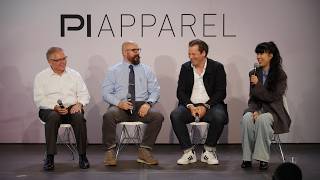
So the last time I was on a stage was— 25 years ago when I won the merit award for industrial design. And so I— and then the Viscom folks convinced me to come out. So after a lot of arm bending— have you guys seen that Homer Simpson GIF where he backs into the bush? I was like, all right, I am going to— but yeah, I'll introduce myself. Hector, long-time industrial designer, 25 years or so. Did product agency world for a while, started my own company for 15 years, ran that. I like to stay behind the scenes, built a bike brand and ran that for a while. And then I found myself back in consultancy world and that's how I discovered AI. And so this was 3 years ago. Since then, it has blossomed into AIX Creative. Claire joined me along with a team there of those folks and, and others. And what we do is we help organizations navigate AI, and, and specifically focused on professional-grade creativity. And, and the idea is to, is to help them explore it, to help them figure out tangible ways to apply it, right? Like, that's very important, and then hopefully lead to long-term adoption of it. But anyway, Claire, you should introduce yourself as well.
Hey, good to be here. My background is also in product design, and Hector and I actually went to the same school at different times. But after my time at school, I actually ended up working in biopharma for about 5 years. I was doing a lot of patient and physician-facing materials. And after, after my stint there, I wanted to transition into something new. And I saw that AI was becoming a very important aspect to a lot of different sectors. So I started experimenting on my own, and Vizcom was actually the very first tool that I tried. And it's incredible to see how far it's, it's come over time. It, it initially was was just— I took a sketch and rendered it in not any particular style, but I was amazed. And it was the very first version of the tool. So I knew it was going to be promising. And that was really the starting point for me. And Hector and I crossed paths, and that was about a year and a half ago now. So it's been great to be a part of a team that's growing so quickly in a world that's so important right now in design.
Yeah, we help, you know, a lot of these brands. Sean, Vans is one of our clients, the VF Corporation, Timberland, North Face, and a list of a bunch of other clients. And we at this point specifically focus on enterprise clients. And what we help with is, so it's all based on R&D and really deeply understanding the needs, right? So if you look at AI is a hot word now, but it's technology, right? It's emerging technology. And so we, you have technology here, you have deep knowledge of professional use cases here, and you have leadership and legal and all those issues. And we sit in the middle, right? Like we're trying to be that translator that helps them understand it by deeply embedding ourselves in AI, anything AI. That is why we have relationships with folks like Jordan and, you know, a bunch of other players in the AI game. And really, it's, you know, we do these R&D projects where we take real-world efforts that you already are doing and we run them with AI, right? And when we run them with AI, it allows us to actually learn by doing. And we do this with the client together. So then that leads into education, that leads into us helping them with model tool selection. We help them navigate legal, which is a huge issue with all of this, which is one thing that Viscount's really we get really good at, tends to get approved at most of our clients. We double as a production agency as well. And the last one here, but the most important one in my opinion, is people, right? I think we get so caught up in the technology right now because that's what everybody's talking about and that's what's sort of overwhelming and mind-blowing. But at the end of it all, if the people doing the the work, you know, don't accept it, nothing's going to happen, right? So we do a lot of work in effectively change management, right? Like helping these organizations figure out how to make this as smooth as possible when we know it's going to be a bit chaotic. But we thought we'd put together some examples of— excuse me— just some use cases that we have found useful with this tool. So yeah, Claire.
Yeah, I think one of the things that's greatest about Viscom is that it's the, the nature of the interface truly allows the designer to impart their vision and to make intentional decisions. And I think this is a very high-level example, but something that we have found to be— it seems to be important to a lot of designers is the ability to communicate a concept through their own native language, whether that be— see, this is a vector example. Or you can also take a concept like this, or a framework, and do it with hand-drawn sketches. So essentially what you're seeing here is we took vector drawings of the different icon styles that Vans offers. And it's basically a mini model. We talk a lot with our clients about the importance of understanding the difference between tool, model, and platform. The model is what has the power, and in this case, you're essentially training a mini model. And here, so you only see one of the shoes that we trained the model on. There were 5 other ones, but here we're able to generate a range of ideas. We don't have the prompt here, but just essentially trying to get a new kind of silhouette that is done in the style of everything else that we were already working with. We had been rendering and kind of modifying silhouettes. So it's a great starting point. And from here you can take one of these concepts and go into the canvas aspect of Viscom and use the pen tool to make specific modifications that you can then render in in whatever CMF you like. So we found this to be a very, very valuable use case for, very early on design work.
Yeah, and one additional point, which ties into this slide as well, is the— I think there's a— I'll say there's a misconception that AI is all like photorealism, right? Like, that's what you see, right? You see just super high-quality visuals, and a lot of the model companies, I would say, have focused pretty heavily on photorealism, which is great, I think, for some use cases. But for folks like us that are a team of creative designers, most of what we do is in this point or in the next slide, we deal with a lot in the sketching part. Yeah, that one. And so I think it's easy to get caught up in that high fidelity. But I think there's so many opportunities in the low fidelity world for exploration, right? Because I think any of us that are creatives in this room know that when something is lower fidelity, there's more room to get in there and change things and modify. And you're in that flow, right? That mindset. And so, yeah, it's just important not to overlook that all these tools work really well with this. And Viscom especially is a tool that has been built for this, right? Like from the ground up. But yeah, this is a good example of that.
Yeah, with the generation of multiple views, there was a slide earlier that Jordan covered where it showed a timeline being compressed. And that's essentially what we're showing here is something that would have taken potentially hours in the past is now compressed into just a few minutes. And not to sugarcoat it and say that this is perfect here, but again, it's a fantastic starting point that you can go from just one sketch to seeing it essentially in space in a different way immediately. I think—
oh, go ahead. No, I was going to say I had— so again, I've been sketching my whole life, right, for the most part. And so I post a lot on LinkedIn, you know, so it's like about AI daily. I try to. And so people will comment on there. And then one of the things somebody commented was, but don't you still like doing the traditional sketching and like going through a concept and just the effort it takes? And as a person that has sat there on a Wacom tablet sketching for 8 hours a day, I'm like, you don't know how much my back hurts like doing that. I don't know if you realize how hard physical labor this is. I'm like, so no, I don't actually miss like having to sketch every view, right? What I've always been about is the vision and the concept and the story I'm trying to tell. And again, as a lifelong sketcher, as a person that's dedicated my whole career to it, I really lean towards sketching. But I also really appreciate when I could take a sketch and I can, in this case, see orthographics, even if they're not right yet. I'm going to build on this. I'm not utilizing AI to figure it out for me. I'm utilizing AI in this case to just help me see it in a different way. I will take this, I will sketch over it, I will change it or see it in 360 views. That's why it's this evaluation of a concept way further upstream than you could before. Those are those wins that I think really make a difference today.
I was actually teaching a class this last year at a college. And part of an aspect of the class was orthographic drawings and draftings. And I felt quite conflicted because I had been talking with the Viscom team and I had all these like 18, 19-year-olds that I'm, you know, I'm going with the curriculum of the school. Of course, I'm like, this is very important to dial in your draftings. And then I'm like, God, they're developing this, this tool right now. So it was a really interesting moment to kind of to see the two worlds getting up against each other. Just wanted to talk about that.
It's changing so much. Again, this was back in the 1900s when I was in school, and I was doing wood rendering, right, where you used to have to render wood. And then I think Claire mentioned that they're still doing that. And it's like, I don't know if you need to be doing that anymore. There are certain things that you do need to be doing, right? There are certain things that tools like these folks from Viscom have created that that's not going to be as necessary anymore. Like the thinking, how you think through problems matters a ton. It will matter more than ever, actually, like having a good strong vision and storytelling. But rendering wood is not going to— it's just not going to matter anymore. Yeah, this is— I thought this example was pretty cool too. The Viscom Render functionality is really good because you can take your sketches in there and then you can render it, obviously. You don't have to do the Photoshop rendering thing. But you could also do something like this example where I pulled that image or we pulled that image from Van's website. And then just by setting one of the— what's it called, Jordan? The lever. Influence. Yeah, the drawing influence. Yeah, the drawing influence lever. Just by turning that down to 70% or so, you're able to just get variations, right? So that's it. So, you know, and then again, we're just— I'm exploring, just looking at different sole patterns, looking at different color options, CMF options. But again, it doesn't just need to be sketching. Like what I have found with AI tools as a whole is that they can do so much more than we think. Like the functionality is there. The challenge is our blocks, right? It's just like we operate like this because this has worked for a long time. And a big part of it is just being around people and seeing what other people are doing so that you can expand it a bit, right? Because again, this has worked for a while, in my case, 25 years. And so I have to remove those and remember that there's other functionality there. Yeah, next one. This one is, this to me, and I already touched on it, but the upstream evaluation of concepts. And so I'm not the big, I'm not this big proponent of what you see online, which is you can, you used to be able to do this and it used to take this to make a movie and now you can make a movie in like half a day. Like that whole concept isn't true. But that gets parroted a lot online, and then there's a perception that that's how it is. I put it in here as something that's done in minutes, because in this case I think it's really valuable, right? And it's the fact that I can take a very rough idea and in minutes, like, look at it as a— I don't know if somebody can click on that visual, but it's like the other ones that we've seen earlier. I took this 2D drawing, right? That could be a napkin sketch. Took that 2D drawing, pulled a character from the website, put the vest on the character, composited it, animated it, right? In minutes, right? So that I'm able to— again, not because I'm going to put this on the website and sell the vest, right? But because I can now just see it in context, right? Something that I could never do, right, in my entire— career, right? To me, that upstream evaluation is a big deal, right? And that's going to make a big impact out there. And that's it. I think that's all we have. Yeah. So, yeah. Yes.
Perfect. Excellent.
We'll be out at the booth with Jordan.
Oh, yes.
Yeah.
Yeah.
Yes. Ask questions if you'd like to discuss anything.
Yep, we will be outside. Yeah, thanks for coming, guys. Oh, we have questions. Q&A. Awesome. Do I just answer these? Or can I just like—
Yeah. Oh, OK. Oh, there we go. I didn't have sound, so I was like, yeah, go ahead.
Oh, OK, cool. Can you get vector drawings from VisCom? Oh, OK. So this is coming very soon. But at the moment, you cannot. One thing we're working on right now is being able to quite literally generate tech packs from a drawing. So right now that's not there, but very soon. Yes, this will be coming out very soon. Do the orthographic views really match, like in a technical drawing? Sometimes the transition between views are tricky. Yeah, so none of this is like 100% perfect all the time, but it is pretty good, like surprisingly good at how well it will be able to translate a 2D drawing and showing every detail from a different view. There probably is maybe sometimes, sometimes, like you'll have to actually go in and obviously add your own flair to it. But I found it to be pretty— the cohesion to be pretty good for the most part. If you guys want to add to some of this.
Yeah, it's like the example that we showed. It's— you can at a glance, it will probably look mostly right. But once you get in there, it's probably not going to be perfect. But that's why we say it can be a great starting point.
Yeah, 100%.
Great. I think there's going to be more questions coming, but I'll throw one out. I've been working with I've been working with Viscom for a little while. I've been working with Hector and Claire at AIX Creative. And the one thing that I always struggle a little bit with is that the ground is always shifting. You're constantly walking, and it's like, oh, now I got to go over here because this is doing something better. Or I have to look at this because this is new, and I need to know what it does. How are you dealing with those challenges?
Yeah, our team— again, we have a whole team dedicated to this specific space. Space, right? So we, you know, I would say we deal with it by just pure, you know, throwing people hours at it, right? And even then we can't keep up, right? The pace is pretty overwhelming, I would say, even for us. Yeah, my suggestion, because we get asked this often, my suggestion is to, you know, follow people like us. But, you know, like, but, you know, follow people like— and others, right? Like, just, you know, folks that are putting in that work and that time to help others navigate and distinguish between the noise and the true signals. That's one way. The other way is, I always talk about it as the language of AI, right? If you learn, it is like learning a new language. You are talking to these things, right? The AI. And if you learn how to to talk to it, how to give it clues, how to communicate with it with one tool, you can tend to do that with a lot of different tools, right? So I always say that if you don't know which tool to use, like, you should pick Viscom. But you can pick a tool and then just go down that path. And that fluency in that language will translate, right? And that's a good way to just— to sort of fight off the overwhelm.
Just to quickly add on that, I think it's one thing if you have a team, but we were at IDC a few weeks ago, and I put together kind of a cheat sheet, and they sound cliché, but another thing you can do if you're an individual is to kind of partner up with somebody who's at a similar skill level as you. You know, you will double your learnings for sure, because with how much volume there is out there, no doubt you will both find different things. To come together and discuss. And you can also try using AI to track AI, which is something that we— the whole concept of agents obviously is quite deep, but that's pretty, pretty complicated. But something to consider.
Yeah.
3D modeling.
Oh, okay. I will continue. We have 20 seconds left. I'll try to answer this. So love using this combo. I generate 3D models. It's always so puffy. What fixes, such improvements can be expected Soon for 3D modeling capabilities. Yes. One thing I found to be useful for this is the ability to give multiple images to generate 3D kind of helps here. But inherently, yes, this is actually something we're pushing out next week is a big improvement on the 3D model capabilities. And a lot of that is just on the, the detail understanding and the actual proportional understanding, because sometimes right now these 3D models, when they generate, they'll be like slightly disproportionate. But then even giving you the ability to also edit this post generation is something we're also building. But yeah, that is something else.
Yeah. And I'll just throw one quick note on 3D modeling too. And I know we're out of time now. I'm just getting comfortable up here. The— for 3D modeling, sometimes you have to view it as not the end result, right? Like for us and a lot of the work we do is we will generate a 3D model that is just— it's a way to rapidly create 3D. That then we can just clean up in KeyShot quickly, that we could animate, that we can use to do video generation, right? Like very hybrid approaches. So if you view it as just like one piece of the puzzle, not the end result, it becomes a lot more useful. Yes, that's it.
All right, cool. Thank you very much. Great presentation.