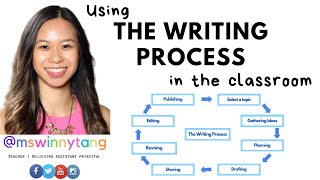
Teacher Winnie shows how to use visual posters for each writing stage around the classroom so students can track their own progress independently. Students move a name tag from poster to poster as they go from topic selection through publishing, with customizable templates for brainstorming, planning, and peer feedback built in.
Chapters
Hi everyone, this is Winnie, and this is how I've been developing independent writers in the classroom. So I've been using the writing process and displaying that in the classroom to just show my students visually what they need to do and where they will be going to next. So I'll give you these resources in the description box below, but this is how I do it. So For example, I'll display the posters up around the room and then I'll put student names or numbers and then once they have completed, for example, selecting a topic for their piece of writing, then they can move their name down to gathering ideas. So I'll show you some photos of how I've done it in my classroom. So here's an example where I've put an example of what a good piece of writing looks like in the middle and then around around it, I've put up the posters of selecting a topic, gathering ideas, planning, and this was in the middle of a piece of persuasive writing, and I had my students put their name under whichever one they were working on. So, you know, obviously everyone works at a different pace, which is why this is a great way to do it because then, students are, yeah, they know where they're going, they know what they're doing, and they know where to go to next. So they're not coming up to you going, you know, "What do I do now? Where do I go to next?" etc. So here's another example as well where I actually put up different resources underneath each step of the way, and I'll go through that in detail as well in this video. I just wanted to show you some examples of photos that I've, you know, done in the past. Also, I have used numbers as well. You can— yeah, it's up to you if you want to use student names or if you want to use numbers instead. I find that, you know, students like having their names up, so it hasn't been a problem for them in the years that I've used this. So the posters that I'll be sharing in the description box below will look like this, so you can choose writing cycle or the writing process. They're selecting a topic, gathering ideas, planning, drafting, sharing, revising, editing, and publishing. Obviously you don't have to use all of these posters. You can pick and choose what you want for your age group, for your year, for your grade, etc. But this is how I use it in my classroom, and I'll go into a little bit more detail. So for selecting a topic, sometimes I will actually put a whole list of topics that students can pick from, and then, you know, they go, go through this writing process, and if they've already published and they're back to selecting a topic again, then it just means that they can pick another one or pick something else. So yeah, I like to give students a choice, so that's why I do that. And then for gathering ideas, that's essentially just brainstorming. So I use this in lots of different types of writing, whether it's persuasive, imaginative, where it's poetry. It just means that when students are up to brainstorming, they can then move their name down to brainstorming. And it gives them a sense of success as well because they know they're moving on to the next thing. So they've already, you know, selected a topic. Now they're going to gather their ideas or brainstorm. I do have a video on brainstorming for persuasive writing, writing. If anyone wants to have a look at that, it's just on my channel. For planning, that's usually planning and putting ideas maybe into a template, maybe to structure the text. So for example, if they're putting their different ideas into the introduction or the arguments and the conclusion, or if it's a narrative, then they're putting it into the orientation, the complication, the resolution, etc. Yeah, and it might be like a template that looks like this for persuasive writing. I do have videos on that if you would like to use them and also resources for teachers especially. Narrative writing, there, it could be a template where they put their ideas and structure into something like this or an informative text. For drafting, that's where they start writing their piece of writing and Sometimes I like to put, you know, different steps up on the board as well, like this is where you write your intro, your arguments. This is where sometimes I'll put my success criteria up too so that they can check their work against it so they can self-assess. And this is also where I like my students to have a look at 2 stars and a wish, 2 things that they did really well, 1 thing that they want to work on, and then I expect them to turn their wish into a star. So they'll pick something that they need to work on and then they go and fix that up and improve on it. And that's what I've put here as well. So with the sharing section, this is where they are going to be resources for each other and this is where they will have a look, share their work. So they'll share their work with a learning buddy, they'll read each other's, they'll mark it off the criteria, they give each other two stars and a wish, and then and they both have to turn their wishes into a star, and the feedback would come from the criteria. So, um, they're not up to editing or revising yet, which is where all the punctuation and spelling comes in, so this is just on whatever the criteria is. Yeah, so this is where they peer assess. With revising, that's when they have a look at their work again, and then they decide what needs to be deleted. So they have to reread it, preferably out loud, so they can hear what it sounds like and see what words need to be deleted, what could they add in, what could they rearrange, what could they exchange to make their sentences a lot stronger. So that's when they can move their name up to that section. For editing, that's where they will edit for their punctuation, their spelling, their punctuation, their vocabulary, and their handwriting. And then once they get to publishing, that's where they can publish it on a piece of paper, or if you're doing it on computers, you know, using PowerPoint or Google Slides, etc. So yeah, so, um, just how it works is, you know, they just put their name on whichever step they are up to. And, and then as soon as they've completed that step, they keep moving their names down, and it just gives them a sense of success as well because they know exactly what they're doing, where they're going, where to go to next. And it makes them independent writers because they, yeah, they know where to go. So this has been really, a really helpful, yeah, strategy to use in the classroom. And I've used it for a few years now, and it's worked really well. So that's why I wanted to share it. So yeah, anyway, if this was helpful to you, um, I'm putting a link to the posters in the description box below. So if this is helpful to you, please subscribe, and thank you for watching. See you, bye!