Relay Bank and Club Capital
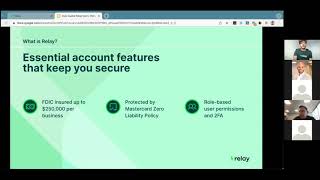
In this Club Capital webinar, product specialist CJ (with Olivia) from Relay Financial presented a comprehensive demo of Relay’s virtual banking platform for small‑business owners. The session covered Relay’s core free banking features—up to 20 checking accounts, 50 Mastercard debit cards, ACH, wires, and check‑sending—along with security controls such as role‑based permissions and two‑factor authentication. Deep integrations with Xero (real‑time transaction sync, automatic categorization, and bill import) and an upcoming Gusto payroll integration were highlighted. The discussion detailed how teams and advisors can collaborate securely, how the platform’s cash‑flow tools (percentage‑based transfers, Profit‑First style accounts) simplify money movement, and how the “adjacent” model lets businesses keep existing bank relationships while using Relay for operations. Relay Pro was introduced as a paid add‑on that adds accounts‑payable automation, multi‑stage approval workflows, batch payments, same‑day ACH, and unlimited domestic/international wires. Limitations such as the current lack of credit lines or credit cards (planned for the next 12 months) were disclosed. The webinar also covered pricing (free standard plan, $30/month Pro), customer‑support availability, and the Club Capital partnership referral link. Attendees asked about check‑book availability, overdraft handling, and line‑of‑credit integration, which were answered by CJ and Micah.
Chapters
All right, this is another Club Capital webinar series. We are really happy to be able to have Relay Financial today. So both CJ and Olivia joining us from Relay. Club Capital just started using Relay. It's actually, it's probably been 6 to 8 months now that we've used, migrated our operating accounts over to Relay. Kind of in, in, in the vein of testing out some, some new providers that are out there before we really kind of go to our client base and make some recommendations. And we've been wildly impressed with what their, their banking interface is, how it performs, how it helps us stay on top of our financials, and how it integrates into the different accounting platforms to make make overall small business accounting easier. So I'm excited to be able to have them on today and talk to, talk to our client base. And we've prepped for this too, so that we can have a little bit more of specific kind of tailored approach directly to our clients. And so we'll let CJ— I think he's going to kind of dive into an overview of Relay, go into a bit of a product demo. As well. And at the end of the day here, we're talking about product. The product is, is banking. So, um, the way— what you'll see today, how they present it, um, as well as how it looks, um, doesn't look like banking even though it is banking. So, um, it's— it'll be great, um, for everybody to be able to see that. Um, we do have a couple clients, uh, joining us today, and then we're going to be saving this to our, uh, like webinar vault on our website, um, and sending this back out to everybody so they, um, can have access to it. Down the road as well. We'll open up for questions at the end, open up to clients that did join us today, and then I have some professional, uh, some questions prepared, um, kind of in the line of, of what I know our, our clients are going to want to know. But without further ado, CJ, hand it over to you.
My good, thank you for that amazing intro. So I'll share my screen and let's get started. Awesome. So I want to say hello to Club Capital and welcome to our Relay demo webinar. I'm CJ and I am one of the product specialists here at Relay, and the purpose of this webinar is really just to help you get acquainted with our platform and learn how you can get the most out of a virtual banking solution. So let's dive right in. Our agenda for today, so we'll do a very quick overview of what Relay is all about. And as Mika mentioned, we'll do a Q&A at the end. So feel free to ask questions in the chat box, and we'll come back and answer them then. So a few small housekeeping items. There's the Q&A, and the session is being recorded. So as Mika mentioned, we'll get to that at the end. And if you're watching this later on, it'll be in the Club Capital vault as well. So what is Relay? So in short, Relay is banking that puts small businesses in control of their own money. But what does that really mean, right? So how does this differ from your traditional banking institution? So unlike your traditional bank, you'll find a lot of features in Relay that are designed specifically to help small businesses manage their day-to-day finances and give all the controls that you need to operate your business. So this includes giving you more visibility into your cash flow. With transaction data that you can actually understand. It also means enabling secure collaboration between your team and your advisor, so helping you work, collaborate the way that you would prefer to. And finally, unlike most banks, Relay comes with tools and software features that help you automate your day-to-day financial admin. So what's our story? Where do we come from? Let's go back here. Okay, so we're founded in 2018 by co-founders with a long track record of working in payments with small businesses and with small business advisors. We exclusively serve the United States and we don't have any physical branches. We're entirely online. And we partnered with Evolve Bank and Trust, a bank that's been around since 1925. And through Evolve, all of our accounts are FDIC insured. So why are we founded? It turns out that small businesses really struggle with their banking. So most traditional banks really underinvest when it comes to ensuring that small businesses are successful. So interesting stats here include that most small businesses have more than one banking relationship, so just over an average of 2.5. And furthermore, small businesses change their financial institutions quite often. So in 2019 alone, over half said goodbye to the traditional bank or changed institutions. So why? Why are small businesses having to add other banks and change their institutions so often? So when we speak to small businesses about their banking, there's some clear reasons why they feel underserved by traditional institutions. On top here, we have customer service. A lot of times it's just really hard to get someone to help you. It's not unusual for businesses to spend hours on the phone trying to reach someone at their bank, and you just, you just don't get through. Next, of course, we have the fees. I'm sure you can relate. So these are the monthly fees just to hold an account, the multiple fees for making payments, or perhaps you even have to keep a minimum balance. So small businesses also report that it's difficult to collaborate on banking with their advisors. These are accountants and bookkeepers. For you, these are your advisors at Club Capital. Most banks don't make it easy to provide banking access for your advisor, and all resulting back and forth It really does add up. And it's especially challenging if you're trying to spend less time in your business and more time working actually on your business. So we wanted to address these common issues directly. And our approach to business banking is really to give you the experience that you have at a local branch and combine that with the efficiency that you get with the software. So what does this look like? Well, first we want to make sure that all business banking basics and the security that you'd expect from any financial institution is taken care of. That's why all Relay business accounts are FDIC insured up to $250,000. In addition to this, all the big cards are protected by Mastercard's zero liability policy, on top of which you can instantly freeze any card from your smartphone or Relay's web app. Finally, Relay lets you set role-based permissions for any users that you invite to collaborate on the account. You can also enable two-factor authentication to keep your login secure. So beyond these basics, here's an overview of what Relay can provide you for your business banking. There are a lot of powerful features all built to help you manage your day-to-day finances. We're going to demo all of them really shortly, but let's set the stage first. So first, all Relay's core banking features are completely free. So all of this includes 20 checking accounts with no fees or minimum balances, up to 50 virtual, physical, or of debit cards for you and your team. You can also make ACH payments and check payments. You get detailed transaction data that gets automatically categorized by the vendor's industry. And as already mentioned, you get to securely collaborate with your team members and advisors. You can also unlock advanced accounts payable automation features with Relay Pro, and we'll talk about all about what's included in Relay Pro later on. For now, let's dive into our Relay bank accounts. Okay, so Amazon Web Services is having some issues today. So this is across their global stream, so we are seeing some slower, um, you know, transaction data and visibility in Relay as well. But it is working for the moment, so let's hope it continues to do that. So things may take a bit longer to load as we go through. So when you log into Relay, this is what you're going to see. First, I'm going to direct everyone to settings and integrations. So here we have a direct API with Xero. This means when you do your banking with Relay, you're not going to have broken bank feeds or duplicating transactions, and your advisors at Club Capital will be able to seamlessly see your banking transactions in your bank and in Xero. As mentioned, we also have Relay Pro, our accounts payable feature. You can create a connection here where we'll sync and we'll pull in all the unpaid bills and invoices from Xero into Relay and you can pay them here. I'll walk you through more of that later on. Just know you can have that connection here for now. We also have integrations with Hubdoc and Dex. Uh, we send your account statements automatically to these platforms through these connections. And we actually have an integration with Gusto for payroll coming out very soon. Now, as we go through the bank feed, I'll be able to better explain what this will look like and how you can take advantage of this. Uh, so let's go look at the bank feed. So scrolling down, you'll see just a bunch of transactions, what's going on. And a lot of the features here are oriented around cash flow visibility. This is you going into your bank account and your advisor and actually understanding what's going on. We're trying to take away that back and forth that you have with them, you know, hey, what was the check deposit for? What was this banking transaction for? So first, when you deposit your check, You'll notice we take a photo— we'll require you to take a photo of the front, and you'll actually have to leave a note. It's one extra step for you, but it'll save a lot of time on your advisor's end, and your advisor won't have to bug you later on, so you can spend more time focusing on your business. And here's that enriched data feature I mentioned before. When you use our Mastercard debit cards, we actually take the raw banking data from that transaction. We have our own internal software system which will translate it to give you and your advisor enhanced financial visibility. So what does that look like? Let's check out this other stocking transaction. If you're not from the Bay Area, you probably don't know what this company does or the transactions for. So clicking in, Relay will actually categorize the expense for you. This is for a parking lot and garage expense. We'll also provide a phone number, website, address, and map location of where this transaction took place. What's also awesome about this is you can see the information here. We'll communicate this information to Xero, so you'll be able to access it there, and there'll be a reconciliation process where your advisor can approve. Or if you guys already know what it is and you have your own definition for it, you can choose not to accept it. It's completely up to you. And you may notice by now that you can actually see these different checking accounts that these transactions are happening through. You have an operating, travel, marketing, With Relay, you'll have access up to 20 of these individual checking accounts for free. What makes Relay unique with the checking accounts is that these aren't envelopes or sub-accounts. They're actually checking accounts. They each have their own accounting number, routing number, and individual bank statements. So you'll see we have a, uh, we have the Profit First cash flow method sort of set up here. So we're using that. You can take advantage of, you know, those features, add accounts, create your own nicknames, choose who has access to those accounts seamlessly. You're not gonna have to contact us. You can do it all on your end. We also have some projects set up. If you're doing real estate investing, construction, maybe you have different things going on. Of course you can create projects. The point here is it's completely customizable, very adaptable. You can do whatever you like to do. And, uh, you know, these can fit your day-to-day needs. Uh, with the bank statements, you can access them here by going to statements. Export, download, and just click here and download them. Your advisor with read-only access will also be able to do this, so they're not going to have to contact you anymore and say, hey, can you email me your account statements? They'll be able to go on your account and get them as well. So mentioning the Profit First cash flow method, if you like moving money around by percentages, you can now do that with Relay. So go into move money. Let's say we just brought in some money from our other banking provider. And we click on the operating account here, and we want to move that money between accounts. So what we can do is we can choose, let's say, marketing expenses, let's do some tax payments, and let's put some money into payroll. So what you can do is go to percentage. Let's say you have an obscure amount here. We can just choose the percentages and Relay will do all that math for you. And here you'll get a full summary of how much money is moving where. and you don't have to get the calculator out anymore and just try to punch those numbers. Okay, so you may already have, you know, a banking provider, whether that's someone, you know, local to your area or a bigger provider where you have a loan out, and it's really difficult for you today to maybe change your bank. So I want to be very clear, that's not what we're asking you to do. We want to be a tool in your arsenal that you can take advantage of, that can enable you to take advantage of all of our features and also enable Club Capital to get eyes and ears into your banking, help make you more efficient. So what you can do is open a Relay account adjacent to your existing banking provider. So what does that look like? Well, here in the accounts tab, you can see we have an add money button. Clicking here, Relay connects to 100% of banks in the US, so there's no fee to bring your money in. And this is a 1 business day ACH pull. So if you're not with one of these bigger banks, you can go here to add a bank, input your information here, and then Relay will be able to pull from that banking provider into Relay. You can do your cash flow management through here, take advantage of all of our great features, and then send money back to that bank if you need to. We also provide next-day ACH for free for our payments. I'll show you that in a bit, but, uh, just one business day moving money to and from a Relay bank account. So our debit cards—Relay provides 50, that's 5-0, Mastercard debit cards for free. These cards are backed by Mastercard's zero liability policy and they'll work anywhere credit's accepted. They'll just pull from the Relay checking account. So if you have a team, uh, all making business expenses and you want to set up your team with cards, here's what you'll do. Go to the green button here. And let's say this is for a junior member of our team. You can create a physical or virtual card. Both sync with Google and Apple Pay. And what we'll do is we'll associate the card, let's say, with the marketing expenses. Let's say this junior member is on our marketing team. Next, you can put the company name or team member name on the card. Say, "Add example." Next, you can put a spending limit just to make sure that they're spending the, you know, the card, the money, you know, adequately. They're not spending fraudulently. We can just set a limit here. And finally, let's say your team's virtual or you want to send them to their home address. You can put in a custom address here and make sure that you're sending that card to where they're located. So the nightmare scenario, you have someone spending on the card fraudulently. What do you do? Find the card on the left side here. Click in, go to edits, and here you can update these transaction limits. But you can also just freeze the card here. And once you freeze the card, you can terminate the card and close it down. What's awesome about this is you have one person spending fraudulently, you can close their account, limit their access to the account, kick them out of the account immediately, and then you can redistribute cards if you need to, to your whole team, and have the account up and running within the hour. You don't have to freeze the whole checking account, the bank account, have to call the bank and wait a week to to get operations going again. We make that process really seamless and make your banking secure. Payments. So the standard way to make a payment with Relay, by going to the new payment in the top right here. So we provide free next-day ACH, as mentioned before. We also have $5 domestic wires, $10 international wires, and checks. So how checks work is you'll input your information here and we'll actually print and send that check on your behalf. Now earlier I mentioned using Relay adjacent to your current banking provider. So what that relationship would look like is you would enter your other bank here as a new payee, and then you could click next to ACH and send money there if you'd like to. For this example, what we're going to do is pretend that we're paying a new vendor of ours. Here it's Gary Garcia, and so we know Gary, but we don't have his payment information on file. So what we're going to do is scroll down here and request for it via email. So what's going to happen is Gary will receive a secure link from Relay and through our Relay portal input his account and routing number. What's awesome about this feature is that we can also require Gary to submit a W-9. This means Gary cannot receive payment until he has given you W-9 form, and you can store all those W-9s in Relay and access them later on. When tax season comes around and Club Capital needs those 1099s done. Scrolling down further, you can make this a recurring payment, schedule this for a future date, and of course we require you to leave a reason. So this not only is for the vendor, but for your advisor Club Capital. So they'll know what all your payments are for and they'll be able to seamlessly and be able to help you understand and balance your books and help you with your payments. Okay, so now I can explain to you Relay Pro. What it does is it takes this basic payments feature we just went through and it takes it to the next level. What it does is it pulls in all of your unpaid bills from Xero, we pay them here in Relay, then we'll sync that information back to Xero. It'll show as a paid bill there. It'll match the corresponding transaction in the bank feed, and you'll just have one-click reconciliation there. To show you how this works, I'm actually going to switch into our other client's account here. Henry's Hat Hut. So here we have all the unpaid bills we pulled in from Xero into Relay. So check out this first one on the right side. First, notice invoice. If there was a source document associated with this bill in Xero, we'll pull that into Relay. You can affirm that the right bill is being paid. And in the bottom left, we have our approval workflow. Relay has multi-stage, multi-party approval workflow functionality. It's a really fancy way to say you can have multiple parties approve bills, and you can customize this very seamlessly. Going back to payments here to manage at the top, let's go to approval rules. So here you'll see all the rules that exist. You can create a new rule, but let's check out that rule we were just looking at. So if we wanted to edit this, we click and go to edit. So you can make this rule for any monetary amount greater than a certain number, less than, or between, have one stage or multiple stages. And let's say that you have an approval workflow set up for your business and maybe someone is no longer with your business, or you've added someone on you want to add. Instead of having to go to your traditional bank, you know, go through this whole process of signing forms, et cetera, you can just go here, add someone on, take someone off, and save. That's all you have to do, and the approval workflow will be updated that easily. We also have a batch pay feature with Relay Pro. Going here, let's filter by bill name. Here you can see we have multiple bills for the same vendor, Langley Supplies. Let's say we want to pay Langley all these bills. We can select them all and go to initiate payments. We're asked if we'd like to combine all these bills. And we do. And with Relay Pro, you can make this payment with same-day ACH with no underlying fees. Scrolling down here, the vendor will also be able, you know, get a notification of, you know, what bills are being paid here. So they'll know exactly what the money's for. Included with same-day ACH with Relay Pro, you'll also have access to unlimited domestic and international wires. So if your business is doing a high volume of wires on a monthly basis, if you're doing a transaction volume to do more than 30 on Standard, we recommend just turning on Pro to save a few bucks every month. And then you can also same-day ACH with that deal as well. So the fee for Relay Pro is $30 per month with no underlying transaction fees. That means for a flat rate of $30, you'll get access to the sync with Xero where we pull in all those unpaid bills. The approval workflows, the batch pay, the same-day ACH, and the unlimited domestic and international wires. Now, Relay looks awesome. This looks like a great solution. How do I get my team on? Go to the Teams tab here. You can go and add a new team member, just input their work email, and then you can make them a cardholder, an admin, maybe they're just doing bill pay, whatever that team member is doing for you. And they'll get an email, and well, they'll be asked to accept and They'll be able to join Relay and they'll just get visibility into what you want them to have. Now on the Advisors tab here, you'll notice this is where you would find your advisors at Clo Capital. What's awesome about Relay is let's say you want your advisors to have full access to do your bill pay, they help you with everything, you can give them that. But if they don't, you just want that read-only access, you can choose to give them that access level as well. And then that means they'll only access your accounts, see the statements and, you know, just see what's going on and be able to do their advisory. Without having to message you back and forth about what's going on in your banking. Back in settings, a couple of the features of importance. So we have two-factor authentication here. You can turn this on if you want that added layer of security and the add business feature. So if you have multiple businesses that you own and you want them all on Relay, you can actually access all of those businesses through one set of login credentials. So you can register them all here. And you log in and you can access all your banking seamlessly here. Now, if you have different teams and all these businesses through each of those individual accounts, you can invite those teams, invite your advisors, and everyone will have only access to what they're working on, and you can get seamless access to all of your banking. And let's go back to our slides here. Just a quick recap. So this is the Relay Pro pricing breakdown. Once again, everything you're getting with Pro Now, of course, with the Standard plan, it's completely free. The 20 checking accounts, the Mastercard debit cards, the ACH and wires, inviting your team members— there's no fee to invite as many team members as you'd like to. You can automate your spending limits for team members, the direct API with Xero, and of course, bank from the web through our mobile app on iOS and Android. Pro, we just recommend it for any of you doing a high transaction volume of payments and you like to get your payments done quickly. Of course, we're doing a lot of international wires as well. You're not going to find a better rate for wires on the market as well. Yeah. So that is everything I had. Do we have any questions?
I appreciate it, CJ. For questions, I definitely have some that I want to make sure that we get to. today. But since we do have a couple clients on the line, Ricky, Tiffany, thank you for, for joining us. I'll get— I'll allow, uh, you know, you guys to kind of chime in, see if you have any questions specifically on your end, um, before we get, uh, before we get going on ours. And I can have Chris and Peter jump in too. Um, if you can't cut— if you do have a question, either come off a mute, or if you can't get off a mute, you can raise your hand. I think there was one question. Okay, good. Olivia's got it there, the Club Capital referral code. And we do have a specific link, I think, just for us. Is that right? There's a specific hyperlink. I think we're still trying to get it up on the website at this point, but we'll have it up on the website on our partnerships page. Any specific product questions or anything? Hey, Ricky. Hey, guys, can you hear me? Yeah, we got you.
Hey, just quick question. I missed the first couple of minutes, but I saw where we could have a check go out straight from Relay within 8 to 10 business days. Do we actually get a physical paper checkbook as well, or is it all going to be done through the website? So Relay actually can't provide physical checks. We also— you can't take the account routing number and like create your own Deluxe checks. The only way to send a check through Relay is through that send check feature. Now, if checks are something that's really important for you, like you like paying people locally and they just want to accept checks, the recommendation would be is just have like a local banking provider that you work with adjacent to Relay and take advantage of their checkbooks and then just use Relay for your cash flow. Okay, got it. Thanks.
What I will say on that feature is we do use the check feature on our side and write checks, have them send it off, but I don't actually do any, any check writing on my side. I do, as CJ mentioned though, we do have another bank where if that I do have, you know, checks for For whatever reason, we would have to write something, I would use that bank. But I've used the check sending feature out of Relay and it's super smooth, something you don't even need to worry about. One of the things I like about it too, I forget CJ, if you mentioned this, but anytime you do a wire, so a wire, an ACH, a transfer, or you use the check feature and like write a check and hit, you know, done, send. Obviously things take a while normally to, to like come out of the bank. They immediately will show your balance differently. Oh, cool. Which is really— so just really good for you to kind of know and understand, right? Yeah, I think it even shows it to you before you hit submit so that you like know, okay, I have X amount, I'm writing a check or transferring X amount to this account. Now how much, you know, do I have in there? And then it keeps it up there too, because a lot of people, even though we have, you know, accounting and everything through us, you know, from a day-to-day, you might look at your bank account more, you know, in terms of what's the balance in there. So it's just really nice to know and have that up-to-date balance of what is actually in the account to be able to play with so you don't overdraw. And then I think too, that's one of the things that we're just super excited about them doing an integration with Gusto on. I think that's going to be something that is part of that integration too, just that you know what's about to come out down the line in terms of payroll fees, so you always know what that balance is. Cool.
And if I can just build on that, with, uh, when you're making payments and let's say you wanted to make a payment that says an overdraft, like you don't actually have that much money in your checking account, what we'll do is we'll actually just cancel the transaction instead of charging overdraft fees of like 19 or 20% or something like that. So you get notification like, hey, we actually, you can't make this payment. You'll know, okay, I gotta move money from my operations into payroll, et cetera. And so you'll have a better idea of how to manage your cash flow as well as with the Gusto integration, just a little sneak peeking what that'll do. If you have recurring bills scheduled in Relay, you can also now with Gusto pair that with your scheduled payroll. And so we can forecast, okay, 7 months from now, this account payroll is going to run a deficit based on your incoming money and your outgoing money. And so it's like, hey, maybe you want to move these bills around in such a way that, you know, you can keep sustainably bringing money in and out and, you know, manage your cash flow ahead of time relative to just getting to 6 months and all of a sudden, you know, you're not paying your employees.
One of the other things I'll just chime in on and some features that I really like is It might seem simple, but I think one of the nicest features with kind of the platform that they've built, and he mentioned this, but this is like a really big stat. They integrate with 100% of banking providers in the US. That's huge. I mean, I work— I won't, I guess, name the bank specifically. I work with one bank because we happen to— our business happens to have a line of credit. Out of a separate bank, and it's actually a pretty large banking institution in the US. And for the life of me, on their website, I don't know how to transfer money from that bank to my other banks. I just can't. I have to physically— I'm like, "Well, I got to write a check to myself, to Club Capital, and actually deposit it in the other bank account because I don't know how to send the money outside of the bank." I think a lot of banks are like that. You You can transfer between their own bank and different accounts you have there, but it's really hard if you have multiple banking relationships to get it from one bank to the next. And especially this is always whether you have multiple business banks or not, you're always going to have the need to send it to a personal bank account, right? From your business to your personal. And a lot of times they're not in the same banking institution. And so the ability to be able to easily send and know that you have at least next day ACH with their company is by far just— it totally eases up stress of like, how am I going to be able to get money from here to here? And it makes it— it really makes that experience, that online banking experience, what you would expect to have. That for some reason is really lacking across most of the providers I've ever seen. Okay, any other questions from you, Ricky, Tiffany? If you have any, definitely let us know. I do want to cover— maybe one, I'll let you kind of reiterate this and I'll get give some commentary to it as well, CJ. But in terms of lines of credit, because I know that's just one of the first questions people ask, do you also offer lines of credit?
Yeah. So currently Relay doesn't have any lines of credit. So we don't have credit cards or interest-bearing accounts or a loan. Right. So in our pipeline, we're looking at having credit cards in the next 12 months. And we're looking to provide rewards as well. We don't know yet in what capacity, you know, what those credit cards will look like, but it's definitely a priority for us. And it's an obvious next step for a business banking provider. Uh, but I wouldn't expect that to happen in the next couple of months. So I think this comes back to the theme I mentioned where you, if you need, you know, that line of credit, like Michael, you mentioned, um, you know, you guys have line of credit, right? Like you can use Relay adjacent and send money to and from, right. And take advantage of our payments features and the checking accounts and, you being able to get Club Capital access into the account, right? But while maintaining that banking relationship. And then if we have a credit card and that's the only line of credit you need, like, you can make the full switch. The point is to be adaptable, right? It's just whatever fit your businesses need. Yep.
And I mean, it'll obviously be great once Relay can provide those, and that's fine. But as CJ mentioned, we work with another— we've made Relay our primary operating account. and we have another banking institution that, that has our, our line of credit. And, um, you know, no issues there. I mean, you know, a lot— all banks, when you open a line of credit, they generally make you open a, um, a bank account to— because that's like pretty much the only place those funds can go to from the line, and that's how you got to pay them as well. Um, and so we just pull out of there, transfer over into, um— now actually utilize Relay to be able to better transfer money because you can pull money and you can send money to and from accounts, which is really great. And I had one other point I wanted to make on this. Oh, one of the things that's just incredible is the way in which they integrate with Xero. So one of the big issues that we have and that our clients have with their banks is is a very finicky online kind of sync between the bank and the small business accounting platform. And it is constantly going down. Ricky and Tiffany are probably like, you know, yes, I see that all the time, or I gotta send my statements and blah, blah, blah. They are integrated, so Relay and Xero, the deepest level you can be. And every transaction comes over same day. It's amazing. And their customer support team is great, unlike any other bank I've ever worked with. Write into support@relayfi.com and say, "Hey, it looks like a couple transactions didn't come over for whatever reason," same day. They send them right over. "Oh yeah, it looks like they didn't." And they send them right over. I mean, it's just a totally different banking experience. Most banks don't even know what Xero is, right? I mean, they've never even heard of it. And a big thing on our client side is checks. So if you are writing checks or utilizing check feature, one of the things, or even receiving checks— this is actually a big point too— on receiving checks, being able to see the check image and having things come through the bank transaction line, which is what it's referred to as coming in from the bank over to Xero, our team, our bookkeeping team will actually be able to see all of that information. So it reduces the amount of questions our team will have on checks, right? Like, hey, what was this check? It'll already come in. So when you write it out of Relay, you have to put in that reason for why you're writing it. So that, and that comes through to Xero. It's not just in the bank, but it comes through to Xero, which is really cool. And then also, inbound checks. So if you're depositing a check, I believe you're depositing a check, you actually have to type in, I think, kind of who it is and what you're receiving it for. I believe we just did this the other day. I just did this the other day on our own account. And those fields that I typed in for, oh, I received this from whatever, for, for this, I think we received like a refund from a state tax account or something, and that comes directly into Xero, and that tells our team immediately what that is without having to go see it and either maybe know what it is from the check or have to ask you. So, um, just really cool, just the way they've designed it. They've designed a banking experience for the small business owner. I mean, at the end of the day is what I'm talking about, right? Where a lot of banking experience just has really nothing to do with small businesses and how they actually operate day to day.
Couldn't have said that better myself. It was pretty awesome.
Yeah, plugging you pretty hard. Chris, any specific questions or things that you've seen from your end?
Nothing that really comes to mind right now, besides, I mean, I don't think anybody can follow up, can follow up with what you just said regarding this. So no, nothing that comes to mind at this point.
Okay. CJ, anything else? I think the only thing too, in terms of how people can sign up is we are going to have, we should have this on our website soon, if not, but it'll be on our partnerships page, just specifically Club Capital link. People can always go to, just straight to reallifefi.com, right? And sign up. And if they need to get us involved, we can kind of show them how to add us as a team member in just like a read-only sense, which is great. Very easy to do. Anything else to kind of mention here, CJ?
I would add color on is like our customer service team, they really are world-class. Like I mentioned earlier about trying to provide that feel of like a local bank or, you know, someone that you can actually trust. So, um, that's why we really prioritize like customer service. So the phone lines are 9 to 5 Eastern Standard Time and the email is like actually 24/7. Like we have CS members working on the weekends, uh, East Coast and West Coast. So, um, we, we just want you to be able to feel like you're not just using some virtual bank and you're out on your own, right? Like they're actually real people behind Relai who will help you with transactions.
Awesome. Well, CJ, Olivia, thank you so much for joining us, uh, today. Um, we'll make sure to put the recording for this up on our website as well as send it out to our client base. Thank you guys.
Micah, thanks for having us. Uh, this was a lot of fun, and yeah, have a good one.
All right, bye everybody.
Take care.