SEO for Web Migrations - Most Common Issues and Top Tips & Tools to Fix Them
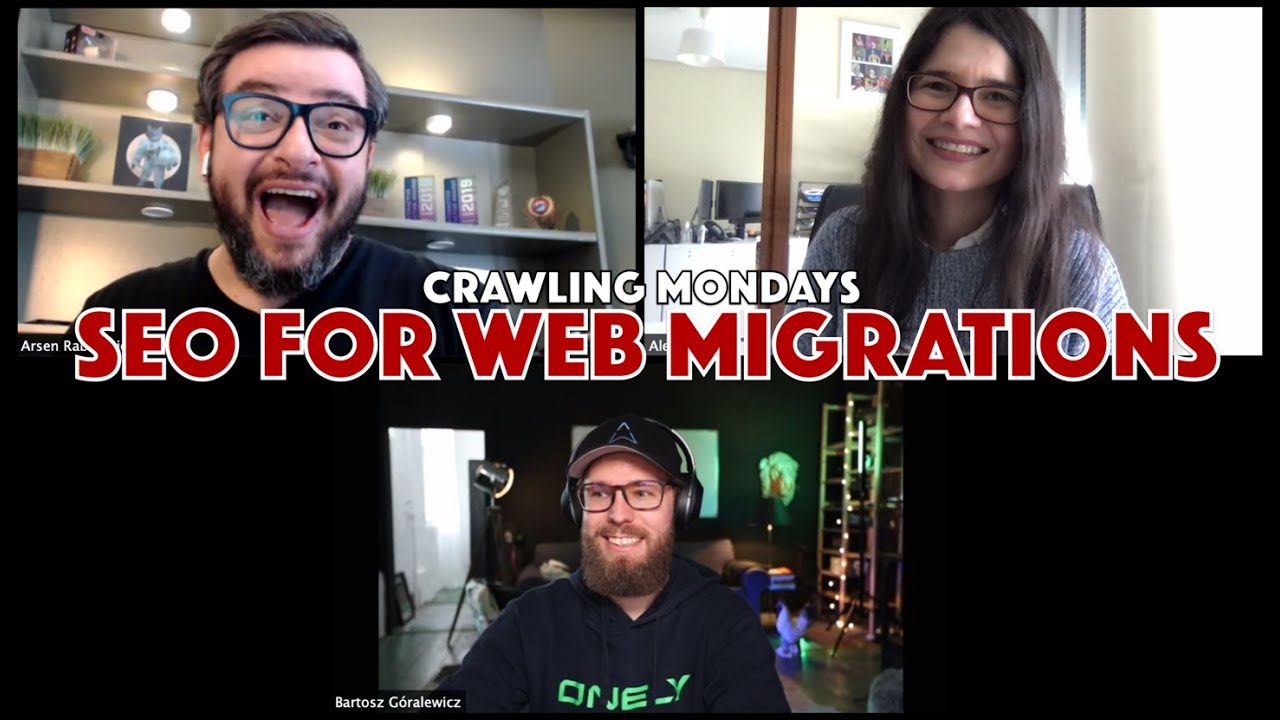
SEO experts Arsen Rabinovich and Bartosz Korolewicz break down why website migrations tank traffic. Most clients wait until weeks before launch to think about SEO. The biggest killers: robots.txt blocking the whole site, staging servers getting indexed, and broken redirects. Use Google Search Console and tools like Screaming Frog to map high-value pages before you move anything.
Chapters
Welcome to a new special edition of Crawling Mondays. Today I have very special guests with me and we are going to cover a very exciting SEO topic, which is SEO for web migrations. My guest today, I have Arsen Rabinovich from Top Hat Rank. He's the director, founder, master and commander of Top Hat. And then I have also Bartosz Korolewicz, the CEO of Onely. Web migration— there are so many different types of web migrations, like merging international websites, rebranding. There are certain types of configurations or misconfigurations or issues or challenges that arise every single time. Can you please share which are those problems that you end up finding somehow in every single opportunity and some of the top reasons why they lose So before Arsen is gonna reply to that, I have one that I think we're all gonna agree with.
That's one biggest—
Robots.txt.
No, but you were close. It's not a quiz though. You get the D. So I think the biggest problem, something we're seeing every single time, is clients reaching out to us like 2 weeks before. I think it's, in our experience, even though we do a lot of very big migrations, small migrations, like enterprise migrations, it's very uncommon from our perspective, our point of view, our experience, to have a client reaching out to us like 6 months in advance. It's more of an exception than the rule.
100%. 100%. Usually it's 2 weeks before. Oh, they have all settled out and thought out and Or it's post-factum. Someone says, oh, SEO! We need to make sure that we don't lose traffic. We get in touch with the SEO right there and it's just a couple of weeks before, a week or a few days before or even afterwards when everything has gone wrong already.
Bart brought up a very valid point. All the time, oh, we're about 3 weeks away from launching our site. We thought we'd get you in to take a look and see what's happening. You have to prioritize at that point. We kind of segment it out. We have pre and post-launch activities and you try to get the most important stuff in. But to answer your question, obviously the blocking of the staging server makes its way over to production all the time. Oh, we launched and we're losing traffic and rankings. And then you go in there and I say this at my talks.
It's indexed.
I've made so much money just saying like, I'm gonna charge you $50 and fix this issue for you right now. And that's your robots.txt file is blocking the entire server, right? And then the other thing that's always causing a lot of fluctuations is when people just do a really horrible job at mapping the redirect.
I think that you are on point that these are usually the most common type of scenarios regarding the configurations themselves. I have to say though that there's a particular issue that it is a question that is not asked and it's fundamental and it bothers me so much when I ask this and the client or the person cannot even find out proper answers like why you are moving. Is it really necessary for you to migrate in the first place? Because sometimes they want to achieve something that is completely doable without a whole structural type of change on the website, without the redirects, without the migration, Etc., right? And so it's overdoing it, overcomplicating it. Then regarding those specific scenarios, those challenges that come up with the fact that in many occasions the clients come too late already, a week before, let's say, what will be the top 2 or maximum 3 things that you will validate?
So when someone comes to you post-factum after the migration, Quite often you need to scrape Google. You need to do a lot of that extra work to get those old URLs from the old domain. Because very often developers don't keep like old sitemaps. Those sitemaps are often not reliable and so on. So if I had 24 hours, I would make sure to look into every single URL and if possible map every single URL within that domain. So that would be the first thing. Do whatever possible To get all of the old URLs within the old structure. So if I were to choose one thing or a few key elements, that would be it.
To validate all the old URLs that were attracting rankings, traffic, value, etc. Money-making URLs. Also the ones that are important from a customer journey perspective. Uncrawl them. I have to say that a really good Tip in case the client, they don't have this list of URLs or somehow you cannot even access to their Google Search Console, Google Analytics, etc. You can go to, for example, SEMrush, Sistrix, whatever third-party tool and go and check which were the pages that were being linked more 2 weeks ago and prioritise those.
Yeah, so very similar. We take an approach. So we've had this happen so many times. Again, it's prioritizing pre and post-launch, what needs to be the crucial things. We have a checklist that we go through internally and to just really get understanding, but I have to agree with Bart 100%. We right away take a look at analytics, we take a look at Search Console, SEMrush, whatever tools we have, and we want to make sure that the money-making URLs, the crucial URLs, are going to be in place. We've done migrations for really active ecommerce sites, so losing a day or saying, oh, we can fix it post-launch, it's a lot of money that can be lost in one day of a page not showing up.
100%.
So we look at it from a standpoint of how much money are we going to lose if there's an issue with these pages, and then we prioritize it. And then obviously making sure that the redirects are in place. Crawlability, accessibility would be the first thing, right? That's the most important part. You have a new site up, you want to make sure it's getting crawled.
Just one last thing to add. When we have like 24 hours and someone is ditching, which is not an uncommon scenario, we would definitely do whatever possible to get to know the old structure as long as you can basically click through that. Let's understand the intent and understand everything that's going on. And not only for the migration's sake by itself, but then we all had those when there is a migration date and there is a core update or something like that.
At the same time.
Yeah. So if this is a new client, and that's usually the case with migrations, someone is reaching out like, we have a migration, help me out. And if it's last minute, we also try to spend a little bit more time to understand all of the possible non-migration-related issues in case, like, to assess the risk of migration to see, okay, maybe after we migrate, it's not the best idea. Maybe we need to fix something first. Like, regardless of that, just basically get to know the website, get a little bit of that feel of how that works. So when something God forbid, goes wrong, we have an idea where to look for that.
The before and after snapshots as quick as possible, indeed. And for that, for example, what I have found really useful is to, when you crawl, to save the HTML, the snapshots, just in case, just in case something that you have overlooked from the configurations, you can go back and load again that crawl that you have done, for example, with Screaming Frog. You can do this and check the former HTML and see how it was actually implemented in the past and the new configuration and see for some reason, oh, maybe that page before was canonicalized and now it's not or vice versa. What is the craziest scenario that you have had with clients? Like the most messed up configurations that you have seen?
I think we had a mix of the CMS moves. So we had a client, ecommerce store, Moving to Angular-based CMS and changing domain. And they did it and they—
Everything at the same time.
Post facto with a very limited budget to fix it because they reached out to us after a month because everything, like they lost traffic quite a bit, like 70-ish percent. The client was very demanding, but they also had a very low budget.
Okay.
That's a very nice way of putting it.
We hopped on a call with their devs. They rejected the idea of any kind of pre-rendering, server-side rendering, anything like that. They butchered the URLs.
Good luck!
The URLs were not mapped. Like, and we had to somehow fight against all of those. So we were like, This is probably not something we should even take on as a client. And there was a lot of obviously like politics involved. There was like a— it was a recommendation from our existing client. So it was really awkward and this was dragging behind us. It was, you know, one of those situations when it's pretty weird not to take that client, but at the same time you see too much risk with—
Yeah, but I have to say something, Bartosz. For this type of very messed up scenario, I have to say something, right? If they come with this very bad situation and then you alert them and you tell them, look, you're in a very bad situation. Allow us to work and allow yourself to be advised. Depends a little bit on the attitude, right? Because if their attitude, even if they are very messed up, is positive and open to hear and to be advised and even put on hold things until things are fixed, then it's okay-ish. But if their attitude is like, In a week anyway and I don't care and this is what there is and it needs to work. If that's the attitude, then I better put it off and say, look, sorry, but I cannot help you. Like, to be able to help you, you need to be open and flexible and give the resources, right?
100% agree. It's just making the whole process very, very difficult. And when possible, we try not to take them on.
I think that as SEOs, It's very important to alert our clients and warn them and provide them realistic expectations of what is achievable or not based on the requirements. Because indeed, sometimes the migrations need to happen yes or yes, and it's not because of SEO but because business, legal, other types of requirements or objectives.
A few interesting things I've seen. I've seen WordPress installed inside of WordPress. So you have a WordPress installation in the directory of a website that's already on WordPress.
Why?
Don't ask. And then when they did the migration, well, when they came to us before the migration, we're crawling and we're like, what's— like, nothing. Like, these 2 parts of the website are completely like the code, just like completely different. I've seen a beauty brand get rid of their category pages. They decided we don't need category pages for the user experience. We're going to move everybody to product. So they moved all of the product, basically combined all the products into a product page where it's variations. So they decided to get rid of their category pages and we're looking just like broad keywords dropping off.
What are the tools that you find that are usually super handy for this type of scenarios of migration validations, those top tools that you cannot live Without for this analysis?
I mean, I'm going to be the guy and say Screaming Frog. Of course.
Don't invite Arsen then.
The old school way. I mean, unless we're dealing with something super large, obviously Screaming Frog will crap out. By the way, we're doing very— I've been playing around with Write. And Izzy is going to be doing a walkthrough for us this next week. Thank you. Thank you, Bart. And thank you guys at Wrike for hooking it up. You know, when you're doing migrations for the important parts, you want to make sure that there are certain components that are in place. So pretty much any crawler that you can feed a list or upload a spreadsheet of URLs to crawl that you can manipulate before you upload it works.
Definitely.
And then for keyword mapping to URL, Search Console, and then exporting data from everywhere else for the backlinks, putting it all together into a massive spreadsheet and just working off of that.
Especially for bigger type of websites and continuous type of validations, it will be like my crawler to go. I have to say that for specific list crawls and specific quick validations like this, Screaming Frog is godsend because of that integration that they also have with the Google Search Console and Google Analytics data. So you can prioritise right away to see which are those crawl pages that are bringing more traffic and also are ranking for more popular keywords right away without losing much time, especially for quick validation. That is great. And then I have to say that in my case, I really, really like Sistrix Evolution Graph. The before and after because it's very flexible. You can use them by subdomain, by subdirectory, so you can compare anything, the before and after from a visibility standpoint. So that offers a lot of visibility to check and monitor the before and after. But of course, your own Google Search Console data is key, your own Google Analytics data too. SEO Monitor, I use them also for those top terms that I really care about and then the share of visibility for those top terms that I really care about.
We actually started playing around a lot also with SEO Monitor based on your recommendation when you and I talked. And Sarah, our director of SEO, really enjoyed it, especially the ability to, for migrations, to be able to kind of do projections on where potentially you can be if these things are changed. So yeah, thank you for that.
We usually start with Writhe, then a little bit of Screaming Frog, but then a lot of the tools that we use are either, like depending on the team that's doing the migration. But we, for example, have Marcin and the whole kind of geeky team at Onely who are huge fans of customizable tools. So they use KNIME. It's K-N-I-M-E. KNIME.
Yeah.
I have no idea how you pronounce that. I asked them at one of the conferences. A few guys told me different pronunciations as well. So I feel okay with that. So they use that. But also what's really, really crucial for me, back in the day it was gscrape, when it still worked with external proxies. When they stopped supporting that, we used Scrapebox. We sometimes use Xrammer as well for like very large files because—
Wow, you're really getting into that time machine.
Yeah, but it does a very good job scraping Google. So for me, scraping Google is really important and just how difficult it got with Google over the last few years, I think we all saw that, made it Kind of necessary to use multiple tools rather than just Scrapebox and just like 200 proxies. So I guess it depends on the part of, on the team within Onely because they are all geeks. So they have their own toolset. They build tools, whatever. But I would say that anything that scrapes Google is really important, especially for the post-factum migrations. So fixing something that already happened in the past.
For ending, this was going to be my last question. The tools that We tend to overlook that you don't see many SEOs talking about it.
I have one, and I'm probably very old school, and I'm guessing this is going to divide the audience in half. But for example, when we work with a client who's on https://www.domain.com, we always ask them for access to http://www.http.domain.com.
All the variations.
All the different variations. When it's really complex like with some manual penalties, we also ask to validate just a folder or something like that or different subdomains. So if there are 83, 90, 100 subdomains, we want them to give us access to the Search Console of those subdomains because it allows you to work a little bit more precise with the data. And sometimes it's changing. So Google is becoming a little bit more like— Google Search Console is becoming a little bit more centralized. But back, like even 2, 3 years ago, you would have completely different dataset of, for example, backlinks. If you validate subdomain, www versus non-www, like you get so much more. And I think we actually wrote a case study, but those things are very often overlooked. And again, if you're migrating, you're not only migrating the URLs, but all of the files. So all of the JavaScript files, all the scripts, all of the images. And now I'm gonna blow your mind. Like everyone watching this video, just post in the comment if you have Search Console for all the subdomains serving your JavaScript, your images. When we look into that, I never had a client doing that. I never saw SEOs looking into that. But that's like just your www.arsen.com It's probably like 10% of your crawler budget. It's 10% of what Google cares about because 90% of the meat, of Arsen's meat, is on a CDN, on a subdomain, somewhere else.
Serving resources, serving all that, those scripts generate additional functionality.
If you're gonna look into server log, it's exactly the same. Look into the CSS files that are not like again, 95% of the cases, you won't have your CSS files on aleydasolis.com. You will have them somewhere else on a subdomain, on a completely different domain from CDN. Like a lot of those. So I would really stress—
Migrations are also consolidations. We've seen, and I'm sure you guys have done these, where you have 2, 3, 4 sites coming together. There's been an acquisition and they want to bring everything under the same domain. What Bart's talking about becomes even more of an issue when you're consolidating multiple websites into one. That also becomes a huge pain in the butt, especially when you want to do your comparison crawls between staging and production. You have to keep in mind 3 previous domains combining into one. One of the things that, as far as an activity that's overlooked during migrations, I would say that it would be they don't take the opportunity to really focus in on information architecture and fixing problems there.
Thank you.
During the migration, that's a perfect opportunity to make those changes. There's a reason why you're migrating. One of the reasons might be that, oh, we have a new— and Aleyda and I spoke about this in San Jose, right? You have a shift in ecommerce inventory, right? That in itself also can be considered almost like a migration, right? Because you have a whole section of your site that's phasing out and a whole new section coming in. So that reorganization, really focusing in on information architecture, providing places for Google to be able to map broader queries to your top-level pages, your categories, your brand pages, especially if you're e-commerce, to your topical informational silos if you're a publisher. Really not digging into that, I think, is something that's so vital because when you're doing a migration, you're not, as an SEO, your job is not only to help them with properly migrating and retaining what was there, you want to make sure that you're preventing loss, but you also want to make sure that there's growth. If you have enough time, and we typically ask for at least a month and a half, 2 months before launch to do all of this, because not only that you need to do the work, you also have to deliver the requirements to engineering and they have to implement that, and then you have to go back and forth and test it. So definitely, if there's enough time, one of the things that's greatly overlooked is a complete review and restructuring, revisions and optimization of your information architecture. Another thing that we're constantly— I completely forgot to bring this up earlier— is orphan pages. One thing that's widely overlooked during migrations is orphans, because in-house, they typically care about what's visible. If they see the data, they see that it's being linked to, they're doing a passive crawl link by link, they're taking those pages and they're working with that, but they haven't taken the time to look at orphans. We've had like, show of hands, how many times have you seen an old version of a website still be in the folder on the new website?
Yeah.
I've seen a whole duplicate of the current site because content didn't change. It was a new design. That's it.
Staging.
Staging, or like old-site, you know, like /old-site, and then you have the entire site with like everything, right? Everything in there. Yeah, so absolutely looking at those resources that like are not easily discoverable, that a lot of people just like don't keep in mind because they either don't understand, haven't had the industry experience, to really think about these things or haven't prepared or downloaded one of Aleyda's checklists, migration checklists, and used it internally.
It has been an amazing conversation. I think that this for me has opened my mind to thinking about so many different configurations and aspects that are not the typical ones that we talk usually about when talking about SEO for web migrations for sure. And hopefully it was the case also for you. Also, if you have any questions, any doubts, leave them below in the comments. I'll give a heads up to Bartosz and also Arsen to come and answer any questions too. And this hopefully sparks also a little bit more of a conversation. And of course, follow Bartosz, follow Arsen. You have their handles on Twitter. Thank you very much for coming. I think it's the most lively conversation ever. And looking forward to have you again soon.
Thank you.
Thank you very much.
More from Aleyda



How to Communicate and Sell AI Search Optimization (GEO, AEO, LLMO) to Decision Makers


AI Search Optimization (GEO, AEO): What is it, Common Errors & How to Optimize AI for Success



OpenAI has introduced shopping research in ChatGPT - #SEOFOMO TL;DR December 1st, 2025

OpenAI announces Instant Checkout and the Agentic Commerce Protocol - #SEOFOMO TL;DR Oct 6, 2025

Google's August 2025 Spam Update Finished Rolling Out - #SEOFOMO TL;DR September 29, 2025