Walk through building a Sales Analytics app in Einstein Analytics Studio using pre-built templates. See persona-specific dashboards for reps and managers, KPI tracking with email alerts, pipeline trending, and leaderboards that let teams collaborate via Chatter.
Chapters
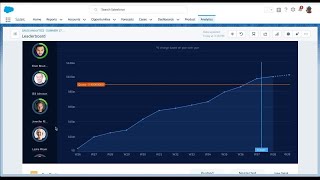
Upon launching Einstein Analytics Studio, things look a little bare. So I think I should create some apps. So when I go to create I can choose app. I can see a list of all of the pre built apps I can see based on my permissions. But let's start with Sales Analytics. So Sales analytics is going to detect your optimal sales force sales cloud settings on this page and then on the next page I can choose to do a basic setup. Once the app is completed I can see all of the content in here. I get a set of pre built data sets that joined all of my most important sales objects from Salesforce. I get a set of lenses that lets me explore those data sets so I can uncover the insights I'm most interested in. And I get a set of Persona focused dashboards that lets my users slice and dice their business. I just went from zero to Insights in a matter of minutes and finally I'm ready to share this out with my team. Now that my app's been created and I've shared it out with my end users, let's look at Sales analytics from the end user perspective. Remember, we built Persona focused dashboards for the sales rep, sales manager, sales operation, and even sales executives. So let's see how they will see the app. As a sales manager, I'm most interested in keeping track of how my team is performing. When I go into the Sales analytics app, I go straight to my leaderboard dashboard. Right away I can see how my team stacks up when it comes to close won opportunities this quarter. To make this a bit more personal, I can even see the photos which they've loaded into their Salesforce profile. But maybe I'm more interested in who's retired the most quota or who has the most pipe coverage. I can quickly change the metric from this list view. As I click on a rep, I can see a list of their individual KPIs and how they're tracking towards their quota. I can even see the details of their top opportunities and take action. I can also collaborate directly on this dashboard with my team. Let's say I want to let my team know that Nathan is leading in quota attainment this week. I can hover over the leaderboard widget, click, annotate and share a message with my team. I can even include a screenshot of the dashboard so that my team can see what I'm talking about and this is what they would see in chatter. Most importantly, I can set up personalized notifications and get notified periodically via email on the progress of my KPIs for instance, this quarter my team needs to close $10 million so I want to track my close one KPI from my Einstein analytics dashboard. I can hover over the KPI and click Set notification. I can then enter my personalized threshold value. In this case, I want to be notified every day via email when the close won amount is under $10 million so I can keep close track on the progress. Additionally, I have the ability to share snapshots as well as follow dashboards in order to keep up with my team's conversations. Looking at my team's overall progress is great, but hitting my number all comes down to the health of my pipeline and how it's changing over time. So I'm going to open my team trending dashboard and look at how my team's pipeline is trending over time. My team reviews pipeline every week and as a manager I need visibility in what has changed since our last meeting. I'm going to change the time period to last seven days quarter closed and immediately I can see that seven days ago I had 116 million in OpenPipe and today I only have 109 million. Einstein analytics has taken all of my opportunity history and bucketed it by actions that impact my pipeline amount. Immediately I can see 2 million has been moved out of this quarter and if I click down on the moved out bucket I can immediately see the details of those opportunities and take action. For instance, I can reach out to the sales rep prior to our team meeting and ask him to set up an EBC with the CIO and see if we can bring this deal back this quarter. Finding the right dashboard to view has never been easier because I can now access my recently viewed dashboards from any app right from the Salesforce Global search bar.