TrailblazerDX 2024 - Main Keynote | Salesforce
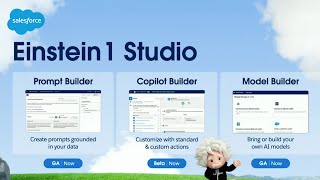
Salesforce leaders unveil Einstein One, a platform combining CRM, data, and AI. The keynote includes a Turtle Bay hospitality demo showing Data Cloud, Prompt Builder, and Einstein Copilot in action, alongside announcements about vector search and low-code tools.
Chapters
Whenever I start to talk about the.
Trailblazer community and what it means to.
Me, I get a little emotional. They're an amazing group of people.
Trailblazers.
When I think about what all of us are going to be able to do with the Einstein One platform and AI, wow.
It's all about us as trailblazers and.
How we're able to take all of our existing skills and create great AI.
Experiences for our customers.
Being a developer, it's super exciting because Einstein one will generate flow for you and then I have what I need in minutes instead of hours.
As a solo admin, sometimes I have.
To become the developer, sometimes the architect, and Einstein one helps me focus on.
Where my value is most important.
The possibilities can be scary, but actually I think more exciting than anything. Your AI is only as good as the data that can feed it. So it's really important to be able to trust the platform that you're using.
Trust is the foundation of the Einstein One platform. It's very important to have CRM, AI data and trust because each of them empower another one. Your data, your metadata, the entire platform coming together.
That's super powerful.
As a Salesforce developer, 9sine one can.
Really help with debugging. We have middle performers become top performers.
It will help you to grow faster, making you an OPEX guru in no time, I promise.
I'm looking forward to really augmenting my own abilities so I can focus on the human aspects of technology.
The Einstein One platform will save me hours to do more throughout our entire organization and all of it's inside of Salesforce. It's a new wave of evolution.
It's going to change our world the same way that the Internet did.
This is a game changer that really.
No other company can do.
And the possibilities are limitless.
Please welcome co founder Salesforce and CTO Slack Parker Harris.
All right. So good to be back. So good to be back here. You know, Dreamforce felt like it was just yesterday. David Schmeier, our head of product. Hey, David. But this is really my happy place is with all of you, the Trailblazers. I think we got some MVPs here. Maybe big shout out to you. I think we got some Vetforce happening. Maybe that's all you got. They totally beat you at that. They totally beat that.
Anyway.
I am so happy to be back here with all of you. We have an incredible show today to talk about building the future. We're going to show you how you can build the future. But of course, you know what? We're going to do next every show. What are we going to do next? That's right. We're going to thank you. We're going to thank each and every one of you for all that you've done with us for 25 years. That's right. That's right. This Friday. I know I don't look that old, but. Yeah, it's been 25 years doing this with all of you. But look what we've done together. It's so incredible. The technology that we've built together, innovation, the nonprofits that we have worked with, or if you're a nonprofit that we worked with you. Yeah. And the customers that we have transformed and that we continue to transform. It's really been 25 years of incredible success. And it's going to be 25 more, 50 more. We're going to keep going together. Okay. But we have a great show for you today. Of course, it's the most important Trailblazer DX next year will also be the most important. But for now, you're at the most important one. After today, you'll get a little FOMO that the next year is going to be even better. But we have a ton of things happening. If you don't know you're in the keynote right now, you kind of haven't had your coffee. This is the main keynote. If you're online, welcome, because we have a bunch of people online who have joined us. But this is not all. If you've been here this morning, you know, there's a big Expo. There's over 300 talks happening. Workshops are happening. There is a ton to follow. Today is Wednesday. I think it's Wednesday, right? Yeah, it's Wednesday. Okay. Tomorrow it's gonna keep going. And so there's so much to do. Go to that QR code and scan it and you can use the app to actually build your agenda. Because there's so much to do. I also wanna thank and I think AWS is right over here. That's all they're gonna give me. That was kind of weak. But anyway, aws, thank you for your partnership. We have had an incredible history with aws. All of our services are running on aws. We have product integration with aws. Thank you for your sponsorship. Thank you to Box, Capado, Provar and all of the other partners that have helped put on this show. Okay, let's move in and talk about us a little bit. So Salesforce, since 1999, you know, we've had this vision, of course, to be the number one CRM and we are. Those are to scale. So we are number one. We will continue to be number one. And we're number one because we did it with you. And along the way, we realized that it's not just about being number one and doing well along the way. We can also do good with you. We have become one of the most innovative companies. With you. We have been become one of the top 100 companies that care in philanthropy, a leader in ethics. As we continue this March, we're at 38 billion. We're going to keep going. That's doing well, but we're also going to do good along the way. So what have we done when we say we're doing good together? Well, we created what's called the 1:1:1 model. You know about it, 1% of our time, 1% of our equity, 1% of our product to nonprofits. So the nonprofits in the room are online. We are working with you. It was not much. Yeah, good shout out. Dave Frank and I in the apartment. You know the story. Not much. Back then, Mark actually wasn't working. He was still at Oracle. So he takes credit. But Dave Frank and I were actually doing the work early on. That's right. Yeah, that's right. But since then, 700 million in all time giving 8.7 million hours are employees all over the world, not just here in San Francisco. Nine days off a year. They go back and give back. And it's part of who we are. 56,000 nonprofits using us for free to do well in the world, on the path together to continue to make the world more sustainable. We are a net zero company. We want more companies to join us. And of course, we want everyone to join us with this model of 111. Because you can do well while you can do good while you're growing the company while you're doing well. And that's the pledge. 1% org. Over 18,000 companies have done this with us. Okay. Well, that foundation and that idea of creating that foundation was really part of the core values of the company that really kind of created when we started the company. And we have guided ourselves by these values ever since. A value of trust. Your data is not our product, you know, and you trust us with that. And I honor that every day. You trust us to make you successful even before we show you all this cool technology today that you're going to see. I want that. I want to do that. I want to learn how to do this. Yes, but are you successful now? And if you're not, let me know, let David Schmeier know. Let all of the executives. You see, anyone at Salesforce, if you tell them you're not successful, we have an army of people that will come help you. It doesn't matter what size company you are, where you are. We want to help you. But we do want to talk about innovation. I love innovation. We're going to do that today. And we also believe that everyone should be treated equally and that we need to make the world more sustainable as we move forward. Okay, but let's talk about where are we right now in the world? What is going on? Because it's kind of crazy. It is crazy. So in 2014, we got into AI. We were in an AI revolution. At least we thought we were. In 2014, we started our research group in 2016. If you were at Dreamforce with us, many of you probably were. You saw the launch of Einstein. Back then, Einstein was about machine learning. It was about prediction. That's. That's just wave one of this AI revolution. It's amazing. Lead scoring, send time optimization and marketing, you know, case routing to the right expert. That's amazing. But look what happened this year. Or I guess it's last year. It's been a full year when, when OpenAI came out with 3.5 and we're all like, whoa, something just happened. Maybe some of you saw it before that, but it was really, for me, that was when it hit me like, well, the world has changed. Generative AI is changing everything. And now we're moving into the world of autonomy. This generative AI, we're using it to create agents to do the work for us. Might be a customer service agent helping us do customer service automatically. It might be your digital twin in the enterprise helping you automatically do your job and be more productive. And we're moving into this crazy world of artificial general intelligence. We can argue when that's going to happen, but it's to going going to happen. But all of you are like, okay, where am I on this spectrum? I could be in predictive and generative, and we've all got FOMO of like, I got to get into this. That's kind of why you're here. But let's talk about AI specifically. What. What is consumer AI? What did we just see happen? And kind of break it down into these layers. Well, you've got the UI, right? If you went to ChatGPT and you type in what's called a prompt, you type in a question, that's the UI. Pretty simple UI, but there's lots of UIs out there. There's also some incredible models, ChatGPT 3.5 and 4.0. You've got Claude from Anthropic, which is getting really great reviews. But how did those models get created? Well, they used a lot of data. The more data, the better the model. And so you can see in the world of consumer AI, you have all of these UIs, you got ChatGPT, you got Gemini, you got Copilot from Microsoft, got a ton of UIs, you got a ton of models too. It's not just like, if I don't have OpenAI, I can't be successful. That's not true anymore. I kind of thought that a year ago in February, but it's not true anymore. What's true is new models keep coming out, models keep getting competitive. One's leading now, the next one's going to lead. It's kind of this world of like, well, it's okay, it's tons of models, but none of those models would exist, these billion parameter models without the data. And in consumer AI, what did they do? They're like, well, let's get as much data as we can. The Internet's pretty cool. I can go find data, let's find what public books are available. Let's go get all the, you know, every website, let's scrape the website. If there's code out there, let's go grab the code. You know, we've seen some issues with this, right? There's some lawsuits going on, like New York Times, like, did you take my data and did you ask me and did you pay me for it? There are developers like, that's my code, you took my code. We'll get through that. But in the world of consumer AI, these models are incredible because of all that data. But now let's move into the world of business. Are you going to go use all that public data to make your interactions with your customers? When you're selling to your customers, when you're marketing to your customers, when you're giving customer service, is all that public data going to help you? Does your customer service agent need to speak like Shakespeare to the customer? Is that going to help you? No, they need to know the customer. You need that enterprise data. You're not going to go out on the Internet and get a bunch of data. It's not, not helpful. You need that enterprise data. But we know that in enterprises that is hard. It's just hard. It's because of all of us and the history of it, of what we've done. You know, we created these departmental databases, we created these data lakes on Snowflake, on Databricks, on Redshift. They're incredible. We implemented something, you know, SAP or Oracle Financial. There's data there, there's data all over the place. 71% of companies applications are disconnected. They're not working together. So at the data layer in the enterprise, we got problems. What about at the model layer? What about at the AI layer? What's going on there in the enterprise? Well, you're all like, let's go. Let's launch into the world of AI. We are ready. Not so fast. What about trust? What about a sharing model? Is this giant billion parameter LLM, does it have a sharing model? Like it's a giant brain, you say, like, which neurons in that model do I have access to? Like, no, it's a brain. You get the whole thing. So if your data's in there, you can't have any sharing model. Everybody gets all the data. If you're a bank, you dump all your data in that LLM, you're going to have some compliance problems, you're going to have security problems, you're going to have privacy problems. You might even have toxicity problems. When the LLMs come back and they're giving you toxic responses or they're going to hallucinate, they're confident liars, and your service agent is going to be like, yeah, I'll give you that discount. Or that bot you saw that airline, like, you got the discount, sure, no problem. And then the airline's like, well, that wasn't us. That was the bot that did that. Like, what are you talking about? That's crazy. You know, this is the world we're in and it's disconnected from CRM. Well, at Salesforce, we like to solve problems like this. So you know that. And you saw us at Dreamforce, we launched Einstein One, or relaunched it. But what is that? What is Einstein One? That's what we want to talk about today. Einstein One is fully integrated, not just sales and service. And our platform, all of you know us very well. We used to talk about like the360 and you'd be like, yeah, but marketing cloud's not really on that platform. Yeah, commerce cloud's not really on that platform. I know, but that's what we've done is we've re. I know. You know, it's a different platform. I know, I know, I know. We've rebuilt those applications and we continue. Yeah, it's incredible. And we can keep adding all of the technology that we've had in those acquisitions, we're putting them on that metadata platform. The metadata platform is what has made us successful. It's what's made you successful. It's how we work together. So you can use no code and low code or high code, but it's all metadata driven. That's the power of Salesforce. And that metadata platform is not only driving all those integrated applications, it's not a separate data cloud. It's not off to the side where we're, like, bought. That would be terrible if we had bought a data cloud and we're like, here's our data cloud. Go use it over here. It would have been disconnected. It would have not worked on that metadata platform. But we didn't do that. We built it from the ground up, fully integrated, so we can unlock all that trapped data in your enterprise. We want to get you value for it. You don't have to copy it in there. You'll see it. We want to connect to where the data is and give you value from that data by bringing it into those applications, bringing it into the integrated AI, because the AI is also integrated. It's not a copilot. Off to the side, where you, like, go over here. Because if it was off to the side, how is it going to get to the data? Or how are you going to customize that AI with that same metadata framework that you know and love? The data's there, unlocking trapped data. So that's at the data layer. Einstein's right there. That's the model layer. You can bring your own models. You can choose your models. You can use multiple models. There's a lot of cool things. And then you have a user interface. I did change jobs recently. I'm now the CTO of Slack. I'm still working at Salesforce, but I love, love, love Slack. And what better interface for AI, for conversational AI than Slack? And so it's all integrated. It's all come together. Okay? But I want to show you this. We want to get into the technology. Like, stop talking, Parker. So let's get into the technology. Let's show you some code. Let's show you some demonstrations. But first, I want to tell you a story by way of a video of a company called Turtle Bay. It's a resort in Oahu. And they want to deliver highly personalized experiences. Not just for their guests, like in their reservations, like, get them a good room, but the whole experience coming into the resort while they're at the resort, to give them highly personalized experiences with with the power of data and the power of AI. And with that. Let's cue the video.
Change is not the hurdle. Change is the remedy that allows us to win every day. And Salesforce is giving us the ability to change the industry. Turtle Bay is a beautiful, magnificent resort that sits on 1300 acres of dream landscape in the north shore of oahu.
For over 50 years, Troto Bay Resort.
Has been the largest employer here on the north shore.
And so I take incredible pride in.
Being able to tell that story.
We're in the luxury environment, but to say luxury and to really communicate what luxury is, that's very difficult because all of us look at luxury differently.
Travelers today expect us to know who they are. And so making their experience here more personalized is really critical.
How do we make an easy shopping experience and merchandise that based on what their likes and affinities are? Trust was the most important thing. I needed a trusted source to secure my data and data cloud was the differentiator and the perfect product to take that journey with me. CRM with AI and data powered by trust, that's the way forward for us. When sales is talking to service, that's giving the steward the ability to say, wow, this is really cool. Like I'm actually having fun solving cases with AI auto responses.
I love using the Einstein One platform because it gives me everything I need and all the guest details right at my fingertips. We have all of these activities that we can see that they booked. What the generative AI can now do is they can take these activities and then automatically recommend other activities that they know these guests will be interested in. So that way our associates have all the tools to really sell the guests on what experience they're wanting to do next.
The Einstein One platform is really redefining how hospitality can deliver to the consumer. For me to see where the customer journey happened prior to even being here, to their journey on site, to getting AI to tell me what the next best experience is that they should buy, that's luxury, that's what they want. And the return on investment happens day one. We've quadrupled our visitation to our website. Triple digit increase in conversion and acquisition, giving us 40% lift in top line revenue here at this hotel. Magic has happened along the way. Far greater than I ever thought. The aloha here is so deep and so real. We're only as good as our culture. We're only as good as our people. Einstein One platform is helping us augment the processes so that we can allow the employee to shine in that regard. We're giving them the time to speak about their place that they love. It's our greatest currency here as a hotel. And people leave here saying, I will be back.
All right, I love that story. And to go into more details, please welcome Clara Shy, EVP and GM of Salesforce AI. Welcome, Clara.
Thank you, Parker. And thank you all for being here for this amazing moment in history, not just for Salesforce, but for the industry and all of our careers. I love that Turtle based story because it shows how Turtle Bay has used Einstein One as the foundation of their business and their guest experience. They're using data cloud to unlock those trapped islands of data, the property management data from Oracle that they're bringing in, the resort activity data from a system called Way that they're bringing in. They're activating that data through sales service marketing, just like we saw in the film, and they're using it to power AI. And the AI is resulting in faster service replies in their ability to personalize every message to every guest and ultimately to drive business growth. 40% increase in sales last year. Just amazing. Now, as you saw in the film, the employees at Turtle Bay are using AI to automate manual tasks like data lookup, data entry so that they can have more time to spend with their customers. This is all possible because of Einstein Copilot. Einstein Copilot is a completely new way to interact with Salesforce. It's a new conversational assistant that is one assistant that works across every Salesforce application, from sales cloud, service cloud, marketing cloud, commerce cloud, even Slack, Mulesoft and Tableau, all one assistant. The most important thing about Einstein Copilot, though, is what you don't see is that behind the scenes, it's automatically grounded. It's automatically aware of all the data, all of the metadata, all of the business logic in your Salesforce organization. Which means that if, for example, you're a new hire and you go into Copilot and you want to understand a B2B account, you can ask, tell me a summary of this account and Einstein Copilot will go across and look at all of the previous sales interactions. It'll look at all the support cases that have been closed, that remain open. It'll look at all the marketing engagement, all the commerce transactions. It'll even look at third party systems to understand what kind of timeshare interest does this customer have, what kind of web engagement, what kind of IoT data can I pull in and really summarize that 360 degree view for that particular employee asking the question and it does it in a way that respects all the data sharing roles in your organization. Just amazing. And that's how we deliver trusted, quality AI. Now let's take a look at what Einstein Copilot looks like for a Turtle Bay employee. Let's flip over to the demo and I just want to give a shout out to Julia and Stefan, our demo drivers. So let's say that I'm a sales rep at Turtle Bay Resort, and like any good salesperson, at the beginning of a quarter, I'm going to log into my Einstein 1 sales and I'm going to click on the Einstein icon and ask, how's my pipeline looking? Really want to make sure that I have that 3x pipeline coverage that my head of sales is always talking about. And boom, right there, Einstein Copilot is able to tell me right away what my pipeline looks like. Now, if a different salesperson in my company asks the same question, they're gonna get a different answer. Because behind the scenes, Einstein Copilot is grounded in our data and metadata. So it knows that different salespeople are owners of different sales deals. And so we're gonna get different answers that are customized and unique to us based on our customers. Now, you can see here that unfortunately, my pipeline is looking a little light. So a logical next question for me to ask is, you know, Copilot, which customer should I call on to get that pipeline number up? And so I'm gonna ask that and it's thinking and right. There are three customer contacts that I can reach out to with relevant details about each one. Now let's look at this. It's not just looking based on who has an active opportunity. It's actually looking at marketing cloud information, commerce cloud information, service, cloud information. It's making sure to recommend customers that don't have any active, open, unresolved support issues. Right. That wouldn't be a good customer for me to call on. It's even pulling in third party web engagement data about what the last web page is that this particular customer visited. Now, this is data that doesn't live directly in Salesforce Lives in Snowflake, but because our data cloud has zero ETL integration with Snowflake and Databricks and Redshift and Bigquery and all the major data warehouses and data lakes out there, I'm able to zero etl that data in and answer this question for the sales rep in a highly relevant way, because which sales rep wouldn't want to know who's visiting their website actively? So in this case, now, I have a plan and I want to reach out to these customers. And again, I'm going to ask Einstein Copilot to help me reach out to each of these customer contacts. And there it goes. And boom, instantly it's personalized a message to every single one of these contacts based on all of the information above across the customer360 across these trapped islands of data that we've now unlocked. And I'm able to click approve and it sends. And now I can really go back to spending time with the guests that I have on property and make sure that I hit my number for the, for the quarter. Now, what you saw here is driven again both by data. It's also driven by metadata, which means that if you went to ChatGPT or even any business copilot on the market, it wouldn't be able to answer this question because it doesn't have that metadata layer that we've been building on for the last 25 years. It doesn't have the context that the AI needs to understand the meaning of the question and how to get an answer back. Just amazing how Copilot can answer questions as well as take action, such as this outreach that you just saw. Now, every customer facing employee at Turtle Bay is using Einstein Copilot. But that's not all. If we go over to Slack, we can see how Einstein Copilot can be used by every employee, not just salespeople and service people. Here we are in the Slack channel for Turtle Bay's marketing employees and you can see one of the latest messages that's been shared is a Tableau Pulse. Tableau Pulse is a proactive set of AI driven insights about an organization's data that surfaces important insights that leaders may not have even known to ask about. And in this case, Tableau Pulse has surfaced the fact that sales are down this week and so the marketing team is all over it. They're also seeing in the Tableau Pulse that the top performing segment are corporate retreats that are booking at the resort. And so Amy, the marketing manager, decides to double down on this segment with a highly, highly relevant, focused message that'll resonate. She decides to ask Einstein Copilot to help. So she goes in and asks, what types of activities do our corporate guests tend to like the most? Now, Einstein Copilot again is looking across everything in sales, service, marketing, commerce, including customer surveys from past corporate event guests. It's even looking at real time IoT data from wearable devices. It's pulling in data from third party customer reviews on popular travel sites and event planning sites. All of this to come up with the fact that kayaking, snorkeling and stand up paddleboarding resonate most with these corporate guests. So now she's able to craft a campaign. And the best part about having done this in Slack is that we know marketing, sales, these are team sports, sports. She can collaborate with the creative team, the content team, with the paid ads team, with earned media team. Everybody is focusing on how to build this campaign to go after this top performing segment. And this is how Einstein Copilot delivers a simple, trusted, quality AI for every business employee in your organization. So we just saw how AI is going to change how every person interacts with software. What it means for us as developers and admins is that it's going to change what we build and also how we build it. And that's why I'm so excited to be here with you this week. And why all of our workshops and the hackathons, everything is sold out is because I think everyone recognizes this moment. We're going from a world where software requires clicks and navigation and understanding how a UX works to one where we simply just have to have natural language conversation. Anyone can do it. We're going from a world where we had to painstakingly as developers and admins, hard code every software flow control path and painstakingly define every different possible screen and page layout to one where we can focus on creating business logic building blocks and rely on AI to help us figure out when to use what with full control and full trust. Now it's not just about AI making apps better. AI is going to make us better as developers. We're going to go from a world where we've had to manually do every step and code every test case and every comment to one where we can all have a peer programmer AI who can help us improve our code, develop faster and address all the unending set of requests from our organizations. This is a completely new world that demands a new set of tools. And that's why I'm so excited to announce our new Einstein One Studio. Einstein One Studio is a family of low code tools purpose built to help everyone in this room, everyone who's listening online, to rapidly build AI apps that are grounded in trusted data. We have three low code builders that that we'll talk about. One is Prompt Builder where you can create, customize and test golden prompts to deploy in any lightning web component as well as in Copilot 2 Copilot Builder. This is where you can customize copilots by designating or which business logic, whether it's Apex code, whether it's flows, whether it's an integration, whether it's a prompt to have your copilot have access to. Finally, it's Model builder. Model Builder is where you can bring your own large language model if you've chosen to train or fine tune one. It's also where you can go with no code, be able to train up a predictive model from scratch using the data that you have in CRM and. And Data Cloud. It's really powerful stuff. And we're going to show you exactly how each of these works in just a moment. But for now, I want to hand it back over to Parker.
All right, give a shout out to Clara. Great job, Clara. All right, so we were really sitting a lot around Copilot and around the UI layer and the model layer, and of course, Copilot built into our metadata platform and a lot of the prompt building and everything that Claire was talking about. So that's UI and model. But where I want to start, because we're going to show you each of these steps of how to build a future with CRM, AI, data and trust. Where I want to start is at the data layer. I want to start by showing you. I'm not going to show you, but I want to show you how you're going to unlock the data. How are you going to use the power of Data Cloud to do just that and to bring up the genius actually behind Data Cloud? Yeah, it is the genius mural. Dihar Krishna Prasad. I think I got it. Mk. He's been practicing that. Mk. Take it away. MK is the genius. He's created this with Ravi and a whole team of people. But kudos to you. It's been a couple years.
It's a female.
The technology is unbelievable. Take it away.
Thank you, Parker. Good morning, everyone. And happy to be here to be talking about data and AI. And Parker just mentioned this before, and I want to reinforce it again. That airline example, which is you are responsible for what your AI is going to output. Right. And so how do you prevent your AI from hallucinating and saying all sorts of random things? Well, you ground it with trusted data. Right? That's the key. Grounded with trusted data. But just like we talked before, the data is separated in so many silos. It's not as easy as we think. In fact, 81% of IT leaders think that data silos are what is preventing their AI and digital transformations. This is why we built Data Cloud. We built Data Cloud. So you can actually unlock all that trap data and bring it in to our ecosystem so you can actually use it in your line of work. And the way data cloud works is very straightforward. We have a lot of connectors to all these sources. So you can bring all your CRM data, multiple instances of CRM data, your marketing data, your real time web engagement, your data in Snowflake databricks and everything else. But most importantly you can put the Salesforce metadata on top of it, which means every single data in your enterprise is now a Salesforce object. What does that mean? Your real time engagement can now trigger a Slack alert to your AE if your prospect is browsing the website just through flows. Your SAP data that might be stuck in your snowflake can now be used to run some AI algorithms that can now power things in your service console and many many more. This power of being able to use all your data through your entire 360 is why Gartner rated us the leader of leader in their just released customer data platforms. Right? If you remember, if you all know the Gartner magic quadrant, there are these four quadrants where we are in the top most right up there, both on the access for visionary for what we are leading as well as execution. And speaking of execution, just if you look at that left side, the amount of innovation we have done just in the last few months, things like data spaces which lets you virtually partition your data so you can actually share this data with different departments or customers without actually having to copy that data. Or things like related lists where now your snowflake data or your data sitting somewhere else can now be a related list in your contact page or things like copy fields, no more reverse ETL needed because it's all built into your platform. And then bring your own lake so you don't even have to copy any data if it's your lake or your warehouse. And speaking of customer success, in fact just today I learned Bajaj, which is one of the world's probably largest loan lender, they went live on data cloud with hundreds of millions of profiles in less than than just three months. Just unheard of. There's just a scale and how quickly you can bring all your data to bear and more. Speaking of another thing too, which is we just released Vector database in search too which means we are now bringing not just structured data which is all what we are used to in the last 25 years, but unstructured data so you can use that too in your AI and your automation. And speaking of AI, all of this data is now usable in your Einstein stack. And we are all used to predictive Einstein stack. But just like Clara said, the generative stack is a different beast altogether. The way you work with generative AI is by sending it instructions, English instructions that says do this for me. And to that instructions, you want to ground it with all that data and with Salesforce you get a trust boundary around it, so then you can actually trust that. Now, no pii or personal information is ever leaked to any of these LLMs. And to make that prompt creation very simple is where we have built this prompt Builder. It's a simple low code tool where you can write the instructions that you want to send to the LLM and then you can ground it with all your related data and then that will automatically send it to the LLM, get the response back. And because it's built into the Salesforce platform, that means you can use this everywhere within Salesforce. Okay, I've talked a lot. Now we are gonna actually see this in action with Turtle Bay and over to our demo team and look at what has happened here. They've already gotten Turtle Bay wipes here. We're just missing some sand and sun maybe. All right, give a hand to Stefan and Julie here. So let's start. All right, so what. When you saw in the demo what Turtle Bay really in the film earlier, Turtle Bay wants to personalize the messaging that they want to send to all their customers. And what better way to do than to use our prompt builder. So if you see the screen here, this is Prompt Builder, by the way. This is all live. You can all try it out yourselves. And this is a live demo too, by the way. And you see that message that's right there? We're saying send me a message that can send an SMS to our customer and make them a special offer. Now we're going to ground it with the customer name and it's really easy because these are all related objects. You can just put that customer name right there. Now we're also going to put the Turtle Base, like Voice, like Aloha, Spirit, beach, vibes, all that stuff. Now we're going to Prompt builder also lets you try it out. So we're gonna try Isabella as one of the customers there on the left side, you should see the resolution come in. This is the prompt that is created. See that customer name is now filled with Isabella. This is the prompt you're sending to the LLM on the right side you will see the response back. And that is a personalized response that the LLM Crafted now. Kind of looks personalized, but not quite right. All the LLM knew was there was a customer called Isabella. It's a Turtle Bay resort. That's about it, actually. The fun thing is if you try it few times, it might even start selling you turtles and other things because LLM thinks there is Turtle Bay. Maybe they sell turtles.
Right?
And to prevent that hallucination is why you need to ground it with the enterprise data. Speaking of that, Turtle Bay has a lot of data. Now, this is your. This is their contact screen in Service Cloud. It's not your traditional contact screen because you see a lot of data in there. That's all their enterprise data coming from various sources. How did we bring that all together? Through Data Cloud. This is the data cloud screen where you can actually bring all this data through simply these connectors. As you can see, we have connectors for marketing, multiple CRM, commerce, web, mobile, all the real time signals, tons of connectors that you can actually pull all the data from or even just leave the data back in Snowflake or Bigquery and federate to it. And of course, with mulesoft, you can connect pretty much your whole enterprise with hundreds of connectors. That's a huge list right there. Now let's get back to that contact screen. I'm going to walk you through each one of them. How did it work? Now if you focus on the left side, you see Isabella and the traditional things like customer ID and email and other things that's in your contact object. But there's also something there called lifetime value. How did that come about? That came about because we created this thing called a calculated insight in Data cloud, which aggregates all the information from various sources on exactly what the customer has done. Normally if you have to do this, you have to copy all the data to some lake, do this operation and then have a reverse detail engine that'll copy it back to your contact object. You don't need to do that anymore. You can create this with a low code tool and calculate insights in Data Cloud. And we now have CRM enrichment built right in. So with one click, that data can be available in your transactional contact object as well. No more reverse ETL needed. All right, now go down. You see, personalization, that's a brand new thing we're just building out where you can now personalize in real time based on that data available and then show it to your users. In this case, this personalization is actually bringing in data from all their commerce and what products have been sold and then can personalize and give the right product that should be sold. Now let's go to the middle of the screen. You see that Booked Experience. That's a traditional related list because there is an entity called Booked Booking Experiences and it's showing that. Now going below, Restaurant Bookings, that looks like a related list, but not quite. Why? Because in the case of Turtle Bay, they can choose to have them all sitting in Snowflake. Now, this data is not even in CRM or in Data Cloud. It's sitting in Snowflake. And the way we make it work is if you go to the actual data Stream page, you see this external reservations. It looks and feels like a nice object with all the fields, except if you look at the details, it says it's actually connected to Snowflake. I'm sure many of you don't believe it. So we're going to actually go to Snowflake. This is the Snowflake page and we're going to update one of the rows. You see the Lele's Bar and Grill. So Isabella has made a reservation for an inside thing. She wants to change it to a pool view. And see, this is real code, as you can see. So it's not fake. So we're going to fire the update statement again because he put an extra space in the beginning. So now it's updated. Now let's go back to that Lightning page and let's do a refresh. And if you just refresh that component, it was inside. If you see the Leylase bar, it should become pool view right there because it's reading data live from Snowflake. But it's making it look like a related list. By the way, it's not just about related list, it's an sobject, which means you can use it everywhere within Salesforce as well. And now let's go to the rightmost side. You see that customer status right there. And then you see that rebooking possibility, a probability right there. That's an Einstein predictive score that they've created. The way they have done that is by bringing all the signals. Like if I go and sign up for an activity, I'm wearing one of those things when you scan them. That's engagement or you're booking things, all of that stuff together. And we want to go create that rebooking probability. But what do you do? How do you do that? Well, we have this new tool for that which is called as Model Builder. What model Builder lets you do is we merge both predictive and generative. It lets you create these predictive models and then we'll talk about the generative models later. In the case of predictive, either you can create a model from scratch, or you can even bring existing models that is sitting on SageMaker, Vertex, Databricks anywhere. Normally you have to do it. You have to copy all the data, score the models, and then again bring all the data back. None of that anymore. All 0etl 0 copy. You can bring any model. But even cooler is that any one of you can create this model. You don't have to be a data scientist for that. And so, in fact, Stephan's going to demonstrate exactly that. How easy is it to create that simple model? Go ahead, Stephan.
Of course, MK So it's incredible now that we can build our own predictive models with this builder sitting on top of Data Cloud. So you have access to all of your data objects from Data Cloud. In this case, we want to bring over those Turtle Bay Explorers experiences, and we're going to use this to predict that booking outcome. So from there, we can select whether or not we want to filter down the data set. In this case, we want to view all the records and we can set which field we want to predict. So here we want to predict the booking outcome, and so we're going to select that.
And you want to maximize it, obviously.
Yeah, exactly. So we want to maximize it to make sure that it's looking for the probability to be true.
Here what he's doing is trying to make sure, creating a model that says, what's the chance of them booking? Right. Rebooking the probability of it.
And so we're going to use the fields that exist in that table to determine what that outcome is going to be. So, for example, the feedback, the experience, whether or not it's a family activity, all will then contribute to that prediction. And then we can select from a number of models that we're going to use to run and train that. Now, this does take a little bit of time, so we trained one earlier.
And likes cooking shows, right?
Yeah, exactly.
All right, what are you seeing here? Tell me.
Yeah, so you can see here that we have a 91% chance to predict that they will be rebooking based off of that data. And so if we scroll down to look at the predictors, we can see that a family activity has a higher probability of ensuring that they'll be coming back to the resort.
That is awesome. Isn't that cool? Like sitting here in beach and actually doing a whole model. All if you can do it. All right, now Heading back to that contact page, you see that now we have that billing probability. Now we also learned that the more activities they do and the more fun they have, the chance of them rebooking is high. So what we want to do then is as they do these activities, they sign up. We want to then send them that personalized offer. But it's easier said than done because when I go scan this, that's a real time event. So how can we capture them? How can we then trigger these prompts to be able to send that real time offer? And to that is where we have this new thing in data cloud called Data Graphs. Because what Data Graphs lets you do is to be able to pull in all the related information that you need and then create one big composite object. So in the case of the customer, for instance, you may want to pull in their related data such as their rebooking probabilities, all of their experiences, engagement and all of that stuff. Normally you have to do it. You may have to do 10 or 15 different queries to do it. Imagine doing that in sub seconds. What Data Graphs lets you do. If you see the preview, it creates this one big JSON document that we automatically maintain behind the covers and real time updatable. And so when you call an API to say get me this composite object one shot, you're going to go to this JSON from memory. That's why it's sub seconds. Now let's remember that prompt that we created a long, long time ago. Now let's go back there so it doesn't hallucinate. We're actually going to go put this data graph in there so we know exactly what Isabella has done. We're also going to put the product so it doesn't start selling us turtles. Right? We're actually going to say what products we have. And now we're going to run this on the left side. What you're going to see is a huge JSON document of everything Isabella has done. You see that? Now the LLMs are really awesome at figuring out how to interpret JSON. So you don't have to tell it anything, just plunk it there, right there and the product and then the right side. Do you see that? It's actually showing you the actual thing what to do, like snorkeling is what it is actually recommending. Now having said all this, you want to actually see this in action. You want to actually check it out. All right, now remember, we have to still have a flow for it to trigger. I'm going to actually Try it in real time here. What Flow does is as events are coming in real time into data Cloud. We now have this new thing called data cloud triggered flows, which can actually trigger an action and that can now call that same prompt to then personalize, because it knows now everything to personalize the products and every engagement you've done. And then we're gonna call an SMS to actually send an event, an SMS to your iPhone. All right, this is real. You guys wanna try it out and see how it works? All right, so I'm going to scan this here. Imagine I'm in Turtle Bay with all this beach vibes here. I'm going to scan it and then it's going to recommend me an activity right there. Okay, let's try it out. You ready? All right. Hey, there you go. All right. Look at that personalized recommendation right there. So, all right, what did you just see? You saw a lot, right? In addition to all the balls, you saw basically data coming from. From all over the enterprise, whether federated, real time or batch. We saw the ability for you to do CRM enrichment related lists without any reverse ETL tools. You saw the ability to then ground all your prompts with that. And then we saw the ability to be able to use that in flow and automate so that you can actually chain all this. So all the way from your data to your AI to your CRM. That is the power of our platform. And then back to you, Parker, if you can still catch this.
All right, there you go. All right. Thank you. That was awesome, mk. Somehow I didn't get the memo that I was supposed to wear sunglasses. And you're all already at Turtle Bay. There you go. Well, mk, that was an incredible demo. I think you kind of get what we mean by data clouds built on the same platform. You saw the power of customizing data cloud, you saw the power of unlocking data. We only let you show the predictive stuff because we got the really hot. No offense. But now we're going to move into the next phase, which we're going to talk about Copilot. We're going to show you the power of Copilot, but not just using it. How are you, with trailblazers, going to unlock it and customize it for each and every one of your businesses and how you work? And to show you that, I want to bring up John Kucera, SVP of Product Management. Take it away, John. All right, all right.
So I've been at Salesforce for 15amazing.
Years.
Building productivity, things like Lightning, console, things like Flow. And now with Generative AI and what I'm super excited about, I think that Generative AI has the biggest potential to reclaim that two thirds of our time. That's automatable. That's the power of Einstein Copilot. And I'm super excited to show you today. So Einstein Copilot orchestrates actions to free up your time. You just talk to it, you ask it a question. Then what Einstein does, it takes those actions, all those things that you've created with flows, with Apex, with prompts, puts them together, figures out how to chain them together, and then it acts on them, enriched by all that trusted data. And how we bring this together and customize it is with Einstein Copilot Builder. So with Copilot Builder, you can get started fast with standard actions out of the box. You can customize the heck out of this with custom actions that we're going to show you. And there's great workshops, by the way. And also you can test, iterate and deploy fast. All right, so let's show it. Let's give another big round to Stefan and Julia, our great demo drivers. All right, so we're going to join our friends at Turtle Bay. Turtle Bay. We're going to ask some questions. Let's open up Copilot and have a conversation. And so you can use those great recommended actions in the bottom there, or we can ask it with natural language. So why don't we ask Copilot, how many high value contacts do we have checking in today? And so something that's really subtle about this. Copilot understands your business. You've taught Salesforce your business with metadata, with custom fields. It knows there's a high value custom field. It interpreted that. It brought back just the people that are in that filter really quickly. This is super powerful. And differentiate it. All right, let's ask it something harder based on the first one. Let's see about the special request. Copilot has memory. Copilot remembers what you just asked, knows what first one means. It's able to find Aisha. It summarizes all that data in a secure way through the trust layer and brings back fast those summaries, all that rich data that's coming in. All right, should we try something even harder? Why don't we send Aisha a personalized message? Why don't we send her an SMS that's going to then welcome her to the resort?
Oh, crap.
This is a live demo, folks. Wait a minute. Einstein can learn. Let's go into Copilot. Let's teach Einstein, a new skill. All right, let's go over to setup. So we're going into setup, we're going to search on copilots, we're going to go into the Copilot Builder, go to that top right. What you see on the left, these are those standard actions you get out of the box. This list is going to grow every month already. You can draft emails, you can ask questions of your business data, you can further ask knowledge and more. And then the other palette, these are the customers actions. These are taking your workflows, your Apex, your prompts, and teaching Einstein to do more things. And so then what we're gonna do is check out testing. How can you test quickly with confidence in Copilot Builder? We're gonna ask that same question we did earlier. How many high value contacts are checking in to the hotel today? And so what you see in that middle panel, Einstein's figuring out the plan. It goes and looks at all those actions said, alright, you're looking to do a query, it then parses your sentence, it pulls out the input, it then generates a query and you can see that output. This makes it super easy and fast for you to customize Copilot. All right, so let's teach Einstein something new. Let's go into actions. So this is where you can create custom copilot actions. All right, do we have any developers in the room? All right, we have you covered with Apex. Where are my flow natics at? All right, so we can make all your flows put to work with Copilot. And so many of you are going to become prompt engineers with prompt templates that's in there as well. So what we're going to do is we're going to take a peek at one of the flows we've already created at Turtle Bay. Turtle Bay uses this flow all across the enterprise, you saw it in MK's demo, to send personalized messages. And so what this flow is doing, it's calling one of those great marketing cloud APIs to send an SMS. And then we're gonna look at some of those input variables. I want you to remember this, we've got two key inputs. Who are we sending it to? The contact, what is the message? That's all we gotta know. Right, so let's go back to Action Builder. Let's go in, let's select a flow. We're going to see that auto launch flow, that API that we've already created. Let's click next. All right, and for all of you people that fastidiously document your flows In Apex, you are done. And for the slackers out there, you have another reason to add descriptions. You give a description to the action the same way you'd introduce to a colleague. Hey, this is what this flow does. It sends sms. That teaches Einstein. Einstein now knows when to use this action. All right, let's give it up for documentation. I love it. All the documenters out there, we do the same for our inputs. And now let's go to the library. Let's add that action in. So what we're doing here is we're gonna add two of them. We're gonna add that flow messaging service, we're gonna add a prompt which is gonna generate that message. And we have just taught Einstein a new skill. This is like that moment in the Matrix when Neo learned kung fu. Einstein knows how to send an sms. That's how easy it was. All right, so let's test this out. Let's go back, ask that same question. What Einstein's doing, it's pulling those actions together. It's figuring out first thing we need to know is who's Aisha. That's that first identify action. It found that contact id. It then chains that into the message. Let's send Aisha's info into the SMS message creation. It then gets that output. It puts that into that flow. We know Aisha, we know the message, we send the flow. Einstein put it together automatically. That is the power of custom actions in Copilot, which is incredible. All right, you can clap for that. All right, so let's try something even more sophisticated here. Let's go into Apex. This is an invokable method that Turtle Bay already has. It's got a couple inputs. We want to give resort credits out and what you need for resort credits, how much should we give? And what is the reservation id? This reservation ID is actually in a third party system. We'll show you in a minute how we can pull it in seamlessly with mulesoft. And what this Apex class is doing, it's kind of an approval matrix. It's saying, all right, if you're a support rep, you can do up to 100 bucks. If you're a supervisor, you can do up to 250. And so this apex class is going to be AI ified. We're going back into Copilot. We've already created a custom action, same steps we just showed you. We're going to add that in. We're going to teach Copilot how to do resort credits. We add that in, we're going to test it in now. All right, let's give a resort credit back to Aisha. Let's do it for 150 bucks. It knows that we're an admin. We're logged in, so we have that authorization. Copilot's doing that same chaining, figures out who she is. It gets that reservation info from a flow using mulesoft. It then passes that to that apex invocable method, issues the resort credit, and we have created a delightful experience for Aisha. So this is fantastic. This is how you can extend Copilot to make it your own for your business. But what if we want to do this on the go? Hey, Stefan, wouldn't it be great if we could do this from Salesforce Mobile?
Totally.
Can you show us how Turtle Bay can do this when they're going into a meeting?
Yeah, of course. So we know you have users that are using Salesforce Mobile all over the place, all over the world. Some just use the mobile app. And you can access Copilot from here too. It has all the skills and actions available to it. So while we're on the go, we can go ahead and actually talk to Copilot here with speech to text. So let's ask Copilot, can you create a case for Cabana 1121? They need some towels sent over ASAP. And then we can send it.
This is amazing. Every single one of you in this room can talk faster than you can type. Think about all of the richness you can get when you're on the go. I'm going into a meeting. I need to get that summary. Hey, what's the phone number for Bob? Hey, I just came out of that. I want to do a follow up task. This is going to be transformational. It's fantastic innovation that we're getting for copilot. But wait, there's just one more thing. What if we could take all of this richness, use these same services for our customers? Customers? What if we could do it on our websites, in WhatsApp, in Apple Business chat? This is a sneak peek of Copilot for digital channels, which is your next gen AI assistance to help your customers. We're logged in here to a Turtle Bay Heroku site. This is what their customers go to. They can open up this AI assistant. It has those same custom actions, that same natural language. We didn't have to train it to learn English. We didn't have to create dialogue trees for it to figure out how to take action. And what we're able to do is ask IT Questions? Hey, I'm checking in a little bit early. I want something to do at the hotel. Can you recommend anything? Copilot's able to use the Knowledge Action. It uses Einstein Copilot Search to retrieve all this from Data Cloud. It gives a natural language summary and it even applies a resort credit. This is the future of customer experience here. Having personalized experiences in a unified copilot. So, so excited that all this is available to you all. Einstein Copilot is going to bring so much productivity to all your companies. And that is how Copilot is going to add productivity. All right, back to you, Parker.
All right, John, Great job. I thought for a minute there you were going to demo the Einstein speaker, but no, we're not bringing that back. Sorry, we're not bringing that back. But that was an incredible demo and really just showing the power of our platform and Copilot and kind of unwinding the magic of these LLMs and showing you underneath how they work, but also how you're going to customize them. Okay, so we were at the data layer and then we were at the Copilot model layer, but now we want to go back up to the UI layer and we want to talk about, like, you shouldn't have to go to your AI. The AI should be there for you. Wherever you're working, the AI should be there for you. And to show you how, we're going to allow you to embed AI everywhere, please welcome Alice Steinglass, EVP and General Manager of Platform. Alice, take it away.
So.
Oh, is it not working? Can you hear me? We're going to give you that one.
Oh, great.
Becca, can you hold this clicker that if I've got to hold a mic, I'm going to give you the clicker. I can hold one thing, not two. Okay, So I want you to check out that stat. 81% of leaders feel urgency to implement AI across their business, but only 31% say they've successfully done this in more than one place. And that gap, that gap between 81 and 31, that's a lot of pressure. And that pressure, it's fallen on you, it's fallen on the developers, the admins. We all know who they're looking at, right? They're looking at you to say, how do we implement AI everywhere? I know I personally was feeling this pressure last year when Generative AI was taking off, and we're trying to figure out how do we implement this in our workflows, in our tools, But I've got good news. For you. We got you, we figured it out. And I've got some great tools that we're going to share with you today to make it easy to embed AI across your experience. So we saw it with Data, we saw how you could customize your copilot for your business, but there's so much outside of Copilot. How do you embed AI in your web pages, in your workflows, in every single text field that your reps are filling out. So today we're going to talk about how you can plan, define, code, test, secure all the parts of the application, lifecycle management, and it's all built on the Einstein One trust layer. I want to start out with Model builder MK showed it to you earlier today to build his own predictive model. You can also use it to bring your own generative model into the Einstein One platform. You don't actually need to do that. You can just use the models that are already there on OpenAI or hosted on Azure. But maybe you work in healthcare or banking, maybe you've been playing around with this, maybe you've been training your own LLM with your own custom industry data and you want to use that. If you have. This is going to make it easy, but you don't want to just hear me talk about it. So once again, we have Stephan and Julia over at the desk and they are going to help me show you how Turtle Bay is making this real. So Turtle Bay collects a lot of customer feedback. They're pulling it from their website, they're pulling it from Yelp, they're pulling it from TripAdvisor. They also have it on those wristbands you saw earlier. What do they do with all of this customer feedback? They have built their own app on the Salesforce platform. This is their guest experience app. And what they can do here is they can click on any customer, in this case, Arturo, and I can see all of his customer feedback. I can see every single survey response that he has ever written to one of their surveys. But I don't have time to read that. And I don't think the service reps at Turtle Bay have time to read all of that either. So check out here at the top. What they have done is they have embedded AI. They are using generative AI to summarize Arturo in a few quick sentences. They're using generative AI to create an overview of the feedback right there. And they're pulling out the sentiment. In this case, Arturo, sentiment is positive. This is AI built right into the Lightning web component. And right now I want to show you how they did that. So we're going to go back over to Model Builder. And remember, this part is optional. You don't need to bring your own model. But here they've been playing around and they fine tuned an LLM with Turtle Bay data. So we're going to go ahead and connect to that model and they just do all the best. Set the name, we're going to point it at the right URL, we're going to put in our API key so that we can connect and authenticate. And then what happens? Now we jump them right into the model playground where I can try it out right on Salesforce and I can set the right settings like temperature and click done. And that's it. We just did it. We just brought the Turtle Bay model into the Einstein one platform. Now I can use it everywhere. I can use it across Prompt Builder, it can connect to Data Cloud, I can use it in Copilot, and in this case, let's go use it in Prompt Builder. Now earlier MK showed you how we could build prompts, and I'm back in Prompt Builder, but I want to do something different. I'm going to use a flex template. Flex templates are really designed for the builders here, for the developers and the admins. What it's going to let you do is pick exactly what types of input you want to bring into the prompt and then use it anywhere you can use it across, flow, across Apex, you name it. In this case, we want to summarize the feedback data. So to do that, we need two inputs. We need our contact and we need the survey information. So let's grab those two contacts and head over to Prompt Builder. Before we get started, remember, we brought our own model. So instead of using one of these default models, we're going to go ahead and choose the train Turtle Bay model that we just connected. And it was that easy. It's right here in the dropdown. Now that it's connected. Okay, so we want to build a prompt and our prompt is going to summarize the feedback data. We just describe it in plain English, Just say, hey, bring in that data and summarize it. But what data? Because we're in our CRM, we're directly connected to all of our data. So bringing in the survey data is just choosing the related list from the dropdown and boom, it's right there. We have all the feedback data. And I can also do more. So in this case, I don't want just the contact. So I've written a flow that's going to go grab that contact's related contacts. We're going to grab the reservation information and I can use that flow or Apex directly inside my prompt to ground it with all the data that I want to include. Now let's try it out. We're going to try it out with Isabella and her survey data. And on the left you can see see all of the data that we are sending into the prompt. And on the right we've got a sample response. And check this out. I told it that I wanted the response in JSON. So it's already set up and ready to use in that Lightning Web component. Do you remember in our component we had three things. We had the overview of the customer, we had the feedback survey overview, and we had the sentiment. Look, it's right there in the JSON we have those three fields ready to use. Okay, so we have now built the prompt and the question is, how do I take this prompt and use it inside my Lightning Web component to do that? We're going to start off in Apex. So let's go over to Code Builder and here I have an Apex class that's using the Connect API to connect to this prompt template. And there's only two things I need to do to get this working. One, I need to send in that contact, and then two, I need to send in the survey information. And as Stefan is typing in the survey information, you may have noticed that he got a little bit of a helping hand from Einstein for Developers, which now has inline autocomplete. Just makes your life a little bit easier when writing your Apex code. So what do we see here? Now we have included this prompt inside of Apex using a prompt template that I could play with, that I could edit, that I could get right and that I could ground with my own CRM data. This means I can now use AI anywhere in any Apex class. And because it's an Apex class, I can leverage it in any Lightning Web component. So let's go back over to that Lightning Web component you saw earlier. And here we have the code that's going to allow me to every single time I click on a contact, go and grab the prompt template from that Apex class and return it. So let's see this in action. I'm going to click on a couple different names here. And as I click on one, what it's doing in real time is it's going and grabbing all of their survey data. It's going and running that flow to get their contact and their Reservation information, and then it's summarizing it and putting it right at the top of the page. But this one is not good. Liam is not happy. And this is where the real value is for Turtle Bay, because the reason they built this is so that they could take action in real time when their customers are not satisfied that they could fix it. So they've actually built a screen flow that's going to go let them create a case and get started. And I want you to check this out. Inside this screen flow, there were two fields to fill out. A case, subject, and a description. And Stefan didn't type anything because once again, they've embedded the AI right inside of their flow. Right inside of their screen flow. They're using a prompt template to fill these out and get him started so he can set up this case even faster. Now we've got our case and we're in Service Cloud, and we can do all of the amazing things in Service Cloud to resolve this for Liam as quickly as possible. We have live chat, we have recommended replies, but we also have something new. I want you to check out this lightning web component that they built. What is this? They are searching through previous cases, through unstructured data to pull in similar cases, the same complaint as Liam that have been resolved successfully. So, Stefan, do you want to show us how they did that?
Yeah, of course. So we now are able to create a vector database directly in data Cloud. We can take those hundreds of thousands, millions of survey responses and vectorize them to search across that structured and unstructured data semantically. Remember, it's coming from surveys, it's coming from TripAdvisor, it's coming from Yelp, and so it all has a different shape. All we have to do is select the object from Data Cloud that we want to bring into the vector. We can set the fields that we want to chunk here so that we can search across them in smaller pieces much faster, and then select the embedding model and the similarity metric that they're going to be encoded with with. Then all we have to do is select the fields that we want to filter on, in this case, the question and the response, and then we can vectorize this entire database and access it from flows from Apex classes from everywhere within Salesforce.
Thank you, Stefan. That was amazing. So what does that do? It lets me resolve Liam's case fast. But what Stefan showed you was a whole nother capability with AI. We've seen that it can generate text, it can generate emails, it can generate JSON, but it Also unlocks new capabilities for search for us to be able to search across this unstructured data. And all of these capabilities you can use everywhere across your apps. You can embed it in Apex, you can put it in LWCs, you can put it in your invocable actions on your web pages. You can put it in screen flows. This is available for you to embed AI everywhere. And I can't wait to see what you all build with this. Thank you. And back to you, Parker.
All right, Alice, great job.
Wow.
All right, so we showed you how to bring trust in data to AI with mk. That was awesome. We showed you how to customize Copilot with John. That's great job, John. And to embed AI everywhere with Alice. Incredible stories, incredible demonstrations. We showed you all of this technology. We showed you Einstein One studio in action. We showed you data cloud in action. All these new features. That vector database right there. We showed you Einstein for developers where AI is helping you to develop on our platform. All of this technology is available now. Some of it's pilot, some of it's beta. Talk to me if you need access. But it's all out there. It's real and we want you to learn it. I mean, I've been spending a lot of time on Slack. I'm looking at all this. I'm like, I got a few things to learn here because you guys are going a little fast. But that's why you're here at Trailblazer dx. But before we get to that, there is one Trailblazer that I want to bring up here, and that is Olay. Mikatin Olay, come on up here. So, Olay, welcome.
Parker.
I want to sing a soccer song. Ole. Ole.
Yeah, it's like, just celebrate it.
I'm good at dad jokes. So you've probably had that before, right?
Yes, yes, of course.
Yeah, of course. Well, anyway, that's not why you're here. So you are entering the world of AI and the world of data. You're working with Salesforce here in the community. Tell us a little bit about your story.
Yes. First of all, hey, tdx. I am Salesforce developer and architect with Salesforce Implementation Partner, RedTech. And AI is a big thing for us. I work with the customers every day, and AI helps me to find answers for those challenging questions. It helps me to generate Apex code, and now it helps me to generate Apex unit tests that I don't like to do at all. So it's really cool and I really love how AI makes me more efficient. Because I can focus on more important things like building customer relationships, working more on workshops, and finding more complicated solutions. So it really makes me passionate about it and I can focus on more that I like to do.
Yeah.
And I would really wish I had this tool back in 2015 when I started, because I could ask those challenging questions there and I could scale up and grow my career just much faster. Right. But luckily there is Trailblazer Community and they helped me a lot. Especially. Yeah, especially at that moment when I failed my first certification. And I was immediately looking for the support and I felt how they are supportive. It's my family and friends there. There's my MVP here. So I'm really. I'm really passionate about it. And I just decided I need to give back. And I started doing local community in Ukraine. I started doing developer meetups, also founded sales for Saturdays there. We've been having all those beautiful events and growing our community, but unfortunately, 22 happened and I was out for vacation and the war started and I didn't come back home. And I felt at the moment how Trailblazer Community is my family. Because almost everyone started reaching out and offering me help, place to stay, like helping with collecting funds and helping Ukraine in all those ways. I really thank you, Salesforce, and everyone for supporting Ukraine because we have so many talents there and I'm proud to present them here. And I'm really proud of our Ukrainian community for fighting and protecting our freedom. And I really wish we are. We are together with this amazing global community. And together with Salesforce, we will grow much more. Thank you, everyone.
Well, thank you. Ole. You know, certainly the people of the Ukraine need our support. So if there's anything we can do for you, and if you can ask the rest of the community for more help, we're here for you. And I love the fact that the community has helped you and you've helped the community in return. And before you go, you know what we're going to do? We would like to bestow on you the latest golden hoodie winner. Oh, I think I like this. You're showing off your muscles. Look at this.
This one is much better.
I'm keeping my jacket on. All right. Ole. That's incredible. Hang on, hang on. I gotta get my picture because I always do this. Can we do a selfie? Of course. All right, here we go. Awesome. I'm gonna not screw it up. There we go.
All right.
Our latest gold hoodie winner. Ole.
Thank you.
Congrats. Ole. Okay, like I said, I feel like I got a lot to learn. You got a lot to learn. If you're online, you have a lot to learn. We have a lot here at the show. You can take advantage of it in person, get the hands on workshops. We just saw some text. Patrick said they're all booked up, but we're going to create more. Create more stuff. Space. Right, Patrick, skill up with trailhead. You can do it online. It's amazing. Watch TDX anytime if you're watching now. Thank you. It is recorded. And of course, take the TDX trail mix. And before you go, thank you so much. But also, as always, we would really like you to fill out our survey. Tell us how we did. We always are looking for constructive feedback. And with that, enjoy the rest of the show.
Sa.









