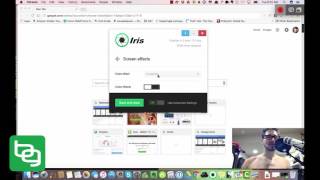
Ben Greenfield demonstrates Iris, a software alternative to Flux, explaining how it reduces blue light to protect melatonin production and reduce eye strain. He walks through the Iris dashboard, showing adjustable color temperature (he sets ~2700K), automatic brightness/location-based dimming at local sunset, multi-monitor support, font rendering options (prefers ClearType), screen effects, magnification/hotkeys, and a Pomodoro-style timer that prompts eye/neck/back exercises.
Chapters
Hey, it's Ben Greenfield here. I'm the. I'm the creepy guy in the blue light blocking glasses that you're looking at there in the lower right hand portion of your screen. What I wanted to show you today was what I've been using as an alternative to this very popular app called Flux. You may have heard of Flux before, but it is designed to reduce the level of blue light that a computer screen produces specifically at night, so that you don't shut down your body's own melatonin production when you're working. For example, in the evenings, when the body is actually not supposed to, from like a natural ancestral standpoint, it's not supposed to be exposed to large amounts of blue light from a screen. Well, you may have heard an interview that I recently did, a podcast interview, and I'll link to that interview under underneath this video in the description for this video in which I interview this very intelligent programmer who designed an alternative to Flux called Iris. I want to show you what this looks like because I installed it on my computer and it is mind blowing in terms of what you can do. So, for example.
If I open Iris, this is what my dashboard looks like. I've got all sorts of things I can do here. So check this out. If I click on color section, I can actually adjust the color temperature of my screen. Now, this influences things like eye strain, the level to which the screen will have a tendency to flicker or not flicker. Your ability to be able to spend long periods of time working or reading on your computer without eye strain. It's essentially just a measurement of the, shall we say, intensity of what the screen is pushing out. I keep my mine at about 2700, which is what the same guy who invented this Iris software keeps his at. So I figure if it's good enough for him, it's good enough for me. But it's relatively low compared to, you know, I could drag it all the way up here to 5,400 or 5,800 or very high. But I like to keep the color temperature relatively low, not just at night, but during the day. And then I can also adjust my screen brightness automatically here. Now, you'll notice I have manual color settings on, and then I turn the manual brightness off. By turning the manual brightness off. What this Iris software does is anywhere where I'm at in the world, it will detect where I'm at, and it will automatically reduce the level of blue light that my screen produces when the sun sets in whatever area of the world that I happen to Be in. Now, when I go over to location, this just allows me. Should I be one of those. One of those nervous preppers who doesn't want the government and their black helicopters following me around, knowing where my computer is at at all times. I could also turn off location services on my computer and just use manual location if I wanted to. For Iris Tech, you'll notice under monitors, I can manage multiple monitors. So this thing will. For those of you who are like day traders with multiple monitors or, I don't know, extreme multitaskers, you can actually apply this to a variety of different monitors, all from one computer. You can have screen effects, meaning I could change my entire screen. See, watch this. To grayscale. I would actually have to apply this for you to see it actually work in action. Or turn it on here. Let's see if I could. Yeah, I have to. I would have to close the. Sorry, I'd have to close the video window. So I'm not going to show you this. Basically, I can convert to grayscale washout inverted. Like you can actually change the color settings. I don't find a lot of efficacy in that, but it is what it is. Now, this is really cool. Fonts. Did you know that certain fonts are easier to read or harder than read? Certain fonts are associated with better comprehensive or comprehension, Lower comprehension. I interviewed the guy that created this software and again, I'll link to that interview underneath the description of this video and we talk a little bit about fonts and how not all fonts are created equal. And you can simply go here and you can select. You want everything that you read in a browser, for example, or in a Word document to be simple fonts or clear Type Fonts or Gdipp. Now, I personally like ClearType. They're very easy to read. So that's what I have my setting on for Iris tech magnification. Pretty simple. I can just have hotkeys here to magnify a timer. This timer will automatically pop up. I don't know if you've heard of the Pomodoro technique or having work breaks, but I could break, let's say every 55 minutes. I could break for five minutes and it will have a screen reminder come up and it'll take me through not just.
A work pause where it'll pop up on top of whatever I happen to be working on. Say, hey, now it's time to take your rest. But I can even go down here and I can learn and have it automatically populate with specific eye exercises, neck exercises and back exercises. For example, you can see all the different eye exercises that I can do here. Gazing into the darkness, side to side, eye movement, up and down eye movement. Things you would normally not really think of doing. But this makes it easy by actually training you how to do it, which I think is really cool.
We have artificial intelligence which uses automatic blink detection to determine when your blink frequency decreases and to actually induce a work break when you're not blinking properly. And again, we talk about this in a little bit more detail in the interview. There are color pausers where you can pause the color timer pausers or you can pause the timer. This would be for specific pieces of software that you're working on. Screen Overlay I can make my screen dim. I can change the opacity of the screen. As you can see, this thing is freaking amazing. So if you go to BenGreenfieldFitness.com IRISTech I R I S T E C H, you can see this software for yourself, you can download it, etc. I'll put a link in the description underneath this video as well to not just the Iris tech website, but also to the podcast that I did with the guy who invented this software. Anyways, if you, in my opinion, some of the best software out there for managing your eye health and also your sleep health when you work on a screen, I will also put underneath the description to this video a really interesting article by my friend Dr. Mercola about not just monitor lighting and he also used this software, by the way, but also house lighting and reading lighting and all sorts of other things that will perhaps get your get your brain ticking about lighting if you're a lighting nerd like I am. All right, well thank you for watching and I hope that you found this helpful and check out the resources under the video.